How to add Style Dictionary to your Next.JS application?
Only some developers like Tailwind CSS.
How to add Style Dictionary to your Next.JS application?
Only some developers like Tailwind CSS.
Photo by 2H Media on Unsplash
After a brief hiatus from writing, I’ve been fully immersed in developing Kariudo — an innovative talent discovery platform that leverages AI-powered search to connect businesses with skilled professionals.
Over the past month, I’ve dedicated my spare time to diving deep into design engineering. The journey has been fascinating, and I’m excited to share my discoveries with you.
In this article, I’ll introduce you to a game-changing styling configuration framework.
This tool eliminates the need to write CSS directly — instead, it generates CSS based on your configurations.
What makes it particularly powerful is its versatility: you can implement it across different platforms, multiple repositories, or within a single mono-repo structure.
Let me show you how it works.
Before switching to Tailwind CSS at credium, I faced the challenge of building a design system from scratch as one of two front-end developers working without a designer.
I made a common but time-consuming mistake: manually converting design tokens into CSS variables. Yes, you read that right — I was copying tokens from our Confluence documentation and hand-coding each CSS variable.
Despite my love for CSS as a technology, the manual process is tedious and inefficient. I hadn’t invested time in researching automation solutions for converting design tokens into web-ready CSS variables.
That changed this weekend during my deep dive into design engineering when I discovered Style Dictionary.
Initially, I thought Style Dictionary might be a lightweight alternative to Storybook.
However, after exploring its documentation, I had an exciting revelation: Style Dictionary eliminates the need to write CSS manually! Instead, you define your design tokens in JSON or export them as JavaScript objects, and Style Dictionary automatically generates the corresponding CSS variables.
What makes Style Dictionary particularly appealing is its simplicity and efficiency. As someone who frequently works with Next.js projects, I was eager to integrate it into my workflow.
Let me walk you through the process of setting up Style Dictionary in a Next.js project and show you how it can transform your approach to design system implementation.
After we set up our NextJS project using the CLI:
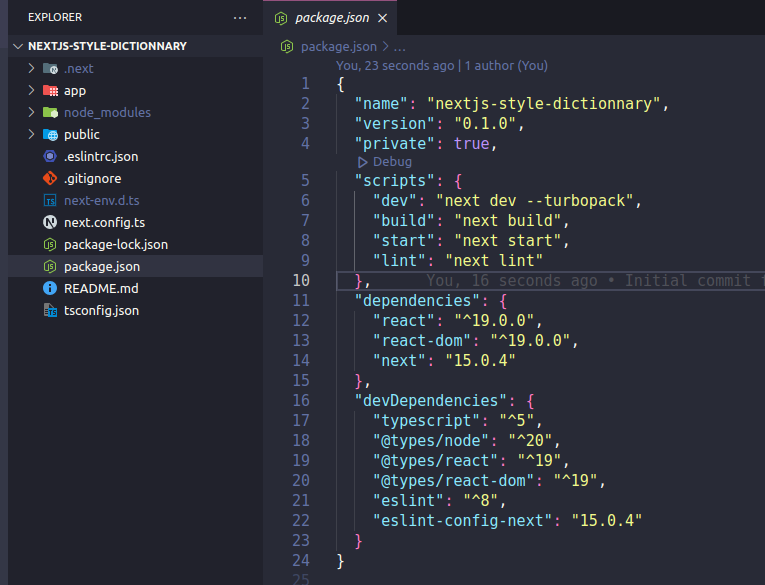
NextJS default setup
We install style dictionary using its CLI:
npm install -g style-dictionaryAfter that, we initialize the basic configuration using this command:
style-dictionary init basic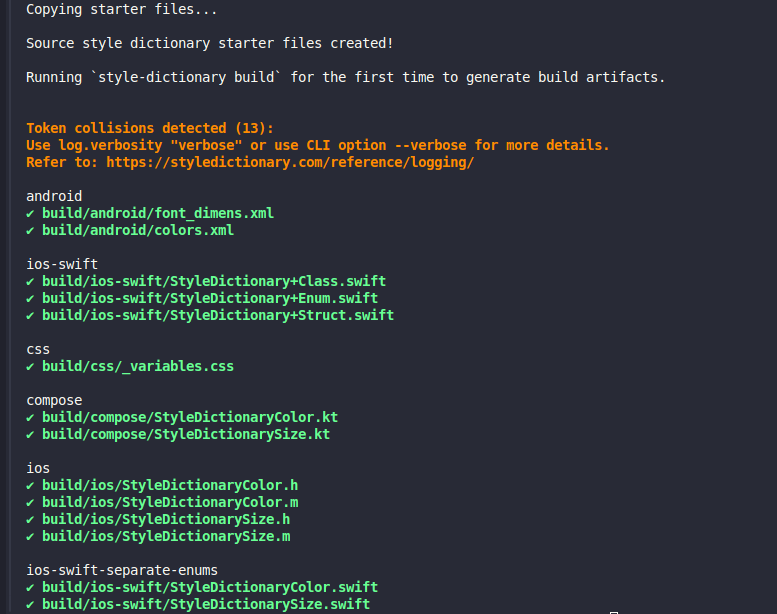
The output of the command
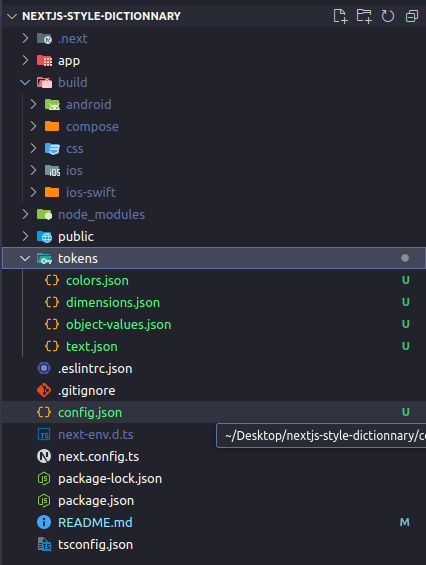
The default generated folders and files from the command
Style Dictionary generates a build directory containing platform-specific output folders and default token files. These initial files include essential design tokens for colors and dimensions, along with a central config.json configuration file.
Since we’re focusing exclusively on web development, we can streamline our setup by removing the mobile platform directories (android, compose, ios, and ios-swift) and their corresponding configurations from config.json. This will keep our project clean and focused on web-specific token generation.
Let’s take a look at how to set up our configuration:
- First, navigate to the
builddirectory - Remove the mobile platform folders
- Update
config.jsonto include only web-specific settings
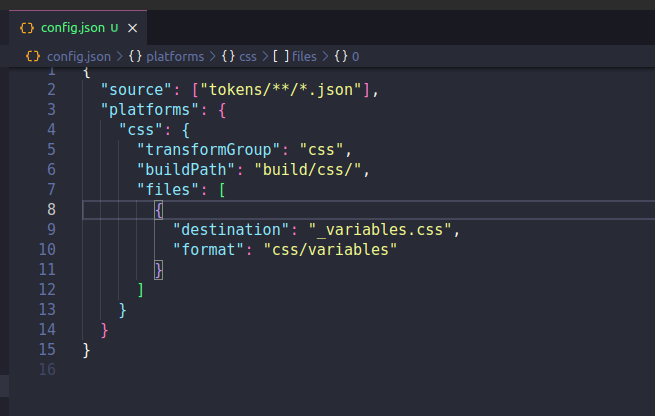
Keeping only the css configuration
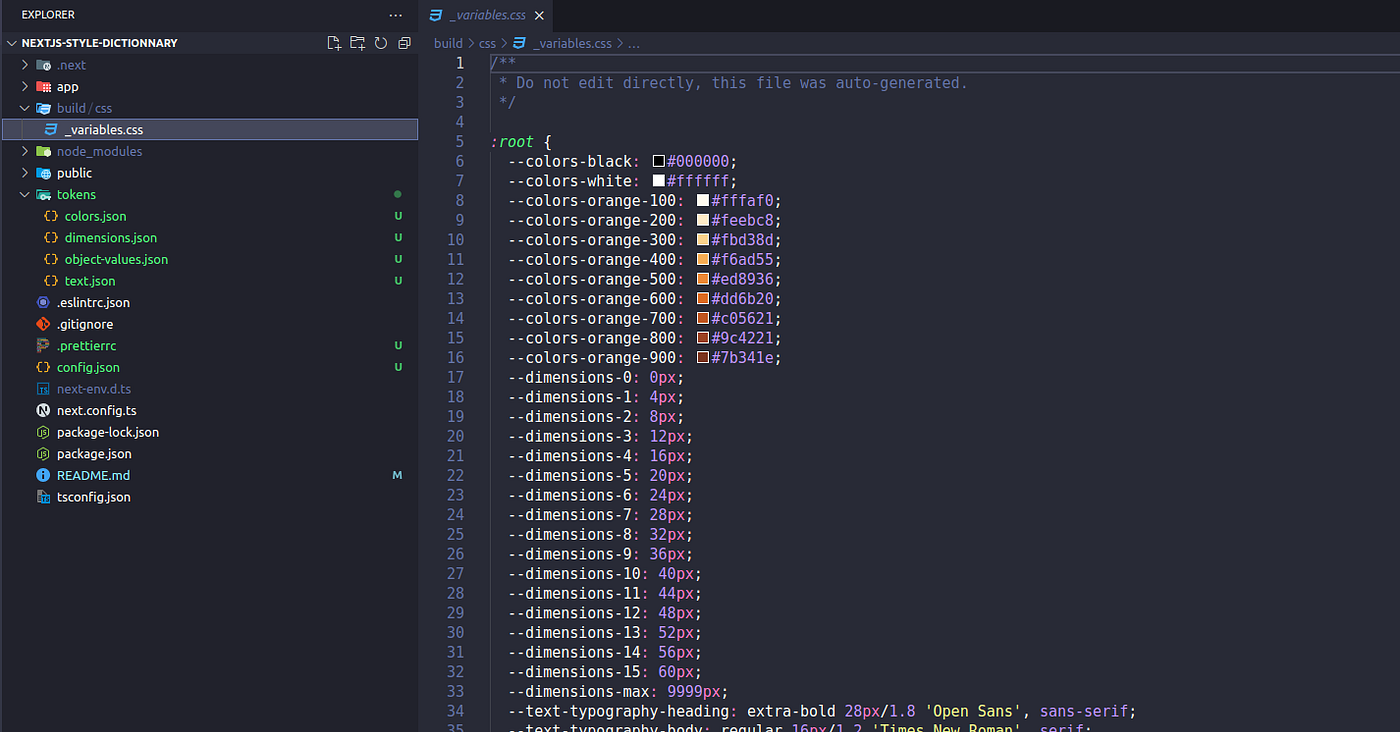
The generated css file
Let’s have a look at our tokens’s files.
Colors
The colors.json contains the names and values of the tokens that present our colors:
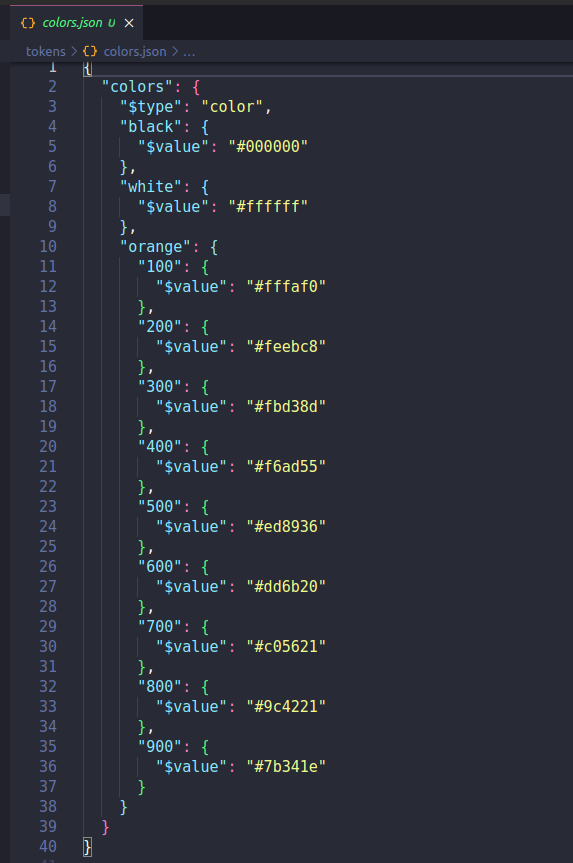
The default tokens for colors
Dimensions
The dimensions.json contains the names and values of the tokens that present our dimensions:
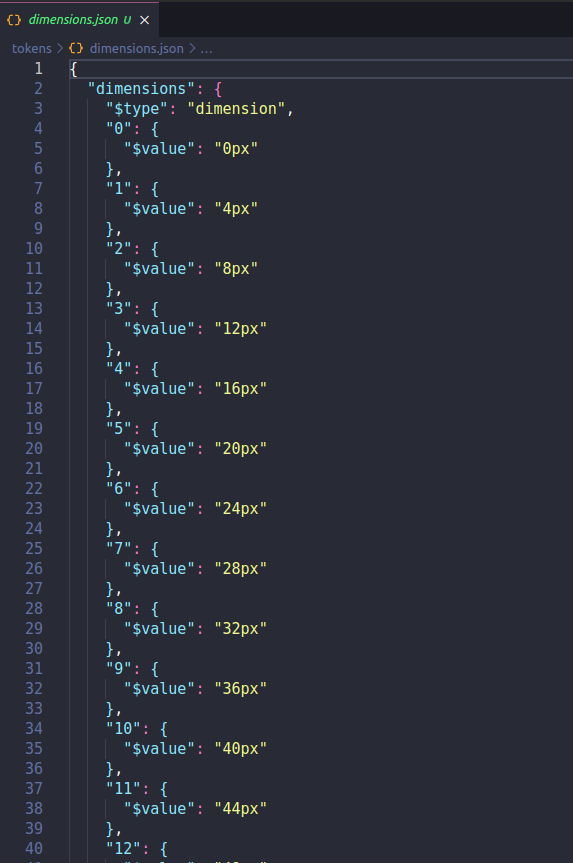
The default tokens for the dimensions
Style Dictionary comes with additional default token files like text.json and object-values.json, which define base tokens for typography and fonts. While these provide a good starting point, you're not bound to them – you can delete these default files and create your custom token structure from scratch to match your project's needs.
To transform your tokens into CSS variables, simply run:
style-dictionary build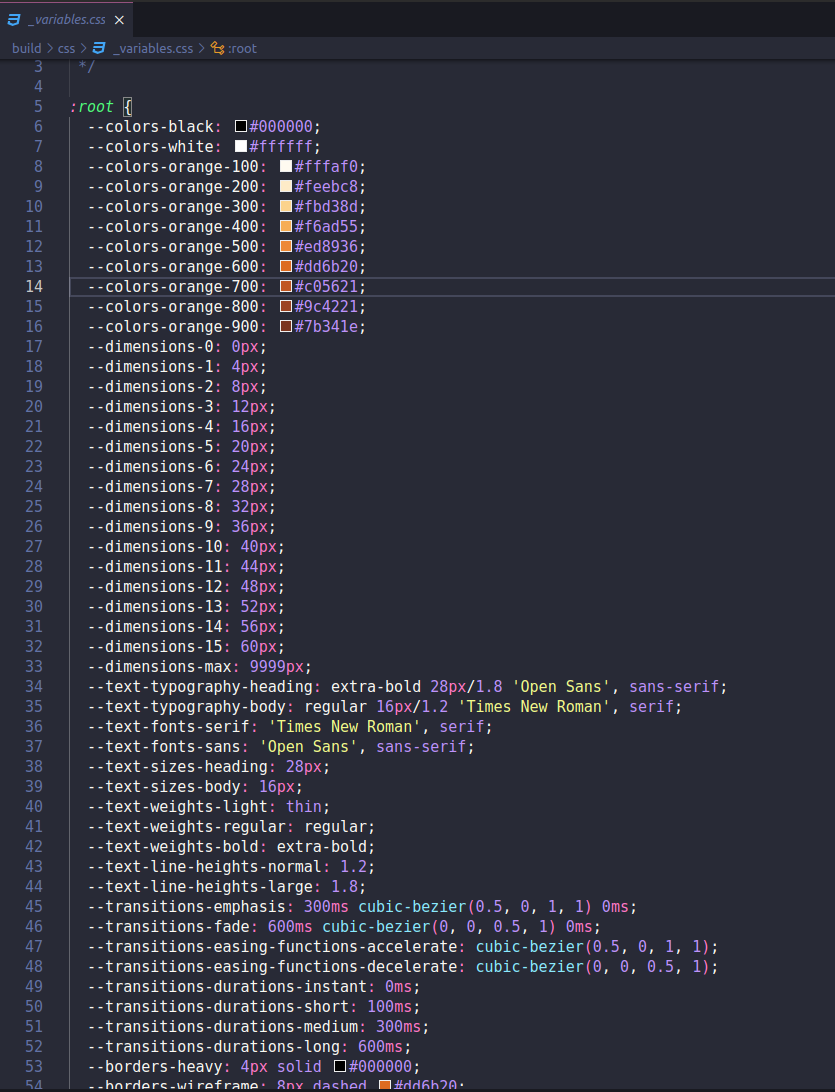
The generated _variables.css
One of Style Dictionary’s most powerful features is its ability to generate platform-specific design tokens from a single source of truth. While we’re focusing on web development today, it’s worth noting that the same token definitions could automatically generate styles for Android and iOS platforms — eliminating the need for manual conversion and maintaining consistency across your entire application ecosystem.
Let’s build on our understanding by creating a custom token file for spacing values.
We’ll create a new file called spacing.json to define our spacing scale:
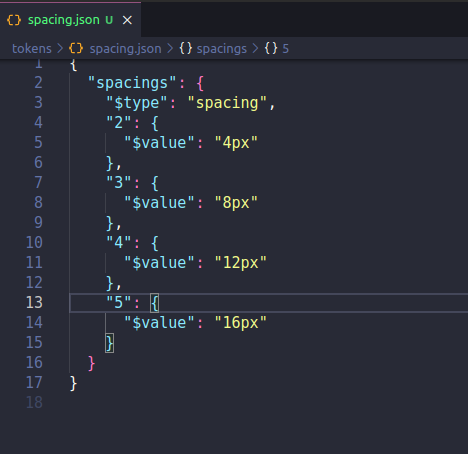
Our spacking tokens file
When we run the command:
style-dictionary buildWe will see new variables at the bottom added to the _variables.css :
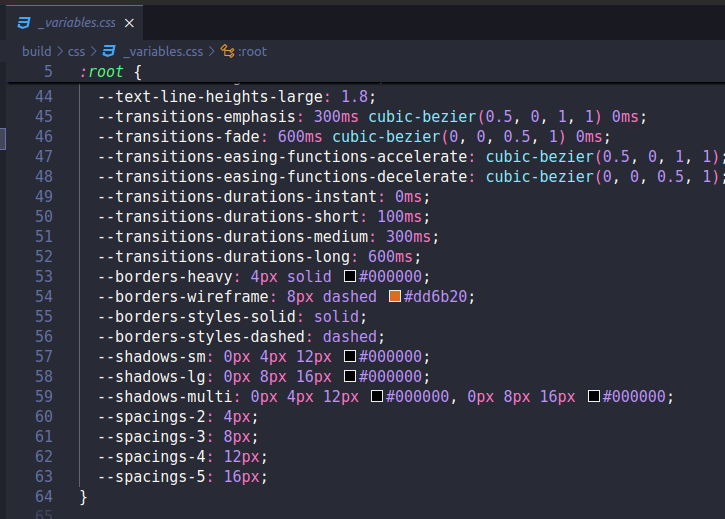
Let’s try our new variables.
We include our _variables.css in our globals.css:
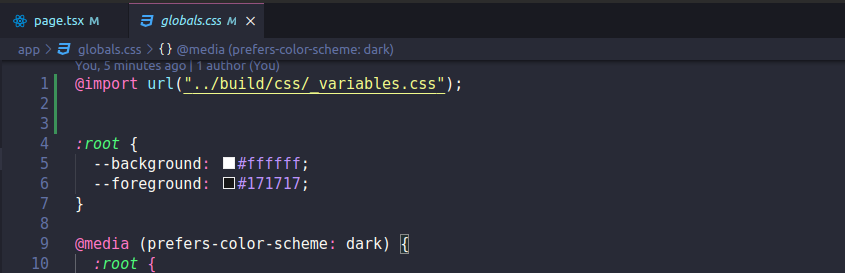
Including _variables.css into globals.css
Then we use our variables:
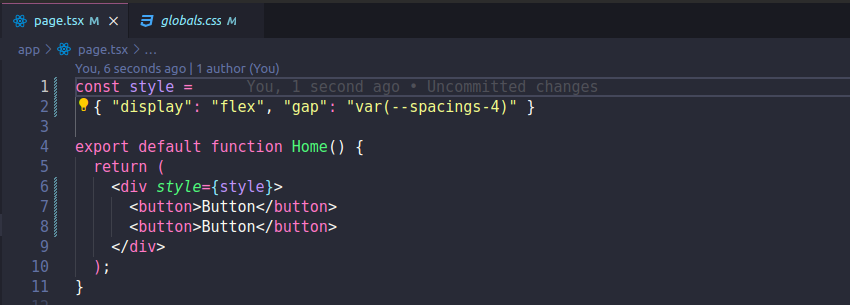
Using css variables.
You can learn more about defining and formatting design tokens in style dictionary.
메타데이터
- post_id
- e799b49f2777
- slug
- how-to-add-style-dictionary-to-your-next-js-application-e799b49f2777
- url
- https://medium.com/@menaiala/how-to-add-style-dictionary-to-your-next-js-application-e799b49f2777
- canonical_url
- https://medium.com/@menaiala/how-to-add-style-dictionary-to-your-next-js-application-e799b49f2777
- author_url
- https://medium.com/@menaiala
- status
- ok
- fetched_at
- 2026-06-27 07:40:21





