System Center vs Windows Admin Center: IT Operations Management
In the evolving world of IT operations, infrastructure management is no longer just about keeping servers online. It’s about agility…
System Center vs Windows Admin Center: IT Operations Management
In the evolving world of IT operations, infrastructure management is no longer just about keeping servers online. It’s about agility, automation, and alignment with business strategy.
Microsoft offers two powerful platforms for managing Windows Server and Hyper-V environments: System Center and Windows Admin Center (WAC). While both tools serve the same ecosystem, they differ significantly in architecture, capabilities, and strategic fit.
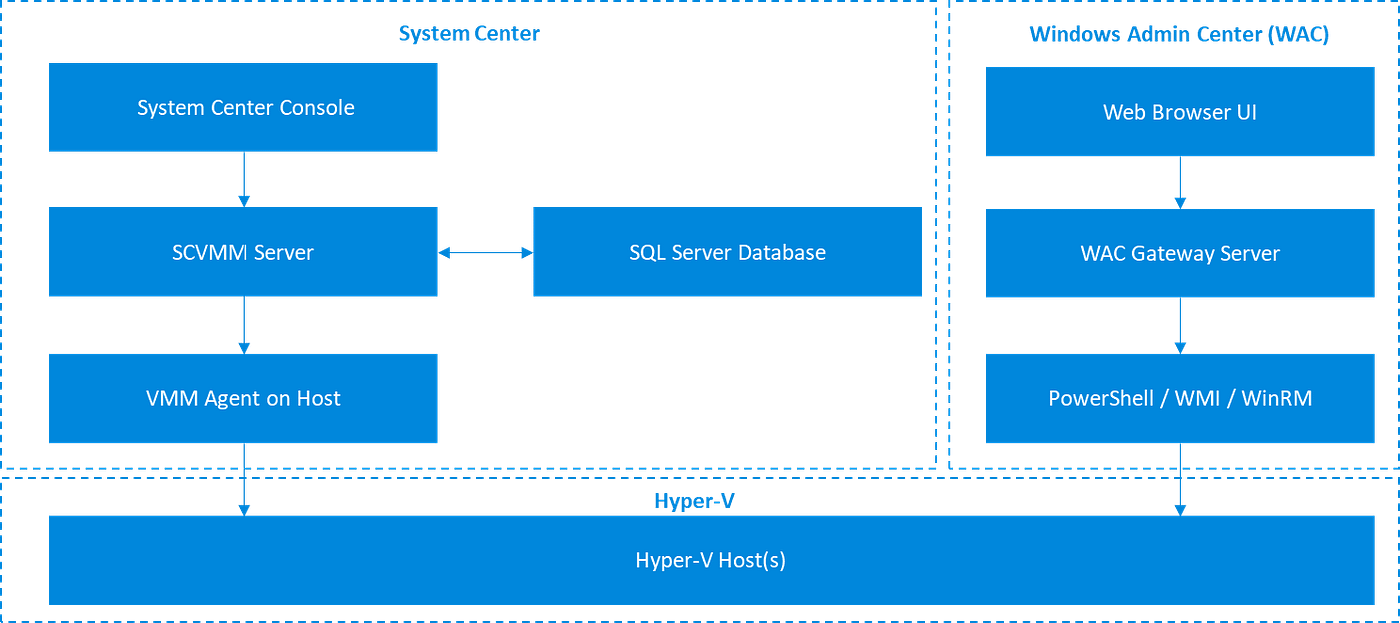
System Center vs Windows Admin Center (WAC) - Architecture

System Center vs Windows Admin Center (WAC) - Comparison Table
This article explores how these tools compare across key dimensions — architecture, ITIL alignment, AIOps readiness, and operational use cases — so you can make an informed decision for your organization.
The Architectural Divide
System Center is a comprehensive suite designed for enterprise-scale orchestration. It includes components like Virtual Machine Manager (SCVMM), Operations Manager (SCOM), Configuration Manager (SCCM), Orchestrator, and Service Manager. These tools work together to manage virtual machines, monitor performance, automate workflows, and align IT services with business goals.
Its architecture is multi-tiered, relying on agents installed on hosts and a SQL Server backend to store configuration data, templates, and historical logs. This persistent data model enables deep orchestration across compute, storage, and network fabrics.
Windows Admin Center, by contrast, is a lightweight, browser-based tool. It’s agentless, using PowerShell, WMI, and WinRM to communicate with managed nodes. There’s no backend database — WAC pulls live data directly from hosts. It’s modular, extensible, and easy to deploy, making it ideal for day-to-day operations in small and mid-sized environments.
Feature Depth and Operational Scope
System Center offers advanced VM provisioning, placement optimization, and fabric control. SCVMM allows administrators to define templates, enforce placement rules, and manage clusters with dynamic optimization. SCOM provides deep monitoring and alerting, while Orchestrator enables automated workflows across the infrastructure.
Windows Admin Center focuses on operational simplicity. It supports basic VM lifecycle tasks — creating, starting, stopping, and deleting virtual machines. It integrates with Failover Clustering for high availability and offers extensions for Azure Arc, Active Directory, and Hyper-V. While it doesn’t offer fabric-level orchestration, it excels at host-level management and real-time visibility.
In terms of automation, System Center supports runbooks and workflows through Orchestrator. WAC relies on PowerShell scripting, which is powerful but manual. For monitoring, System Center integrates with SCOM for proactive alerting and performance dashboards. WAC connects to Azure Monitor, offering cloud-native telemetry and basic alerting.
ITIL Framework Alignment
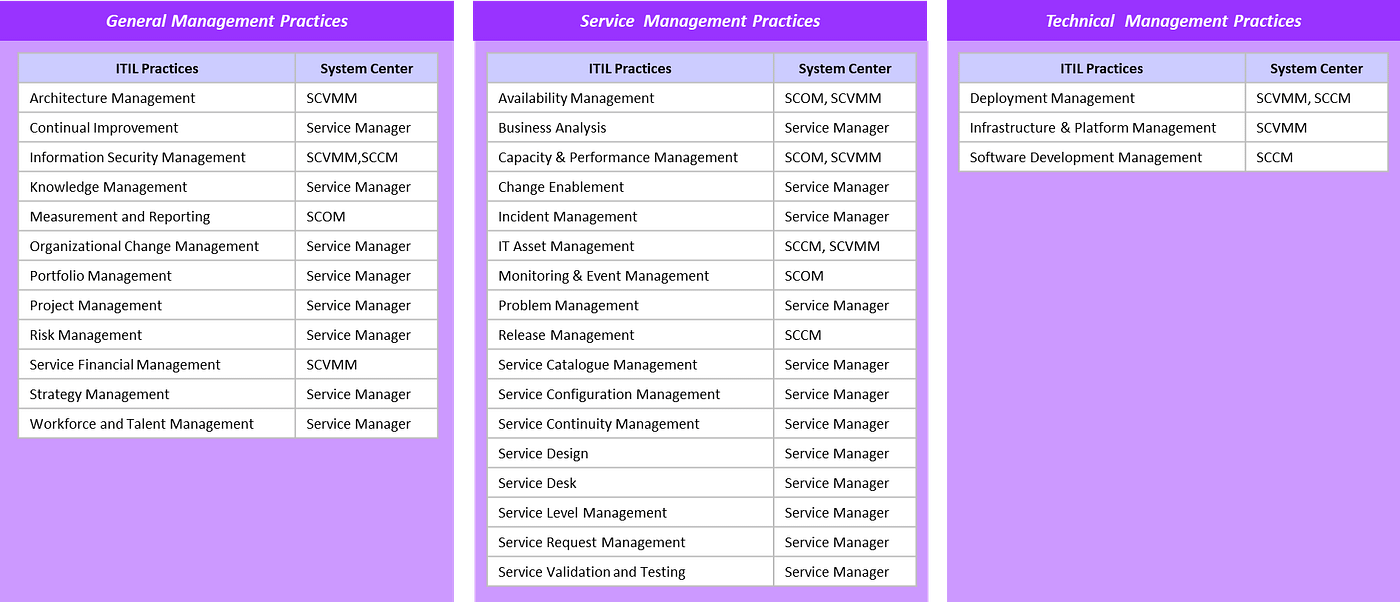
The ITIL framework provides a structured approach to IT service management, including processes like Configuration Management, Change Management, Incident Management, and Problem Management.
System Center aligns closely with ITIL. SCVMM supports Configuration and Change Management through standardized templates and controlled provisioning. SCOM enables Incident and Problem Management by collecting telemetry and generating alerts. Service Manager integrates ITIL workflows directly into the platform, and Orchestrator automates Release Management and remediation.
Windows Admin Center supports ITIL principles in a more lightweight fashion. It enables Configuration Management through real-time visibility and PowerShell Desired State Configuration. Change Management is manual, relying on scripting and operator discipline. It doesn’t natively support Incident or Problem Management workflows, making it better suited for environments where ITIL is a guideline rather than a mandate.
AIOps Readiness
AIOps — Artificial Intelligence for IT Operations — is the future of infrastructure management. It uses machine learning and analytics to automate and enhance IT operations, enabling predictive maintenance, anomaly detection, and autonomous remediation.
System Center is well-positioned for AIOps. SCOM collects rich telemetry data that can be fed into machine learning models for anomaly detection. Orchestrator can trigger automated remediation workflows based on predictive insights. With integration into platforms like Azure Machine Learning and Power BI, System Center can support proactive, intelligent operations.
Windows Admin Center doesn’t natively support AIOps, but it can integrate with Azure Monitor and Azure Arc to feed data into external AIOps platforms. While it’s reactive by design, WAC can be extended into AIOps workflows using cloud-native tools. This makes it a good fit for modular environments that want to experiment with intelligent automation without overhauling their infrastructure.
Strategic Fit and Use Cases
Choosing between System Center and Windows Admin Center depends on your organization’s size, complexity, and strategic goals.
System Center is ideal for large enterprises with formal ITSM practices, hybrid cloud deployments, and a need for deep orchestration. It supports compliance, automation, and scale, making it suitable for private cloud and datacenter environments.
Windows Admin Center is perfect for SMBs, branch offices, and edge deployments. It’s fast, intuitive, and cost-effective. It excels at operational tasks like VM management, cluster configuration, and real-time troubleshooting.
Many organizations benefit from using both tools. WAC can handle daily operations, while System Center manages strategic orchestration. This hybrid approach allows IT teams to be both agile and structured, combining the speed of WAC with the depth of System Center.
Real-World Scenario
Consider a healthcare provider with hundreds of clinics and a central datacenter. Each clinic runs local servers managed via Windows Admin Center for quick updates and troubleshooting. The datacenter is orchestrated via System Center, ensuring compliance, automation, and scalability. Azure Monitor collects telemetry from both environments, and Power BI visualizes performance trends.
This setup supports both tactical agility and strategic control, enabling the organization to scale, adapt, and innovate while maintaining operational excellence.
Conclusion
System Center and Windows Admin Center are not competitors — they’re complementary tools designed for different layers of IT operations. System Center offers deep orchestration, ITIL alignment, and AIOps readiness. Windows Admin Center delivers speed, simplicity, and cloud-native integration.
If your organization needs structured, scalable infrastructure management, System Center is the right choice. If you want lightweight, modular control over your servers and clusters, Windows Admin Center is ideal. And if you want both? Use them together. Let WAC handle the operations and System Center drive the strategy.
In the era of intelligent infrastructure, the best tools are those that help you move fast, stay secure, and align IT with business outcomes.
References
- Windows Admin Center Overview https://learn.microsoft.com/en-us/windows-server/manage/windows-admin-center/overview
- System Center Documentation https://learn.microsoft.com/en-us/system-center/
메타데이터
- post_id
- e79ea2981b71
- slug
- system-center-vs-windows-admin-center-it-operations-management-e79ea2981b71
- url
- https://medium.com/@leoyeh.me/system-center-vs-windows-admin-center-it-operations-management-e79ea2981b71
- canonical_url
- https://medium.com/@leoyeh.me/system-center-vs-windows-admin-center-it-operations-management-e79ea2981b71
- author_url
- https://medium.com/@leoyeh.me
- status
- ok
- fetched_at
- 2026-08-20 09:57:17