How Win32 API Stopped User Tampering in Our Kiosk App
When impatient users broke our kiosk app with spam clicks, Golang and the Win32 API helped us take back control.
How Win32 API Stopped User Tampering in Our Kiosk App
The Backstory
When I built the desktop app for the first time, I encountered accidental user tampering. That problem started when our kiosk photobooth app was transferring data from DSLRBooth to my app.
But, before you read this article, I suggest you read the article below first.
Not a medium member? click here to read.
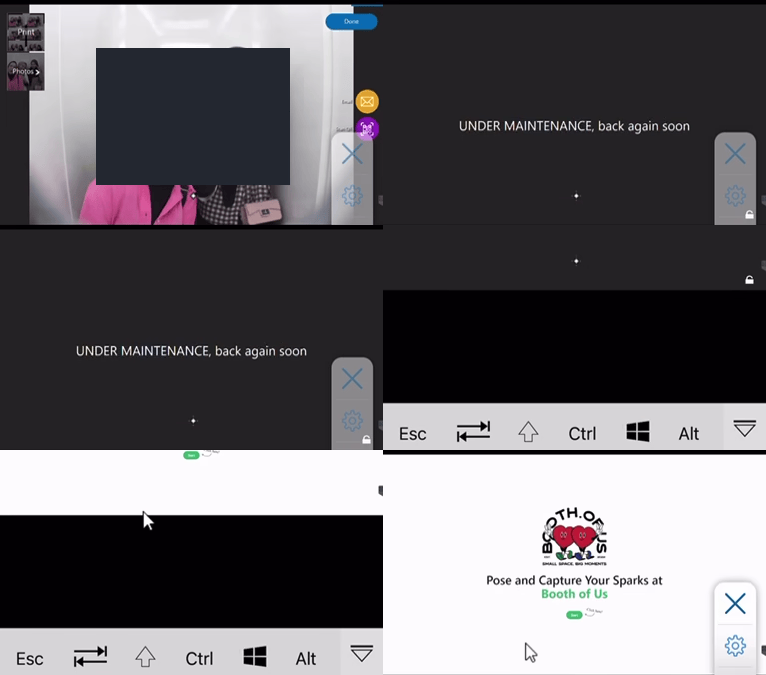
Video: User spams clicks until Chrome doesn’t switch
What does the user tempering mean? yup, that’s the user behaviour about spam touch when the two window apps are switching; there is a glitch in the window switching.
That video shows how broken it is: when it's printing the photo and waiting for the DSLRBooth process to finish, it shows the text "UNDER MAINTENANCE, back again soon."
We can't show the text like that because, when we watch the video, we see the user click behaviour due to impatience while waiting for a new session, so the window doesn't switch smoothly to the payment app.
So what’s the impact?
- Users left the booth because the app was stuck
- The owner must restart the app manually
How did my engineering process go?
Because this hampers the business process, I have to find a proper solution, so I decided to break it down first.
- Reproduced the error from the video by doing the same action
- Decide how to make the transition between apps smoothly
- Based on number 2, what solution is proper to develop this (My client doesn't want to wait for a long development)
I enhanced the payment application by implementing longer wait times during transitions, which initially created a smoother user experience, but it didn't last long because users still needed to go through the next session. Even if the timer turned off, the user isn’t aware of that. Confused :(
I'm done with the FSM event trigger, ensuring transitions are activated only after the designated wait. But sometimes the spam click was still tampered with
Additionally, I discovered the W32 API switch app, which helped to manage application window changes seamlessly. This combination enabled me to effectively address challenges in the kiosk photobooth app, resulting in increased client satisfaction and operational reliability
The W32 API has helped me a lot, it only needs to cover the switch based on the FSM transition, with direct switching from window to window. The app requires switching between Chrome and DSLRBooth or vice versa.

Source: Gemini W32 API illustration
What is W32 API?
W32 API or Win32 API is the Windows API that provides access to the core features and capabilities of Windows. These include an API about:
- Window → I use this
- Shell
- User input
- Devices
- etc
You can see the detail here.
I do a lot of research on this W32 API because I developed the payment app in Golang. But, I don't mind about how to integrate W32 with the GoLang itself, I found nothing about W32 in GoLang, until I met these libraries
This helps me solve W32 API calls; this is where the engineering process comes in.
- I read the W32 API documentation on the Microsoft website
- After that, we can check the function in the DLL file
- If it exists, we can do a
syscallin Win32 API from Go!
Hands on!
package process

import (
 "strings"
 "syscall"

 "github.com/JamesHovious/w32"
 "github.com/rs/zerolog/log"
)

const (
 ChromeWindowName       = "chrome"
 GoogleChromeWindowName = "Google Chrome"
)

// switcherChromeCallback is a callback function for EnumWindows.
// the callback function is called for each top-level window that is encountered.
// using the SetForegroundWindow function to activate also allow the permission for HWND_TOPMOST.
// https://docs.microsoft.com/en-us/windows/win32/api/winuser/nf-winuser-setforegroundwindow
func switcherChromeCallback(hwnd syscall.Handle, lparam uintptr) bool {
 h := w32.HWND(hwnd)
 text := w32.GetWindowText(h)
 if strings.Contains(text, GoogleChromeWindowName) {
  isShowWindow := w32.ShowWindow(h, w32.SW_RESTORE)

  err := w32.GetLastError()
  if err > 0 {
   log.Error().Msgf("Error after ShowWindow: %v", getErrorMessage(err))
  }

  isForeground := w32.SetForegroundWindow(h)

  err = w32.GetLastError()
  if err > 0 {
   log.Error().Msgf("Error after SetForegroundWindow: %v", getErrorMessage(err))
  }

  isSetWindowPos := w32.SetWindowPos(h, w32.HWND_TOPMOST, 0, 0, 0, 0, w32.SWP_NOSIZE)

  err = w32.GetLastError()
  if err > 0 {
   log.Error().Msgf("Error after SetWindowPos: %v", getErrorMessage(err))
  }

  w32.ShowWindow(h, w32.SW_SHOWMAXIMIZED)

  err = w32.GetLastError()
  if err > 0 {
   log.Error().Msgf("Error after ShowWindow Maximized: %v", getErrorMessage(err))
  }

  log.Info().Msg("Switching to Chrome")
  log.Info().Msgf("Is set window pos: %v", isSetWindowPos)
  log.Info().Msgf("Is foreground: %v", isForeground)
  log.Info().Msgf("Is show window: %v", isShowWindow)

  return false
 }

 return true
}
Here is an example of syscall and W32 wrapper. I created a switcher to switch the window to the Google Chrome app. After this function is created, we need to call the syscall to interact with the W32 API
package process

import (
 "errors"
 "fmt"
 "os"
 "os/exec"
 "unsafe"

 "github.com/hnakamur/w32syscall"
 "golang.org/x/sys/windows"
)

...

func SwitchWindow(win string) error {
 switch win {
 case DSLRBoothWindowName:
  return w32syscall.EnumWindows(switcherDSLRBoothCallback, 0)
 case ChromeWindowName:
  return w32syscall.EnumWindows(switcherChromeCallback, 0)
 default:
  return errors.New("invalid window name")
 }
}
Nice, I've done with the switcher function, now how to make it work?
Just integrate it with FSM here!
...

m := Machine{
  cfg: cfg,
  storage: &entity.MachineStorage{
   State:          entity.StateOffHook,
   StateHistories: make(entity.MachineStateHistories, 0), // * set empty slice
  },
  DSLRBoothService:   DSLRBoothService,
  TransactionService: TransactionService,
  machineRepo:        machineRepo,
  cacheRepo:          cacheRepo,
}

...

m.Configure(entity.StateResult).
  SubstateOf(entity.StatePostProcess).
  OnEntryFrom(entity.TriggerSharingScreen, func(ctx context.Context, args ...interface{}) error {
   log.Debug().Msgf("SharingScreen")
   log.Debug().Msgf("SharingScreen, args: %v", args)

   for {
    if err := m.DSLRBoothService.ShowLockscreen(ctx); err != nil {
     log.Error().Err(err).Msg("[OnEntry][Print] failed to show lockscreen, retrying...")
     time.Sleep(entity.LockWaitTime * time.Millisecond)
     continue
    }
    break
   }

   ...

   err := process.SwitchWindow(process.ChromeWindowName)
   if err != nil {
    log.Error().Err(err).Msg("[SharingScreen] failed to switch window to chrome")
   }

   // * set storage by arguments
   log.Debug().Msgf("[SharingScreen] set storage by arguments %v", args)
   m.SetStorageByArguments(ctx, args...)

   // * force update transaction status to DONE
   if err := m.TransactionService.UpdateTransactionStatusByTransactionSerial(ctx, m.storage.TransactionSerial, entity.DONE); err != nil {
    log.Error().Err(err).Msg("failed to update transaction status to " + string(entity.DONE))
   }

   // * delete booth serial from cache
   m.cacheRepo.Del(ctx, m.storage.BoothSerial)
   log.Info().Msgf("BoothSerial %s is deleted from cache", m.storage.BoothSerial)

   m.cacheRepo.Wait(ctx)

   // * set storage to empty
   return m.SetStorageByArguments(ctx, []string{entity.EmptyData, entity.EmptyDataFlow}...)
  }).
  Permit(entity.TriggerPrinting, entity.StatePrint)

...
The process.SwithWindow(process.ChromeWindowName) was called, which indicates that the switching method is needed. After this function is triggered, the window can switch smoothly between DSLRBooth and Chrome.
Result!
[embed]
Final Thoughts
Creating the kiosk photobooth app has been an exciting journey that truly showcases how innovation can enhance user experiences! By harnessing the W32 API, I tackled user tampering and created smoother window transitions, making the app flow effortlessly. The addition of state machines provided a reliable user path, significantly reducing frustrations that can lead to abandoned sessions.
Through my research, I discovered the fantastic synergy between Golang and the W32 API, which helped overcome key challenges and boosted client satisfaction. Looking ahead, it's vital to stay attuned to user behavior and adapt our development strategies as needed. This experience has highlighted the power of melding technical expertise with a user-focused mindset in software development, paving the way for even greater achievements in the future!
In the next part, I'll walk you through the engineering behind the scenes:
- Internet down? No worries — just switch to offline mode.
메타데이터
- post_id
- e7e9c041d803
- slug
- how-win32-api-stopped-user-tampering-in-our-kiosk-app-e7e9c041d803
- url
- https://medium.com/@aldiwildan/how-win32-api-stopped-user-tampering-in-our-kiosk-app-e7e9c041d803
- canonical_url
- https://medium.com/@aldiwildan/how-win32-api-stopped-user-tampering-in-our-kiosk-app-e7e9c041d803
- author_url
- https://medium.com/@aldiwildan
- status
- ok
- fetched_at
- 2026-07-15 18:56:44
