🌐 Why Do Production AWS VPCs Use Two NAT Gateways Instead of One?
A small architecture decision that can make a big difference during failures 🚀 🤔 My Initial Understanding
🌐 Why Do Production AWS VPCs Use Two NAT Gateways Instead of One?
A small architecture decision that can make a big difference during failures 🚀 🤔 My Initial Understanding
When I first learned AWS networking, my understanding was simple:
- Create public subnet, private subnet
- Deploy a NAT Gateway in a public subnet
- Route private subnet traffic through the NAT Gateway
Something like this:
Internet
    │
    ▼
Internet Gateway
    │
    ▼
Public Subnet (AZ-A)
    │
    ▼
NAT Gateway
    │
    ▼
Private Subnet(s)
And honestly, it worked.
Private instances could:
- Install packages 📦
- Pull Docker images 🐳
- Reach AWS services 🌐
- Access external APIs 🔗
So I started wondering:
Why do production architectures often deploy two NAT Gateways?
Wouldn’t one be enough? 🤔
🏗️ Understanding the Typical Production Setup
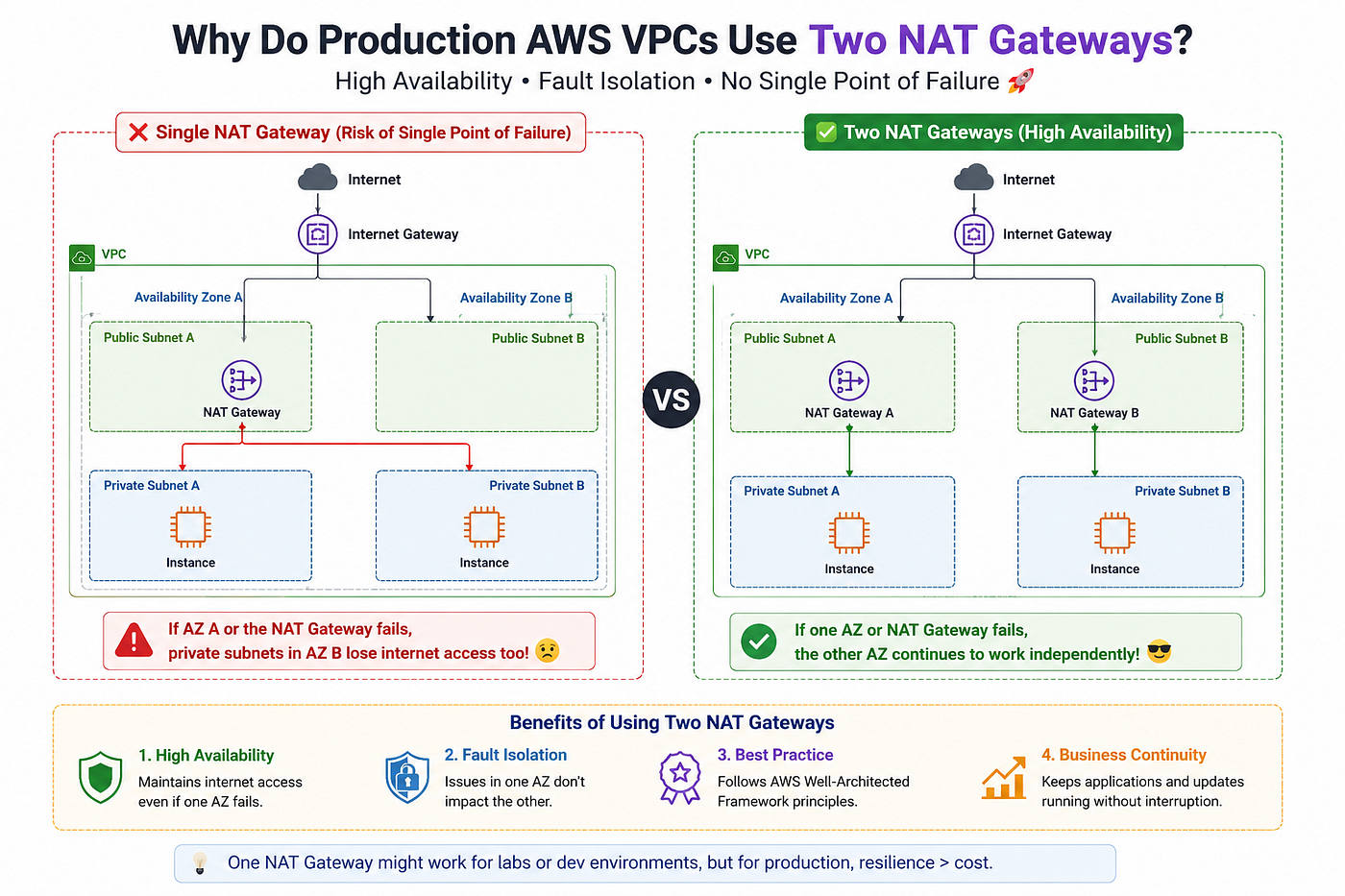
A production VPC commonly spans multiple Availability Zones (AZs).
Example:
AZ-A AZ-BPublic Subnet A Public Subnet B
NAT Gateway A NAT Gateway BPrivate Subnet A Private Subnet BEach private subnet routes traffic to the NAT Gateway within its own Availability Zone.
🚨 The Problem With a Single NAT Gateway
Imagine this setup:
AZ-A
 ├─ NAT Gateway
 ├─ Private Subnet A
AZ-B
└─ Private Subnet BBoth private subnets use the same NAT Gateway.
Private Subnet A ─┐
                  ├── NAT Gateway
Private Subnet B ─┘
Everything works perfectly…
Until something fails 😬
⚠️ What Happens If an Availability Zone Has Issues?
Suppose the NAT Gateway exists only in AZ-A.
Now imagine:
🚨 AZ-A experiences an outage.
What happens?
Private Subnet A
Already impacted because its AZ is unhealthy.
Private Subnet B
This is where things get interesting.
Even though AZ-B is healthy:
❌ Its internet-bound traffic still depends on the NAT Gateway in AZ-A.
As a result:
- Software updates fail
- Package downloads fail
- Docker image pulls fail
- External API calls fail Your application may still be running, but outbound connectivity breaks.
🎯 High Availability Is the Real Reason
AWS promotes designing for high availability.
The goal is:
Avoid a single point of failure.
A single NAT Gateway serving multiple Availability Zones becomes a dependency that can impact the entire environment.
Using two NAT Gateways removes that risk.
✅ The Recommended Production Design
Deploy:
- NAT Gateway A in Public Subnet A
- NAT Gateway B in Public Subnet B
Then configure routes like this:
Private Subnet A
        │
        ▼
NAT Gateway A
Private Subnet B
│
▼
NAT Gateway BEach Availability Zone becomes more independent.
🚀 Benefits of Two NAT Gateways
1️⃣ Higher Availability
If one AZ experiences issues:
- The other AZ still has its own NAT Gateway
- Outbound traffic continues working
2️⃣ Better Fault Isolation
Problems remain contained within a single AZ.
Instead of:
❌ One failure affecting multiple AZs
You get:
✅ One failure affecting only one AZ
3️⃣ AWS Architecture Best Practice
Many AWS reference architectures follow this pattern because it aligns with multi-AZ design principles.
💰 But Isn’t It More Expensive?
Yes.
This is usually the first concern.
One NAT Gateway costs less than two NAT Gateways.
So why spend more?
Because production environments value:
- High Availability
- Resilience
- Reliability
more than the cost savings of removing a NAT Gateway.
Think of it as paying for insurance 🛡️
Most of the time you won’t need it.
But when something fails, you’ll be glad it’s there.
🔍🎯 Final Takeaway
When I first learned AWS networking, a single NAT Gateway seemed completely sufficient.
And for:
- Labs
- Learning environments
- Small non-production workloads
it usually is.
But production environments are designed differently.
The question changes from:
“Will it work?”
to
“Will it still work when something fails?”
That’s where multiple NAT Gateways become valuable.
Sometimes the difference between a basic architecture and a production-ready architecture is not functionality — it’s resilience. 🚀
메타데이터
- post_id
- e80a80eeb51a
- slug
- why-do-production-aws-vpcs-use-two-nat-gateways-instead-of-one-e80a80eeb51a
- url
- https://medium.com/@deepthkg/why-do-production-aws-vpcs-use-two-nat-gateways-instead-of-one-e80a80eeb51a
- canonical_url
- https://medium.com/@deepthkg/why-do-production-aws-vpcs-use-two-nat-gateways-instead-of-one-e80a80eeb51a
- author_url
- https://medium.com/@deepthkg
- status
- ok
- fetched_at
- 2026-06-24 23:31:39





