Flutter Integration Testing in 2026: Flutter Test vs Patrol vs Maestro
Your app works perfectly on your machine. Then a user reports a broken login flow on Android 12 with a system permission dialog blocking…
Flutter Integration Testing in 2026: Flutter Test vs Patrol vs Maestro
Your app works perfectly on your machine. Then a user reports a broken login flow on Android 12 with a system permission dialog blocking the way — and you have no automated test to catch it. Sound familiar?
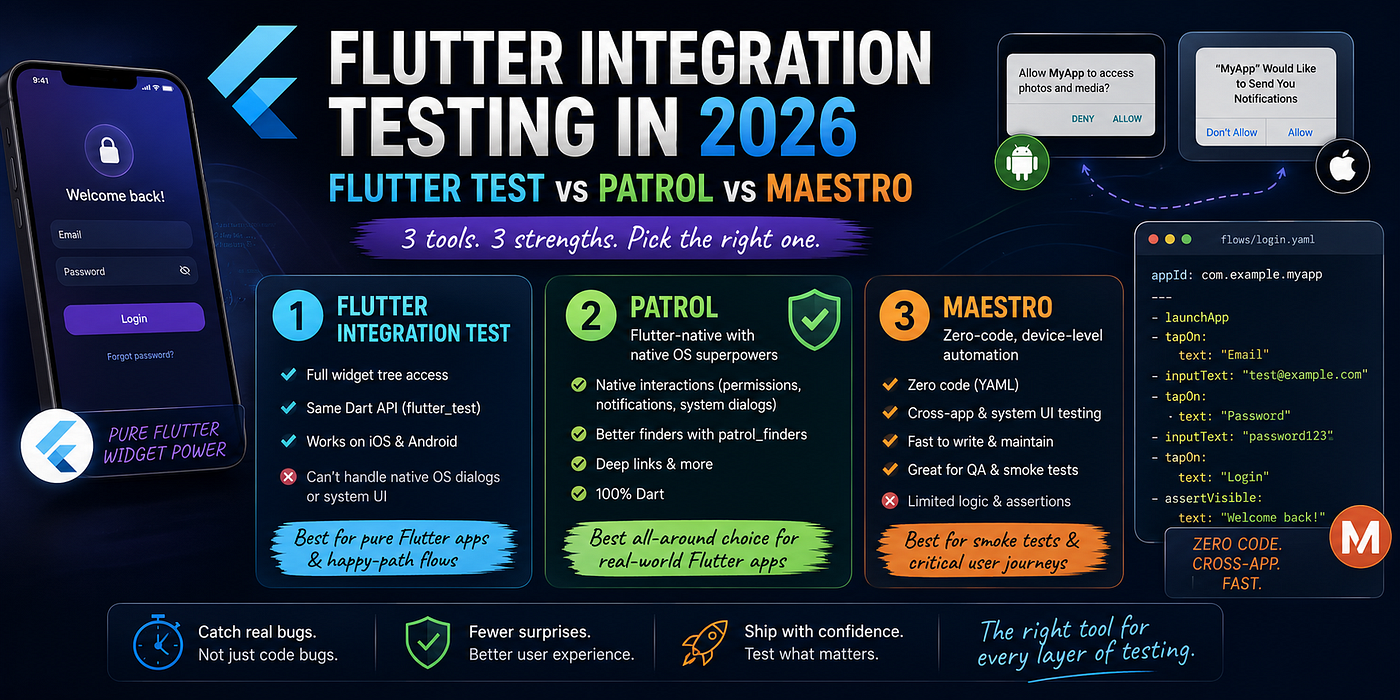
Flutter Integration Test in 2026
Integration testing in Flutter has matured a lot, but so has the ecosystem around it. Today you have choices beyond the built-in integration_test package — and picking the wrong one means writing tests that don't actually cover real user scenarios.
This post compares the three tools Flutter teams actually use in 2026:
- Flutter Integration Test — the official built-in solution
- Patrol — Flutter-native with native OS superpowers
- Maestro — zero-code, device-level automation
What about Appium? Appium treats your Flutter app as a black box. The other three don’t — and that changes everything about how you write tests. One paragraph is all Appium deserves here: it was built for native apps, the Flutter driver is clunky, and almost no Flutter team reaches for it in 2026. Moving on.
1. Flutter Integration Test
The integration_test package is Flutter's official answer to end-to-end testing. It runs your tests directly on a device or emulator, with full access to the widget tree via WidgetTester.
What it’s good at
- Deep Flutter widget access — find, tap, scroll, and verify any widget
- Same Dart API as your unit/widget tests (
flutter_test) - Runs on both iOS and Android with no extra setup
- Works well in CI with
flutter test integration_test/
Where it falls short
The moment your test needs to interact with anything outside Flutter — a system permission dialog, a push notification, the iOS share sheet, a native keyboard — you’re stuck. Flutter Integration Test simply cannot reach those elements. It only sees what Flutter renders.
Example: Login test
// integration_test/login_test.dart
import 'package:flutter_test/flutter_test.dart';
import 'package:integration_test/integration_test.dart';
import 'package:my_app/main.dart' as app;
void main() {
IntegrationTestWidgetsFlutterBinding.ensureInitialized(); testWidgets('user can log in with valid credentials', (tester) async {
app.main();
await tester.pumpAndSettle(); await tester.enterText(find.byKey(Key('emailField')), 'test@example.com');
await tester.enterText(find.byKey(Key('passwordField')), 'password123');
await tester.tap(find.byKey(Key('loginButton')));
await tester.pumpAndSettle(); expect(find.text('Welcome back!'), findsOneWidget);
});
}Clean and familiar. But the second your login triggers a biometric prompt or a “Allow notifications?” dialog, this test breaks.
When to use it
When your app is pure Flutter with no native OS interactions. Great for component-level integration tests and simple happy-path flows.
2. Patrol
Patrol by LeanCode is what Flutter Integration Test should have been. It wraps integration_test under the hood, so everything you know still works — but it adds a native automation layer on top.
What it adds
- Native interactions: tap “Allow” on permission dialogs, interact with system alerts, handle notifications
- Better finders:
patrol_findersgives you more expressive selectors than the defaultfindAPI - Deep links: test deep link handling natively
- Still 100% Dart — no context switching, no new language to learn
Example: Same login test, but with a camera permission dialog
// integration_test/login_test.dart
import 'package:patrol/patrol.dart';
import 'package:my_app/main.dart' as app;
void main() {
patrolTest(
'user can log in and grant camera permission',
($) async {
app.main();
await $.pumpAndSettle(); await $(#emailField).enterText('test@example.com');
await $(#passwordField).enterText('password123');
await $(#loginButton).tap();
await $.pumpAndSettle(); expect($(find.text('Welcome back!')), findsOneWidget); // Tap a button that triggers camera permission
await $(#scanQrButton).tap(); // Handle the native OS dialog — Flutter Integration Test can't do this
if (await $.native.isPermissionDialogVisible()) {
await $.native.grantPermissionWhenInUse();
} await $.pumpAndSettle();
expect($(find.byKey(Key('cameraView'))), findsOneWidget);
},
);
}The $.native API is the key differentiator. You're still writing Dart, still inside your Flutter project, but now you can reach outside the Flutter layer.
Setup
# pubspec.yaml
dev_dependencies:
  patrol: ^3.0.0
  integration_test:
    sdk: flutter
Then run with the Patrol CLI:
dart pub global activate patrol_cli
patrol test
When to use it
This should be your default for any Flutter project that handles permissions, deep links, notifications, or any native OS interaction. If you’re already using Flutter Integration Test, migration is straightforward since the API is compatible.
3. Maestro
Maestro by mobile.dev takes a completely different approach. You write tests in YAML — no Dart, no code. Maestro drives the device at the OS level, reading the accessibility tree to find and interact with elements.
What makes it different
- Zero code: YAML files are your tests — QA engineers can write them without Dart knowledge
- Cross-app flows: Maestro can interact with any app on the device, including the system UI, other apps, and the browser
- Fast to write: a 10-step user journey takes maybe 20 lines of YAML
- Launcher + Cloud: Maestro has a studio UI and a cloud service for running tests at scale
Example: Same login flow
# flows/login.yaml
appId: com.example.myapp
---
- launchApp
- tapOn:
    text: "Email"
- inputText: "test@example.com"
- tapOn:
    text: "Password"
- inputText: "password123"
- tapOn:
    text: "Login"
- assertVisible:
    text: "Welcome back!"
That’s the whole test. And if a permission dialog appears mid-flow, Maestro handles it automatically by default.
The trade-offs
Maestro is fast to write but limited in logic. Conditional flows, data-driven tests, and complex assertions require workarounds. For a login flow or an onboarding sequence, it’s perfect. For nuanced state-dependent scenarios, you’ll feel the friction.
Also, Maestro reads Flutter through the accessibility tree — it doesn’t have direct widget access the way Patrol does. If your widgets lack proper semantic labels, tests become brittle.
When to use it
Smoke tests, critical user journeys, onboarding flows, and any test written by a QA team that doesn’t write Dart. Excellent as a first layer of confidence on every release build.
Side-by-Side Comparison

How to Choose
Start with Flutter Integration Test if your app has no native OS interactions and you want zero setup overhead. It’s already in your project.
Upgrade to Patrol the moment you need to test permissions, notifications, deep links, or any native dialog. The migration cost is low, and the payoff is high. For most production Flutter apps, Patrol is the right default.
Add Maestro on top for smoke testing on release builds. Let it validate your critical paths quickly and cheaply — it’s fast to run and fast to write. A hybrid of Patrol (for deep tests) + Maestro (for smoke tests) is a powerful combination.
Final Verdict
If you’re starting a new Flutter project today:
- Use Patrol as your integration testing backbone — it gives you everything Flutter Integration Test offers, plus native interaction support
- Add Maestro for fast smoke tests on release candidates
- Skip Appium unless your organization already uses it for a broader test suite across platforms
Flutter testing has never been better. The gap between “tests that run in CI” and “tests that catch real user bugs” is now very small — you just need the right tool for each layer.
Found this useful? Follow me for more Flutter, mobile, and testing content. I write about the practical stuff — what actually works in production.
메타데이터
- post_id
- e80cfde5d686
- slug
- flutter-integration-testing-in-2026-flutter-test-vs-patrol-vs-maestro-e80cfde5d686
- url
- https://medium.com/@antoniwijaya.kwok/flutter-integration-testing-in-2026-flutter-test-vs-patrol-vs-maestro-e80cfde5d686
- canonical_url
- https://medium.com/@antoniwijaya.kwok/flutter-integration-testing-in-2026-flutter-test-vs-patrol-vs-maestro-e80cfde5d686
- author_url
- https://medium.com/@antoniwijaya.kwok
- status
- ok
- fetched_at
- 2026-07-13 06:23:13





