Module 3.1: PDFs, Chunking, Embeddings, and ChromaDB
The less glamorous RAG steps are usually the ones that decide answer quality.
Module 3.1: PDFs, Chunking, Embeddings, and ChromaDB
The less glamorous RAG steps are usually the ones that decide answer quality.
GitHub repo: agentic-rag-with-ai-gateway-tracing-labs
Quick setup note: The notebooks use OpenAI-compatible clients. If you run LiteLLM, point OPENAI_BASE_URL at the gateway, set OPENAI_API_KEY, CHAT_MODEL_NAME, and EMBEDDING_MODEL_NAME in .env, and keep LITELLM_MASTER_KEY aligned with your gateway config. The details are in [.env.example](https://github.com/chanderkant7/agentic-rag-with-ai-gateway-tracing-labs/blob/main/.env.example).
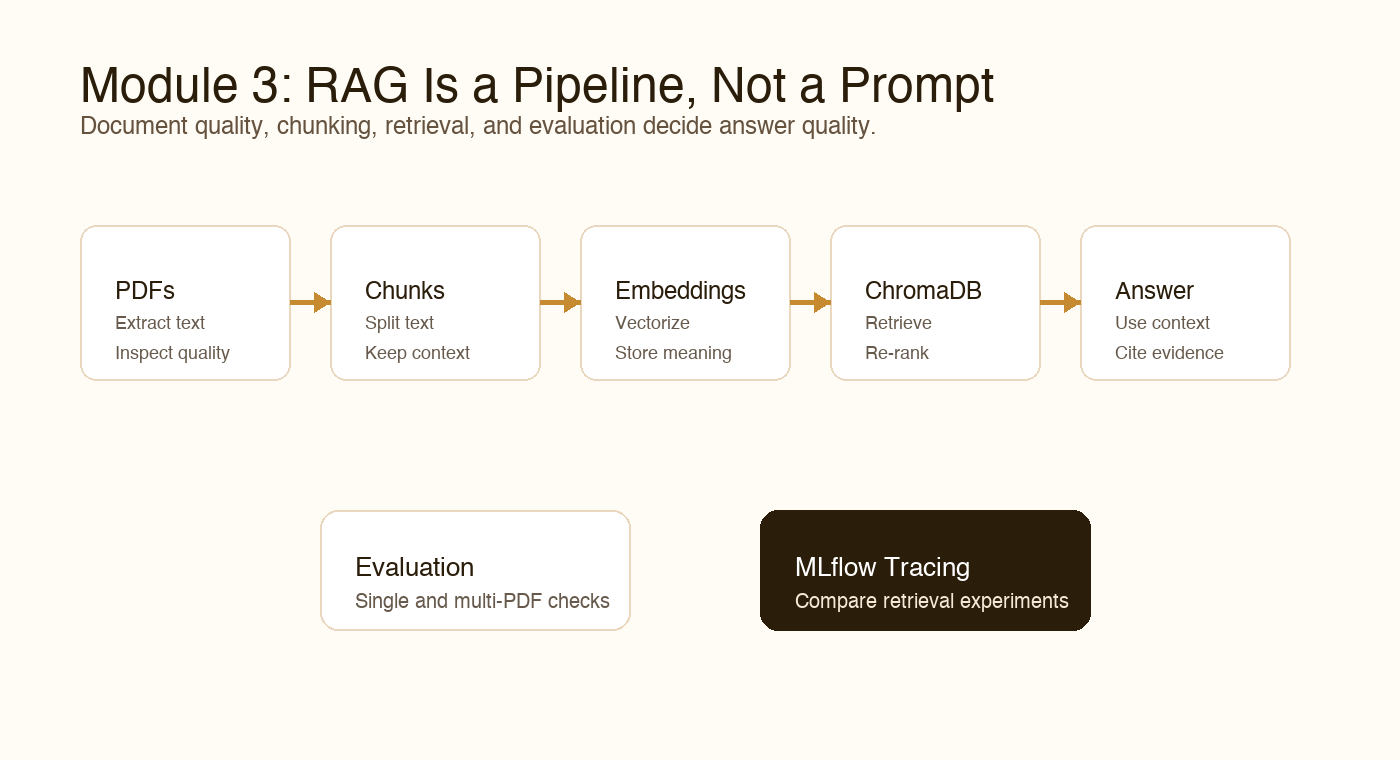
The first half of RAG is making documents searchable through extraction, chunking, embeddings, and vector storage.
The first half of Module 3 is about building the retrieval foundation, the part of RAG that people often underestimate until the answers start drifting.
Before you ask smart questions over documents, you need to make the documents searchable. That sounds simple until you open a PDF and realise the text is not as clean as it looked on screen.
Module 3 starts with reading PDFs, chunking text, generating embeddings, and storing vectors in ChromaDB.
This is where practical RAG begins: not with a dramatic answer, but with clean-enough source text.
Step 1: Reading PDFs
PDFs are everywhere in Indian enterprise workflows: policies, reports, contracts, manuals, circulars, forms, SOPs, and training documents.
But PDFs are not always friendly to machines. A PDF is designed for display, not necessarily for clean text extraction.
Common issues include:
- Broken line order
- Repeated headers and footers
- Tables that flatten badly
- Page numbers mixed with content
- Scanned pages with no text layer
- Multi-column layouts
The PDF notebook helps you inspect the extracted text before you trust it. This habit saves you later. If the extracted text is poor, embeddings will faithfully preserve that poor quality.
Notebook Snippet: Module3/Part1/01_Read Pdf File.ipynb
PDF loading uses the current LangChain Community loader:
from langchain_community.document_loaders import PyMuPDFLoaderdef load_pdf_with_langchain(pdf_path):
loader = PyMuPDFLoader(pdf_path)
documents = loader.load()
print(f"Successfully loaded {len(documents)} document chunks from the PDF.")
return documentspdf_path = repo_path("Module3", "Part1", "Data", "HealthcaredocforRAG.pdf")
docs = load_pdf_with_langchain(pdf_path)Step 2: Chunking Text
Once you have text, you need to split it into chunks.
Chunking is one of the most important RAG decisions. If chunks are too small, they lose context. If chunks are too large, retrieval becomes noisy and expensive.
Module 3 explores chunking strategies such as:
- Fixed-size chunks
- Recursive character splitting
- Sentence-based chunking
- Semantic chunking
- Overlap between chunks
- Context-preserving splits
There is no universal perfect chunk size. A legal contract, medical policy, and product FAQ may all need different strategies.
The question to keep asking is: when a user asks something, can the retriever find a chunk that contains enough information to answer it?
Notebook Snippet: Module3/Part1/02_DataChunking.ipynb
The recursive splitter keeps related text together better than naive splits:
from langchain_text_splitters import RecursiveCharacterTextSplitterdef recursive_chunking(docs, chunk_size=500, chunk_overlap=50):
splitter = RecursiveCharacterTextSplitter(
chunk_size=chunk_size,
chunk_overlap=chunk_overlap,
)
return splitter.split_documents(docs)recursive_chunks = recursive_chunking(docs)Step 3: Embeddings
Embeddings turn text chunks into vectors. These vectors represent semantic meaning, so similar text can be found even when the wording is different.
For example, a user may ask:
What is covered under emergency hospitalization?The document may say:
Emergency inpatient treatment is eligible under the policy...Keyword search might struggle. Embedding search has a better chance because it captures meaning, not just exact words.
This is why embeddings are central to RAG.
Notebook Snippet: Module3/Part1/03_DocumentEmbeddings.ipynb
The embedding notebook uses the gateway-aware embedding model from .env:
embeddings_client = openai.OpenAI(api_key=api_key, base_url=base_url)@retry(wait=wait_random_exponential(min=45, max=120), stop=stop_after_attempt(6))
def get_embeddings(texts_chunk):
return embeddings_client.embeddings.create(
input=texts_chunk,
model=embedding_model_name,
).dataStep 4: ChromaDB
ChromaDB stores embeddings and metadata so you can run vector search.
In the RAG workflow, ChromaDB becomes your searchable memory over documents:
Document chunks -> embeddings -> ChromaDB collection -> retrievalThe notebook flow helps you create the collection, add documents, and query for relevant chunks.
The important part is not just storing vectors. It is keeping enough metadata so you can trace answers back to the source. For real systems, source visibility matters.
A Small LangChain Dependency Note
The notebooks now use the updated LangChain import structure:
langchain_community.document_loaderslangchain_community.vectorstoreslangchain_text_splitterslangchain_core
It matters because LangChain has evolved. Using current imports keeps the notebooks closer to modern package expectations and avoids old deprecation patterns.
Use MLflow While Experimenting
When you change chunk size, overlap, embedding model, or retrieval settings, keep MLflow running locally.
It helps you inspect which notebook produced which run and keeps Module 3 traces separate from other modules. This is especially helpful when you are comparing retrieval experiments.
The Takeaway
RAG quality is not decided only by the final prompt. It is built step by step:
- Extract text cleanly
- Chunk it thoughtfully
- Embed it consistently
- Store it with useful metadata
- Retrieve the right context
Get these pieces right, and the final answer has a much better chance of being useful instead of merely confident.
Feedback
If you try this with a messy PDF, share what the text extraction looked like. Those ugly first outputs are often the best teachers in a RAG project.
Series Navigation
- Previous: Module 3 Intro
- Next: Module 3.2
- Series index: All posts
메타데이터
- post_id
- e878da4be031
- slug
- module-3-1-pdfs-chunking-embeddings-and-chromadb-e878da4be031
- url
- https://medium.com/@chanderkant-sharma/module-3-1-pdfs-chunking-embeddings-and-chromadb-e878da4be031
- canonical_url
- https://medium.com/@chanderkant-sharma/module-3-1-pdfs-chunking-embeddings-and-chromadb-e878da4be031
- author_url
- https://medium.com/@chanderkant-sharma
- status
- ok
- fetched_at
- 2026-06-10 08:17:25





