Everyone is rebranding to .AI I built the actual GCP Architecture behind the hype — Layer by Layer
How rebranding your company as “AI‑first” forces you to re‑architect everything underneath — from clunky VPN‑style entry to a modern…
When your brand ends in -AI, the real innovation isn’t just the model — it’s the reliability of the delivery. This is the story of rebuilding a legacy “Software Solutions” stack into a Google Cloud‑based nervous system that finally matches the promise.
Everyone is rebranding to .AI I built the actual GCP Architecture behind the hype — Layer by Layer
How rebranding your company as “AI‑first” forces you to re‑architect everything underneath — from clunky VPN‑style entry to a modern, GCP‑driven nervous system, one layer at a time.
Photo by appshunter.io on Unsplash
⭐️ (Not a Medium member yet? Read the rest of this story paywall-free here.)
If you’ve looked at a job board, a LinkedIn feed, or even a local billboard lately, you’ve seen it. The great extinction of “Software Solutions,” “Systems Inc.,” and “Digital Technologies” is upon us. In their place, a single, two‑letter king has risen: -AI.
*🚨 High-Paying Tech Roles Available* 💰 $3K–$10K/Month Remote & Onsite Opportunities ⚡ No long applications — just submit your profile in minutes 🔎 Get matched with active hiring companies [👉 Start Application (60 Seconds)](https://optimhire.com/?ref_code=codetodeploy)**

It’s the 2026 version of the .com boom. A company that used to do industrial HVAC maintenance now calls itself <<companyname>>.ai. It doesn’t have a neural network; it has a very sophisticated thermostat and a clean UI. But in the current market, if your name doesn’t imply that a GPU is sweating somewhere on your behalf, you’re considered a relic.
As I was prepping for the GCP Professional Cloud Architect exam, this pattern kept showing up: everyone talks about the “brain” of their AI‑stack, but nobody walks through how the plumbing is actually handled in GCP. So instead of just memorizing services, I built a mental (and then a literal) use‑case for an AI‑rebranded company:
- From a legacy “Software Solutions” stack,
- To a modern, GCP‑driven nervous system,
- Where every “-AI” promise is backed by real‑world networking, security, data, and observability patterns.
That use‑case is what this article is built from. It’s not a dry exam‑recap; it’s a lesson‑learned story about how GCP orchestrates the plumbing underneath the AI‑hype, layer by layer.
From the front door (VPN vs Identity‑Aware Access) to the pulse (Cloud Operations and observability), we’ll walk through the same nine‑layer model I used to internalize how GCP actually handles the plumbing of an AI‑first company. If you’re thinking about the Architect track or just want to see how a rebranded “-AI” stack maps to real GCP patterns, this is the guide I wish I had during prep.
Layer 1: The Front Door — Why Is My “AI” Company Still Making Me Dial a VPN?
Sitting in a café recently, trying to push a small fix to a shiny new “-AI” dashboard, I watched the disconnect between branding and reality play out in real time. The company had just spent a fortune rebranding everything as “Instant,” “Cognitive,” and “Seamless.”
But there I was, staring at a grey loading bar on a VPN client from 2012.
This is the old way: you open your laptop, “dial in” to the VPN, and wait. The system builds a tunnel from your home to the office server room, and only then lets you reach any service. From a design perspective, it kills the feeling of immediacy. From a support perspective, it’s a nightmare of “connected but not working” tickets.
The innovation isn’t faster VPNs; it’s the fact that the VPN‑style front door is finally being replaced by Identity‑Aware Access. Think of it like this:
- Old way: You need a physical key to open the building’s front door. Once you’re inside, you can roam freely.
- New way: There is no front door. Every room has a facial‑style scanner. If you’re supposed to be in the “Cloud Run” room, the door just slides open when you walk up.
On a modern stack, the machine itself becomes a “hardware passport.” You don’t “log in” to a network anymore; you try to reach the service you need, and the system checks identity and device state in the background. If you’re an approved user on an encrypted device, you’re in.
If your company brand ends in “-AI” but your team still has to “dial in” like it’s 1999, you aren’t innovating the experience. You’re just wearing a fancy suit over dirty pajamas.
Layer 2: The Map — Why I Stopped Playing “Where’s Waldo?” with IP Addresses
With the VPN‑style front door out of the way, there’s a new problem: once you’re inside, where do you go?
In the old “Software Solutions” days, finding a service meant memorizing its IP address. It was like visiting a friend but having to remember their GPS coordinates instead of typing their name into a map. The “legacy” nightmare was a mix of manual hosts file edits, slow DNS propagation, and engineers who forgot to tell the rest of the world when a server moved.
Google Cloud DNS is the “live” map upgrade. Instead of manually drawing the map, GCP creates a Private DNS Zone — a private Google Maps for your organization.
- Internal‑only names:
api.internal.aiis visible inside your network but not to the outside world. - Instant updates: spin up a new Cloud Run instance and the DNS map updates automatically.
- Split‑horizon magic: at home,
dev.company.aipoints to the secure cloud; in the office, it points to the local test server, with no manual changes.
From a design perspective, this lets you build with human‑read[email protected] only to the support perspective, it wipes out a whole category of “service not reachable” tickets.
Layer 3: The Shield — Cleaning Up the “Allow All” Nightmare
Legacy firewalls often look like a junk drawer: rules from 2018 with names like “Temp fix for Bob” and “Test‑Server‑v3‑DONT‑DELETE,” plus hundreds of “allow” rules nobody understands but nobody dares delete.
For a rebranded “-AI” company, that’s a liability. You can’t claim “Intelligence” if your security posture is a duct‑tape‑held brick wall with a dozen untraceable holes. The old pattern was to add another rule on top of the existing mess, until the “wall” was more like a screen door.
The upgrade is Hierarchical Firewall Policies in GCP:
- Global shield: top‑level, non‑negotiable rules (no public internet access to databases, for example).
- Identity‑based rules: instead of “allow IP 192.168.1.5,” you allow a service account or workload identity.
- Clean‑room perimeter: VPC Service Controls put a virtual fence around sensitive data so even leaked credentials can’t exfiltrate it.
With this shift, teams move from a tangled web of IP‑based rules to a coherent, hierarchical system that can be read, audited, and debugged at a glance.
Layer 4: The Highway — Why Our “-AI” App Stopped Taking the Scenic Route
In the old model, data traveled the “scenic route” — the public internet. It bounced through random providers, fought for space with cat videos, and hit every digital pothole along the way. Even with a VPN and firewalls, performance still depended on the least‑predictable part of the stack: the public web.
For a company that brands itself “-AI,” lag is a death sentence. If your predictive agent takes five seconds to respond, customers don’t feel intelligence; they feel annoyance.
The upgrade is Private Service Connect (PSC), which builds a private, Google‑backbone express lane between services. Think of it like this:
- Old way: sending a sensitive package across town in a taxi during rush hour, on public roads.
- New way: a private underground vacuum tube directly from warehouse to customer.
With PSC, most internal traffic — and even traffic from trusted partners — never touches the public internet. It stays on Google’s private fiber backbone, giving:
- Line‑rate performance tuned to real‑world hardware,
- Eliminated “internet potholes” and latency spikes,
- Simplified support: fewer mysteries caused by third‑party ISPs.
Layer 5: The Handshake — How to Let Partners in Without Giving Away the House
Supplier‑style integrations used to feel like an awkward first date: you want to share data, but you don’t want each other to see the messy parts of your networks. The old “Software Solutions” approach often meant collapsing two networks together with a Site‑to‑Site VPN — a support nightmare if both sides used the same IP ranges.
The pain points were clear:
- Network‑merging: arbitrary IP overlaps,
- Binary trust: either block the supplier or open a tunnel that lets them roam freely,
- Complex NAT and routing that feels like fighting around instead of collaboration.
The upgrade is again Private Service Connect (PSC):
- Old way (VPN peering): knock down the wall between two houses so you can share a lawnmower, but now they see your kitchen.
- New way (PSC): build a secure drawer in the fence; you put the lawnmower in, they pull it out, and neither side ever sees the other’s backyard.
From the engineering side, this means:
- No IP‑range firefighting,
- Zero‑trust‑style exposure: partners only see a single service endpoint,
- Cleaner support: no multi‑week “let’s open the port” negotiations.
Layer 6: The Traffic Cop — Managing the “AI” Rush Without the Crashes
The “-AI” brand promise falls apart the moment traffic spikes. One viral post, and a “revolutionary AI agent” turns into a rotating wheel and “502 Bad Gateway” errors.
In the old “Software Solutions” days, load balancers were dumb turnstiles: pass traffic to server A, then server B, regardless of whether server B was already on fire. Cold starts on serverless platforms like Cloud Run made this even worse: the user clicks, the container wakes up, and four seconds later they’re staring at a spinner. In 2026, that’s an eternity.
The upgrade is Global External HTTP(S) Load Balancer with Serverless NEG support:
- Global Anycast IP: one address for the whole world, served from the closest Google Edge PoP.
- Smart routing: if US‑East is overloaded, the “Traffic Cop” quietly shifts the next request to US‑Central.
- Cold‑start mitigation: the load balancer helps keep containers warm by distributing traffic more intelligently.
From a design perspective, this removes the need to “guess capacity.” From a support perspective, it shifts the narrative from “site is down under load” to “the system scales.”
Layer 7: The Logic — Why I Stopped “Server Hugging” and Started Scaling
Legacy “server‑room” thinking required you to own and nurse specific machines: you knew their quirks, you patched them, you prayed they wouldn’t run out of disk space. As an AI‑branded company, that model is a liability. Marketing promises “infinite intelligence,” but the reality is a few overworked VMs.
The old pain points:
- Always‑on tax: paying for beefy servers even when nobody is using them.
- Manual scaling: spotting traffic spikes and then manually spinning up more instances.
- Human‑centric troubleshooting: “Server X is out of RAM again.”
The upgrade is Cloud Run — an orchestrated, container‑first, serverless runtime:
- Scale‑to‑zero: when nobody is using the app, you pay almost nothing.
- Scale‑to‑thousands: during a viral spike, GCP spins up hundreds of copies almost instantly.
- Focus on code: you push container images; the platform handles the OS, patching, and scaling.
This shift moves the team from “managing infrastructure” to “designing and deploying logic.” The “-AI” engine becomes as elastic as the branding suggests.
Layer 8: The Memory — Giving Our “-AI” a Global Brain (Without the Migraines)
No matter how smart your logic is, forgetting the conversation five seconds later ruins the illusion. Classic “Database is full” or “locked row” errors are the worst kind of anti‑AI experience.
In the old stack, the database was a single, fragile tower. If it slowed down or went away, the whole brand collapsed. One heavy AI‑style query would choke the rest of the system, and “adding another database” turned into a syncing nightmare.
The upgrade is Cloud Spanner and AlloyDB:
- Global, consistent memory: the “magic book” that instantly copies pages to libraries around the world, so a thousand concurrent users see the same data.
- Five‑nines availability: the database is effectively never down.
- AI‑ready performance: AlloyDB can be up to four times faster than standard PostgreSQL for heavy analytical workloads.
Teams move from “design around database limits” to “assume the memory layer is globally robust and highly available.”
Layer 9: The Pulse — How I Stopped Being a “Firefighter” and Became a System Surgeon
The “blackout” pattern is familiar: the launch is a big party, the brand is “seamless intelligence,” and then the system quietly dies while alerts flood in. In the old stack, monitoring was a digital smoke detector: it went off only after the building was already on fire.
The legacy issues:
- Fragmented signals: VPN logs, database logs, and app logs never lived in the same place.
- Blind‑spots: the first alert was often a tweet from a frustrated customer.
- Reactive troubleshooting: hours spent sifting through noisy logs after the fact.
The upgrade is Google Cloud Operations (Cloud Monitoring + Logging + Error Reporting + Tracing):
- Distributed tracing: follow a single request from the “Front Door” through the “Logic” and into the “Memory.”
- Uptime checks: probes from multiple regions catch partial outages before end users do.
- Error grouping: 1,000 identical crashes collapse into one actionable issue.
Monitoring becomes proactive, not reactive. The system has a “digital pulse” that surfaces problems before they touch the brand.
Here’s the cheat sheet I kept using while building this mental model — the translation from legacy language to the GCP way of doing things.
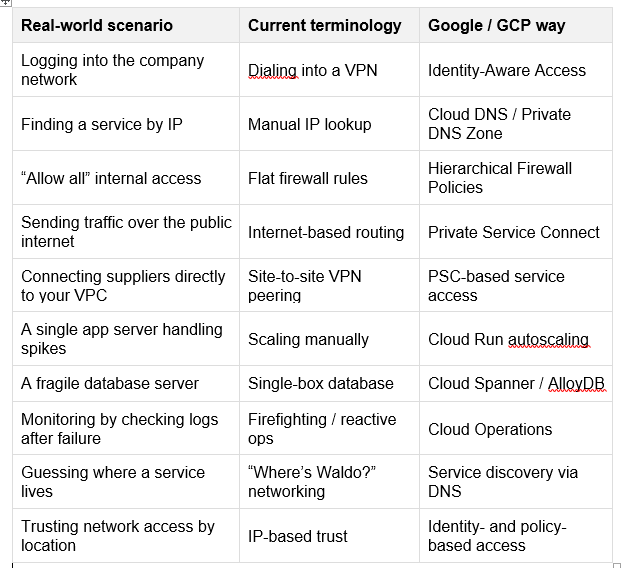
Screenshot captured from word document
Closing Thought: Is Your AI Built on Sand?
Over these nine layers — Front Door, Map, Shield, Highway, Handshake, Traffic Cop, Logic, Memory, and Pulse — the same pattern appears: the “-AI” label is only as strong as the underlying nervous system.
Marketing can change the name on the building, but engineers determine whether it has working electricity, plumbing, and a solid foundation. Moving a legacy “Software Solutions” stack into a modern GCP‑based architecture isn’t just a technology upgrade; it’s a necessary alignment between the story you’re telling the world and the reality you’re building under the surface.
If you’re thinking about the GCP Professional Cloud Architect exam or just want to see how an AI‑rebranded company can be grounded in real GCP plumbing, this is the use‑case‑style guide I wish I had when I started.
Thank you for being a part of the community
Before you go:

👉 Be sure to clap and follow the writer ️👏️️
👉 Follow us: **Linkedin| [Medium](https://medium.com/codetodeploy)**
👉 CodeToDeploy Tech Community is live on Discord — **Join now!**
Disclosure: This post includes affiliate and partnership links.
메타데이터
- post_id
- e8a6bfbbbc9d
- slug
- everyone-is-rebranding-to-ai-i-built-the-actual-gcp-architecture-behind-the-hype-layer-by-layer-e8a6bfbbbc9d
- url
- https://medium.com/codetodeploy/everyone-is-rebranding-to-ai-i-built-the-actual-gcp-architecture-behind-the-hype-layer-by-layer-e8a6bfbbbc9d
- canonical_url
- https://medium.com/codetodeploy/everyone-is-rebranding-to-ai-i-built-the-actual-gcp-architecture-behind-the-hype-layer-by-layer-e8a6bfbbbc9d
- author_url
- https://medium.com/@sriram.chennai64
- status
- ok
- fetched_at
- 2026-08-11 02:01:24