Converting manual tests into automation tests using Natural Language Processing
The process of transforming manual test cases into automation tests can be a time-consuming endeavour, but this process can be expedited…
Converting manual tests into automation tests using Natural Language Processing
The process of transforming manual test cases into automation tests can be a time-consuming endeavour, but this process can be expedited through the utilisation of machine learning (ML) and natural language processing (NLP) techniques. Specifically, a keyword-driven framework can be easily established and applied to automate the conversion of manual tests without the need for writing code.
The underlying methodology revolves on the use of Rasa NLU, a pivotal component of the complete solution, to convert manual test cases into keywords and locators that can be used as keyword by our keywrod driven automation framework. To achieve our goal, we will employ the below solution approach:
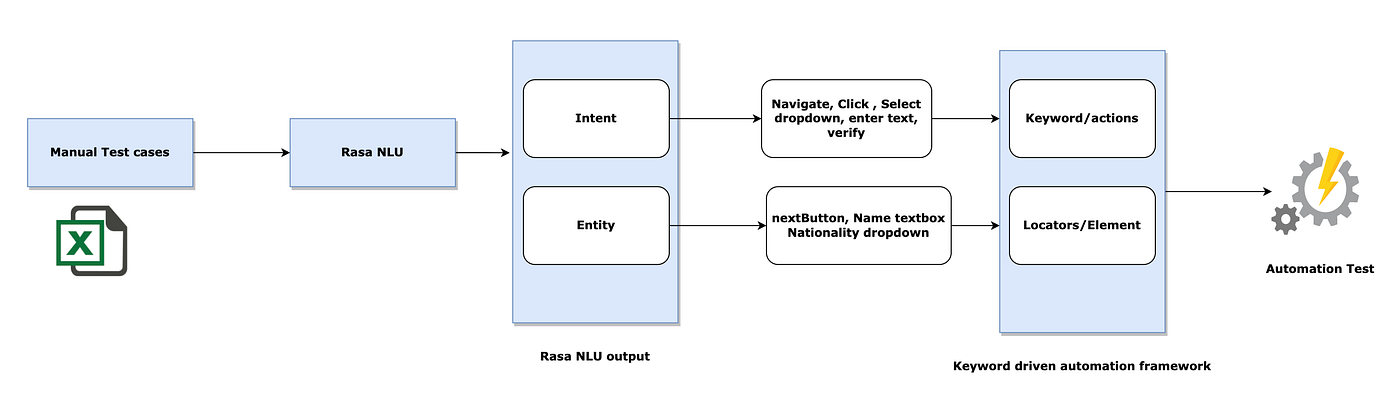
Firstly, we will gain a comprehensive understanding of Rasa NLU which is key to the solution.
Rasa NLU (Natural Language Understanding) is an open-source Python library for building conversational AI applications. It is a part of the larger Rasa framework, which includes tools for building conversational AI chatbots and assistants.
The primary purpose of Rasa NLU is to extract the meaning from user messages, also known as intent classification and entity recognition. It uses machine learning algorithms to parse user messages and determine their intent and entities.
In order to use Rasa NLU, you’ll need to provide training data in the form of test steps along with their corresponding intents and entities. Rasa NLU uses this training data to learn how to identify the intents and entities in new user messages.
Once you have trained your Rasa NLU model, you can use it to extract the intents and entities from new user messages in real-time. This can be done using the Rasa NLU Python library or by integrating Rasa NLU into a larger conversational AI system.
Let’s understand from an example of how Rasa NLU can be used to extract entities and intents from a sentence.
Let’s suppose we have manual test step — “I navigate to “www.google.com” and click on search button,” we want to extract the intent of the message as “click and navigate” and the entities as “search button and www.google.com”. Here’s how we can do it using Rasa NLU:
- First, we define the intents and entities we want to extract in our Rasa NLU configuration file. Here’s an example of how we could define the intent and entities for our test steps:
# config.yml
language: "en"

pipeline:
  - name: "WhitespaceTokenizer"
  - name: "RegexFeaturizer"
  - name: "CRFEntityExtractor"
  - name: "EntitySynonymMapper"
  - name: "CountVectorsFeaturizer"
  - name: "EmbeddingIntentClassifier"

# define the intents
intents:
  - navigate
  - click

# define the entities
entities:
  - Url - www.google.com
- Button - search button-
Next, we train our Rasa NLU model on a dataset of example messages and their associated intents and entities.
-
Once we’ve defined our configuration file and trained our model on our training data, we can use our model to extract intents and entities from new messages. Here’s an example of how we could use the Rasa NLU Python package to extract the intents and entities from the message “Users goes to yahoo.com and click on next button”:
from rasa.nlu.model import Interpreter

interpreter = Interpreter.load("./models/nlu")

message = “Users goes to yahoo.com and click on next button“
result = interpreter.parse(message)

print(result["intent"]["name"])  # output: “navigate, click”
print(result["entities"])  # output: [{'entity': ‘url’, 'value': 'yahoo.com '}, {'entity': ‘button’, 'value': ‘next’}]
In this example, we’ve loaded our trained Rasa NLU model from the “./models/nlu” directory and used it to parse the message . The result dictionary contains the extracted intent and entities from the message, which we can access using the result[“intent”] and result[“entities”] keys.
We already have many pre trained model to choose from once we have the trained model we just need to execute step 3 for each line of manual test cases and update test case with keyword and format recognised by our keyword driven automation framework.
메타데이터
- post_id
- e8aa5d98004b
- slug
- converting-manual-tests-into-automation-tests-using-natural-language-processing-e8aa5d98004b
- url
- https://medium.com/@pkum37/converting-manual-tests-into-automation-tests-using-natural-language-processing-e8aa5d98004b
- canonical_url
- https://medium.com/@pkum37/converting-manual-tests-into-automation-tests-using-natural-language-processing-e8aa5d98004b
- author_url
- https://medium.com/@pkum37
- status
- ok
- fetched_at
- 2026-07-11 14:39:29