#5 Claude Loops: Run Claude Like Production
The final step is turning local agent work into a harness with triggers, budgets, approvals, logs, rollback, and handoff.
#5 Claude Loops: Run Claude Like Production
The final step is turning local agent work into a harness with triggers, budgets, approvals, logs, rollback, and handoff.
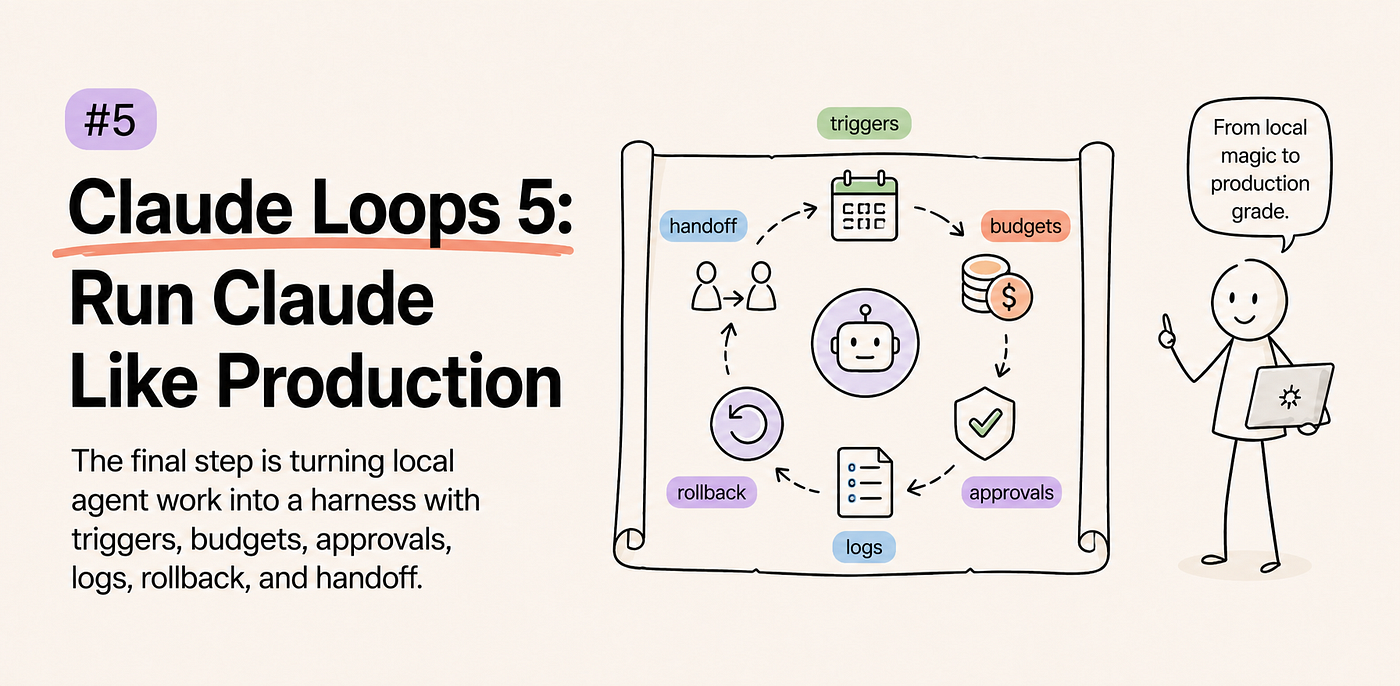
Production loop chart: local Claude session becomes an operating harness
A local Claude session can feel magical because you are sitting beside it. You see the prompt, the tool call, the hesitation, the diff, and the final receipt. Production removes that comfort. The loop may start from a schedule, a ticket, a CI event, or another agent. If the harness cannot stop it, explain it, and hand it off, the loop is not ready.
Local Loops Have a Human in the Chair
Why does the same Claude workflow feel safe on your machine and scary when it runs without you watching?
Because local work cheats.
In Part 1, we stopped treating Claude like a chat box. In Part 2, we treated context as the loop's working memory. In Part 3, we scoped the tool surface. In Part 4, we made Claude prove the work with evidence. All of that still assumes a human can look over the loop's shoulder.
That is why a local Claude Code session feels more forgiving than it really is. You notice when the model reads the wrong file. You reject a risky command. You ask for a smaller diff. You decide whether the test output actually means what Claude says it means.
Production takes that chair away.
The loop now needs an operator surface. Something has to decide what starts the run, what tools are allowed, how much budget the run can burn, when a human must approve, what evidence gets saved, and what happens when the run cannot prove success.
A production Claude loop is not a smarter prompt; it is a local loop with memory, meters, gates, and a way to stop.
A Harness Is the System Around the Model
What changes when Claude moves from a session to a harness?
The model stops being the whole story.
Anthropic's agent writing frames a harness as the system that lets a model act as an agent: it processes inputs, orchestrates tool calls, and returns results. Claude Code gives you a rich local harness. The Agent SDK gives developers primitives for building more explicit ones. Hooks, settings, tools, permissions, transcripts, and informational messages become the machinery around the loop.
That machinery matters because long-running agents fail in boring ways. They try to do too much at once. They lose coherence as context fills. They hand the next session an unclear state. They keep going because nobody taught the harness what "too far" means.
So production is not the place to say, "Claude can probably handle it."
Production is where you ask: what does the loop see, what can it touch, how long can it continue, and what artifact proves what happened?
Triggers Are Not Just Convenience
What should be allowed to start a production loop?
Only events you are willing to treat as work orders.
A local loop starts because you typed a request. A production loop can start from a GitHub issue, a scheduled maintenance window, a CI failure, a support ticket, a Slack message, or another agent handing off state. That trigger carries assumptions. It tells the loop what the task is, what context matters, and what authority might be needed.
This is where many agent systems get sloppy. They wire Claude to a queue and call it automation. But a trigger without a contract is just a prompt with better plumbing.
A useful trigger says five things:
- why this run exists
- what evidence should be loaded first
- which tools are in scope
- what budget applies
- who owns the final decision
That last item is not bureaucracy. It is how you avoid orphaned autonomy. Every production loop should know whether it is a helper, a drafter, a fixer, a reviewer, or an operator with permission to act.
If the trigger cannot answer that, the loop should not start yet.
Budgets Are a Safety Feature
Why should a production loop have a budget before it has ambition?
Because agents can turn uncertainty into activity.
A vague local task wastes your afternoon. A vague production loop can burn tokens, touch tools, spam logs, keep retrying, and leave behind a pile of almost-useful artifacts. The harm is not always one dramatic failure. Sometimes the failure is a system that keeps doing plausible work after the useful path has disappeared.
Budgets give the loop friction.
Budget can mean max turns. It can mean token ceiling. It can mean runtime. It can mean tool-call count. It can mean model tier. It can also mean scope: one file, one branch, one issue, one customer record, one environment.
The point is not to make Claude timid. The point is to make exploration visible. When the loop spends half its budget reading files and still cannot name the failing boundary, the harness should notice. When the loop hits its tool-call cap, it should leave a handoff instead of improvising a heroic finish.
Budget is not an accounting detail. It is the loop's first stop sign.
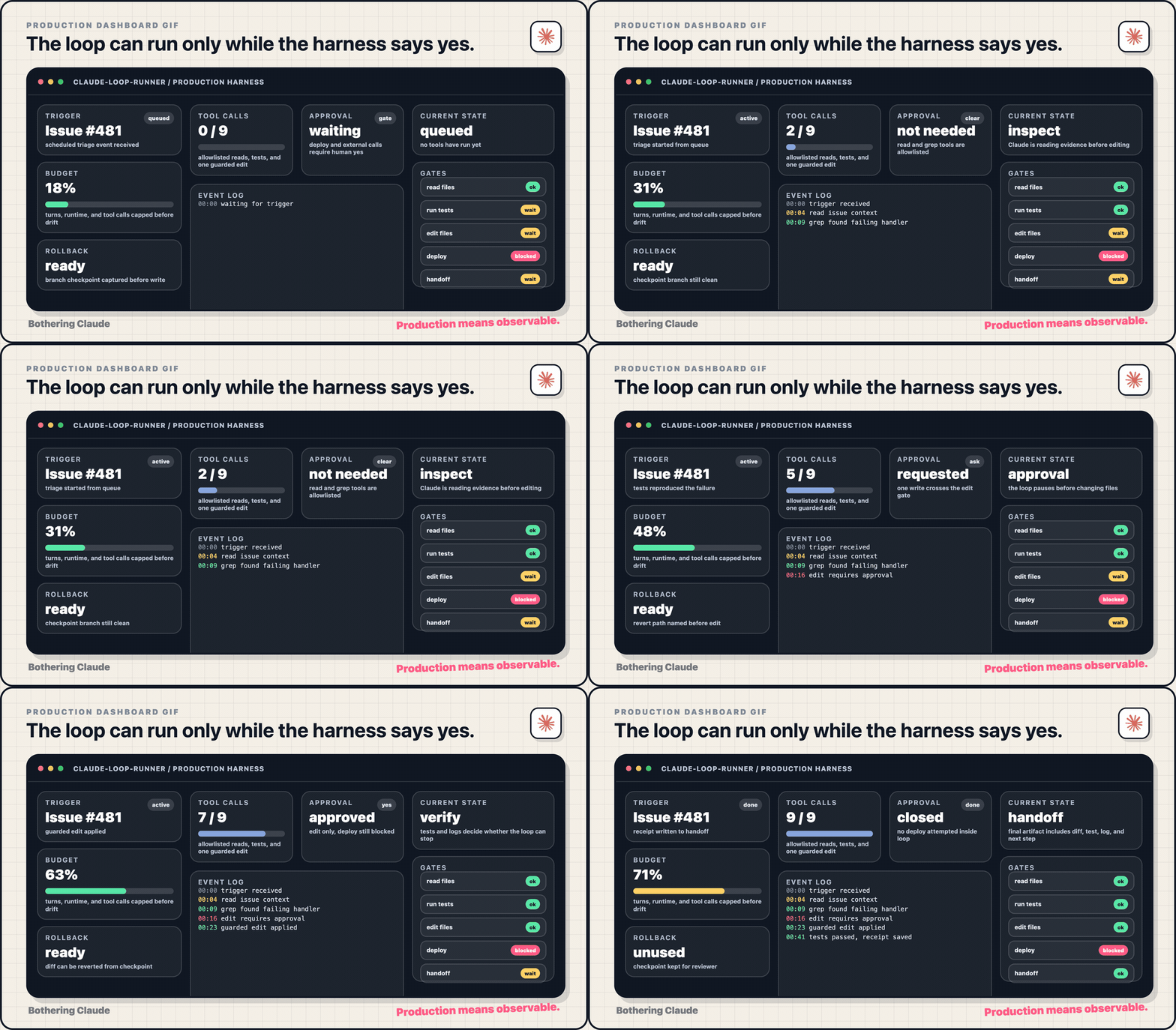
Production dashboard GIF: trigger, budget, tool calls, approvals, logs, rollback, and handoff change state
Approval Gates Protect the Expensive Moves
Where should a human step back into the loop?
At the point where the action becomes hard to undo.
Claude Code's hook and permission systems are useful because they separate observation from action. Reading a file is not the same class of move as editing a file. Running a local test is not the same class of move as deploying. Calling an internal read-only tool is not the same class of move as sending data to an external system.
Production loops need that distinction in their bones.
You do not need a human approval for every harmless step. That turns the loop into a very expensive form. But you do need gates around writes, deletes, deploys, external API calls, permission expansion, customer-facing communication, and anything that crosses a trust boundary.
The important detail is timing. A gate after the tool runs is a log. A gate before the tool runs is a control.
That is why hooks and permission modes belong in the design discussion, not at the end as implementation trivia. They decide where the loop can be autonomous and where it must ask.
Logs Are the Production Version of Memory
What does the next human need when they inspect a loop that already ran?
Not a beautiful summary. They need a trace.
A production loop should save the trigger, the loaded context, the tool calls, the tool results, the approval decisions, the final evidence, and the reason it stopped. Claude can write a summary too, but the summary should sit on top of the trace, not replace it.
Anthropic's Agent SDK reference includes message shapes for things like compaction boundaries and informational messages. Claude Code hooks also pass structured event context. Those details matter because production work needs correlation. If a hook blocked a command, a reviewer should be able to connect that block to the prompt, the tool call, and the final status.
Logs should answer practical questions:
- what started this loop
- what did Claude inspect
- what did Claude change
- what did the tools return
- what did the harness block
- what evidence ended the run
- what should happen next
If the log cannot answer those questions, the next session has to guess. Guessing is how production loops become haunted by their own history.
Rollback Is Part of the Prompt
Why should rollback be designed before Claude edits anything?
But here is the thing: rollback is not a disaster plan for after the loop fails. It is part of the loop contract before the first risky action.
For code, rollback might be a branch, a patch file, or a clean revert path. For config, it might be the previous value and the environment where it was read. For data, it might be a backup, a dry run, or a read-only query that confirms the affected rows. For external systems, it might be a no-send mode until a human approves.
The harness should force Claude to name the recovery path before it touches the production surface.
This does two useful things. First, it makes the action more reviewable. Second, it changes Claude's behavior. A loop that has to explain rollback before acting is less likely to treat production like a scratchpad.
The phrase "smallest safe step" only means something if the system knows how to undo the step.
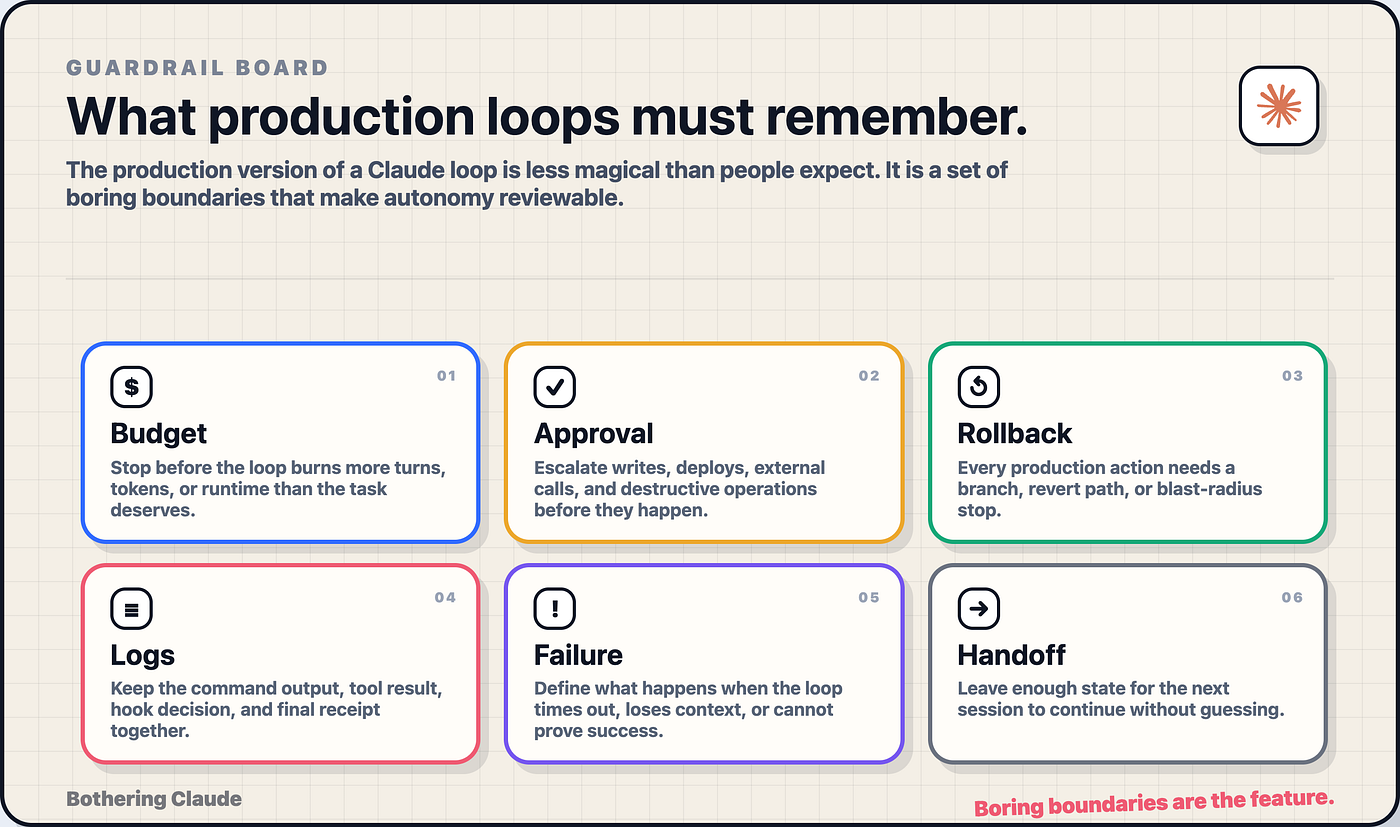
Production guardrail board: budgets, approvals, rollback, logs, failure, and handoff
Failure Needs a First-Class Path
What happens when the production loop cannot prove success?
It should stop in a useful shape.
This is the difference between a production harness and a long prompt. A prompt asks Claude to keep trying. A harness decides when trying is no longer the right move.
Failure paths should be boring and explicit:
- budget exhausted
- verification failed
- approval denied
- tool unavailable
- context insufficient
- risky action requested
- rollback unclear
Each failure should produce a specific artifact. A failed verification should include the command and output. A denied approval should include the requested action and reason. A budget stop should include what was tried and what remains unknown. A context stop should include the missing information.
This is how you keep failed loops useful. The next human or agent should inherit a map, not a mystery.
Long-running agent work needs this discipline more than short work. Anthropic's harness writing emphasizes decomposition, structured handoff, and evaluator style checks because long tasks drift when state is not carried cleanly. The production lesson is simple: when a loop cannot finish, it should still improve the next loop.
Handoff Is the Product of the Loop
What should a production Claude loop leave behind?
An artifact that lets the next operator continue without rereading the whole session.
That artifact does not need to be fancy. It needs to be structured. Trigger. Goal. Scope. Files or systems touched. Evidence collected. Decisions made. Budget used. Approval state. Rollback path. Open questions. Next safe action.
This is where production loops become cumulative. One loop can inspect and stop. Another can edit and verify. Another can package the change for review. Another can monitor the result. The point is not to make one agent do everything. It is to make each loop leave enough state for the next loop to be less confused.
That is also why compaction alone is not a production strategy. Compaction helps a session continue across context pressure. It does not automatically create a clean operational handoff. The harness has to ask for one.
The final message of a production loop should read less like a victory speech and more like a work order that has been closed, paused, or escalated.
The Production Loop Contract
How do you know the fifth loop is ready?
You can ask one boring question: could someone else review this run tomorrow?
If the answer is no, you do not have a production loop yet. You have a local Claude session with better plumbing.
The production loop contract is simple:
- every run starts from a named trigger
- every trigger carries scope and owner
- every loop has a budget
- every powerful action has a gate
- every tool call leaves a trace
- every risky edit has a rollback path
- every failure produces a useful artifact
- every successful run ends with a handoff
This is the end of the Claude Loops series, but it is also where the real work starts. The beginner move is asking Claude for answers. The advanced move is designing the loop around the answer: context, tools, verification, and production boundaries.
Claude gets interesting when it can act.
Claude gets useful when the system around it knows when to stop.
Until then...
— Sage 🍓
PS: Pick one Claude workflow you already trust locally. Before automating it, write down the trigger, budget, approval gate, log artifact, rollback path, and handoff shape. If any one of those is missing, keep it local for one more week.
Reference Notes
메타데이터
- post_id
- e9164959273a
- slug
- 5-claude-loops-run-claude-like-production-e9164959273a
- url
- https://pub.towardsai.net/5-claude-loops-run-claude-like-production-e9164959273a
- canonical_url
- https://pub.towardsai.net/5-claude-loops-run-claude-like-production-e9164959273a
- author_url
- https://medium.com/@sageholloway
- status
- ok
- fetched_at
- 2026-07-17 08:43:13