Where to Put Namespace Declarations in XSpec Tests
Prefix like a pro, especially in tests for XQuery
Where to Put Namespace Declarations in XSpec Tests
Prefix like a pro, especially in tests for XQuery
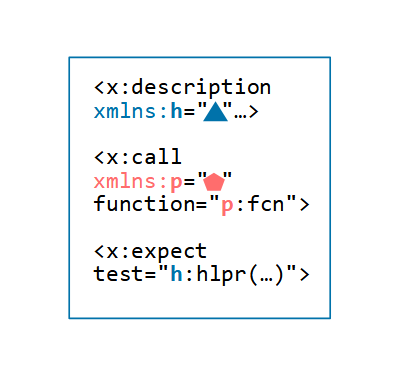
If your XSpec test file uses a prefixed name like x:scenario or xh:html (and the namespace isn’t one that your XSLT or XQuery processor knows automatically), you must use a namespace declaration to associate the prefix to the URI of the namespace. But where does the namespace declaration go?
The Namespaces in XSpec topic says, “In tests for XQuery, put namespace declarations on <x:description>; in tests for XSLT or Schematron, put namespace declarations on the element where you are using the prefix or an ancestor.” This topic clarifies the advice for XQuery tests. You actually have more flexibility than the advice suggests, but the extra flexibility might not be tremendously valuable to you.
XSLT and Schematron with XSLT-based queryBinding
In tests for XSLT or a Schematron schema with an XSLT-based queryBinding attribute value, a required namespace declaration can be on the element where you are using the prefix or any ancestor element. For instance, suppose the test file uses an <x:context> element whose select attribute value refers to an element name in the HTML namespace. A namespace declaration like xmlns:xh="http://www.w3.org/1999/xhtml" can go on the <x:context> element, its <x:scenario> parent, any other <x:scenario> ancestors, or the <x:description> ancestor. The following example points out the options.
<x:description stylesheet="test-target.xsl"
  xmlns:x="http://www.jenitennison.com/xslt/xspec">   <!-- here, -->
  <x:scenario label="Where to declare xh prefix?">    <!-- here, -->
    <x:scenario label="Child scenario">               <!-- here, -->
      <x:context href="file.html" select="//xh:div"/> <!-- or here -->
    </x:scenario>
  </x:scenario>
</x:description>
If the hierarchy has multiple declarations for the prefix xh, the declaration on the deepest ancestor-or-self wins.
If you’re accustomed to namespace usage in other XML applications, the ancestor-or-self range of choices is probably what you would expect.
XQuery and Schematron with XSLT-based queryBinding
In tests for XQuery or a Schematron schema with an XQuery-based queryBinding attribute value, you can decide whether to:
- Use an easy-to-remember rule about the location of namespace declarations, or
- Maximize your flexibility, at the expense of a little more complexity
Simple Rule
The simplest rule is: when an XSpec file uses a namespace prefix, put the namespace declaration on the <x:description> element in that file and any other XSpec files that import it.
Greater Flexibility
The more nuanced rule has the following parts based on where the prefix appears:
functionattribute of<x:call>element: Put the namespace declaration on that element or any ancestor elementnameattribute of<x:variable>or<x:param>element: Put the namespace declaration on that element or any ancestor elementtestattribute of<x:expect>element: Put the namespace declaration on<x:description>selectattribute of<x:expect>,<x:param>, or<x:variable>element: Put the namespace declaration on<x:description>asattribute of<x:expect>,<x:param>, or<x:variable>element: Put the namespace declaration on<x:description>- Text value template or attribute value template in an element: Put the namespace declaration on that element or any ancestor element
The next XSpec release after v3.2.2 will make item 5 more flexible by supporting declarations on the as attribute’s parent element or any ancestor element.
Suppose you try to apply an ancestor-or-self rule but make a mistake, such as binding a prefix like xh on an <x:expect> element and not on the <x:description> element. When you run the test suite, you will see an error like the following ones from Saxon and BaseX, respectively.
XPST0081 Namespace prefix 'xh' has not been declared[XPST0081] Namespace prefix not declared: xhThe processor doesn’t have access to your original XSpec file and doesn’t know that you declared the prefix on the <x:expect> element.
What About Code that Moves Around?
The XSpec elements <x:import> and <x:like> cause code to be used somewhere other than their original location. These elements make the rules above a little harder to understand, so let’s try to clarify them.
Effect of x:import
The <x:import> element enables you to import content of one XSpec file into another XSpec file. Wherever one of the XQuery rules says, “Put the namespace declaration on <x:description>,” it means the <x:description> element of the file you actually execute. That might be the importing file alone, or both files if you plan to execute the imported file by itself.
Wherever one of the XQuery rules says, “Put the namespace declaration on that element or any ancestor element,” it means in the same file where the prefix appears. An importing file’s <x:description> or <x:import> element is not an ancestor of an element in an imported file.
Effect of x:like
The <x:like> element enables you to reuse code by pulling the contents from one test scenario into another (see Code Reuse in XSpec for more!). Wherever one of the XQuery rules says, “Put the namespace declaration on that element or any ancestor element,” the word “ancestor” refers to the original location, not the location where <x:like> copies the code.
How Does This Flexibility Help You?
Here is a situation where flexibility about where to declare namespace is useful: You have an XSpec test file that tests an XQuery module and uses the prefix f for the module’s namespace URI. You want to import another XSpec file that tests the same XQuery module, but this other file uses the prefix g for the same URI. Do you have to change g: to f: or declare the prefix g in the importing file? Not necessarily!
If the only uses of the prefix
gare in<x:call>elements’functionattributes, you can simply insert<x:import>and not fuss with namespace prefixes or declarations.
Each of the following two example files uses a prefix in the <x:call> element’s function attribute and declares the prefix on a descendant of that file’s <x:description> element. Nowhere does the importing file declare the g prefix that the imported file uses.
Example 1. Importing File
<x:description query="urn:x-xspectacles:functions:namespaces-xquery"
  query-at="test-target.xqm"
  xmlns:x="http://www.jenitennison.com/xslt/xspec">

  <x:import href="imported-file.xspec"/>

  <!-- This file declares the 'f' prefix on x:scenario. -->
  <x:scenario shared="yes" label="function call"
    xmlns:f="urn:x-xspectacles:functions:namespaces-xquery">
    <x:call function="f:do-something"/>
  </x:scenario>

  <x:scenario label="(Main XSpec file) Calling the function">
    <x:like label="function call"/>
    <x:expect label="returns some element">
      <some-element/>
    </x:expect>
  </x:scenario>

</x:description>
Example 2. Imported File, imported-file.xspec
<x:description query="urn:x-xspectacles:functions:namespaces-xquery"
  query-at="test-target.xqm"
  xmlns:x="http://www.jenitennison.com/xslt/xspec">

  <!-- This file declares the 'g' prefix on x:call. -->
  <x:scenario label="(Imported XSpec file) Calling the function">
    <x:call function="g:do-something"
      xmlns:g="urn:x-xspectacles:functions:namespaces-xquery"/>
    <x:expect label="returns some element">
      <some-element/>
    </x:expect>
  </x:scenario>

</x:description>
How Does This Flexibility Fall Short?
Now, suppose that you modify imported-file.xspec by making a test or select attribute of <x:expect> call a test helper function from another module. When referring to that function, suppose the attribute value uses the prefix h. Such references are examples of item 3 or item 4 from the list under “Greater Flexibility.” There, the rule is that prefixes must be declared on the <x:description> element of the file(s) you plan to execute. So, the prefix h needs a declaration on the <x:description> element of the importing file (and imported-file.xspec, too, if you plan to execute it in isolation). Because items 3 and 4 do not offer the same prefix flexibility that the function attribute does, your celebration of an easy <x:import> without changing any other code was premature.
And if the imported file used the prefix f in the name of the test helper function, that would conflict with the importing file’s use of prefix f for the namespace URI of the module being tested. To fix the conflict, you could change the imported file so that it either uses a unique prefix or uses prefix-free notation like Q{test-helper-namespace}my-helper-fcn(...).
As for XSpec variables, being able to use a locally declared prefix in the variable name is not as helpful as it might seem. If you reference the variable in a test or select attribute and use a prefixed name, then you’ll have to declare the prefix on the <x:description> element after all.
Key Takeaways
- When an XSpec element’s attribute represents the name of a function, variable, or parameter, you can declare a namespace prefix on that element or on any ancestor element, up through
<x:description>. - In tests for XQuery or a Schematron schema with an XQuery-based
queryBindingattribute value, when you use a prefixed name in an XPath expression located in an attribute of an XSpec element, you must put the namespace declaration on the<x:description>element of the test file you are executing. The same is true for prefixed names inasattribute values in XSpec v3.2.2 and earlier. - If you prefer a simple rule over a flexible one, just put all your namespace declarations on
<x:description>in the same XSpec file and any other XSpec files that import it.
Code is downloadable from https://github.com/galtm/xspectacles/ on GitHub, in the src/namespaces-xquery folder.
메타데이터
- post_id
- e98c2852575b
- slug
- where-to-put-namespace-declarations-in-xspec-tests-e98c2852575b
- url
- https://medium.com/@xspectacles/where-to-put-namespace-declarations-in-xspec-tests-e98c2852575b
- canonical_url
- https://medium.com/@xspectacles/where-to-put-namespace-declarations-in-xspec-tests-e98c2852575b
- author_url
- https://medium.com/@xspectacles
- status
- ok
- fetched_at
- 2026-07-20 07:07:55