How Instagram Stores Reels, Photos, and Drafts Behind the Scenes
Every day, millions of people open apps like Instagram, record Reels, edit photos, save drafts, and endlessly scroll through videos. What…
How Instagram Stores Reels, Photos, and Drafts Behind the Scenes

How Instagram Stores Reels, Photos, and Drafts Behind the Scenes
Every day, millions of people open apps like Instagram, record Reels, edit photos, save drafts, and endlessly scroll through videos. What feels instant and effortless on the surface is actually powered by a sophisticated media storage and delivery system working behind the scenes.
Think about what happens when you record a Reel:
- The camera captures video frames and audio.
- The app applies filters, effects, and music.
- The video is temporarily stored on your device.
- A draft may be saved locally for later editing.
- The final media is uploaded to cloud servers.
- The platform compresses and processes the content.
- Viewers across the world stream the Reel almost instantly.
Handling all of this smoothly requires careful architecture decisions around storage, performance, networking, and user experience.
In this blog, we’ll explore how modern social media apps likely manage Reels, photos, and drafts behind the scenes — inspired by apps like Instagram, but explained at a high architectural level.
Why Social Media Apps Need Efficient Media Storage
Social media platforms are fundamentally media platforms.
Users upload:
- Photos
- Videos
- Stories
- Reels
- Audio clips
- Profile pictures
- Live streams
A single short Reel can easily be tens or hundreds of megabytes before compression. Multiply that by millions of uploads per day, and storage quickly becomes one of the biggest engineering challenges.
The platform must solve several problems simultaneously:
- Upload media quickly
- Prevent excessive mobile data usage
- Keep drafts safe
- Stream videos smoothly
- Reduce device storage usage
- Deliver content globally with low latency
- Avoid app crashes on low-end devices
This is why modern apps use a combination of:
- Local device storage
- Cloud object storage
- Compression pipelines
- CDN delivery
- Intelligent caching systems
The Journey of Recording a Reel
Let’s follow the lifecycle of a Reel from recording to publishing.
Step 1: Recording the Video
When you record a Reel, the app accesses:
- Device camera
- Microphone
- Temporary memory buffers
The raw video captured by your camera is extremely large.
For example:
- A few seconds of raw HD video may consume hundreds of megabytes.
- Raw media is too large for instant uploads.
So the app usually stores the captured media temporarily in local device storage before any upload begins.
Why Media Is Stored Locally First
Uploading immediately while recording would create several issues:
- Internet interruptions could corrupt uploads.
- Users may discard the recording.
- Editing requires fast local access.
- Mobile networks are unreliable.
Instead, apps usually follow this flow:
- Record media locally
- Save temporary files
- Allow editing and preview
- Compress media
- Upload finalized version
This local-first approach improves reliability and responsiveness.
Reel Draft Flow
Here’s a simplified draft architecture:
Camera Recording
        ↓
Temporary Local File
        ↓
User Edits Reel
        ↓
Draft Metadata Saved
        ↓
Draft Persisted Locally
        ↓
User Reopens App Later
        ↓
Draft Reloaded from Storage
What Happens When You Save a Draft
Saving a draft is more than just storing a video file.
The app often stores multiple components:
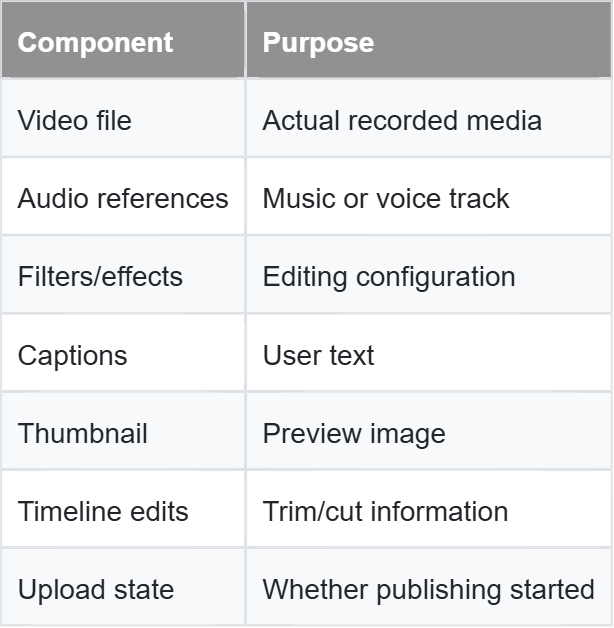
Instead of permanently uploading everything immediately, many apps first persist drafts locally on the device.
This allows drafts to survive:
- App restarts
- Device lock/unlock
- Network disconnections
- Temporary crashes
How Drafts Survive App Restarts
If drafts only lived in RAM (temporary memory), they would disappear as soon as the app closed.
To prevent this, apps store draft data in persistent local storage such as:
- App sandbox directories
- Internal file systems
- Device databases
- Offline storage layers
The app also stores metadata describing:
- File locations
- Edit history
- Creation timestamps
- Media duration
- Preview references
When the app launches again, it scans stored draft metadata and reconstructs the editing session.
That’s why unfinished Reels often reappear exactly where you left them.
Local Storage vs Cloud Storage
Modern social apps rely on both local and cloud storage.
Local Storage
Local storage exists on the user’s device.
Used for:
- Drafts
- Temporary uploads
- Cached content
- Recently viewed media
- Offline access
Advantages
- Instant access
- Works without internet
- Faster editing experience
- Lower server cost
Limitations
- Limited device space
- Risk of deletion during uninstall
- Device-specific availability
Cloud Storage
Cloud storage exists on remote servers.
Used for:
- Published photos
- Reels
- Stories
- Backups
- Global distribution
Advantages
- Accessible worldwide
- Highly scalable
- Durable and redundant
- Easy sharing
Limitations
- Requires internet
- More infrastructure cost
- Higher latency than local storage
Local vs Cloud Storage Architecture
USER DEVICE
     ┌─────────────────┐
     │ Draft Storage   │
     │ Cached Videos   │
     │ Temp Uploads    │
     └────────┬────────┘
              │
              │ Upload
              ▼
     ┌─────────────────┐
     │ Cloud Storage   │
     │ Media Servers   │
     │ Backup Systems  │
     └────────┬────────┘
              │
              ▼
     ┌─────────────────┐
     │ CDN Distribution│
     └─────────────────┘
Uploading Large Media Files Efficiently
Uploading large videos is surprisingly difficult.
Problems include:
- Weak mobile networks
- Interrupted uploads
- Large file sizes
- Battery consumption
- Data usage
To solve this, apps use optimized upload pipelines.
Chunked Uploads
Instead of uploading one giant file, the app splits media into smaller chunks.
Example:
100 MB Video
   ↓
10 MB Chunks
   ↓
Upload Individually
   ↓
Server Reassembles File
Benefits:
- Uploads can resume after interruption
- Failed chunks retry independently
- Better reliability on slow networks
This is why uploads can continue even after temporary signal loss.
Media Compression and Processing
Raw media from smartphones is too large for scalable platforms.
Before or after upload, apps compress media aggressively.
Compression Goals
Reduce:
- File size
- Bandwidth usage
- Storage cost
- Streaming latency
While preserving:
- Acceptable visual quality
- Fast playback
- Compatibility across devices
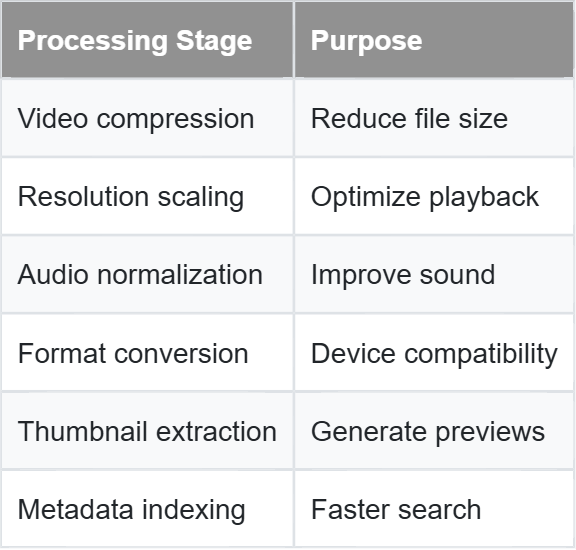
What Gets Processed?
A Reel may go through:
Thumbnail Generation and Previews
Showing a full video everywhere would be inefficient.
Instead, apps generate lightweight preview images called thumbnails.
These thumbnails appear in:
- Explore pages
- Feed previews
- Profile grids
- Search results
The app extracts a frame from the video and stores it separately.
Benefits:
- Faster loading
- Lower bandwidth usage
- Better scrolling performance
Without thumbnails, scrolling through Reels would feel extremely slow.
Media Upload and Processing Pipeline
User Records Reel
        ↓
Local Temporary Storage
        ↓
Compression
        ↓
Chunked Upload
        ↓
Cloud Storage
        ↓
Media Processing Servers
        ↓
Thumbnail Generation
        ↓
CDN Distribution
        ↓
Viewer Playback
Caching Frequently Viewed Content
Imagine if every Reel had to be downloaded again every single time you watched it.
The experience would be terrible.
To avoid this, apps use caching.
What Is Caching?
Caching means temporarily storing frequently accessed content closer to the user.
Examples:
- Recently viewed Reels
- Profile photos
- Feed thumbnails
- Frequently watched videos
Cached content can be loaded instantly without repeated downloads.
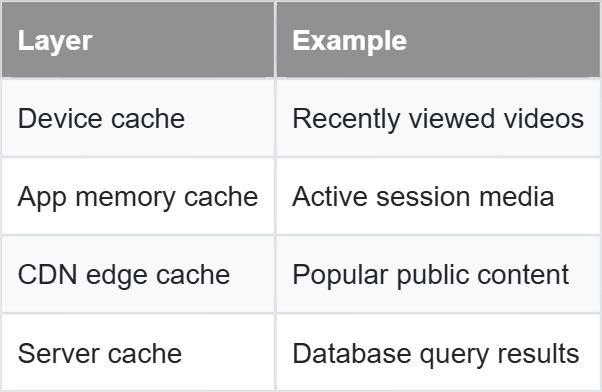
Where Does Caching Happen?
Caching can exist at multiple layers.
Cache Lifecycle Example
User Watches Reel
        ↓
Reel Stored in Device Cache
        ↓
User Reopens App
        ↓
Cached Reel Loads Instantly
        ↓
Cache Expires Later
        ↓
Fresh Copy Downloaded Again
Apps intelligently remove old cached files to prevent excessive storage usage.
Content Delivery Using CDNs
One of the most important systems behind global social apps is the CDN.
CDN stands for Content Delivery Network.
A CDN is a globally distributed network of servers that stores copies of media closer to users.
Why CDNs Matter
Imagine every Reel worldwide had to stream from one central server.
Users far away would experience:
- Slow loading
- Buffering
- High latency
Instead, CDNs replicate popular media across multiple geographic regions.
So if someone in India watches a Reel, it may stream from a nearby regional server instead of another continent.
CDN Delivery Flow
Creator Uploads Reel
        ↓
Cloud Storage
        ↓
CDN Replicates Content
        ↓
User Requests Reel
        ↓
Nearest CDN Server Responds
        ↓
Fast Video Playback
This dramatically improves:
- Streaming speed
- Reliability
- Scalability
- User experience
Balancing Storage, Performance, and User Experience
Social media architecture is ultimately about trade-offs.
Apps constantly balance:
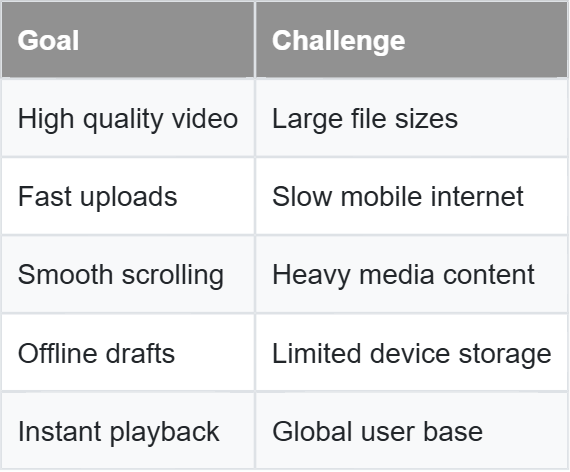
The best systems carefully optimize all three:
- Storage efficiency
- Performance
- User experience
Product Thinking Behind Media Systems
What makes apps like Instagram feel polished is not just engineering — it’s product thinking.
For example:
Why save drafts locally?
Because users expect unfinished work to remain safe even without internet.
Why compress videos?
Because most users care more about fast uploads than perfect raw quality.
Why use thumbnails?
Because instant scrolling feels more important than loading full videos immediately.
Why cache aggressively?
Because smooth playback increases watch time and engagement.
These are product decisions supported by architecture.
Final Thoughts
Every Reel you watch travels through an enormous pipeline of systems:
- Local storage
- Draft persistence
- Compression
- Upload infrastructure
- Cloud storage
- Media processing
- Thumbnail generation
- CDN delivery
- Intelligent caching
What feels like a simple “Post Reel” button is actually powered by sophisticated distributed systems optimized for billions of users.
Modern social media apps succeed not only because they store media — but because they make that storage invisible, fast, reliable, and effortless for users.
That invisible experience is what great mobile architecture is all about.
메타데이터
- post_id
- e9b422d6b1b8
- slug
- how-instagram-stores-reels-photos-and-drafts-behind-the-scenes-e9b422d6b1b8
- url
- https://medium.com/@pratksharma/how-instagram-stores-reels-photos-and-drafts-behind-the-scenes-e9b422d6b1b8
- canonical_url
- https://medium.com/@pratksharma/how-instagram-stores-reels-photos-and-drafts-behind-the-scenes-e9b422d6b1b8
- author_url
- https://medium.com/@pratksharma
- status
- ok
- fetched_at
- 2026-06-09 15:37:30