How I Built a “Check My Garage Door” Vision System in One Evening with AI (part 1 of 2)
A battery-powered camera, an unofficial bridge, and Claude’s vision API turned a vague idea into a working nightly alert system in about…
How I Built a “Check My Garage Door” Vision System in One Evening with AI (part 1 of 2)
A battery-powered camera, an unofficial bridge, and Claude’s vision API turned a vague idea into a working nightly alert system in about two hours — built with Claude Code — and here’s what that says about how software gets built now.
The morning I found it open
The real problem is quiet and a little embarrassing: some mornings I come downstairs and realise the garage door has been open all night. Not because I worried about it — because I didn’t. I forgot it entirely, went to bed, slept fine, and only found out the next day that the car and everything else in there sat exposed to the whole street until morning.
That’s the gap. The Eufy app is great, but it’s passive — it waits for me to think to check. And the nights that matter are exactly the nights I don’t think to check, because if I’d thought about the door at all, I’d have closed it.
So what I wanted was the opposite of an app: every night, automatically, something should look at my garage and answer one question — is it open? — and if the answer is yes, email me. No new hardware, no subscription, nothing for me to remember to open. Just the camera I already own, checking once a night, on its own.
So one evening I sat down with Claude Code as my pair-programmer and said, roughly: “Connect my Eufy camera, grab a live image, have an AI decide if the garage is open, and email me if it is — and make it run every night.”
A couple of hours later, it worked. This is the story of how — and why I think the how matters more than the what.
The thing that struck me: the AI already knew the hard part
Here’s the moment that made me stop and think.
Eufy has no official public API. This is the kind of detail that, five years ago, would have cost me an evening of forum-crawling before I wrote a single line of code. I’d have found a half-abandoned Python library, tried it, watched it break against a Eufy cloud change, and started over.
I didn’t have to discover any of that. The LLM already knew:
- That the maintained, reliable path is
**eufy-security-ws* — an unofficial* Node.js bridge that speaks to Eufy's cloud — and not the brittle pure-Python libraries. - That a battery-powered EufyCam has no RTSP stream, so the only way to get a frame is to start a livestream, capture it, and stop.
- That the livestream arrives as raw H.264, not a tidy JPEG — so we’d need to decode a frame before handing it to anything else.
- That for “is the door open?” I should skip writing computer-vision code entirely and just ask a vision-capable model.
None of that was me being clever. That was accumulated community knowledge — blog posts, GitHub issues, library READMEs — already compiled into the model and handed to me as architectural decisions at the moment I needed them. The thing that used to be the project (figuring out how Eufy works) had collapsed into the first thirty seconds.
What we actually built
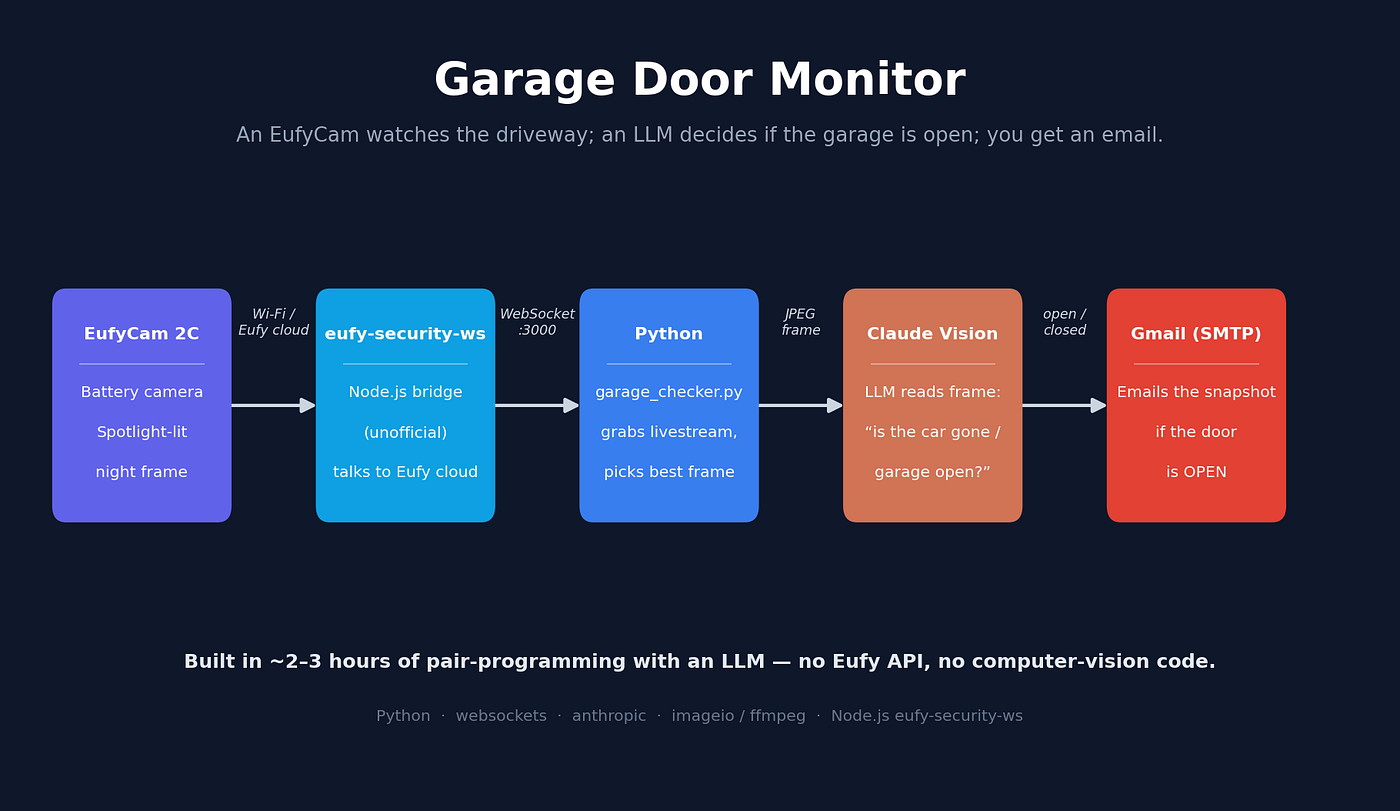
The shape is deliberately small — four focused pieces wired by one script:
**eufy-security-ws** (Node.js) connects to Eufy's cloud and exposes a local WebSocket.- A Python client starts the livestream, turns on the camera’s spotlight, collects a few seconds of H.264, decodes the frames, and picks the best-lit one.
- Claude’s vision API looks at that frame and answers a single question.
- An SMTP notifier emails me the snapshot if the answer is “open.”
That’s it. No database, no cloud function, no model training, no OpenCV. A daily run, a glance, an email.
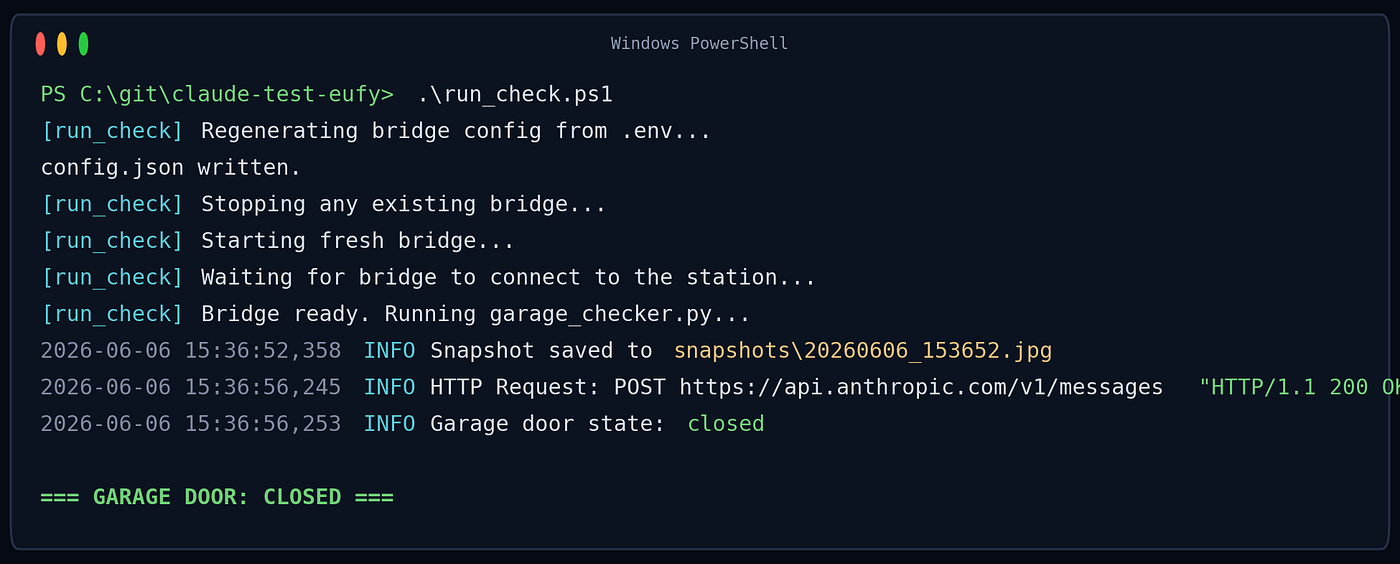
One command kicks off the whole nightly run — it restarts the bridge, waits for the camera, captures, asks the model, and tells me the verdict:
The interesting problems were physical, not coded
Because the boilerplate evaporated, the time I spent was on the genuinely hard, real-world parts — and they were a pleasure to debug with an assistant rather than alone:
The image was pitch black. First captures at night were nearly unusable — a near-black rectangle with a couple of distant porch lights. Useless to any vision model.
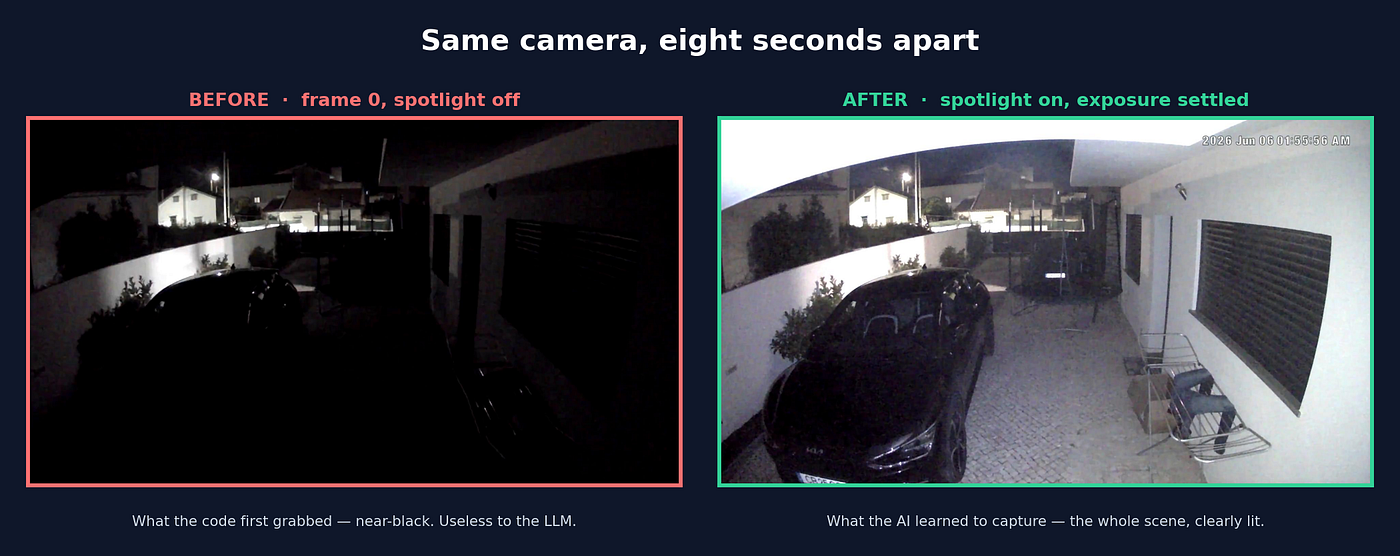
The instinct was to guess-and-fix. Instead we instrumented it: captured a 20-second stream and measured the brightness of every decoded frame. The data was unambiguous — the very first frame (the one I was naively grabbing) sat at brightness ~17, while a few seconds in, once the camera’s spotlight engaged and auto-exposure settled, frames hit a clean ~90. The interesting part: the AI’s own suggestion was to turn the camera’s spotlight on during the livestream — a capability of the camera I’d forgotten it had — and then wait for it to actually take effect. The bug wasn’t the spotlight; it was that I was grabbing the darkest possible moment, before the light it had switched on could do anything. Fix: stream for a few seconds, skip the warm-up, pick a settled, well-lit frame.
The prompt was the product. The camera can’t even see the garage door. It sees the driveway. So the real signal is the car: whole car parked outside → door closed; only a fragment of car visible (being driven into the garage at the corner of the frame) or no car at all → door open. Getting that prompt right — and explicitly teaching the model to ignore the fisheye lens clipping the car against the image edge, and to ignore a neighbour’s van parked far down the street — was where the actual engineering judgement lived. Not in the plumbing.
A long-running bridge silently went stale. After twelve hours the bridge stopped delivering frames — no error, just silence. Rather than guess, we queried the camera state (connected, online, 13% battery), watched a livestream request return zero events, and concluded the session had gone stale. The fix was a wrapper that restarts the bridge fresh before each run. Mundane, but it’s the difference between a demo and something that survives until tomorrow.
Notice the pattern: every real problem was about the world — light, lenses, batteries, stale sessions — not about syntax.
How “being a developer” is changing
I’ve been writing software for a long time, and this evening felt different in a way worth naming.
The unit of work moved up a level. I wasn’t typing smtplib boilerplate or reading the websockets docs. I was making decisions: which bridge, how to capture a frame, what exactly to ask the model, how to make it survive a stale session. The assistant did the typing; I did the judging. My value wasn't in knowing the API — it was in knowing what good looks like and noticing when the output wasn't it.
Research collapsed into the build. “How does Eufy work?” used to be a phase. Now it’s a sentence. The cost of finding out dropped so far that I went straight to deciding.
Taste and verification became the bottleneck. The AI will happily produce a plausible-looking dark image and a confident “open” verdict that’s wrong. My job was to not accept that — to look at the actual snapshot, to measure brightness instead of trusting a vibe, to validate the prompt against three labelled images before believing it. The skill that mattered wasn’t writing code; it was refusing to be satisfied until the evidence agreed.
Small, disposable, honest. Because building was so cheap, I could afford to be ruthless: tiny modules, one job each, unit tests on the logic that mattered, throwaway diagnostic scripts I deleted afterward. The economics of “just try it” changed.
None of this makes the developer redundant. It moves the developer’s attention to where it was always most valuable: the decisions, the judgement, the verification — and the messy, physical, real-world details that no model can see from inside a prompt.
The takeaway
A few years ago, “watch my garage door with AI” is a weekend project at best, and probably a stalled one — defeated by an undocumented API before it began.
This time the undocumented API was a non-event. The model handed me the architecture, wrote the plumbing, and freed me to spend my two or three hours on the only things that were ever actually hard: getting a clear picture in the dark, asking exactly the right question, and making it keep working tomorrow.
That’s the shift. Not “the AI writes the code.” It’s that the boring 80% is now free, so all your attention goes to the 20% that needs a human — and that 20% turns out to be the good part.
A follow-up is coming. This piece was about the experience of building it. A second article will walk through the actual solution — the architecture, the code, the prompt, the gotchas — and make the full Github repository available so you can run it yourself.
Built with Claude Code: Python, websockets, the Anthropic SDK, imageio/ffmpeg, and the eufy-security-ws Node.js bridge. The whole thing is a handful of small files and a PowerShell wrapper that runs it on a schedule.
P.S. In the spirit of full honesty: this article was co-authored with Claude — which feels only fair, given Claude built most of the thing it’s about. 😉
메타데이터
- post_id
- e9dee459bf0f
- slug
- how-i-built-a-check-my-garage-door-vision-system-in-one-evening-with-ai-part-1-of-2-e9dee459bf0f
- url
- https://medium.com/@vasco.antunes.silva/how-i-built-a-check-my-garage-door-vision-system-in-one-evening-with-ai-part-1-of-2-e9dee459bf0f
- canonical_url
- https://medium.com/@vasco.antunes.silva/how-i-built-a-check-my-garage-door-vision-system-in-one-evening-with-ai-part-1-of-2-e9dee459bf0f
- author_url
- https://medium.com/@vasco.antunes.silva
- status
- ok
- fetched_at
- 2026-06-29 01:02:39




