Getting Your Genie Spaces Production-Ready with Genie Workbench
How to Accelerate Deploying Genie Spaces to Production
Getting Your Genie Spaces Production-Ready with Genie Workbench
How to Accelerate Deploying Genie Spaces to Production
Databricks Genie has seen explosive adoption. Customers have created over 1.5 million Genie Spaces in 2026 alone, making natural language querying one of the fastest-adopted capabilities on the Databricks platform.
Deploying a trusted Genie Space requires thoughtful configuration — specifically curated metadata, encoded business logic, and validated benchmarks. The challenge isn’t the product itself. It’s knowing what to add, where to add it, and how to systematically improve accuracy. Without a clear framework, teams get stuck in the development phase, iterating manually, unsure what’s working, and unable to confidently push their space into production.
Closing the Trust Gap
Moving from a demo to enterprise-grade trust requires three critical components:
- Curated Metadata: Table descriptions, column annotations, and example values that explain your data model.
- Grounding Instructions: Encoded business logic and SQL query examples that align answers with organizational thinking (like specific metric formulas or required data filters).
- Benchmark Validation: Objective proof that generated SQL matches expected results.
A new space typically starts at just 54% benchmark accuracy. Building a production-ready Genie Space requires moving past subjective assessment to a systematic, repeatable validation process that closes this gap.
That’s the problem Genie Workbench was built to solve.
What is Genie Workbench?
Genie Workbench is a unified tool that autonomously creates, scores, and optimizes Genie Spaces. It closes the gap between a newly created space and a production-ready one by replacing what was previously a manual, unclear process with a repeatable, measurable framework.
It is deployed as a Databricks App that consolidates the entire Genie Space lifecycle into a single workflow. It follows a methodical approach so that no matter where you are in the process, Genie Workbench guides you through the steps needed to build a trusted, production-ready Genie Space: create, score, optimize, and track/version.
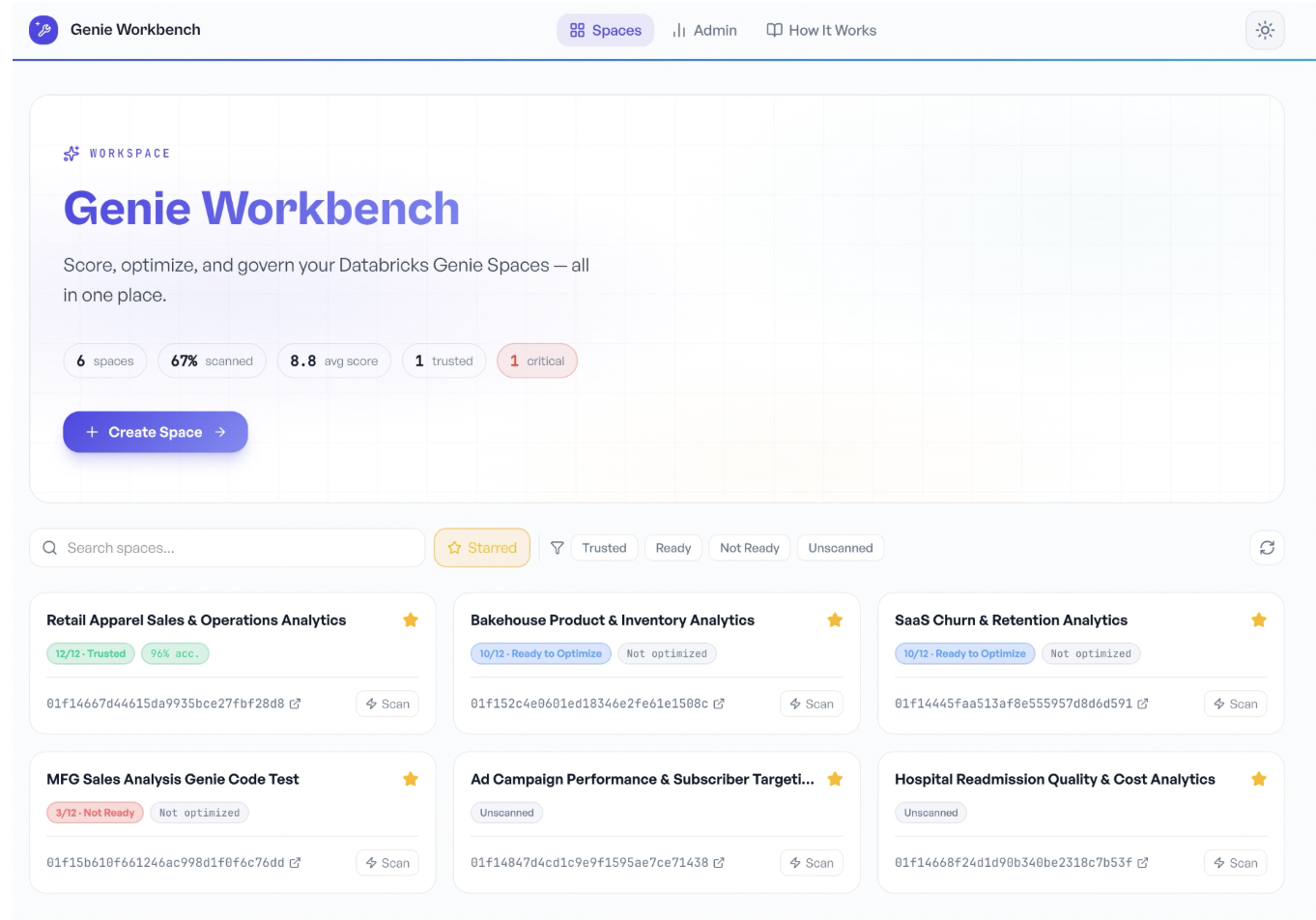
Create
An AI-powered agent guides you from business requirements to a fully deployed Genie Space. It handles data discovery, feasibility assessment, data quality, plan generation, SQL validation, and deployment. The output is a configured space with joins, metric views, instructions, validated sample queries, and benchmark questions- ready to score and optimize.
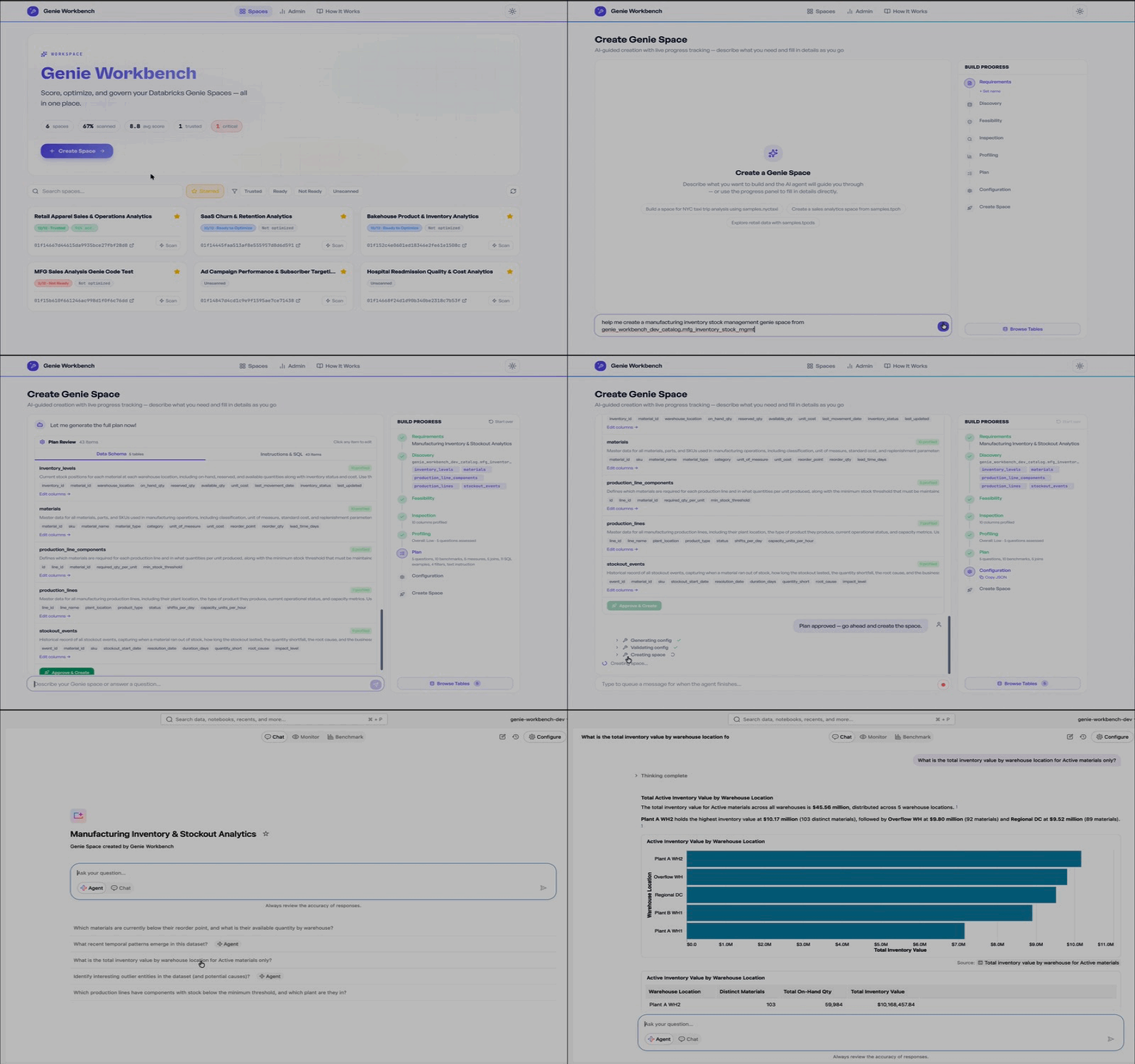
Score (IQ Scanner)
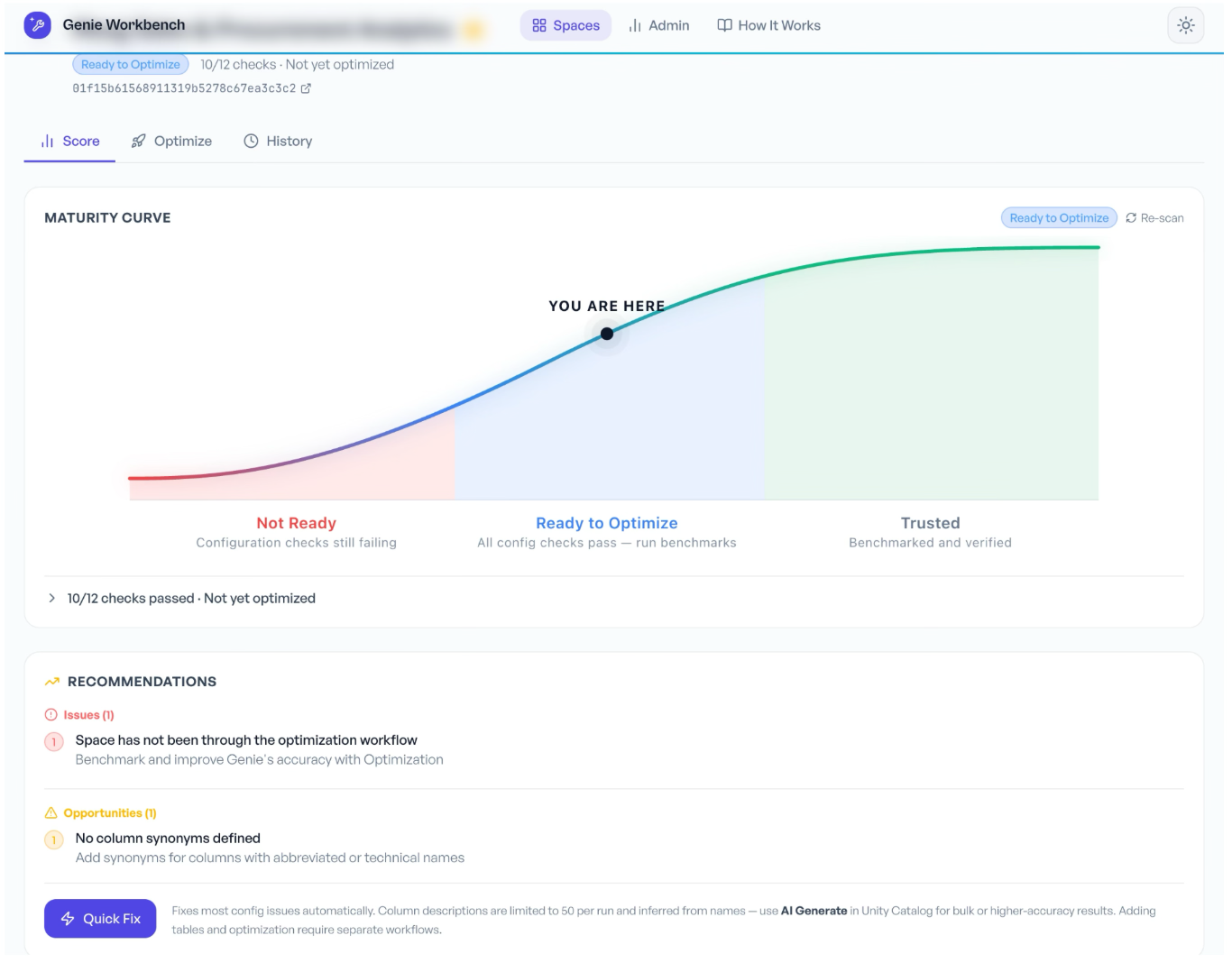
A rule-based scanner evaluates your space across 12 best-practice checks and classifies it into one of three maturity tiers:
Not Ready: Critical configuration gaps
Ready to Optimize: Foundational config in place, accuracy tuning needed
Trusted: Production-ready for business users
Optimize (Auto-Optimize)
A benchmark-driven pipeline that measures real accuracy, diagnoses failures, and iteratively tunes the space configuration. It runs as a Databricks Job across 6 tasks (preflight, baseline, enrichment, lever loop, finalize, deploy), optimizing across 6 levers including metadata, metric views, join specs, and instructions. Every run is logged in MLflow with full version control. If the space regresses, it automatically rolls back to the last known good configuration.
In practice, teams have seen spaces go from 73% baseline to 93% accuracy after optimization.
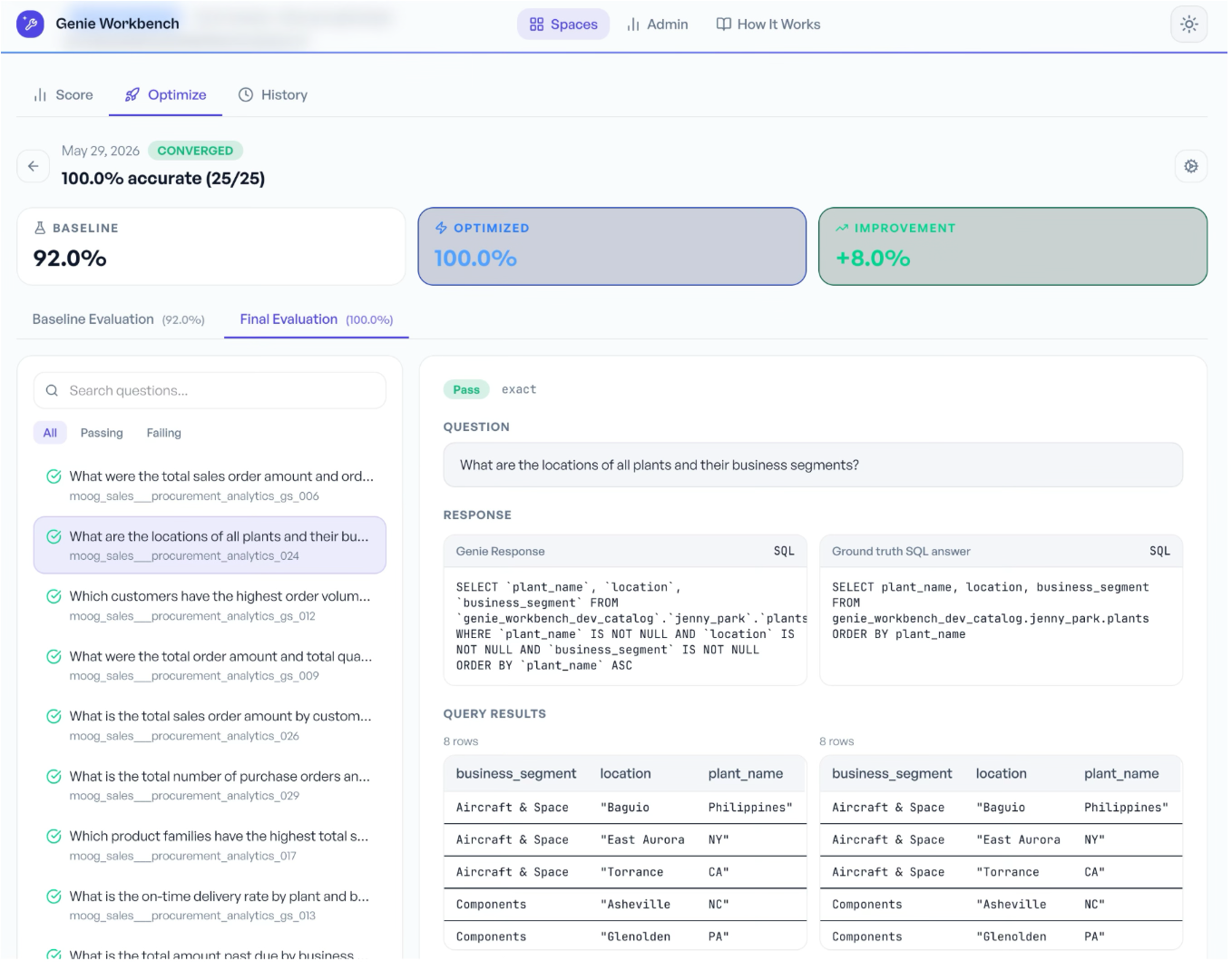
Before and after optimization comparison results
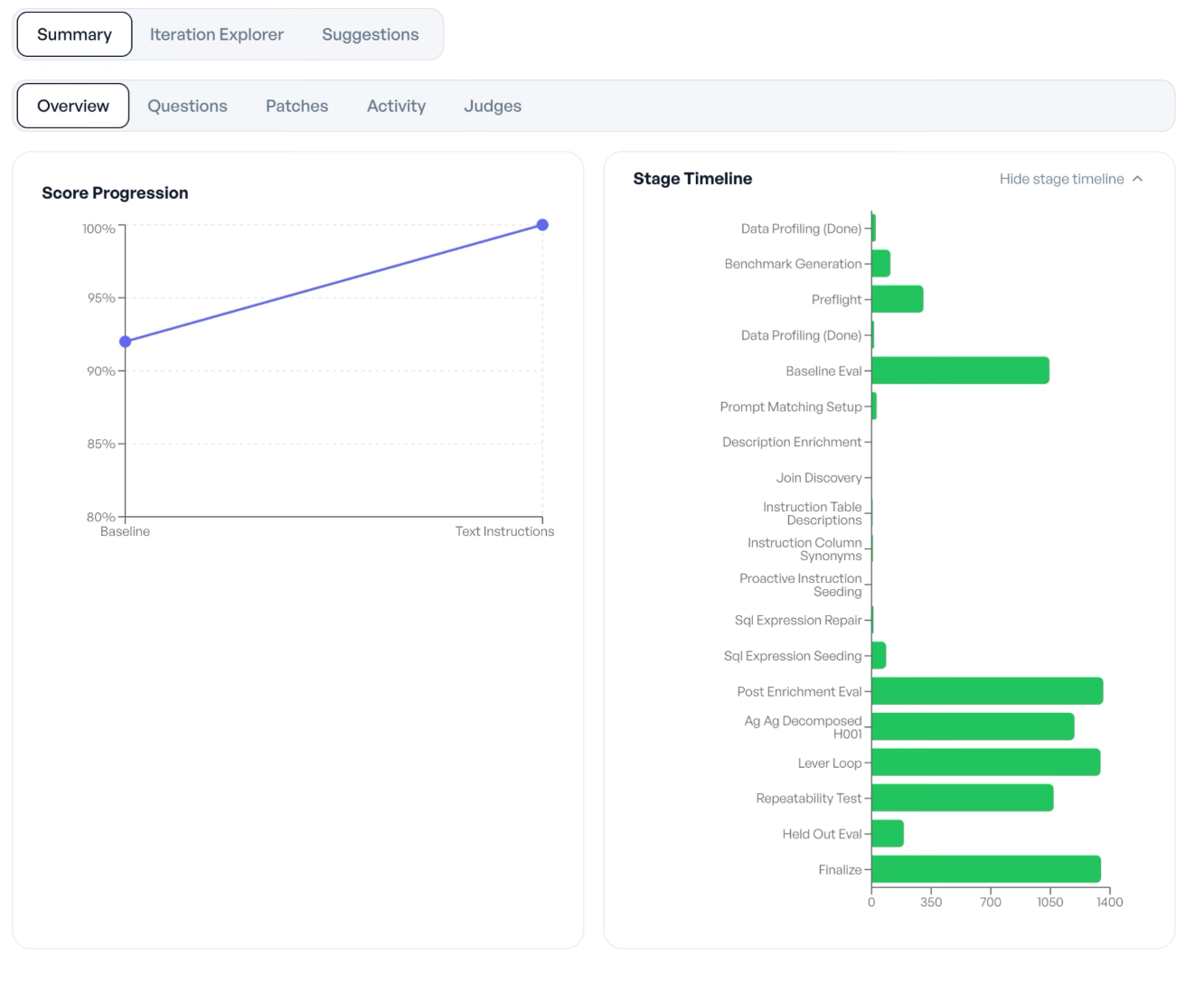
Overview of optimization process
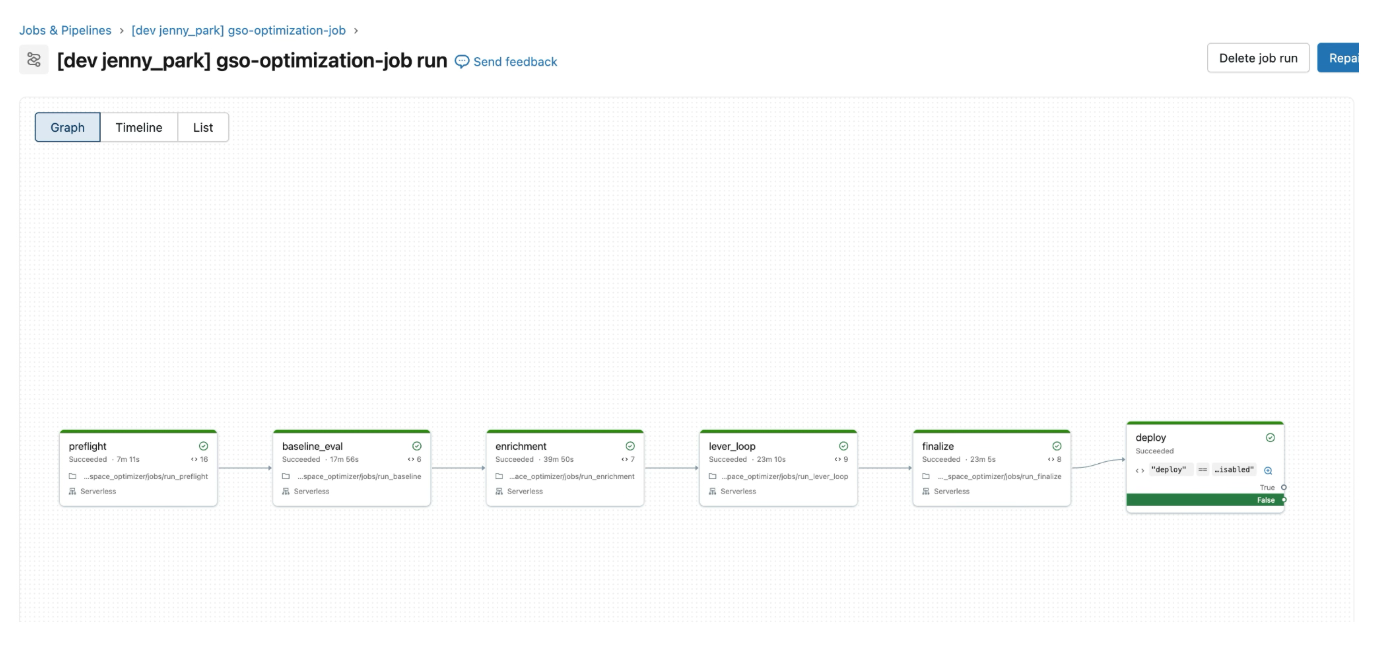
Genie Optimization deployed as Lakeflow Jobs
Track
The Genie Space Optimizer leverages MLflow and Unity Catalog to provide complete visibility and version control over every optimization cycle. Each run is tracked as an MLflow experiment, where 9 automated judges evaluate the space and log accuracy scores as trace assessments, snapshotting successful iterations with full parent-child lineage. Simultaneously, Unity Catalog records this audit trail across 15 Delta tables — tracking every patch, rollback, and piece of judge evidence to give you full provenance from “why did this change happen” to “what was the accuracy impact.”
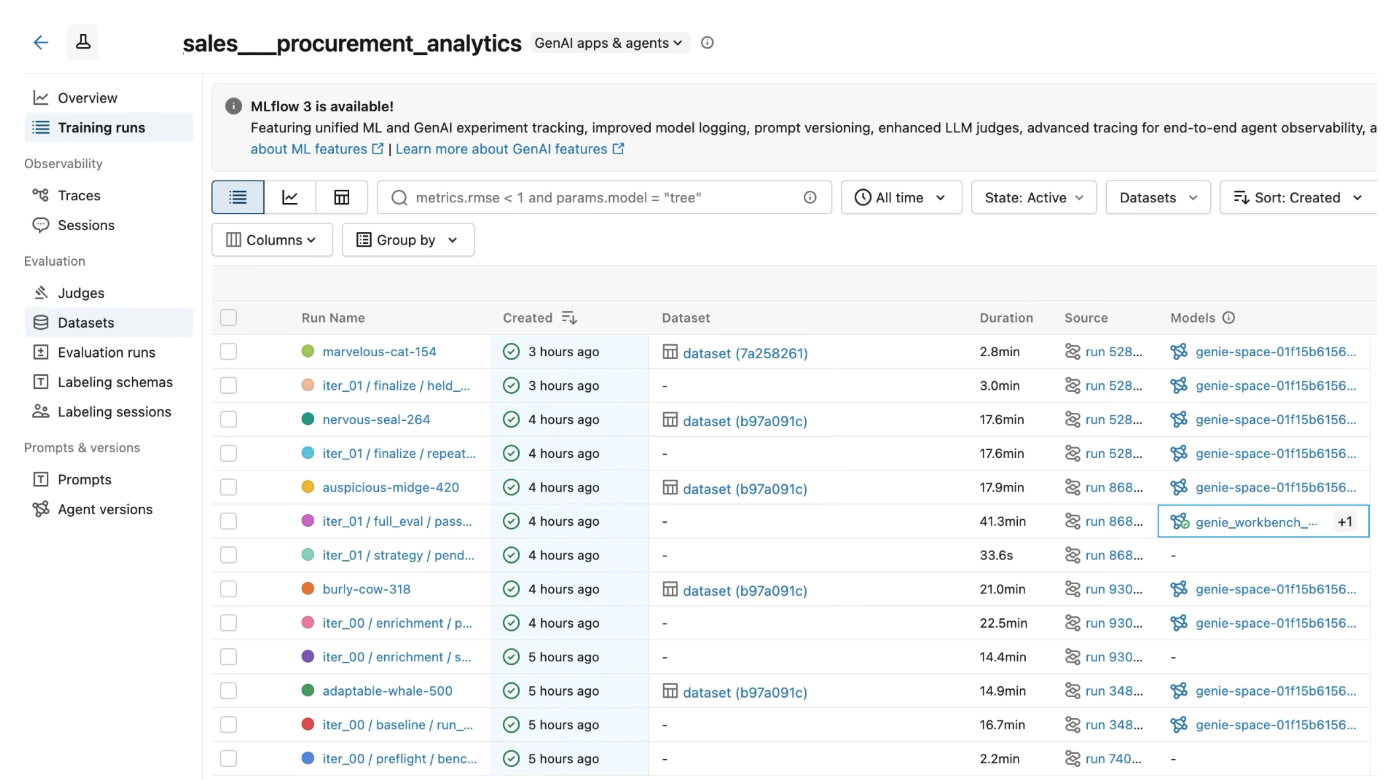
MLflow Experiment runs to track optimization iterations
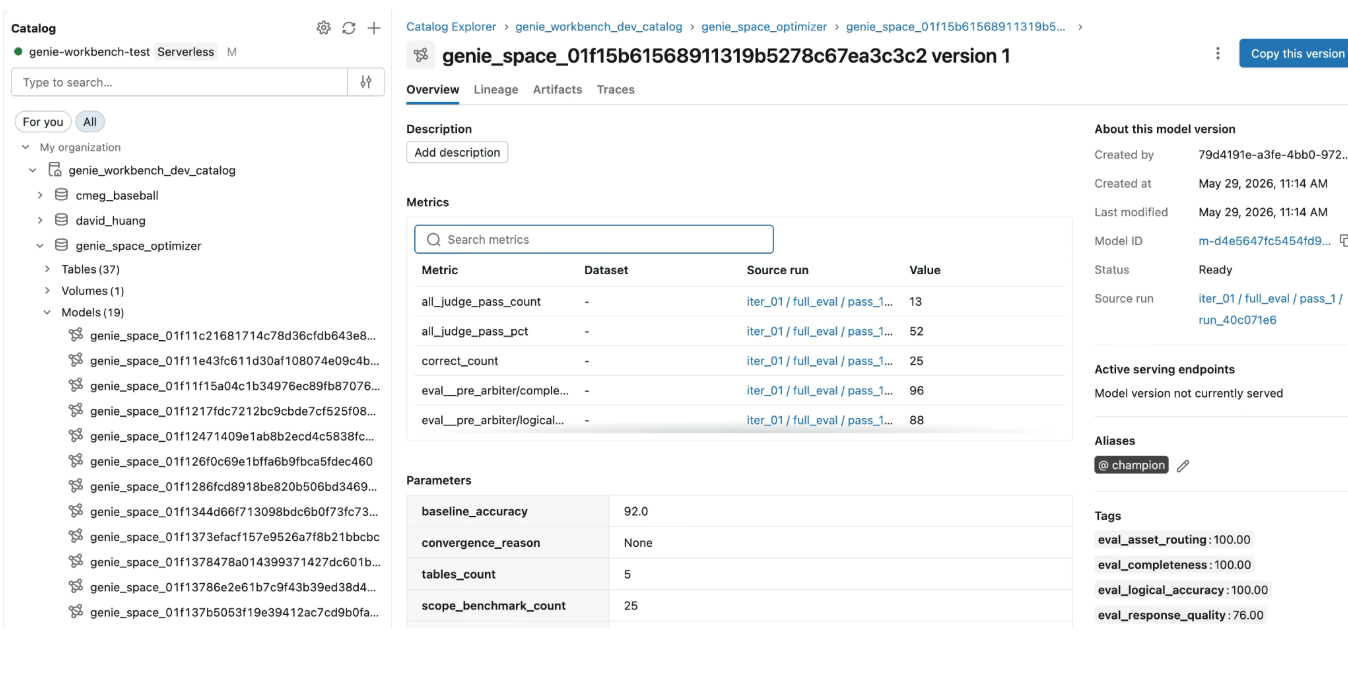
Genie Spaces logged in UC for versioning and tracking with aliases
How It Works: The Journey from 0 to 85%+
Here’s what a real workflow looks like, end to end:
Step 1: Create your space. Start with your business requirements. The Create agent profiles your data, builds metadata, generates grounding instructions, creates benchmark questions, and deploys a configured Genie Space. You go from nothing to a working space in minutes.
Step 2: Score it. Run the IQ Scanner. You’ll likely land in the “Not Ready” or “Ready to Optimize” tier on your first pass. The scanner tells you exactly which of the 12 checks failed and why: missing table descriptions, absent column annotations, no sample queries, etc.
Step 3: Optimize. Run Auto-Optimize. The pipeline executes Genie against every benchmark, compares generated SQL to expected answers, diagnoses failures, and iteratively tunes the configuration. The Databricks engineering team has shown that spaces starting at ~54% accuracy climb to 85%+ through this systematic process, and Genie Workbench automates the entire loop.
Step 4: Validate and deploy. Run the IQ Scanner one final time. Confirm you’ve reached the “Trusted” tier. Deploy with confidence, backed by benchmark data and MLflow tracking that proves your space is production-ready.
In practice, teams complete this entire journey in a 3–4 hour workshop. What used to take weeks of manual iteration now has a repeatable, measurable framework.
Getting Started
Prerequisites
- Databricks workspace with Apps enabled
- SQL Warehouse (Serverless or Pro)
- Unity Catalog enabled
- Workspace admin or equivalent permissions
- Recommended: Lakebase for persistent storage, MLflow Prompt Registry for Auto-Optimize
Installation
Genie Workbench offers two installation paths:
Option 1: Notebook (recommended)
Run notebooks/install.py directly in your Databricks workspace. No local toolchain required.
Option 2: Terminal (for developers)
Run scripts/install.sh followed by scripts/deploy.sh. Requires Databricks CLI v0.297.2+, Python 3.11+, uv, Node.js, and npm.
Your First 30 Minutes
- Open the app Create a new project
- Run the Create agent: Build your first Genie Space from business requirements
- Run IQ Scanner: Get your baseline score and maturity tier
- Validate/Define 10–15 benchmark questions: Pair each with validated SQL
- Run Auto-Optimize: Monitor the pipeline as Genie Space auto-optimizes
- Deploy: Test the production-ready space backed by data, not guesswork
The Bottom Line
The path from a blank Genie Space to a trusted, production-grade conversational analytics experience doesn’t have to be manual, ad-hoc, or based on guesswork. Genie Workbench gives you the systematic framework (Create, Score, Optimize, Track) to build spaces that earn business trust, backed by benchmarks and MLflow tracking at every step.
Self-service analytics is a competitive necessity. 67% of data leaders plan to implement a data product marketplace to facilitate data sharing at scale. Genie Workbench is the quality layer that makes that vision trustworthy. The organizations that win with AI-powered analytics won’t just be the ones that adopt it first. They’ll be the ones that adopt it right.
— -
Genie Workbench is an open-source Databricks App built by the Field Engineering team. Get started at github.com/databricks-solutions/databricks-genie-workbench.
— -
Resources:
메타데이터
- post_id
- e9e7db8a88ca
- slug
- getting-your-genie-spaces-production-ready-with-genie-workbench-e9e7db8a88ca
- url
- https://medium.com/@jenny.j.park/getting-your-genie-spaces-production-ready-with-genie-workbench-e9e7db8a88ca
- canonical_url
- https://medium.com/@jenny.j.park/getting-your-genie-spaces-production-ready-with-genie-workbench-e9e7db8a88ca
- author_url
- https://medium.com/@jenny.j.park
- status
- ok
- fetched_at
- 2026-06-29 22:44:20




