How I Shipped 341 MB of JSON Through Google Apps Script — and Lived to Tell the Tale
How I Shipped 341 MB of JSON Through Google Apps Script — and Lived to Tell the Tale
Google Apps Script is easily my favorite runtime, so much so that I wrote a book about it. Yet, being a low-code environment it comes with its quirks, quotas and limitations. In a recent project I needed to process 300 spreadsheets totalling over 5 million cells in over 80,000 rows. I could eithr abandon the platform and spin up a “real” backend, or get creative. Really creative.
I got creative. And what emerged is an architecture I now believe every serious Apps Script developer should have in their toolbox: a two-half pipeline that compresses, chunks, and reassembles massive datasets by moving every heavy computation out of Apps Script entirely — into a local Node.js preprocessing step and the user’s own browser. Apps Script itself becomes the thinnest possible proxy: a stateless, sub-second string-returning bridge between Google Drive and the client.
This is the deep-dive story of that pipeline. Here’s what we’ll cover:
- The four killer constraints that make the naive approach impossible
- The complete compress-chunk-upload-reassemble flow
- the Vite + clasp +
gwstoolchain that makes it all work - Real measured numbers from production
- The trade-offs (plus improvements) you’ll need to weigh if you adopt this pattern yourself.
The Four Walls You Will Hit
Before we talk solutions, let’s put our finger on the problems. If you’ve ever tried to serve a large dataset with Apps Script, you already know the proble. Maybe you’ve tried to orchestrate multiple executions through google.script.run; and maybe that as enough of a work around, and maybe not (spoiler alert: not in this project). Here's what I've had to deal with.
1. The 6-minute execution budget. Every Apps Script execution has a hard wall clock limit — six minutes for consumer accounts, thirty for Workspace plans. Parsing millions of cells from hundreds of spreadsheets within a single server function? Not happening. I explored the classic workaround — splitting work across multiple executions with triggers and PropertiesService — way back in 2021. The pipeline we’re building here takes a more radical approach: move the heavy lifting out of Apps Script entirely.
2. google.script.run only speaks ECMAScript primitives. The bridge between your browser client and the Apps Script V8 runtime — that magical google.script.run.withSuccessHandler() we all rely on — can only pass strings, arrays, objects, numbers, and booleans. Native Apps Script objects like Blobs, Drive Files, or Calendars? They die on the bridge. This means your return values must survive JSON serialization through the IFRAME sandbox's postMessage channel. Binary data? Forget it.
3. There’s an undocumented but very real payload ceiling. Google doesn’t publish a precise byte limit for google.script.run return values, but anyone who's pushed the envelope knows the score: payloads above tens of megabytes trigger "Argument too large" exceptions, or worse — they silently return undefined. Community testing and production scars put the practical ceiling somewhere in the 20–30 MB range. A separate 50 MB blob upload limit through HtmlService is documented, but that's a different mechanism entirely.
4. CacheService caps at 100 KB per key-value pair. You might think, "Fine, I'll cache the parsed data server-side." Nope. CacheService is designed for configuration snippets and short-lived tokens, not megabyte-scale datasets. It cannot serve as your datastore.
These four constraints are non-negotiable. They are the laws of physics in the Apps Script universe. The pipeline we’re about to walk through treats them not as obstacles to overcome but as boundary conditions to route around.
The Two-Halves Architecture
The core insight is surprisingly simple once you state it: move all the work that doesn’t fit inside Apps Script’s quotas to the two places that have none — the developer’s machine and the user’s browser.
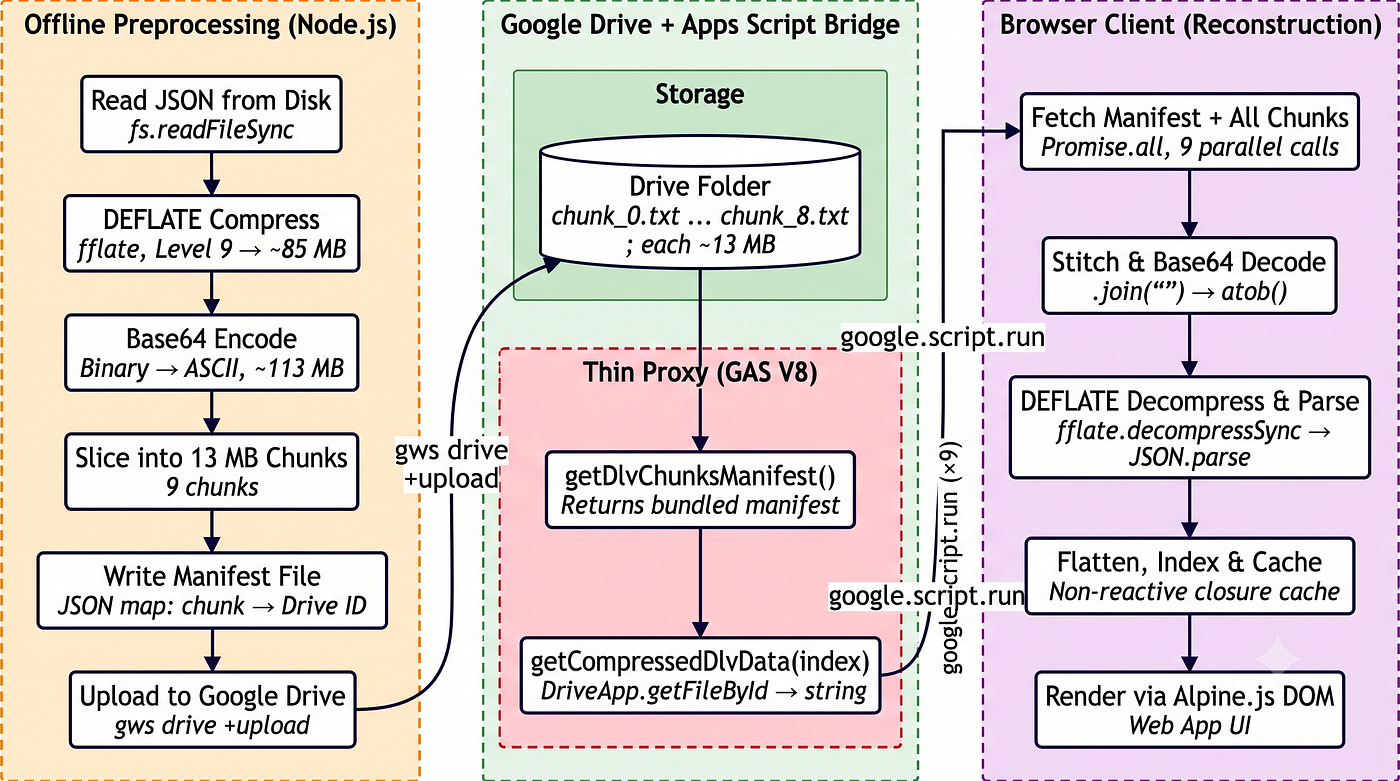
Half One: The Local Preprocessing Pipeline (Node.js, Unbounded)
This runs on your machine or a CI runner, well outside Google’s execution sandbox. It:
- Reads the master aggregated JSON snapshot — hundreds of megabytes — straight from disk.
- Compresses it with raw DEFLATE at maximum compression level using fflate, a pure-JavaScript library weighing roughly 8 kB that runs identically in Node.js and the browser.
- Encodes the binary stream to Base64 so it can survive the
google.script.runstring channel. - Slices that Base64 string into fixed-size chunks (13 MB each, chosen through empirical testing — more on that below).
- Uploads each chunk as a plain text file to a designated Google Drive folder via the
gwsCLI. - Writes a manifest file mapping chunk indices to their Drive file IDs.
Half Two: The Google Apps Script Runtime (V8 Engine, Heavily Bounded)
Deployed as a Sheets-bound or standalone project serving an HtmlService web application. The server code is almost absurdly thin:
- The manifest is imported at build time as a static JSON asset bundled into the IIFE.
- One function returns the manifest. One function per chunk reads a Drive file by ID and returns its text content as a plain string.
- It does not parse, decompress, aggregate, or transform the data in any way. It is a pure Drive-to-string proxy.
The Client Browser (Alpine.js SPA)
- Fetches the manifest, then downloads all chunks in parallel through
runGascalls. - Concatenates chunks in memory, decodes Base64, decompresses with fflate (the same library used to compress), parses the JSON, and indexes the resulting dataset with non-reactive closure caching — ensuring searches stay instantaneous even across millions of cells.
That’s the architecture. Now let’s look at the toolchain that builds it.
How the Code Gets Built and Deployed
None of this toolchain was wired together by hand. It all comes from the **Apps Script Engine Template** — a reusable project starter I built and open-sourced. One command — npx apps-script-engine my-project — and you get a fully scaffolded project with Vite, clasp, environment management, and a build pipeline that produces exactly what Apps Script needs: a single-file client bundle for HtmlService, an IIFE bundle for the server (with npm dependencies like fflate baked in), and thin wrapper functions so the GAS runtime can call your exported functions.
I first open-sourced this template back in August 2024, and it has grown — through performance optimizations that yielded 10× speed improvements and, as of v2.0, full TypeScript support — into the complete toolkit you’re looking at now.
The key result for this pipeline: you get to npm install fflate and import { decompressSync } from 'fflate' in your Apps Script HTML code, and it works in production. The template handles the bundling, the IIFE wrapping, and the export hoisting automatically. Deployment is a single command:
npm run build:addon:push
  → npm run build:ui     (Vite single-file: Alpine.js + Tailwind → index.html)
  → npm run build:gas    (Vite IIFE: server.js + fflate + manifest → server.iife.js + exports.js)
  → npm run push         (clasp push -f)
That’s it. The template is what makes this architecture reproducible — you scaffold, you write your server functions, and you build. The internals of AST traversal and IIFE wrapping are handled for you.
The Data Movement Pipeline: Step by Step
This is where the magic really happens. Let’s walk through each stage with actual code.
Step 1 — Extraction from Google Sheets (External, Upstream)
The master dataset originates from an external extraction process that walks a folder hierarchy of Google Sheets, reads their data ranges programmatically via the Google Sheets API, and aggregates everything into a single JSON snapshot.
This extraction is deliberately kept outside the web application and outside the build pipeline. It’s an I/O- and CPU-intensive task — opening hundreds of spreadsheets, reading millions of cells, normalizing structure — that would never fit inside the 6-minute budget. By hoisting it into an unbounded execution environment (a Node.js script on a developer machine, or a scheduled Cloud Function), the web application never touches a single source spreadsheet cell at runtime. It only ever reads the pre-compiled, pre-compressed binary artifact.
The output is a JSON file committed to version control as the authoritative snapshot.
Step 2 — Compression
const rawData = fs.readFileSync("outputs/master_data_combined.json", "utf8");
const u8 = fflate.strToU8(rawData);
const compressed = fflate.deflateSync(u8, { level: 9 });
fflate is the unsung hero here. It’s a pure-JavaScript compression library — roughly 8 kB, zero native dependencies, identical behavior in Node.js and in the browser. This symmetry is critical: the same library compresses during the offline build and decompresses in the user’s browser at runtime. No format compatibility issues, no environment-specific APIs like Node’s zlib or the browser's CompressionStream.
We use raw DEFLATE at compression level 9 (maximum). The “raw” part means we omit the gzip header and CRC trailer, saving a handful of bytes. fflate.decompressSync on the client autodetects the format, so this choice is transparent.
Real measured compression from a 341 MB JSON snapshot: the compressed binary stream comes out to roughly 85 MB — a compression ratio of about 4×. Clinical and structured data with high entropy compresses less aggressively than repetitive log data, but 4× is enough to make chunking feasible.
Step 3 — Base64 Encoding
const b64 = Buffer.from(compressed).toString("base64");This is the tax we pay for staying purely within Apps Script. The compressed binary stream must cross the google.script.run bridge, which serializes everything as JSON through the IFRAME sandbox. Binary types like Uint8Array or ArrayBuffer are either rejected or silently corrupted. So we encode to Base64 — converting arbitrary binary into a plain ASCII string safe for JSON transport.
The cost is a fixed 33% expansion: 85 MB of compressed binary becomes roughly 113 MB of Base64 text. We accept this because introducing a Cloud Run sidecar or a CDN-hosted file would defeat the purpose of keeping the entire runtime surface within a Sheets sidebar. The architecture pays the Base64 tax to avoid paying the infrastructure tax.
Step 4 — Chunking
const CHUNK_SIZE = 13 * 1024 * 1024; // 13 megabytes per chunk
const chunksCount = Math.ceil(b64.length / CHUNK_SIZE);
The 113 MB Base64 string is sliced into consecutive 13 MB substrings. For our dataset, that’s 9 chunks: 8 full-size at ~13.6 MB each and one tail chunk at ~9.7 MB.
The 13 MB threshold wasn’t pulled from thin air. It satisfies three constraints simultaneously:
- Stays well under the practical
google.script.runpayload ceiling. Production experience shows payloads above 20–30 MB frequently trigger serialization failures. Thirteen megabytes leaves comfortable headroom. - Keeps each server function sub-second.
DriveApp.getFileById().getBlob().getDataAsString()on a 13 MB text file completes in well under one second. All nine parallel calls easily stay within the 6-minute limit. - Enables full concurrency. Nine independent chunks fetched via
Promise.allmeans wall-clock download time is bounded by the slowest single chunk, not the sum of all nine.
Each chunk is written to disk in two formats: .js files (ES modules for Vite dev server mock mode) and .txt files (the actual upload payloads for Google Drive).
A manifest file ties it all together:
{
  "root_folder": "<drive_folder_id>",
  "extracted_at": "2026-07-09T09:02:22.435Z",
  "chunks": [
    {
      "index": 0,
      "drive_id": "1Qlb...",
      "local_path": "outputs/chunks/chunk_0.js"
    },
    {
      "index": 1,
      "drive_id": "1FGA...",
      "local_path": "outputs/chunks/chunk_1.js"
    }
  ]
}
Step 5 — Upload to Google Drive via gws CLI
gws drive +upload outputs/chunks/chunk_0.txt \
  --parent 1wUx-2z4AilM-uEL3i-ZNvStJzhf9Cc7O \
--name chunk_0.txt**gws** (Google Workspace CLI, v0.22.5) is an open-source command-line tool from [github.com/googleworkspace/cli](https://github.com/googleworkspace/cli). It wraps the Google Workspace REST APIs behind a clean, consistent interface: gws <service> <resource> <method> [flags]. The +upload convenience helper auto-detects MIME type, constructs a multipart upload to files.create, sets the parent folder and filename, and returns the created file's metadata as JSON — including the Drive file ID.
Since our pipeline script runs in Node.js, we invoke gws via child_process.spawnSync, parse the JSON response, and write the id field back into the manifest:
function runGws(args) {
  const result = spawnSync("gws", args, { encoding: "utf8" });
  if (result.status !== 0) {
    console.error(`Error running gws ${args.join(" ")}:`, result.stderr);
    return null;
  }
  return JSON.parse(result.stdout);
}
For local development, npm run db:deploy:local runs the entire compress → encode → slice → write flow but skips the upload. Chunks are marked with drive_id: "local_only" in the manifest, and the Vite dev server's custom middleware plugin serves the local .txt files over HTTP. The client-side code path — fetch chunk text → concat → atob → decompressSync → JSON.parse — is identical in local development and production. Only the data source changes.
Step 6 — Recovery from Drive: The Thin Server
Here’s the entire server-side data path — two functions:
import manifest from "../../../outputs/dlv_chunks_manifest.json";

export function getDlvChunksManifest() {
  return manifest;
}

export function getCompressedDlvData(chunkIndex) {
  const chunk = manifest.chunks.find((c) => c.index === chunkIndex);
  if (!chunk || !chunk.drive_id) {
    throw new Error(`Chunk ${chunkIndex} not found.`);
  }
  if (chunk.drive_id === "local_only") {
    throw new Error(
      `Chunk ${chunkIndex} has local_only placeholder. Deploy data first.`,
    );
  }
  const file = DriveApp.getFileById(chunk.drive_id);
  return file.getBlob().getDataAsString();
}
Let me emphasize what’s happening here — and what’s not happening. The manifest is imported at build time and bundled into the IIFE. No runtime API call needed to discover what chunks exist. DriveApp.getFileById().getBlob().getDataAsString() reads the entire file and returns a plain string — the one type google.script.run can legally return. For a 13 MB text file, this call completes in well under one second. The function is idempotent and stateless: read file, return string. No parsing, no transformation, no caching, no mutation. It is trivially auditable and virtually immune to exceeding the 6-minute budget.
Step 7 — Stitching and Decompression in the Browser
The client orchestrates reconstruction in six stages:
// 1. Fetch the manifest (one cheap call)
const manifest = await runGas("getDlvChunksManifest");

// 2. Fetch all chunks in parallel
const chunkPromises = manifest.chunks.map((c) =>
  runGas("getCompressedDlvData", [c.index]),
);
const chunkResults = await Promise.all(chunkPromises);

// 3. Stitch - string concatenation restores the unified Base64 stream
const compressed = chunkResults.join("");

// 4. Decompress
const jsonStr = decompressBase64(compressed);

// 5. Parse into JavaScript objects
const rawData = JSON.parse(jsonStr).data;

// 6. Flatten the hierarchical structure into a flat array
The decompressBase64() function is a four-stage synchronous pipeline:
function decompressBase64(b64) {
  // Stage 1: Base64 decode via the browser's built-in atob()
  const binString = atob(b64);

  // Stage 2: Manually copy char codes into a Uint8Array
  const bytes = new Uint8Array(binString.length);
  for (let i = 0; i < binString.length; i++) {
    bytes[i] = binString.charCodeAt(i);
  }

  // Stage 3: DEFLATE decompress via fflate (the same library used to compress)
  const decompressed = fflate.decompressSync(bytes);

  // Stage 4: UTF-8 decode back to a JavaScript string
  return fflate.strFromU8(decompressed);
}
A few behavioral notes worth highlighting:
- Parallelism is real.
Promise.alldispatches all chunk fetches concurrently. Eachgoogle.script.runcall is a separate IFRAME → server → Drive round-trip, and they overlap rather than serialize. Wall-clock download time is bounded by the slowest chunk, not the sum. - Stitching is a simple
.join(''). Because Base64 was sliced at arbitrary character boundaries, per-chunk decoding isn't possible — the entire stream must be reassembled first. But.join('')is O(N) and near-instant even for ~113 MB strings in modern engines. - The
charCodeAtloop (Stage 2) is the CPU bottleneck. Converting an ~85 MB binary string to aUint8Arrayrequires iterating every byte. It takes several hundred milliseconds. **decompressSyncblocks the main thread.** For an 85 MB compressed payload decompressing to ~341 MB, expect a 1–3 second UI freeze. We'll discuss fixes below.
Step 8 — Non-Reactive Closure Caching
Once decompressed, the dataset lives as a read-only JavaScript array. Alpine.js’s reactive proxy is powerful, but re-rendering DOM on every state change across millions of cells would be catastrophic. The solution: a non-reactive closure cache with a cheap selection signature:
const cache = {
  maps: null,
  headerIndex: new Map(),
  mergedKey: null,
  mergedRows: null,
  displayKey: null,
  displayRows: null,
};
If the signature (composite string of active IDs, count, and search query) matches the cache key, the pre-computed array reference is returned instantly. Only on a cache miss does the application run the indexing and mapping algorithms, which use pre-compiled header index maps for O(1) lookups instead of O(N) scans over millions of cells.
This is the final link: the pipeline got the data into the browser; the cache keeps it fast once there.
The gws CLI: A Closer Look
I want to spend a moment on gws because it's one of those tools that deserves more attention than it gets. The Google Workspace CLI is open-source, community-maintained, and explicitly labeled "not an officially supported Google product" — but for our purposes, it's exactly what we need.
Its command structure is beautifully uniform:
gws <service> <resource> [sub-resource] <method> [flags]So gws drive files list, gws sheets spreadsheets get, gws gmail users messages list — all follow the same pattern. Authentication supports multiple strategies: a pre-obtained OAuth token via environment variable, a credentials JSON file, client ID/secret, or interactive browser-based login via gws auth login.
The +upload helper is the killer feature for our pipeline. One command replaces multiple lines of API construction that would otherwise be needed. The trade-off — invoking gws as a child process via spawnSync — adds negligible overhead for a script that runs infrequently.
Real Measured Numbers
Theory is nice. Here are the actual numbers from a production 341 MB master JSON snapshot:
[embed]
What This Architecture Achieves
Let’s count the wins explicitly, because there are several.
It bypasses the 6-minute execution wall. No single server function performs heavy work. Each is a sub-second Drive read. All CPU-intensive work runs offline in Node.js or in the user’s browser — neither of which has a 6-minute budget.
It bypasses google.script.run type and size limits. Everything crossing the bridge is a plain ECMAScript string. The 13 MB chunk size stays comfortably below the undocumented serialization ceiling. Base64 encoding ensures binary data survives JSON serialization intact.
It bypasses the 100 KB CacheService ceiling. The dataset lives in Google Drive files, not in CacheService. Drive imposes no meaningful per-file size limit for text files, and it acts as a free, durable, permission-scoped content delivery mechanism. No separate hosting. No database server. No CDN.
It bypasses Google Sheets throughput limits at runtime. The source data is never read from spreadsheets at runtime. The only Sheets interaction is reading a small configuration sheet (typically under 10 KB).
It remains a genuinely low-code application. There is no Cloud Run instance, no database server, no API gateway, no custom hosting. The entire runtime surface is a Google Sheets sidebar served by HtmlService. A non-technical user launches it from a spreadsheet menu. The "infrastructure" is a single Drive folder.
Deployment is two commands:
npm run db:deploy— compress, chunk, upload data to Drivenpm run build:addon:push— compile UI + server, push to Apps Script via clasp
The Trade-offs (Every Architecture Has Them)
I wouldn’t be doing my job if I didn’t tell you where this hurts.
Base64 Expansion Tax (+33%)
Every byte crossing the bridge is 33% larger than it needs to be. The alternative — transmitting raw binary — simply isn’t available through the Apps Script IFRAME bridge. You could eliminate this tax by introducing a Cloud Run sidecar or a CDN-hosted file, but that defeats the “zero-infrastructure” design goal.
All-or-Nothing Reassembly
Because Base64 was sliced at arbitrary character boundaries, the entire stream must be present before atob() and decompressSync() can run. Promise.all fails fast — if any single chunk download fails, the whole load fails. There's no partial recovery and no progressive rendering.
Synchronous Decompression Freezes the Browser
fflate.decompressSync() blocks the main thread for 1–3 seconds. The application yields before CSV export (30 ms setTimeout to paint a spinner) but does not currently yield during decompression. It's janky. It's fixable. But it's there.
Deploy is Atomic and Manual
npm run db:deploy clears all previous chunks, recompresses, and re-uploads from scratch. A network interruption mid-upload leaves orphaned files and an incomplete manifest. The fix is to re-run — there's no transactional upload, no resume, no rollback.
Manifest Baked at Build Time
The manifest is statically imported into the server bundle. When new data is deployed, the Apps Script project must be rebuilt and pushed too. Data updates and code deployments are coupled. This is a deliberate simplicity trade-off, but it’s a trade-off.
No Incremental Updates
Adding one row changes all chunks because the entire dataset is recompressed from scratch and the Base64 stream is sliced anew. Simple and safe, but wasteful if only a fraction of the data changed.
Memory Footprint
The full decompressed dataset (~341 MB as JavaScript objects) lives entirely in browser memory. Modern desktop browsers handle this fine. Mobile or older hardware? Not so much. The non-reactive cache prevents re-allocation storms, but the baseline footprint can’t be reduced without switching to a lazy-loading or indexed query-backend model.
What I’d Improve Next
Every project has a v2 wishlist. Here’s mine.
1. Decouple the Manifest from the Source Code
Store the manifest as a standalone file on Drive and have the server read it at runtime:
export function getDlvChunksManifest() {
  const manifestFile = DriveApp.getFileById(MANIFEST_FILE_ID);
  const jsonText = manifestFile.getBlob().getDataAsString();
  return JSON.parse(jsonText);
}
This decouples data deployment from code deployment entirely. New chunks can be uploaded without touching the Apps Script project. The cost is one extra DriveApp call on startup — sub-100 ms for a ~1 KB file.
2. Offload Deployment to a Cloud Function + Cloud Scheduler
Package the compression and upload logic into a Google Cloud Function triggered by Cloud Scheduler. A service account with Drive write access handles everything on Google’s infrastructure — no developer machine involved. Combined with a decoupled manifest, data updates become fully automated: new data appears → Cloud Function compresses and uploads → runtime manifest on Drive is updated → browser clients pick up new chunks on next page load.
Cloud Functions have a 9-minute timeout (15 minutes for gen2), comfortably fitting the full cycle. The free tier includes 2 million invocations per month.
3. Asynchronous Decompression via Web Worker
Move fflate decompression into a Web Worker to keep the main thread responsive:
const worker = new Worker("/decompress.worker.js");
worker.postMessage(compressedBytes);
worker.onmessage = (e) => {
  const jsonStr = e.data;
  // continue with parsing and indexing
};
This eliminates the 1–3 second UI freeze during decompression. The trade-off is additional complexity in worker bundling — fflate must be available in the worker scope.
4. CI/CD Pipeline Integration
Integrate into GitHub Actions: on push to main with changes to the data snapshot → trigger the Cloud Function. On push with changes to gas/src/ → run build:addon:push. GitHub Environments manage dev/UAT/production clasp configurations, with credentials in CI secrets.
5. Incremental Updates via Chunk-Aware Architecture
Instead of slicing the Base64 stream at byte boundaries, chunk at the logical level — groups of spreadsheets, date ranges, or alphabetical shards. Each logical chunk is independently compressed and uploaded with a version identifier. The client compares local version tags and only downloads changed chunks. This enables partial updates at the cost of less uniform chunk sizes and more complex version management.t
The Bigger Lesson
This architecture exists because of constraints. But here’s the thing I want you to take away: those constraints didn’t limit what we built — they defined it. The four walls of Apps Script — 6-minute execution, string-only return types, a practical payload ceiling, and a tiny cache — forced an architecture that is, in retrospect, better than the “just spin up a backend” alternative. It’s simpler to deploy. It has fewer moving parts. It costs nothing to run. This isn’t the first time I’ve pushed Google Apps Script far past its intended boundaries — I once built an entire LLM fine-tuning pipeline using Apps Script as the orchestration layer for Vertex AI. The constraints didn’t stop that project either. They shaped it. And the pattern generalizes beyond GAS: if you ever need to serve large datasets through an API gateway with tight quotas, the compress-chunk-reassemble pipeline is now in your toolkit.
The toolchain — Vite’s IIFE bundling, the AST extraction plugin, clasp, and gws — bridges the gap between modern JavaScript development and the constrained Apps Script runtime. You get npm dependencies, environment switching, and automated deployment without sacrificing the low-code, Sheets-sidebar deployment model that makes Apps Script so compelling in the first place.
That’s the whole story. I’d love to hear how you’re handling large datasets in your own Apps Script projects — or if you’ve hit the same walls and found different ways around them. Drop a comment below.
Have you pushed the google.script.run payload ceiling yourself? What broke first?
Related Articles
If this deep-dive resonated with you, here are a few more from the toolbox:
- **Kickstart Your Apps Script Projects with the Pinnacle of My Development — The Apps Script Engine Template** — The original announcement of the template that makes this entire architecture reproducible. Covers the philosophy, the scaffold, and the “why” behind the build pipeline.
- **Make Apps Script Fast Again! With Apps Script Engine** — How the template enables 10× performance gains in Apps Script web apps by eliminating callback hell, bundling npm dependencies, and providing a proper local dev environment.
- **Apps Script Engine v2.0 is Here! Your Workflow Just Got a TypeScript Power-Up** — The migration from Jest to Vitest, the addition of full TypeScript support, and what v2.0 means for production-grade Apps Script development.
- **How Apps Script Became the Ultimate LLM Fine-Tuning Tool** — Another case study in pushing Apps Script far beyond its intended limits: using Google Sheets as a human-in-the-loop interface for Vertex AI fine-tuning pipelines.
- **Beat the Clock! Dodging the Maximum Script Runtime in Google Apps Script** — The classic approach to the 6-minute problem: chunking work across multiple script executions with triggers, timers, and PropertiesService. A useful contrast to the offline-compression strategy in this article.
Happy building. 🚀
About Me
Get my book Kickstart Google Apps Script. I am an AI-first Google Cloud and Workspace developer and a Workspace Google Developer Expert (GDE), CTO and co-founder of Mentormatic, and founder of Wurkpaces.dev
메타데이터
- post_id
- ea364effc8b2
- slug
- how-i-shipped-341-mb-of-json-through-google-apps-script-and-lived-to-tell-the-tale-ea364effc8b2
- url
- https://itnext.io/how-i-shipped-341-mb-of-json-through-google-apps-script-and-lived-to-tell-the-tale-ea364effc8b2
- canonical_url
- https://itnext.io/how-i-shipped-341-mb-of-json-through-google-apps-script-and-lived-to-tell-the-tale-ea364effc8b2
- author_url
- https://medium.com/@dmitry-kostyuk
- status
- ok
- fetched_at
- 2026-07-17 12:05:36