I Deleted A Few Apps and My Phone Got Faster
The home screen experiment that cut my screen time by 90 minutes a day.
I Deleted A Few Apps and My Phone Got Faster
The home screen experiment that cut my screen time by 90 minutes a day.
I was not looking for a productivity hack when this started, I was genuinely just trying to find the Settings app on my own phone. It was a Weekday afternoon, standing in a supermarket car park, and I needed to change my Wi-Fi settings before walking in. I had four pages of apps, three folders all named “Stuff,” and one folder called “New” that had not been new since about 2024. I swiped twice, overshot, swiped back, opened the wrong folder, closed it, swiped again, and it took me eleven seconds to find Settings on a device I have used every single day for three years.
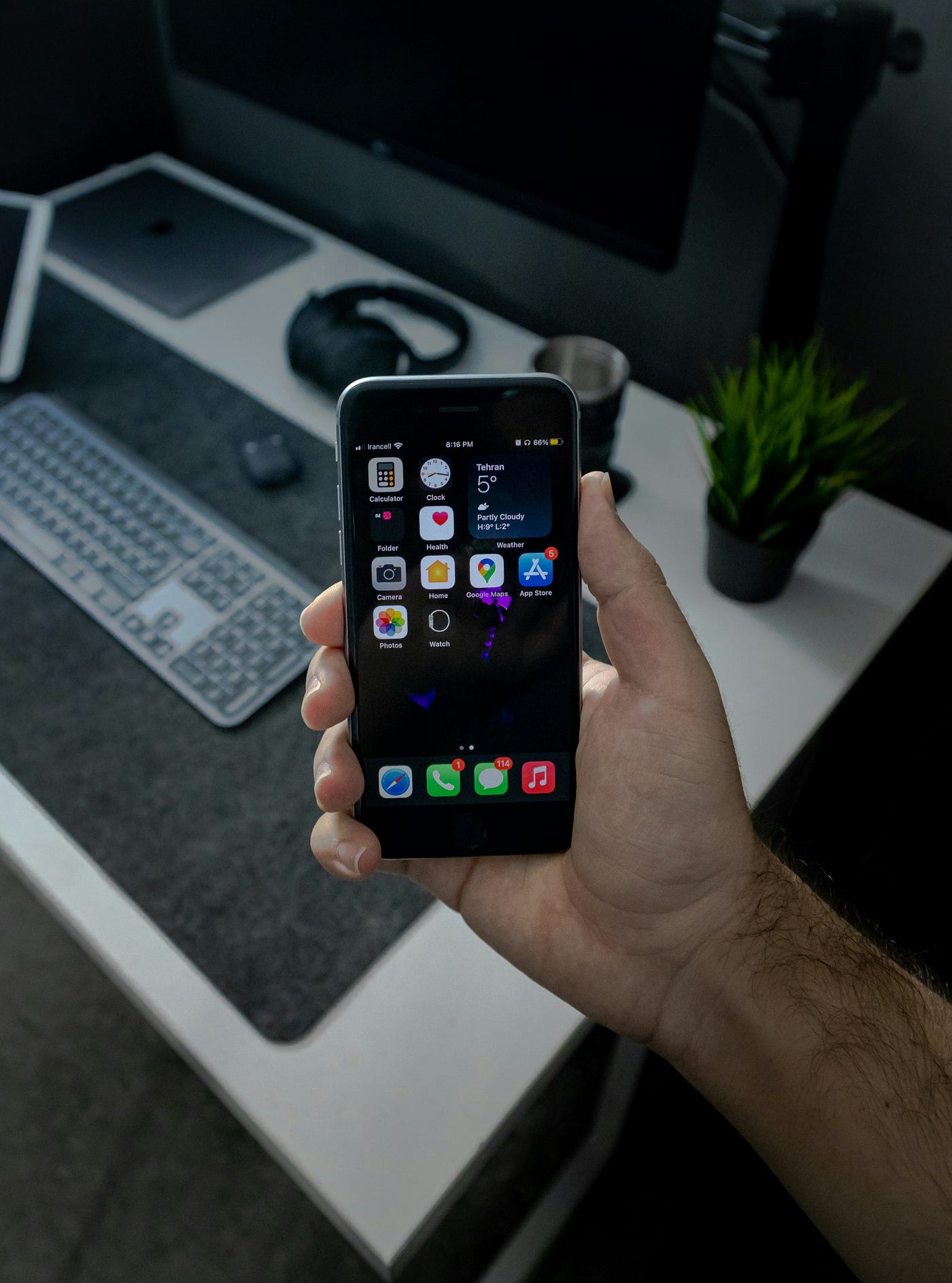
Photo by Mohammadreza alidoost on Unsplash
Something about that moment stuck with me for the rest of the evening, not in a dramatic or life-changing way, more like a splinter under the skin that you keep pressing on even though you know it is going to sting. So that night I sat on the sofa, opened my Screen Time stats, and had a proper look at what I had actually used in the last seven days. Eighty-three apps installed, fifteen of them used daily, another eight used a couple of times that week, and the remaining sixty were doing absolutely nothing except sitting there, collecting notification badges, and making it harder to find the stuff I genuinely needed.
I deleted forty-seven of them in one sitting, and honestly, I thought I would regret it by the morning.
What happened next was strange
My phone felt physically faster, and I know that sounds like something people say to justify a decision they have already made, but hear me out. Apple does not suddenly give you more RAM because you removed a weather app you downloaded in 2023. The benchmarks did not change. But the experience of using the phone changed immediately because I unlocked it and saw nine apps, a weather widget, and a whole lot of dark wallpaper where four pages of visual noise used to be.
There was no scrolling, no scanning, no folders to open and rummage through. My eyes went straight to whatever I needed because there was nothing else competing for attention, and the whole interaction with the phone started feeling different within the first few hours.
The first two days were uncomfortable though, because I kept reaching for apps that were not there anymore. Instagram was gone from my home screen, and I should clarify that I had not deleted it, I just moved it to the App Library, but removing the visual trigger turned out to be enough. The reflex to open it when I was bored had nowhere to land, so the reflex just faded on its own without me having to exercise any willpower at all.
By day four, I stopped noticing the missing apps, and by day seven, my Screen Time report showed something I was not expecting. My daily average had dropped from 3 hours 40 minutes to 2 hours 10 minutes, which is ninety minutes gone from my daily phone usage without setting a single timer, installing a single screen time app, or making any conscious effort to use my phone less. I just could not find anything to mindlessly scroll through because the mindless apps were no longer staring at me every time I unlocked the screen.
The part that did not work
I should be honest about the bit that failed because it is the part nobody writes about in these articles, and it is probably the most useful part.
When I first decided to strip my home screen back, I went all the way. Zero apps on the home screen, just a wallpaper and the dock with four apps in it. I thought it would feel clean and intentional, like some kind of digital monastery where I would only reach for my phone with purpose and clarity. What actually happened is that every single time I wanted to open anything, I had to swipe down, type the name, wait for it to appear, and tap it. Camera? Swipe and search. Notes? Swipe and search. Calendar? Same thing, over and over again, dozens of times a day.
For the first hour, it felt disciplined and mindful, but by the third hour, it felt like I had deliberately broken my own phone to prove a point to nobody. I was fighting the device instead of using it, and the friction was not productive friction; it was just annoying friction that made me want to give up on the whole experiment.
So I started adding apps back, but slowly and one at a time, only when I caught myself searching for the same app more than twice in a single day. Calendar came back first because I check it constantly. Then Notes, because I capture ideas throughout the day. Then Camera, because the moment you want to take a photo is never the moment you want to be typing “Camera” into a search bar. Safari was already in the dock so that was already sorted.
After about a week of this slow promotion process I landed on nine apps and a widget, and that number has barely moved in six months. Sometimes it goes up to eleven if I am travelling and Maps earns a temporary spot, sometimes it drops to eight if I realise something has been sitting there untapped all week. But the rule stays the same, one screen, and if a new app needs to come on then something else has to leave.
Why folders never worked for me
I know the obvious response to all of this is “just use folders,” and believe me, I tried that approach for years. Folders are how I ended up with the three folders called “Stuff” in the first place, because they let you pretend you are organised without actually making any decisions about what to keep and what to let go of. You drag a few apps into a folder, give it a vaguely descriptive name, and feel a brief moment of tidiness before the folder fills up with fifteen more apps over the next month and becomes its own little pocket of chaos.
The other problem with folders is the extra tap. Instead of seeing the app and tapping it once, you tap the folder, scan the contents to find what you are looking for, and then tap the app. That is two taps and a visual scan instead of one tap, and when you multiply that across dozens of daily interactions it adds up to a surprising amount of friction that you stop noticing because you have been doing it for so long.
I got rid of every folder on my phone and moved anything I was not using daily to the App Library, which is the screen you get to by swiping all the way right past your last home screen page. If you have never actually explored it properly, everything on your phone is already there, categorised automatically by Apple, and searchable by name. You do not need to maintain it or organise it because it does that on its own, and honestly it does a better job than any folder system I ever built manually.
The wallpaper detail that turned out to matter more than I expected
This is going to sound trivial but changing my wallpaper to a solid dark grey made a noticeable difference to how the whole screen felt. Not a photo of a mountain, not a gradient, not my dog looking noble in the morning light, just a flat dark background that sits somewhere around Apple’s system dark grey colour.
On an OLED screen, dark pixels are literally turned off, so there is a small battery benefit, but that is not really why I did it. The real reason is contrast. When your background is plain and dark, your app icons pop visually and your eyes find what they need faster because there is nothing else competing with the interface for your attention. A busy wallpaper with a bright focal point in the centre of the screen is essentially forcing your brain to process two layers of information every time you unlock your phone, the wallpaper and the apps on top of it, and over the course of a day that adds up to a surprising amount of unnecessary visual work.
I keep the personality on my Lock Screen instead, which is where I have a photo I actually like, a couple of widgets I glance at, and the time. But when I unlock and land on the Home Screen, the wallpaper gets out of the way because I am there to do something, not admire the view.
Where you put your apps matters more than which apps you keep
This is something I figured out embarrassingly late and it genuinely changed how fast my phone feels to use even though nothing technical changed at all. Your thumb has a natural resting position on the lower third of the screen, and the apps you place in that zone are the ones you can tap without stretching your hand or adjusting your grip. The top of the screen is the hardest part to reach, which is exactly where most people put their first row of apps because that is where iOS starts filling them in from.
So I flipped my layout around. Widgets go at the top because I look at them but rarely tap them, they are glanceable information that does not need to be in my thumb zone. My apps sit in the lower half of the screen where my thumb naturally lands, and my single most-used app sits in the bottom-right corner of the dock because I hold my phone in my right hand and that corner is the absolute easiest spot to hit without even looking.
Once I rearranged everything by reachability instead of aesthetics, using the phone felt noticeably quicker, not because the processor got faster but because the physical act of navigating became more efficient and I stopped doing that awkward thing where you shuffle the phone in your hand to reach something in the top-left corner.
Where I am now, six months in
I am still on one screen with nine apps and a weather widget, still no folders, and my screen time sits around two hours a day, which for someone who writes on their phone occasionally and manages a few side projects is a number I am comfortable with. It was nearly four hours before the experiment.
The biggest change is not the number though, it is the feeling of picking up my phone and knowing exactly what is there. There are no surprises, no notification badges on apps I forgot I had, no moments where I pick up the phone to do one thing and surface twenty minutes later having done something entirely different with no memory of how I got there.
I did not install a minimalist launcher or buy a dumb phone or do a digital detox week where I dramatically left my phone in a drawer. I just deleted a load of apps I was not using, rearranged the ones I kept based on how my hand actually holds the device, and set a single rule that everything has to fit on one page or it does not belong on my home screen.
That is the whole thing, and it has been the most effective change I have made to how I use my phone in years.
The template I built from this
After doing this for myself and then walking two friends through the same process on their phones, I realised the whole system was repeatable enough to turn into a proper template. So I put together a PDF with three layout options depending on how many apps you want visible, a step-by-step app audit that uses your own Screen Time data instead of guesswork, and printable worksheets so you can plan your layout on paper before rearranging anything on your actual phone.
It is called The Minimalist Home Screen Template and it is $3.99 on Gumroad.
Get The Minimalist Home Screen Template
If you want to go beyond the home screen and rebuild how your entire iPhone works, covering Focus Modes, Shortcuts automations, the Control Centre, notification management, and how all the native apps connect into one workflow, the iPhone Productivity Playbook covers the full system.
The iPhone Productivity Playbook — $8.99
I write about getting more from Apple devices without installing third-party apps.
메타데이터
- post_id
- ea6c310ae065
- slug
- i-deleted-a-few-apps-and-my-phone-got-faster-ea6c310ae065
- url
- https://medium.com/miles-metrics/i-deleted-a-few-apps-and-my-phone-got-faster-ea6c310ae065
- canonical_url
- https://medium.com/miles-metrics/i-deleted-a-few-apps-and-my-phone-got-faster-ea6c310ae065
- author_url
- https://medium.com/@Anilkumarbakkashetti
- status
- ok
- fetched_at
- 2026-08-03 02:18:31