Building a Multimodal AI Agent System Without Breaking the Bank
There’s a common misconception: for AI to understand different input formats, you need a single top-tier and, of course, very expensive…
Building a Multimodal AI Agent System Without Breaking the Bank

Stop Overpaying for Multimodal AI
There’s a common misconception: for AI to understand different input formats, you need a single top-tier and, of course, very expensive model from the top of benchmarks. In practice, for businesses, using such giants for every minor task is a direct path to lack of agility and an inflated budget.
But everyone wants multimodality. Especially us at Selfwork — we absolutely need it. Freelancers bring us their portfolios in every possible format, and we have to analyze them, sort them (and do a lot more with them).
Here’s how we solved this problem.
Not one “expensive” model, but a well-coordinated team. How do “blind” AI agents see images?
We built a multimodal agent system that runs on affordable models, yet handles video, PDFs, and complex visual data even better than its “bigger siblings”.
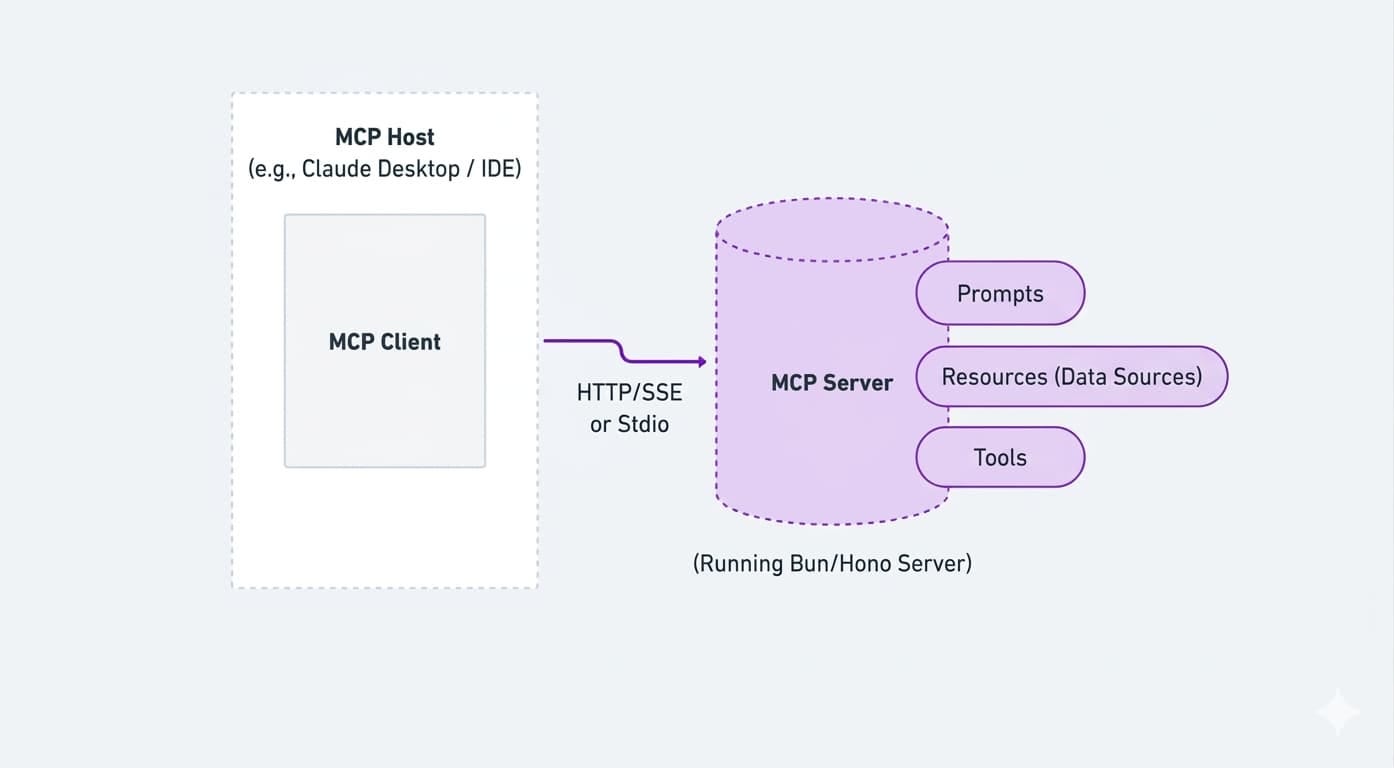
Here’s how it works. We have a model — the “brain center,” the coordinator. Right now, this role is handled by GPT-5.4 mini (by the way, we’ve switched models three times in the past six months).
This orchestrator agent communicates with the user. For example, a freelance designer uploads their resume as a PNG or records a short video showcasing an interface. Our orchestrator doesn’t try to “swallow” the entire file (the larger the file, the more expensive it will be). Instead, it acts like a competent manager and delegates tasks to specialized subagents.
How does this work in practice? Within the dialogue context, the agent only sees a notification: “The user has attached a file: portfolio.pdf/png/jpg.”
— If it’s a PDF: the agent calls a text-extraction tool. This allows it to quickly process even long, multi-page texts, without bloating the context window.
— If it’s an image or video: this is where it gets interesting.
If the agent understands it can’t handle it alone, so it calls in backup — a “vision-enabled” model (for example, from Google Gemini) — and gives it a specific task: “Find the list of skills and tech stack in this screenshot.”
As a result, with this on-demand approach, we achieve top-model-level results while paying tens of times less, because the “heavy” visual models run for just a few seconds on a specific request.
At the same time, for the user, the process remains seamless — they simply attach a file and see a concise status like “Analyzing attachment…,” without realizing that several models are working behind the scenes to analyze their portfolio. Or their avatar. Or just a random photo of a cat they decided to send to our agent.

Selfwork interface
But what if the user starts spamming? How do you avoid going bankrupt on memes?
Speaking of cat photos — what happens if a user sends a bunch of irrelevant files? Let’s break it down step by step:
Step 1: Metadata (What the agent knows about the file)
The user uploads a photo of a cat. The orchestrator agent doesn’t look at the image itself but at its technical details:
File name (e.g., funny_cat.png).
Format (PNG, PDF, MP4).
Dialogue context (are we filling out a profile or just chatting?).
Step 2: Situation assessment (Context check)
The orchestrator agent analyzes: “So, I’m currently helping the user fill in a seller profile’s skills. They sent a file called funny_cat.png. Does that sound like a portfolio based on the name? No. Did I ask them to send a cat photo? No.”
Step 3: Memory & reuse
The results of previous analysis are not lost — they are stored. For example, if a user uploads a PDF, the AI extracts the text once, and that output is saved for future use. So when the agent needs to reference that same file again later in the conversation, it doesn’t have to run text extraction again — it simply reuses what’s already available.
Step 4: Verdict
If the file doesn’t seem relevant in the current context, the orchestrator may decide not to process it further. However, the file still remains in the conversation history. This means that later in the dialogue, if the user refers back to it or asks something related, the AI can return to that file and analyze it when it actually becomes useful.
In the end, our main agent behaves like a (slightly annoying) manager with a folder of documents. It doesn’t inspect every detail itself, but it knows which “department” to call. If there’s a cat photo in the folder instead of a resume, the agent, after receiving a brief summary from the visual tool (“this is an animal, not text”), will simply say: “Hey, this doesn’t look like a portfolio — could you send the actual file?”
To sum it all up. Is building an Agent System worth it?
AI agent architecture is rapidly moving away from monolithic systems. The future belongs to fragmented systems where a “brain” coordinates dozens of specialized “eyes” and “hands.” Just like when hiring a team, you don’t hire one person to handle everything (although who knows — that seems to be trendy now), agents can also be different. Each has its own area of responsibility.
메타데이터
- post_id
- ea7f8b40f4b8
- slug
- building-a-multimodal-ai-agent-system-without-breaking-the-bank-ea7f8b40f4b8
- url
- https://medium.com/selfwork-insights/building-a-multimodal-ai-agent-system-without-breaking-the-bank-ea7f8b40f4b8
- canonical_url
- https://medium.com/selfwork-insights/building-a-multimodal-ai-agent-system-without-breaking-the-bank-ea7f8b40f4b8
- author_url
- https://medium.com/@romasy
- status
- ok
- fetched_at
- 2026-06-14 11:28:49