Your Spark Job Is Running. Then a Server Dies. Here’s Exactly What Happens Next.
What Apache Spark does when a Worker Node completely crashes — and why it’s smarter than you think.
Your Spark Job Is Running. Then a Server Dies. Here’s Exactly What Happens Next.
What Apache Spark does when a Worker Node completely crashes — and why it’s smarter than you think.
Imagine this: you’ve just kicked off a massive Spark job — processing 500 GB of user clickstream data. It’s been running for 40 minutes. You’re sipping coffee, watching the Spark UI, feeling good.
Then suddenly… one of your worker nodes loses power. Gone. Dead. Silent.
Your first instinct? “Oh no, is my entire job going to fail?”
Here’s the shocking part — it probably won’t.
And if you’re preparing for a data engineering interview, this exact scenario is one of the most commonly asked questions at companies like Uber, Netflix, LinkedIn, and Databricks.
So let’s break it all down, step by step, in plain English.
🎯 Why This Question Even Matters
Most beginners learn that Spark is “fault-tolerant” and move on. They assume it magically recovers and never dig deeper.
But interviewers aren’t looking for buzzwords. They want to know:
- What specifically happens when a node crashes?
- Which tasks get re-run, and which don’t?
- What is RDD lineage, and why does it save you?
- What about shuffle data — is that lost forever?
- When does a job actually fail?
If you can’t answer these with precision, you’ll struggle in both interviews and production debugging. Let’s fix that right now.
💡 First, the Architecture You Need to Know
Before we talk about crashes, let’s quickly understand who the players are.
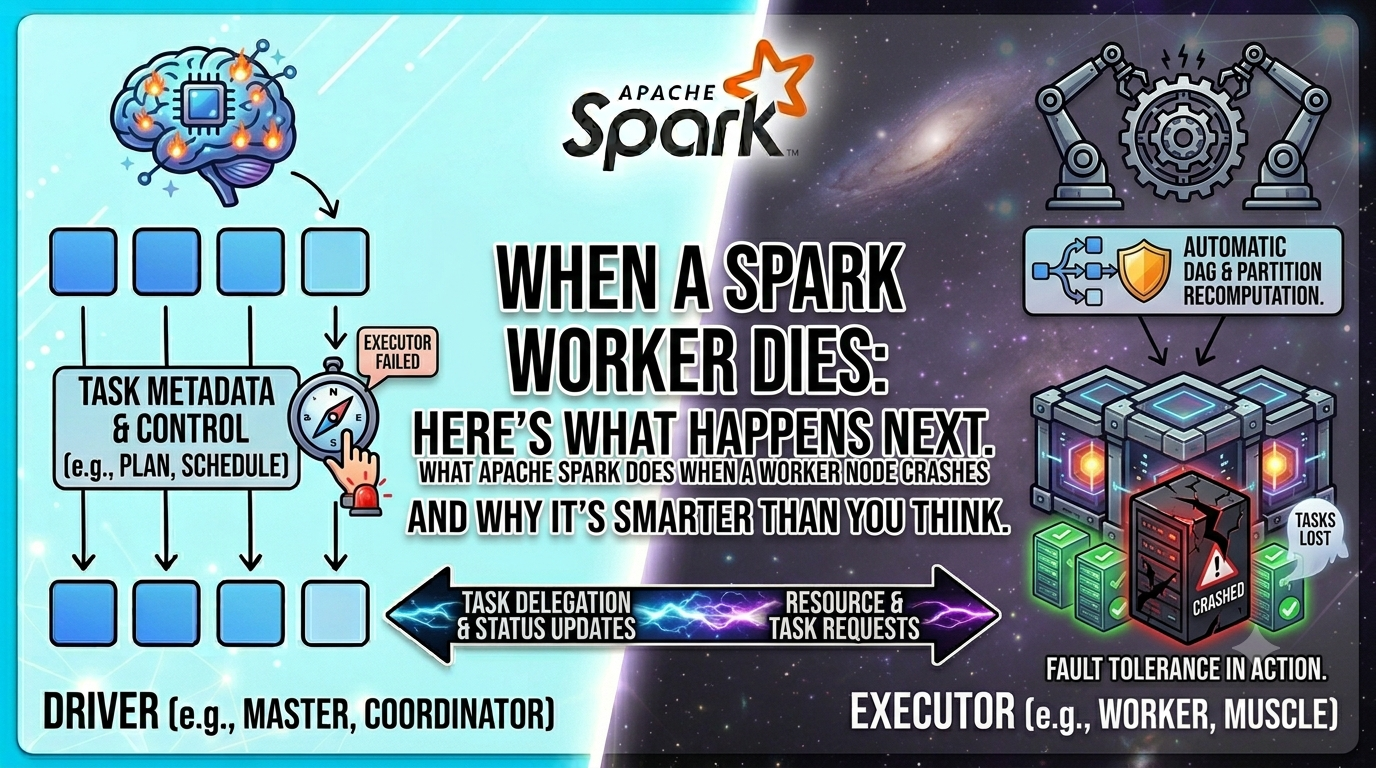
The Driver — The brain. It lives on the master node, holds your SparkContext, and orchestrates everything. Think of it as the project manager.
The Worker Nodes — The muscles. They run Executors, which actually process your data. Think of them as factory workers.
The Executor — A JVM process running on a Worker Node. It holds tasks in memory, stores cached RDD partitions, and reports back to the Driver.
The Cluster Manager — The HR department (YARN, Mesos, or Kubernetes). It allocates resources and monitors node health.
When you submit a Spark job, the Driver breaks the work into Tasks, groups them into Stages, and sends them to Executors across Worker Nodes.
Now — what happens when one of those nodes just disappears?
🔥 The Crash: A Step-by-Step Breakdown
Step 1: The Heartbeat Goes Silent
Every Executor sends a heartbeat signal to the Driver every few seconds (controlled by spark.executor.heartbeatInterval, default: 10 seconds).
When a Worker Node crashes, those heartbeats stop.
The Driver waits. After a timeout window (controlled by spark.network.timeout, default: 120 seconds), it declares: "That Executor is dead."
Step 2: The Driver Takes Inventory
Now the Driver checks: “What was that Executor doing?”
It looks at its Task Scheduler and identifies:
- Which tasks were running on that Executor (now failed)
- Which RDD partitions were cached on that Executor (now lost)
- Whether any shuffle output from that Executor is needed downstream
Step 3: Tasks Are Re-Scheduled
Any tasks that were in-progress on the dead node are marked as failed and immediately re-queued.
The Cluster Manager spins up a new Executor (on a different, healthy node), and those tasks are re-run from scratch.
This is where RDD Lineage becomes your best friend.
🧪 RDD Lineage: The Secret Weapon
Think of RDD Lineage as a recipe card.
You don’t need to store every dish — you just store the recipe. If you lose a dish, you cook it again using the same recipe.
Every RDD in Spark knows:
- Where it came from (its parent RDD)
- What transformation created it (map, filter, join, etc.)
This chain of knowledge is called the DAG (Directed Acyclic Graph).
So if a partition of an RDD is lost because a node crashed, Spark doesn’t panic. It looks up the lineage, goes back to the source data (HDFS, S3, etc.), and recomputes only the lost partitions.
Source Data (HDFS)
       ↓
   textFile()  → RDD1 (partitions 0–9)
       ↓
   filter()    → RDD2 (partitions 0–9)
       ↓
   map()       → RDD3 (partitions 0–9)
If partition 7 of RDD3 is lost, Spark recomputes:
textFile→ partition 7 onlyfilter→ partition 7 onlymap→ partition 7 only
Only the lost partition. Not the whole dataset. That’s elegant engineering.
🔄 The Shuffle Problem (The Tricky Part)
Here’s where things get more interesting — and where most beginners get confused.
Spark jobs are divided into Stages, separated by shuffle boundaries (like groupByKey, reduceByKey, join).
When Stage 1 finishes, it writes shuffle output (intermediate data) to the local disk of the Worker Nodes.
Stage 2 then reads that shuffle data from Stage 1’s nodes.
Now here’s the problem: if the node holding shuffle output crashes, that data is gone.
Spark can’t just recompute Stage 2’s tasks. It has to go back and recompute Stage 1 tasks that produced that shuffle output.
This is why shuffle-heavy jobs can be significantly more expensive to recover from — recomputation cascades backward through the DAG.
Practical tip: If you cache or persist() an RDD before a wide transformation (shuffle), you reduce the recomputation cost in case of failure.
# Without caching — if crash happens, full lineage recomputed
rdd_joined = rdd1.join(rdd2)

# With caching — Stage 1 results are safe on disk
rdd1.persist(StorageLevel.MEMORY_AND_DISK)
rdd2.persist(StorageLevel.MEMORY_AND_DISK)
rdd_joined = rdd1.join(rdd2)
🧪 Practical Example: Walk Through a Real Crash
Let’s say you’re running this job:
from pyspark import SparkContext, StorageLevel

sc = SparkContext("yarn", "ClickstreamJob")
# Stage 1: Load and filter
raw = sc.textFile("s3://data/clickstream/")         # RDD1
filtered = raw.filter(lambda x: "purchase" in x)   # RDD2
mapped = filtered.map(lambda x: (x.split(",")[0], 1))  # RDD3
# Stage 2: Shuffle (wide transformation)
counts = mapped.reduceByKey(lambda a, b: a + b)     # RDD4
# Stage 3: Output
counts.saveAsTextFile("s3://output/results/")
The DAG looks like this:
Stage 1: textFile → filter → map   (narrow transforms, no shuffle)
         ↕ shuffle write (to local disk of workers)
Stage 2: reduceByKey                (wide transform, shuffle read)
         ↕
Stage 3: saveAsTextFile
Now, Worker Node 3 crashes mid-way through Stage 2:
- Driver detects heartbeat loss after timeout
- Tasks running on Node 3 during Stage 2 are re-queued
- Spark checks: does it have shuffle data from Stage 1 for Node 3’s partitions?
- If Node 3 also held Stage 1 shuffle output → Spark re-runs Stage 1 tasks for those partitions
- New Executor picks up the work on Node 5 (healthy)
- Job resumes — no manual intervention needed
From the user’s perspective? The job slows down slightly. That’s it.
⚠️ Common Mistakes and Misconceptions
Mistake 1: “Spark always re-runs the entire job on failure”
Nope. Spark re-runs only the affected tasks and partitions. The rest of the job is unaffected.
Mistake 2: “Cached RDDs are always safe”
Not if they’re cached in MEMORY_ONLY mode on the crashed node. If the node dies, that cache is gone. Use MEMORY_AND_DISK or replicated storage levels (MEMORY_ONLY_2) for critical intermediate data.
Mistake 3: “The Driver crashing is the same as a Worker crashing”
This is a critical distinction. If the Driver crashes, the entire job fails — because the Driver holds all the metadata, the DAG, and the task scheduler. Worker crashes are recoverable. Driver crashes (usually) are not, without checkpointing or HA setup.
Mistake 4: “Spark retries indefinitely”
No. Spark has a retry limit. By default, each task is retried 4 times (spark.task.maxFailures = 4). If it fails more than that, the stage fails, and eventually the job fails.
🚀 Pro Tips and Best Practices
1. Tune your timeouts wisely.
The default spark.network.timeout of 120 seconds means Spark waits 2 full minutes before reacting to a dead node. In production, tweak this based on your cluster's heartbeat reliability.
spark.network.timeout=60s
spark.executor.heartbeatInterval=10s
2. Use checkpointing for iterative algorithms.
If you’re running MLlib algorithms (like PageRank or K-Means that loop many times), use rdd.checkpoint() to save RDD state to HDFS. This truncates the lineage and prevents recomputation from going all the way back to the source.
sc.setCheckpointDir("hdfs:///spark-checkpoints/")
iterative_rdd.checkpoint()
3. Prefer MEMORY_AND_DISK over MEMORY_ONLY for important RDDs.
If the data doesn’t fit in memory, it spills to disk instead of being lost. For fault tolerance, disk is your friend.
4. Watch your shuffle output size.
Large shuffle datasets mean large recomputation cost on failure. Use reduceByKey instead of groupByKey — it reduces data before shuffling, so there's less to recompute.
5. Enable speculative execution for slow nodes.
Sometimes a node doesn’t crash — it just gets very slow (hardware degradation, noisy neighbor). Spark’s speculative execution launches duplicate tasks on other nodes and uses whichever finishes first.
spark.speculation=true🔄 Real-World Use Cases
At Uber: Spark processes trillions of trip records. Worker node failures are expected at scale. Their infrastructure is built assuming nodes will die — and Spark’s fault tolerance is a core reason Spark was chosen over MapReduce.
At Netflix: Content recommendation pipelines run multi-hour Spark jobs. They use checkpointing + S3-backed shuffle (via EMR) to make jobs resilient to spot instance terminations.
At LinkedIn: Apache Spark powers their data warehouse jobs. They tune spark.task.maxFailures and use HDFS for shuffle storage to prevent cascade failures from taking down long-running jobs.
In interviews: When asked “what happens when a node crashes in Spark?”, the companies hiring for senior Data/ML Engineer roles want you to walk through: heartbeat detection → task re-scheduling → RDD lineage recomputation → shuffle dependency handling → retry limits. Nail this flow and you stand out immediately.
📌 Quick Recap
- Spark detects node failure via heartbeat timeout (default 120s)
- Only failed tasks are re-run — not the entire job
- RDD Lineage (DAG) allows Spark to recompute only lost partitions from source data
- Narrow transformations (map, filter) recover cheaply — just recompute the partition
- Wide transformations (reduceByKey, join) may require recomputing upstream shuffle output
**persist(MEMORY_AND_DISK)** reduces recomputation cost- Checkpointing truncates lineage for iterative workloads
- Driver crash = job failure (unlike Worker crash)
- Spark retries tasks up to
spark.task.maxFailurestimes (default: 4) before giving up
🚀 Level Up Your Career — Don’t Wait, Start NOW!
If you’re serious about growing in tech and staying ahead of the curve, this is your moment. No shortcuts — just real skills that actually make a difference.
🌐 Let’s Connect & Grow Together
Follow me for practical insights, real-world learning, and career tips:
🐦 Twitter: https://x.com/SriwWorld 📺 YouTube: https://www.youtube.com/@sriwworldofcoding?sub_confirmation=1 ✍️ Medium: https://medium.com/@sriwworldofcoding 🧵 Threads: https://www.threads.com/@sriwworldofcoding 📸 Instagram: https://www.instagram.com/sriwworldofcoding/ 📘 Facebook: https://www.facebook.com/profile.php?id=61576419014220 🌌 Bluesky: https://bsky.app/profile/sriwworldofcoding.bsky.social
🎯 Want Real Skills? Start With These Hands-On Courses
⚙️ Apache Airflow Bootcamp (Workflow Automation)
👉 https://www.udemy.com/course/apache-airflow-bootcamp-hands-on-workflow-automation/ 💡 Go from beginner to advanced — master DAGs, scheduling, operators, sensors, and build real production workflows.
🔥 PySpark for Data Engineers (Architecture + Interviews)
👉 https://www.udemy.com/course/pyspark-for-data-engineers-architecture-interviews/ 💡 Deep dive into Spark architecture, optimization, and performance tuning — plus crack interviews with confidence.
☁️ Crack Azure Data Engineer Interviews: The Ultimate Q&A Guide
👉 https://www.udemy.com/course/crack-azure-data-engineer-interviews-the-ultimate-qa-guide/ 💡 Get interview-ready with real-world questions on ADF, Synapse, Databricks, Event Hubs, Data Lake, Azure Functions & more.
💥 The difference between where you are and where you want to be? ACTION. Start learning today — your future self will thank you.
Got a question or want me to cover a specific Spark scenario? Drop it in the comments below. I read every single one.
메타데이터
- post_id
- eb56317005ec
- slug
- your-spark-job-is-running-then-a-server-dies-heres-exactly-what-happens-next-eb56317005ec
- url
- https://medium.com/@sriwworldofcoding/your-spark-job-is-running-then-a-server-dies-heres-exactly-what-happens-next-eb56317005ec
- canonical_url
- https://medium.com/@sriwworldofcoding/your-spark-job-is-running-then-a-server-dies-heres-exactly-what-happens-next-eb56317005ec
- author_url
- https://medium.com/@sriwworldofcoding
- status
- ok
- fetched_at
- 2026-07-08 20:12:56