Finance Helper using Multi-Agentic System (Langchain-Langgraph), MCP, Ollama, Flask — 3.0
Finance Stock Helper is a project designed to support individuals in making better-informed stock investment decisions. The system is…
Building a Multi-Agent AI Finance Assistant (LangChain, MCP, Ollama, Flask) — Part 3.0 Quick Market Analysis Agent
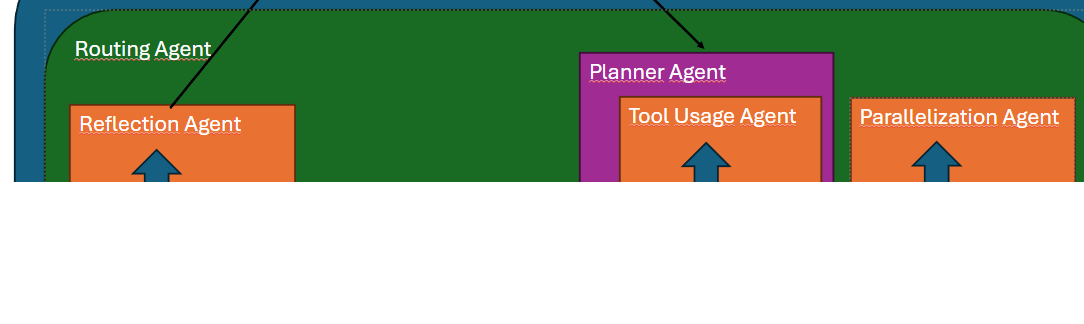
Finance Stock Helper is a project designed to support individuals in making better-informed stock investment decisions. The system is built on a multi-agent architecture and powered entirely by local large language models (LLMs) running through Ollama.
Ollama enables the use of lightweight language models that can operate efficiently on consumer-grade hardware. When combined with Model Context Protocol (MCP) and a set of prebuilt tools, this architecture allows anyone to run a personal stock analysis assistant directly on their home device — without relying on cloud-based AI services.
Story Articles
1.0 Strategy Saver Agent 1.6 Strategy Saver Agent to MCP 1.8 Strategy Saver Agent to MCP, Client 2.0 Roouting Agent 2.6 Distribute Agent to MCP 2.8 Distribute Agent to MCP, Client 3.0 Quick Market Analysis Agent 3.2 Quick Market Analysis Agent, support Toolset 3.6 Quick Market Analysis Agent to MCP 3.8 Quick Market Analysis Agent to MCP, Client …
Quick Market Analysis Agent

The next core component of the Finance Stock Helper is the Quick Market Analysis Agent. Its primary role is to provide a fast, real-time assessment of market conditions for a cryptocurrency that the user is interested in.
Upon receiving a request, the Quick Market Analysis Agent first analyzes the user’s intent and identifies the specific cryptocurrency in question. It then activates two tools in parallel:
- News Analysis Tool — retrieves the most trending and relevant articles about the selected cryptocurrency.
- Market Data Tool — gathers and analyzes key market indicators such as price movements, trading volume, and volatility.
Once both tools have completed their analysis, their outputs are passed to a dedicated LLM. The model synthesizes the information, summarizes key findings, and generates an initial conclusion. The insights from both sources are then merged into a single coherent response and presented back to the user in a clear and actionable format.
Below is the initial implementation of the Quick Market Analysis Agent:
1. Quick_Market_Analysis_Agent.py
from Backend.Connectors.LLM_Connector import LLMConnector
from Backend.Connectors.Binance_Toolset.Strategy_Indication import produce_conclusion
from Backend.Connectors.Binance_Toolset.Binance_Tools import BinancePairCheck
from Backend.Connectors.News_Fetcher.Google_news_fetch import get_crypto_news
from langchain_core.prompts import ChatPromptTemplate
from langchain_core.runnables import RunnableParallel, RunnableLambda
Importing: Components from LLM_connector, Strategy_Indication and Binance_Tools will be used. Strategy_Indication and Binance_Tools will be explored on the article 3.2 Quick Market Analysis Agent, support Toolset. Also langchain framework, will be used to create the prompt for the agent and allow a parallel excecution using the Runnable’s.
# Create market report
def market_report(crypto: str) -> str:
    news = get_crypto_news(crypto)
    result = "\n".join(item["title"] for item in news)
    return result

# Create on chain report
def onchain_report(crypto: str) -> str:
    match_maker = BinancePairCheck().check_binance_pair(crypto, 'tether')
    return produce_conclusion(match_maker)
Function for report creation:
a. Create market report: A function capable of getting as input a crypto name and returing a text. The text consists of only of the titles from the articles found by the get_crypto_news function.
b. Create on_chain report: A function capable of getting as input a crypto name and a on chain report. To create the report, the BinancePairCheck need to be used to validate that the crypto in question is tradeable at Binance. After that the produce_conclusion is able to create the on chain report.
class QuickMarketAnalysisAgent:
    def __init__(self,model='qwen3:1.7b'):

        # Agentic Initialization
        self.llm = LLMConnector.llm_connect(model=model)
        self.parallelizer_template = (
"""
You are a useful assistant for cryptocurrency.
Read the user query and answer only with the name of the crypto.

User query: {query}"""
)
        market_conclusion_template = (
"""
You are a useful assistant for cryptocurrency.
Read the title from the articles below and give a clear
sentiment from the news:
\n{news}"""
)
        on_chain_conclusion_template = (
"""
You are a useful assistant for cryptocurrency.
Summarize and give a clear conclusion from this report:
\n{report}"""
)

        # User query extraction
        extract_prompt = ChatPromptTemplate.from_template(
            self.parallelizer_template
        )

        extract_crypto_chain = extract_prompt | self.llm
        extract_text = RunnableLambda(lambda x: x.content)

        # Tools parallel excecution
        market_runnable = RunnableLambda(lambda x: market_report(x))
        onchain_runnable = RunnableLambda(lambda x: onchain_report(x))

        parallel_tools = RunnableParallel(
            market=market_runnable,
            onchain=onchain_runnable
        )

        # Report Chains
        market_conclusion_prompt = ChatPromptTemplate.from_template(market_conclusion_template)
        market_chain = market_conclusion_prompt | self.llm

        on_chain_conclusion_prompt = ChatPromptTemplate.from_template(on_chain_conclusion_template)
        on_chain_chain = on_chain_conclusion_prompt | self.llm

        # Create the agentic pipeline
        self.full_pipeline = (
                {"query": RunnableLambda(lambda x: x)}
                | extract_crypto_chain
                | extract_text
                | parallel_tools
                | {
                    "market_conclusion": RunnableLambda(
                        lambda x: market_chain.invoke({"news": x["onchain"]})
                    ),
                    "onchain_conclusion": RunnableLambda(
                        lambda x: on_chain_chain.invoke({"report": x["market"]})
                    )
                }
                | RunnableLambda(lambda x: f"""
FINAL SYNTHESIS:
Market view: {x['market_conclusion'].content}
\nOn-chain view: {x['onchain_conclusion'].content}
                    """)
        )

    def quick_market_recap(self, user_input):
        result = self.full_pipeline.invoke(q)
        return result
a. Agentic Init: The agent connects to the local LLM and selects the specified model via Ollama. A prompt template based on Zero-shot reasoning guides the model to extract the name of the crypto from the user query. The report templates are tasking the LLM to create a report, while describing briefly the input from the tools.
b. User query extraction: A chain is tasked with extracting the name of the crypto. On the next step, a RunnableLambda extracts only the content from the agent answer.
c. Tools parallel excecution: The RunnableParallel is fed with two RunnableLambda. Each Lambda function, using the functions for the report creation, is tasked with the creation of the report, one for the market and the other for the on chain analysis.
d. Report Chains: Chains are made. Their goal to read the reports from the parallel excecution and give a conclusion on them.
e. Pipeline Creation: The above componets are used to create the pipeline. Each step is procceded by the agent and the final step is the synthesis of the conclusions.
e. quick_market_recap: The function is using the pipeline, created at the initialization of the class. And so the agent is able to create and return an answer to the user.
if __name__ == '__main__':
    q = 'What is the trend on the Ethereum?'
    agent = QuickMarketAnalysisAgent()
    agent.quick_market_recap(q)
Example: Above is an example to run the agent.
메타데이터
- post_id
- ebd573f5ab96
- slug
- finance-helper-using-multi-agentic-system-langchain-langgraph-mcp-ollama-flask-3-0-ebd573f5ab96
- url
- https://medium.com/@papanikst/finance-helper-using-multi-agentic-system-langchain-langgraph-mcp-ollama-flask-3-0-ebd573f5ab96
- canonical_url
- https://medium.com/@papanikst/finance-helper-using-multi-agentic-system-langchain-langgraph-mcp-ollama-flask-3-0-ebd573f5ab96
- author_url
- https://medium.com/@papanikst
- status
- ok
- fetched_at
- 2026-07-13 06:23:13



