Spark Memory allocation & Management
Lets talk about how memory allocation works for spark driver and executors. Understanding driver and executor memory allocation is crucial…
Spark Memory allocation & Management
Lets talk about how memory allocation works for spark driver and executors. Understanding driver and executor memory allocation is crucial for avoiding OOM (Out-of-Memory) exceptions in your Spark applications. This article provides insights into the configurations involved and how to manage memory effectively within YARN.
When you submit a Spark application in YARN, the YARN Resource Manager (RM) allocates an Application Master (AM) container. This container launches the Spark driver JVM with a specific memory allocation.
Driver Memory Breakdown
Spark driver memory is requested using two configurations:
spark.driver.memory: Defines the main memory for the driver JVM.spark.driver.memoryOverhead: Specifies additional memory for non-JVM processes (default: 10% ofspark.driver.memory).- YARN allocates the requested driver memory + the higher value between 10% of requested memory and 384 MB for container overhead.
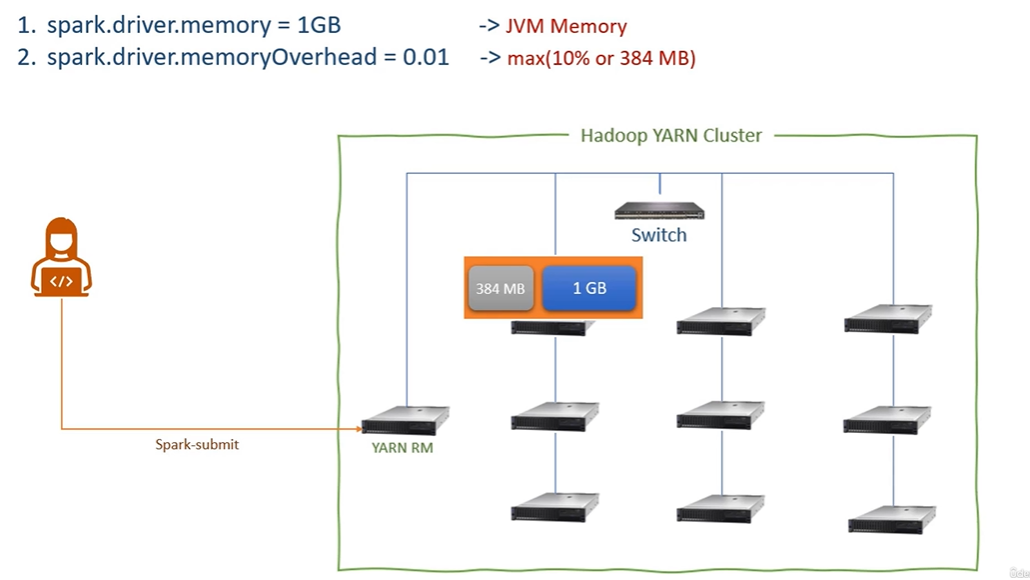
Image source is from Prashant Pandey library
Executor Memory Breakdown
- Executor memory in each container is the sum of four parts:
spark.executor.memoryOverhead: Memory for non-JVM processes within the executor (default: 10% ofspark.executor.memory).spark.executor.memory: Main memory for the executor JVM.spark.memory.offHeap.size: Memory allocated for off-heap storage (default: 0).spark.executor.pyspark.memory: Memory for PySpark applications (default: 0).

Image source is from Prashant Pandey library
Important Note: The physical memory limit for a container depends on the worker node’s available memory. YARN cannot allocate a container exceeding that limit.
A Spark container’s total memory is divided into two sections:
- Heap Memory: This is the main memory for the JVM process running inside the container. It’s called driver memory if the container holds the Spark driver, and executor memory if it holds a Spark executor.
- Overhead Memory: This is separate memory managed by the operating system within the container. It’s used for various tasks, including network buffers for data shuffling and reading data from storage.
Both parts are crucial for your Spark application to run smoothly. Insufficient overhead memory, often overlooked, can lead to Out-of-Memory (OOM) exceptions due to its role in network operations.

Image source is from Prashant Pandey library
- Understanding memory allocation helps optimize Spark application performance.
- The Spark memory pool is crucial for DataFrame operations and caching.
- Adjust memory fractions (storage/executor) based on your specific use case.
Understanding Spark Executor Memory Allocation
This summary explains how Spark allocates memory within the JVM heap of an executor container.
Initial Allocation:
- You requested
spark.executor.memoryas 8 GB, resulting in 8 GB of JVM heap memory. - By default, an additional 10% is allocated for container overhead (not covered here).

Image source is from Prashant Pandey library
JVM Heap Breakdown:
Heap memory further broken down into 3 parts.
- Reserved Memory (300 MB): Fixed amount used by the Spark engine itself.
- Spark Memory Pool (Controlled by
spark.memory.fraction)
- Default: 60% of remaining memory after reserved memory is subtracted.
- In this example: *8 GB — 300 MB = 7.7 GB 60% = 4.62 GB**
- User Memory (40%): Remaining memory after reserved and Spark memory pool allocations.
- In this example: 7.7 GB — 300 MB — 4.62 GB = 3.08 GB

Image source is from Prashant Pandey library
Spark Memory Pool (4.62 GB):
- This pool is primarily used for Data Frame operations and caching.
- You can adjust the allocation using
spark.memory.fraction(default: 60%). - It’s not recommended to reduce it significantly as it’s used for internal Spark functions.
User Memory (3.08 GB):
Used for non-DataFrame operations such as:
- User-defined data structures (hash maps)
- Spark internal metadata
- User-defined functions
- RDD information and operations (unless directly used in Data Frame operations) — RDD conversions, lineage & dependency.
You can increase its allocation (from the default 60%) to 70% or even higher if your application doesn’t heavily rely on User Memory tasks like custom data structures, User-Defined Functions (UDFs), or manual RDD operations. However, it’s not advisable to reduce it significantly (or to zero) because a minimum amount is needed for Spark’s internal functions and metadata storage.
Spark Memory Pool Sub-pools (Default 50/50 split):
- You can modify the split between Storage and Executor memory using
spark.memory.storageFraction. - The default 50/50 split might not be optimal depending on your workload.
- In the example, with a 4.62 GB Spark memory pool, the default split creates:
- Storage Memory: 2.31 GB (50%)
- Executor Memory: 2.31 GB (50%)
Memory Pool Usage:
- Storage Memory:
- Primarily used for caching DataFrame objects using the
cacheoperation. - Cached DataFrames persist in the storage pool until explicitly un-cached or the executor stops.
- Considered “long-term” memory as cached data remains available.
- Executor Memory:
- Used for temporary buffering during DataFrame computations.
- Examples: Join buffers, aggregation buffers, temporary data during calculations.
- Considered “short-term” memory as buffers are freed after the operation completes.

Image source is from Prashant Pandey library
Spark Unified Memory Management for Tasks
This summary explains how Spark allocates memory to tasks within an executor.
Old Approach (Pre-Spark 1.6):
- Static memory management assigned a fixed amount of memory to each task.
- This approach was simple but didn’t adapt well to varying task requirements.
Current Approach (Unified Memory Manager):
- Introduced in Spark 1.6.
- Aims for fairer allocation of memory amongst active tasks within an executor.
- Doesn’t pre-assign a fixed amount per task.
- Spark considers the available memory pool (2310 MB executor pool in this example) and the number of active tasks (4) when allocating memory.
- The exact memory allocation per task is dynamic and depends on the workload.
- The unified memory manager strives to distribute memory fairly among active tasks for optimal performance.
Lets say if we have only 2 active threads then Unified memory manager tried to distribute memory into 2 parts instead of reserving for 4 cores/slots.

Image source is from Prashant Pandey library
Allocation and Borrowing:
- The unified memory manager doesn’t pre-assign fixed memory per task.
- It allocates memory from the executor memory pool based on task requirements.
- If the executor memory pool is full, the manager can borrow from the storage memory pool (as long as free space exists).
Flexible Boundaries:
- The initial split between storage and executor memory (default 50/50) is a guideline, not a rigid boundary.
- You can adjust it using
spark.memory.storageFractionbased on your caching needs.
Borrowing Scenarios:
Caching vs. Execution:
- If the storage pool is full and you attempt to cache more data frames, the manager borrows from the executor pool (assuming free space).
- Conversely, if the executor pool needs memory for computations and the storage pool has cached data, the manager might evict cached data to free space.
Eviction and Spilling:
- When the manager needs to free space in the borrowed pool (e.g., executor needs memory after borrowing from storage), it evicts cached dataframes.
- Evicted dataframes are spilled to disk if possible.
Limitations and Spilling to Disk:
- The manager cannot evict “changed” data blocks (dirty blocks) from the storage pool to free space for the executor pool.
- If the manager encounters unspillable data and the executor requires more memory, the executor itself might resort to spilling data to disk.

Image source is from Prashant Pandey library
The Unifies memory manager allocates memory to executors from both storage memory and user memory based on necessity and availability. Therefore, allocating more memory to off-heap memory also aids the memory manager in assigning memory to the executors.
When there’s a demand for more memory and the memory manager is unable to allocate sufficient memory, an OutOfMemory (OOM) exception occurs.
메타데이터
- post_id
- ebf9129750cb
- slug
- spark-memory-allocation-management-ebf9129750cb
- url
- https://medium.com/@nethaji.bhuma/spark-memory-allocation-management-ebf9129750cb
- canonical_url
- https://medium.com/@nethaji.bhuma/spark-memory-allocation-management-ebf9129750cb
- author_url
- https://medium.com/@nethaji.bhuma
- status
- ok
- fetched_at
- 2026-08-02 20:48:00



