RESTHeart Cloud Examples: A Multi-Framework Reference Implementation
Build modern web applications with RESTHeart Cloud as your backend through practical examples in Vue.js, React, and Angular
RESTHeart Cloud Examples: A Multi-Framework Reference Implementation
Summary
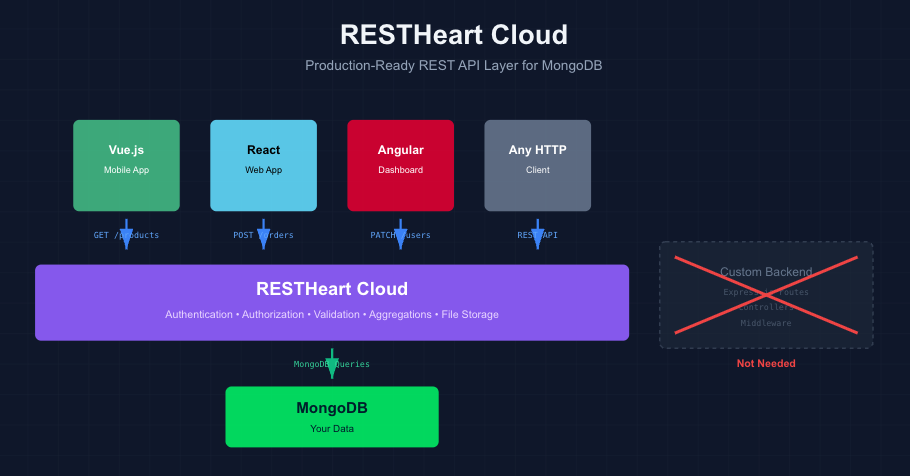
Modern application development faces a persistent challenge: building and maintaining backend infrastructure consumes significant development resources that could be better spent on features that differentiate your product. RESTHeart Cloud addresses this by providing a production-ready REST API layer over MongoDB, eliminating the need to write and maintain custom backend code for common data operations.
For mobile and web applications, this translates to faster time-to-market and reduced operational complexity.
Your frontend developers can work directly with MongoDB queries through REST endpoints, without waiting for backend teams to implement new API endpoints for each data access pattern.
Security policies, authentication, and data validation are configured declaratively rather than coded, reducing the surface area for bugs and security vulnerabilities.
The ROI is straightforward: less code to write means less code to test, deploy, and maintain. Teams can iterate on data models and query patterns without backend releases, and the same API serves web, mobile, and any other HTTP-capable client without modification.
What This Repository Contains
This is a monorepo with three implementations of the same product search application: one in Vue.js, one in React, and one in Angular. All three connect to the same RESTHeart Cloud backend.
I built these to show how RESTHeart Cloud works with different frontend stacks. If you’re evaluating RESTHeart or wondering how it fits with your preferred framework, you can clone this and have a working example running locally in about five minutes.
The Application
It’s a basic e-commerce product search. You can:
- Search products by name (case-insensitive)
- Filter by price range (min/max)
- Filter by category
- Sort by price ascending/descending
The UI is responsive and handles loading states and errors. Nothing fancy, but it covers the patterns you’d need for a real application.

Technical Implementation
Each framework implementation is self-contained in its own directory with its own dependencies and build setup. The Vue and React versions use Vite, Angular uses the Angular CLI.
API Interaction
All three apps use their framework’s standard HTTP client (fetch for Vue/React, HttpClient for Angular). No special SDK or library required. RESTHeart Cloud speaks REST with JSON, so you’re just making regular HTTP requests.
Here’s what the API calls look like:
// Basic search by name
GET /products?filter={"name":{"$regex":"headphones","$options":"i"}}

// Price range filter
GET /products?filter={"price":{"$gte":50,"$lte":150}}

// Category filter
GET /products?filter={"category":"electronics"}

// Combined filters with sorting
GET /products?filter={"category":"electronics","price":{"$lte":200}}&sort={"price":1}
The filter parameter takes MongoDB query syntax directly. If you know MongoDB queries, you already know how to query RESTHeart Cloud. That's the whole point - no translation layer, no custom query DSL.
Project Structure
Each framework directory follows that framework’s conventions:
vue-product-search/- Standard Vue 3 + Vite setupreact-product-search/- Standard React + Vite setupangular-product-search/- Standard Angular CLI setup
Configuration is via environment variables (.env files for Vue/React, environment.ts for Angular). You just need to set your RESTHeart Cloud instance URL.
Backend Setup
The backend setup is documented separately, but the short version: you create a products collection in your RESTHeart Cloud instance, add some product documents, and configure read permissions for unauthenticated access. The repository documentation links to the full setup guide.
Why Three Frameworks?
Different teams use different stacks. I wanted to show that RESTHeart Cloud doesn’t care what you use on the frontend — it’s just HTTP and JSON. Pick the framework you’re comfortable with.
Also, if you’re comparing frameworks or planning a migration, having the same application implemented three ways can be useful as a reference.
Running It Locally
git clone https://github.com/SoftInstigate/restheart-cloud-examples.git

cd restheart-cloud-examples

# Pick your framework
cd vue-product-search  # or react-product-search or angular-product-search

# Configure your RESTHeart Cloud URL
cp .env.example .env

# Edit .env with your instance URL

npm install
npm run dev  # or npm start for Angular
That’s it. The app will connect to your RESTHeart Cloud instance and you can start querying data.
What’s Missing
These are examples, not production applications. They don’t include:
- Authentication (though RESTHeart Cloud supports multiple auth methods)
- Form validation beyond basic checks
- Pagination (RESTHeart Cloud supports it, I just didn’t implement it in the UI)
- Tests
- Advanced error recovery
The focus is on showing the RESTHeart Cloud integration patterns, not building a complete application.
Use Cases
This pattern works well for:
- MVPs where you need a backend quickly
- Mobile apps that need a REST API
- Admin dashboards and internal tools
- Projects where your team is stronger on frontend than backend
- Prototypes and demos
It’s less suitable if you need complex business logic that can’t be expressed as database queries, or if your data access patterns don’t map well to REST.
Repository and Resources
- Repository: github.com/SoftInstigate/restheart-cloud-examples
- Documentation: restheart.org/docs
- Get started with RESTHeart Cloud: cloud.restheart.com
The code is MIT licensed. Use it however you want.
If you run into issues or have questions, open an issue on GitHub or check out the RESTHeart discussions.
메타데이터
- post_id
- ec1b3b440c8b
- slug
- restheart-cloud-examples-a-multi-framework-reference-implementation-ec1b3b440c8b
- url
- https://medium.com/softinstigate-team/restheart-cloud-examples-a-multi-framework-reference-implementation-ec1b3b440c8b
- canonical_url
- https://medium.com/softinstigate-team/restheart-cloud-examples-a-multi-framework-reference-implementation-ec1b3b440c8b
- author_url
- https://medium.com/@mkj6
- status
- ok
- fetched_at
- 2026-06-14 11:28:49