Reducing AI Coding Agent Token Waste with RTK: A Java/Spring Boot + Gemini CLI Scenario
AI coding agents are becoming part of everyday engineering workflows. They can run commands, inspect logs, summarize failures, and help…
Reducing AI Coding Agent Token Waste with RTK: A Java/Spring Boot + Gemini CLI Scenario
AI coding agents are becoming part of everyday engineering workflows. They can run commands, inspect logs, summarize failures, and help debug systems directly from the terminal.
But there is a hidden problem:
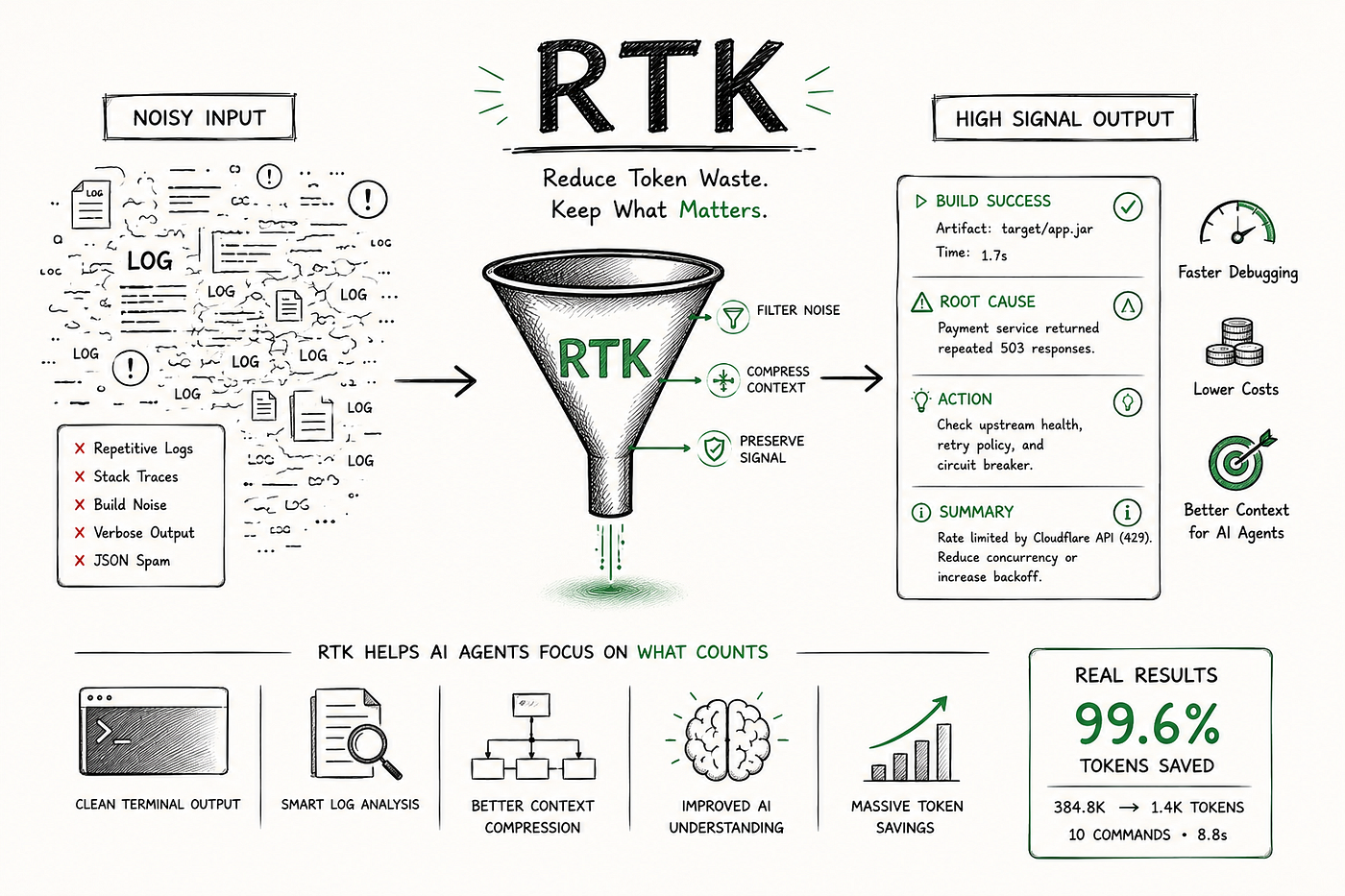
AI agents often consume huge amounts of terminal noise before they reach the useful engineering signal.
This becomes very visible in Java and Spring Boot projects, where common commands can produce thousands of lines of output:
- Maven build logs
- Spring Boot startup output
- Repeated application logs
- stack traces
- JSON logs
- retry loops
- CI-style command output
Most of that output is useful for machines, but not always useful for an AI agent.
An AI agent usually does not need 3,000 repeated log lines. It needs the root cause, the repeated pattern, and the actionable fix.
That is where RTK becomes interesting.
What RTK Does
RTK acts as a context optimization layer between terminal output and AI coding agents.
Instead of sending raw terminal output directly into the AI context, RTK can filter, summarize, and compress noisy output.
The goal is not just shorter terminal output.
The real goal is:
- less low-value context reaching the AI model
- lower latency
- reduced context-window pressure
- less reasoning noise
- lower operational cost during long-running AI sessions
- better focus on the actual engineering problem
RTK is an open-source CLI tool available here:
In this article, I used RTK as a context optimization layer for terminal-based AI coding workflows using Java, Spring Boot, Maven, and Gemini CLI.
Test Setup
For this test, I used:
Java
Spring Boot
Maven
Gemini CLI
RTK
The test project generated three noisy runtime scenarios:
- Repeated service retry logs
- Repeated stack trace output
- Repeated structured JSON logs
I used Gemini CLI as the AI coding agent and asked it to run every command through RTK explicitly.
The Prompt Used in Gemini CLI
Run every command through RTK explicitly.

Use exactly these shell commands:

1. rtk mvn clean package -DskipTests

2. java -Ddemo.mode=noise -jar target/rtk-java-token-demo-1.0.0.jar 2>&1 | rtk log

3. java -Ddemo.mode=stacktrace -jar target/rtk-java-token-demo-1.0.0.jar 2>&1 | rtk log

4. java -Ddemo.mode=json -jar target/rtk-java-token-demo-1.0.0.jar 2>&1 | rtk log

After each command, summarize:

. important signal
. repeated noise removed
. what the AI actually needed
The important detail is this pattern:
some-command 2>&1 | rtk logThis was the most effective way to route noisy runtime output into RTK.
Command 1 (Maven Build)
rtk mvn clean package -DskipTestsThis command built the Spring Boot application.
Important signal:
BUILD SUCCESSThe AI needed to know:
- Did the build succeed?
- Was the jar created?
- Were there any important warnings?
RTK reported:
Tokens saved: 307

Average saving: 40.9%
This is useful, but not the biggest win. Maven build output was not the main source of waste.
Command 2 (Repeated Application Logs)
java -Ddemo.mode=noise -jar target/rtk-java-token-demo-1.0.0.jar 2>&1 | rtk logThis generated thousands of repeated service retry logs.
Gemini saw the RTK summary:
Log Summary
[error] 0 errors
[warn] 0 warnings
[info] 3003 info messages
The raw output contained thousands of repeated lines, but the AI did not need all of them.
The AI needed:
- the log pattern
- whether there were errors
- whether warnings existed
- whether the service was producing repeated noise
Command 3 (Repeated Stack Trace Output)
Stack traces are one of the easiest ways to destroy an AI context window.
A repeated Java/Spring stack trace can include:
- framework internals
- Repeated JVM reflection frames
- launcher frames
- duplicated exception chains
In this case, RTK compressed the output into a short summary:
Log Summary

[error] 0 errors

[warn] 0 warnings

[info] 3 info messages
For AI debugging, the agent usually needs:
- exception type
- application-level frame
- root cause
- actionable fix
It does not need the same stack trace repeated many times.
Command 4 (Repeated JSON Logs)
java -Ddemo.mode=json -jar target/rtk-java-token-demo-1.0.0.jar 2>&1 | rtk logStructured logs are useful, but they can also become extremely repetitive.
The runtime emitted thousands of JSON log lines. RTK reduced them to:
Log Summary

[error] 0 errors

[warn] 0 warnings

[info] 2003 info messages
The AI needed to know:
- How many events occurred
- whether any errors existed
- whether any warnings existed
- whether the JSON stream contained state changes or failures
It did not need every repeated JSON object.
Final RTK Result
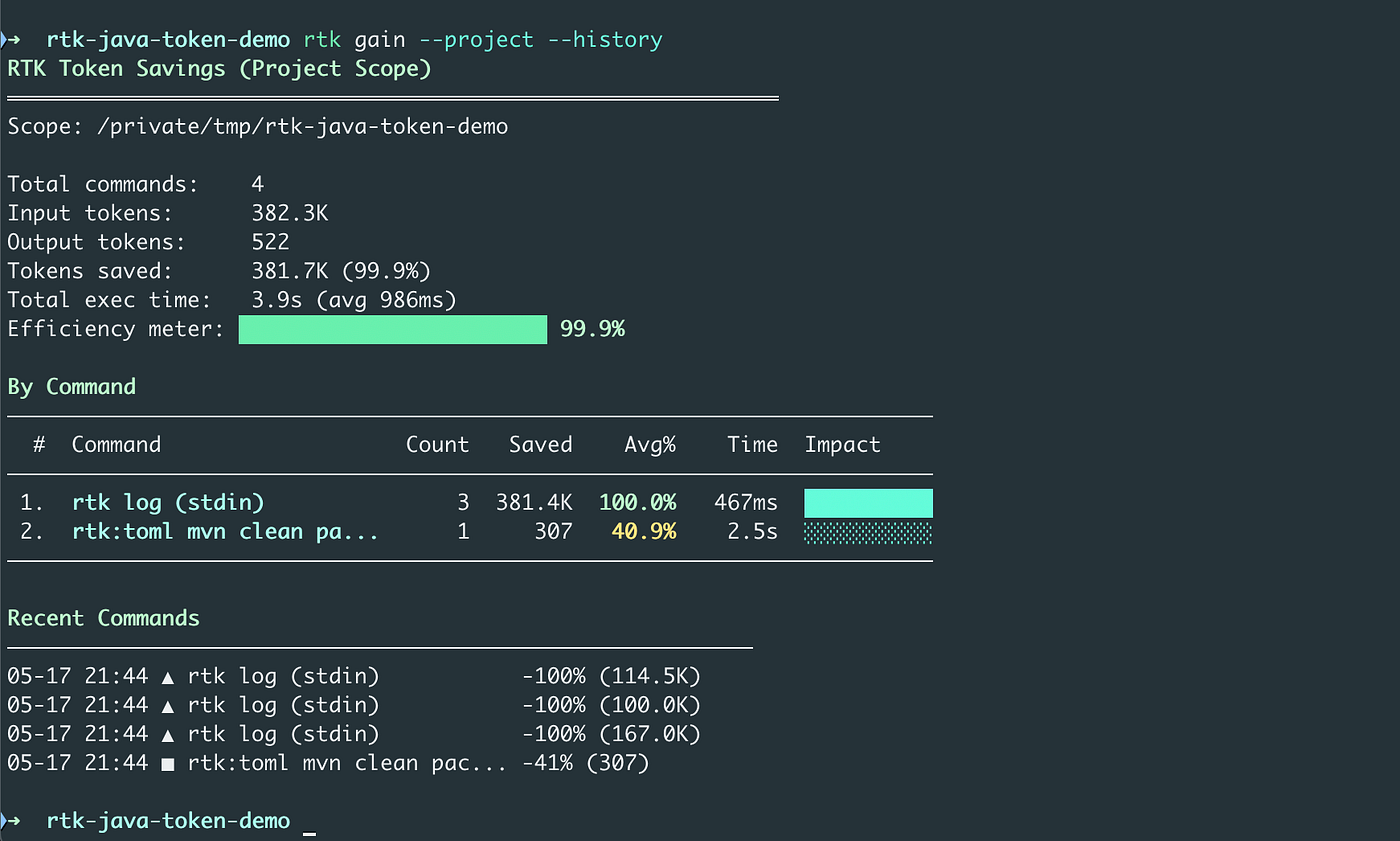
After the Gemini CLI session, I ran:
rtk gain --project --historyRTK reported:
Total commands:    4

Input tokens:      382.3K

Output tokens:     522

Tokens saved:      381.7K (99.9%)

Total exec time:   3.9s (avg 986ms)
Command-level breakdown:
rtk log (stdin)               Count: 3   Saved: 381.4K   Avg: 100.0%

rtk:toml mvn clean package    Count: 1   Saved: 307      Avg: 40.9%
Recent command history:
rtk log (stdin)           -100% (114.5K)

rtk log (stdin)           -100% (100.0K)

rtk log (stdin)           -100% (167.0K)

rtk:toml mvn clean pack... -41%  (307)
This shows how quickly a terminal-based AI coding session can consume tokens, even in a small demo project.
The more raw output the agent reads, the more context pressure it creates.
The Important Lesson
The biggest improvement did not come from Maven.
It came from this pattern:
some-noisy-command 2>&1 | rtk logThat is the practical workflow.
For Java and Spring Boot projects, this is useful for:
java -jar app.jar 2>&1 | rtk logmvn spring-boot:run 2>&1 | rtk logkubectl logs deployment/my-service 2>&1 | rtk logdocker logs my-container 2>&1 | rtk logcat ci-output.log | rtk logWhat This Means for AI Coding Agents
AI coding agents should not receive raw terminal output by default.
They should receive high-signal context.
A good AI context should include:
- root cause
- error category
- warning count
- Repeated pattern summary
- affected service
- actionable fix
- example log line if needed
It should not include:
- thousands of repeated retries
- duplicate stack traces
- Repeated JSON objects
- Maven boilerplate
- framework internals unless relevant
- progress logs
- unchanged repetitive output
This is context hygiene.
Practical CLI Cheat Sheet
Reset RTK metrics
rtk gain --reset --yesRun the Maven build through RTK
rtk mvn clean package -DskipTestsFilter noisy runtime logs
java -jar target/app.jar 2>&1 | rtk logFilter Spring Boot logs
mvn spring-boot:run 2>&1 | rtk logShow project savings
rtk gain --projectShow command history
rtk gain --project --historyUse with Gemini CLI
geminiThen ask Gemini to run commands through RTK explicitly.
Honest Limitation
RTK does not magically reduce every command.
In my test, the main savings came from:
rtk log (stdin)The Maven build had moderate savings:
40.9%The runtime logs had massive savings:
~100%That means RTK is most valuable when the output is repetitive, noisy, or log-heavy.
Final Thought
The future of AI coding is not only about better models or larger context windows.
It is also about better context discipline.
If AI agents are going to operate inside real engineering environments, they need cleaner input.
RTK is interesting because it treats terminal output as something that should be optimized before it reaches the model.
In this Java/Spring Boot + Gemini CLI test, the project-level token waste was reduced by 99.9%.
That is not just a token optimization.
That is AI context infrastructure.
메타데이터
- post_id
- ec420dfd8bb2
- slug
- reducing-ai-coding-agent-token-waste-with-rtk-a-java-spring-boot-gemini-cli-scenario-ec420dfd8bb2
- url
- https://medium.com/vibecodingpub/reducing-ai-coding-agent-token-waste-with-rtk-a-java-spring-boot-gemini-cli-scenario-ec420dfd8bb2
- canonical_url
- https://medium.com/vibecodingpub/reducing-ai-coding-agent-token-waste-with-rtk-a-java-spring-boot-gemini-cli-scenario-ec420dfd8bb2
- author_url
- https://medium.com/@mbanaee61
- status
- ok
- fetched_at
- 2026-06-27 07:40:21