A New Ad Fraud Trend: “AfterCall” Ads
Written By: Nir Danon
A New Ad Fraud Trend: “AfterCall” Ads
Written By: Nir Danon

Picture this: you visit your mom, and she asks you to help her with her phone. She tells you, “I think I have a virus.” Every time she hangs up a call, an ad pops up. Sometimes it’s for a game, a shopping service or a random app. Thinking she may have downloaded a suspicious app, you take a look, check her recent apps, scan for shady-looking ones and review her browsing and download history. Nothing suspicious, but the ads keep coming. It looks something like this:
![[Notice the large ad at the bottom once the phone call ends.]](https://miro.medium.com/v2/resize:fit:380/1*rWDwy-_B2yLHCc2MciG-hQ.gif)
[Notice the large ad at the bottom once the phone call ends.]
We call such ads “AfterCall” ads. They appear at the end of a phone call, outside the app’s normal context. App platforms have always been fighting these out-of-context apps and have implemented different and increasingly effective protection mechanisms. They scan apps before submitting them to the app store and prompt users to uninstall apps that have already been classified as malicious, with apps displaying out-of-context ads at the top of their priority list.
Yet fraudsters continue to adapt their methods to evade platforms’ efforts and keep pushing these low-quality inventory apps. The DV Fraud Lab has witnessed a suspicious and significant spike in out-of-context apps that use a rather simple mechanism: displaying ads after a user places a phone call on their mobile device, and so dubbed “AfterCall ads”.
How It Works
All AfterCall apps we have analyzed follow a fairly similar flow, consisting primarily of three parts: requesting special permissions from the user under false pretense, a Broadcast Receiver to handle end-of-call events and an Activity to display ads.
The permission that makes it all possible
At this stage, you might think, “Wait, how is this allowed?” Can any random app just take over my entire phone and show ads whenever it wants? The answer is, of course, not. But the fraudsters rely on the oldest tricks in the book — deception, and the user’s lack of knowledge — to obtain the permission that allows this behavior.
Android strictly controls the “Display over other apps” permission (SYSTEM_ALERT_WINDOW). Unlike normal permissions, it cannot be granted through the usual in-app pop-up dialog. Instead, the developer redirects the user to the Settings app to make the decision more deliberate.
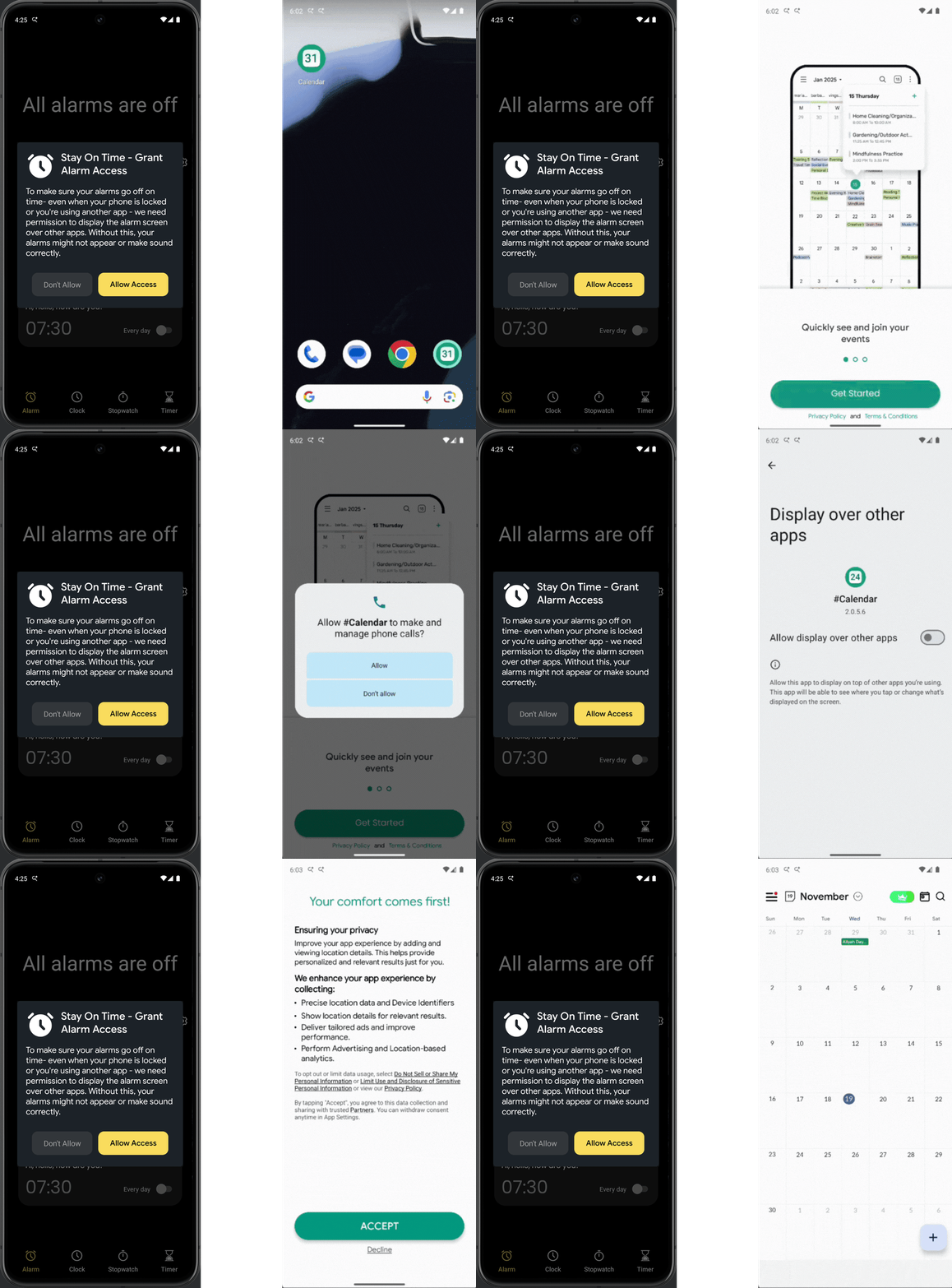
Yet malicious developers still manage to work around this safeguard by manipulating the user journey. On the app’s first launch, it requests the user’s permissions, a standard procedure in most apps. However, AfterCall apps usually attempt to deceive the user into granting the “Display over other apps” permission by claiming they need it for legitimate reasons, when in reality it’s used to show AfterCall ads. Most non-technical users simply tap through, unaware of the consequences.
Below are two examples:
- On the left, we see that during the onboarding stage, it prompts the user with a plausible reason for requesting the permission (which may be true), but the permission is being abused.
- On the right, we see that the fraudulent app blocks the UI until the user grants overlay permissions, prompting most users to agree to continue using the app.
The Call-State Receiver
To understand how the fraudsters “hook” the end-of-call event, we first need to understand what Receivers are in Android.
Android has a distinctive approach to cross-application communication built around Intents and Broadcast Receivers. The operating system and user apps can send Intents, small messages that describe an event. Apps can implement Receivers to listen for these Intents and act accordingly. It resembles a publish–subscribe model, where any app can opt in to receive the broadcast.
For instance, when you receive a phone call, the TelephonyManager component, which handles calls on the device, broadcasts an ACTION_PHONE_STATE_CHANGED Intent with the state set to RINGING. For example, a typical music streaming app will listen for this Intent and pause the music when it receives it so that you can hear the ringtone. When the call ends, TelephonyManager broadcasts another ACTION_PHONE_STATE_CHANGED Intent with the state set to IDLE, signaling that the call is over. The music app can then resume.
This kind of communication is part of what makes our phones feel so fluent and responsive. However, this can also be exploited by apps with ulterior motives. Fraudsters often use it to trigger the out-of-context behavior in their apps.
All apps exhibiting the AfterCall behavior implement their own BroadcastReceiver, which listens for the same telephony intents described above. They wait for the phone call to finish, then fire the ACTION_PHONE_STATE_CHANGED intent with the state set to IDLE, and use that signal to display an ad to the user.
![[declaration of the receiver in AndroidManifest.xml]](https://miro.medium.com/v2/resize:fit:1400/1*K16lML6jlcZPG1BN1FmgVA.png)
[declaration of the receiver in AndroidManifest.xml]
In the receiver declaration above, we can notice a few things: first, the receiver sets its priority to an unusually high value (998), likely to run first in case multiple receivers are listening to the same broadcast. We can also see the PHONE_STATE intent (highlighted), which it specifically requests. In addition, it registers for events such as device startup, app updates and power connection, all of which allow the app to persist and stay in memory, increasing its chances of displaying AfterCall ads. Note that the developer appears to have mistakenly placed a permissions declaration inside an intent-filter tag. Such errors reflect how low-quality these apps usually are, which is also visible in their app activity design.
The Ad Display Activity
While the receiver handles the event logic, the Activity handles what the user actually sees. When it opens, it displays an ad like the one shown below:
![[Ad display activity from different AfterCall apps]](https://miro.medium.com/v2/resize:fit:1400/1*YghDzncfa3-BYv3NeTLLSA.png)
[Ad display activity from different AfterCall apps]
There are a few things worth noting here. First, these apps’ activities are remarkably similar, even though the actual apps are very different — they all have the same design: call details, a facade about how it relates to the app, a “profile picture,” and always an ad placed underneath.
![[Declaration of the activity in AndroidManifest.xml]](https://miro.medium.com/v2/resize:fit:1260/1*Kix2b5H1iOSmb-S-nWStwg.png)
[Declaration of the activity in AndroidManifest.xml]
We can also see from the GIF in the introduction and the activity declaration above that the developers employ evasion techniques. When the AfterCall ad activity appears, it removes itself from the recent apps list. This means that when a user is trying to identify which app is taking over their phone after each phone call, they won’t be able to trace it back to the malicious app, reducing the rate of uninstalls and increasing revenue.
At first glance, the app icons in the top-right corner may seem like a clue. Still, the developers deliberately select icons that resemble everyday utilities, such as a clock, notes or calendar. For the average non-technical user, these icons appear completely harmless, making it unlikely they’d connect the behavior to the fraudulent app.
Detection Difficulties and Impact
Detecting the AfterCall fraud trend is not an easy task. A static signature, such as matching a package name or class name, is ineffective since each developer implements their own variation. A dynamic signature of behavioral patterns is also insufficient, as legitimate apps (like caller ID apps) use the same after-call events. As a result, they often slip through the cracks in the platforms’ pre-installation scans. Because they use evasion mechanisms, user reporting alone is often insufficient — which is why collaboration between independent verification providers and platforms is essential. DV’s AI-powered detection methods successfully detect this scheme in all variations we observed.
The impact is also significant: DV FraudLab uncovers dozens of these apps every month, collectively responsible for hundreds of millions of impressions. Not only is the ad budget wasted, but the user experience is also frustrating, and in turn, it severely damages the brand’s reputation as users associate advertisers with malicious behavior.
The user experience is the most significant pain point of this tactic. When advertisers invest in ad campaigns, their goal is to build brand awareness and create positive associations with their brand among potential customers. But a user who is repeatedly bombarded with intrusive AfterCall ads, unable to understand where they come from or why they appear, ends up experiencing the opposite effect. Instead of developing trust, the user associates the brand shown in the ad with malicious, disruptive behavior on their device. This is yet another reason advertisers should always use DV’s fraud detection and brand awareness; it is not enough to put in more spend, they must also ensure the ads are served fairly.
메타데이터
- post_id
- ec44279843b2
- slug
- a-new-ad-fraud-trend-aftercall-ads-ec44279843b2
- url
- https://medium.com/doubleverify-engineering/a-new-ad-fraud-trend-aftercall-ads-ec44279843b2
- canonical_url
- https://medium.com/doubleverify-engineering/a-new-ad-fraud-trend-aftercall-ads-ec44279843b2
- author_url
- https://medium.com/@dv-engineering
- status
- ok
- fetched_at
- 2026-07-14 20:46:09