Snowflake Cortex Search vs Cortex Analyst vs Cortex Code: The Complete Guide
Snowflake Cortex Search vs Cortex Analyst vs Cortex Code: The Complete Guide
Three powerful AI capabilities, one platform — but they solve completely different problems. Here’s how to pick the right one (and when to use all three together).
Tejas Ugale( Data Consultant @Snap Analytics)
7 min read · May 2026 · Snowflake Builders Blog
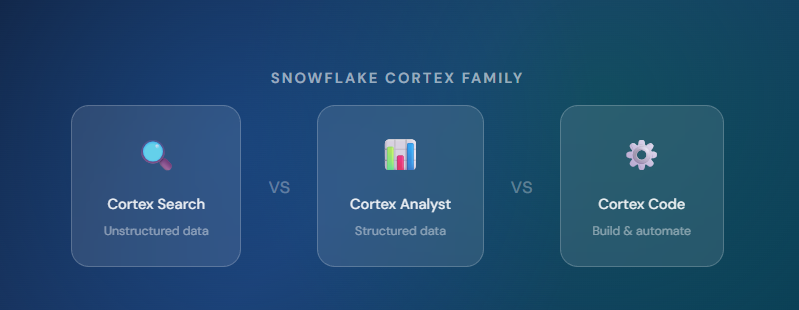
The Quick Choice
- Use Cortex Search when your data is unstructured — documents, tickets, reviews, transcripts.
- Use Cortex Analyst when your data is structured — tables, metrics, dashboards, SQL.
- Use Cortex Code when you want to build or automate — pipelines, dbt, SQL generation.
- Use Cortex Agents when you need all three working together in a single workflow.
Snowflake has shipped a lot under the “Cortex” banner. If you’ve been confused about when to use Cortex Search versus Cortex Analyst versus Cortex Code — you’re not alone. The names are similar. They all involve natural language. They all live inside Snowflake. But they are solving fundamentally different problems.
This guide breaks it down clearly: what each does, where each shines, real examples with code, and a decision framework you can actually use.
The Core Idea: Three Layers of Intelligence
Think of the Cortex suite as three distinct layers inside your Snowflake environment:
🔍 Layer 1: Cortex Search (Unstructured → Retrieval)
Retrieves answers from unstructured text using semantic embeddings and keyword ranking. Think RAG without the plumbing.
📊 Layer 2: Cortex Analyst (Structured → Analytics)
Translates natural language into SQL on structured tables and semantic models. Powered by an LLM that understands your schema.
⚙️ Layer 3: Cortex Code (Instructions → Code)
An AI coding agent that builds your data infrastructure — dbt models, Airflow DAGs, Streamlit apps, Snowflake admin — from plain English.
The Golden Rule: The key decision is not the tool — it’s the data type + what you’re trying to do with it. Is your data in tables or in documents? Do you want to query it, retrieve from it, or build something on it?
🔍 Cortex Search — AI Over Unstructured Data
Cortex Search is Snowflake’s managed RAG (Retrieval Augmented Generation) service. You point it at text columns (customer reviews, support tickets, call transcripts, legal documents, knowledge base articles) and it creates a search index using vector embeddings + keyword matching (BM25).
How it works under the hood

Setting it up (it’s just SQL)
SQL
-- Step 1: Create the search service on your text column
CREATE OR REPLACE CORTEX SEARCH SERVICE support_search
  ON ticket_text
  ATTRIBUTES category, priority
  WAREHOUSE = my_wh
  TARGET_LAG = '1 hour'
  AS SELECT
      ticket_id,
      ticket_text,
      category,
      priority
  FROM support_tickets;
Python
# Step 2: Query it in Python (REST / Snowpark)
response = root.databases['mydb'] \
    .schemas['public'] \
    .cortex_search_services['support_search'] \
    .search(
        query="payment failed but charged",
        columns=["ticket_text", "category"],
        limit=5
    )
When to use Cortex Search
- Customer support chatbots over ticket history (classic RAG use case).
- Document search over contracts, policies, or manuals (semantic + keyword hybrid).
- Finding similar call transcripts or reviews via fuzzy/semantic similarity.
- Knowledge base Q&A for internal teams where no SQL knowledge is required.
📊 Cortex Analyst — Natural Language to SQL
Cortex Analyst is for your structured data. It’s an LLM-powered layer that sits on top of your Snowflake tables and semantic models, letting business users ask questions like “Which customers had the highest revenue last quarter?” — and getting back accurate, auditable SQL results.
The key ingredient is the Semantic Model — a YAML file you define once that maps your business terminology to your actual schema. This is what makes Cortex Analyst accurate, not just fluent.

The Semantic Model (The Secret Sauce)
YAML
# semantic_model.yaml
name: sales_model
tables:
  - name: orders
    description: "All customer orders"
    base_table:
      database: prod
      schema: public
      table: orders
    measures:
      - name: total_revenue
        description: "Sum of order values"
        expr: SUM(order_value)
        data_type: number
    dimensions:
      - name: customer_segment
        description: "Customer tier: enterprise, mid-market, smb"
        expr: customer_segment
verified_queries:
  - name: top_customers_by_revenue
    question: "Which customers had the highest revenue last quarter?"
    sql: |
      SELECT customer_name, SUM(order_value) as revenue
      FROM orders
      WHERE DATE_TRUNC('quarter', order_date) = DATE_TRUNC('quarter', DATEADD('quarter',-1,CURRENT_DATE()))
      GROUP BY 1 ORDER BY 2 DESC LIMIT 10
Why Auditability Matters: In regulated industries, you can’t hand an executive an AI-generated number without showing your work. Cortex Analyst surfaces the SQL behind every answer — the business user sees the result and the query that produced it. That’s trust.
⚙️ Cortex Code — The AI Builder
While Search and Analyst query your data, Cortex Code builds your data infrastructure. Operating in Snowsight and via CLI, this AI coding agent generates production-ready SQL, Python, dbt models, Airflow DAGs, and Streamlit apps from plain English descriptions.
Think of it as having a senior data engineer pair-programming with you — one who knows your Snowflake schema, understands your semantic models, and writes clean diffs for your review.
What Cortex Code can build:
- SQL transformations & CTEs: “Create a churn risk score table joining orders, sessions, and support.”
- dbt models & tests: “Create a dbt model for monthly active users with a not-null test.”
- Cortex Agents: “Build an agent that uses Analyst for metrics and Search for transcripts.”
- Streamlit dashboards: “Build a churn dashboard with filters by region and segment.”
Side-by-Side Comparison

Real-World Scenarios
Scenario 1: Support team wants to find similar tickets ➔ Use Cortex Search
- The Query: “Find all tickets similar to ‘double charge after crash’ from the last 90 days.”
- Why: Cortex Search uses vector embeddings to find semantically similar tickets — even ones that don’t use the exact words “double charge”. You are looking for relevant text, not aggregates.
Scenario 2: VP of Sales asks “Why did revenue drop last month?” ➔ Use Cortex Analyst
- The Query: “Show me revenue by segment this month vs last month, and flag any that dropped more than 10%.”
- Why: Revenue lives in structured tables. A drop requires aggregation,
GROUP BY, and comparison logic. That’s SQL territory.
Scenario 3: Data engineer wants to build a churn model pipeline ➔ Use Cortex Code
- The Query: “Build a dbt model called customer_churn_risk that joins orders, support_tickets, and product_events…”
- Why: Analyst is for querying existing data. You want to build new infrastructure — a dbt model that runs daily and writes to a table.
Scenario 4: Customer Success Manager wants a full picture ➔ Use all three via Cortex Agent
- The Query: “Give me an account briefing for Acme Corp: revenue trend last 6 months, their top 3 support themes, and any renewal clauses from their contract.”
- Why: This is a multi-step workflow. A Cortex Agent acts as an orchestrator, routing the revenue query to Analyst and the support themes/contracts to Search, then synthesizing the final brief.

Common Mistakes to Avoid
- ❌ Using Cortex Search for analytics. “How many tickets were filed last week?” is a count query — it belongs in Cortex Analyst (or plain SQL). Search retrieves content; it doesn’t aggregate.
- ❌ Using Cortex Analyst for document retrieval. “Find contracts that mention auto-renewal” is a semantic retrieval task. Analyst writes SQL — it can’t perform fuzzy text matching across free-form documents without an underlying search index.
- ❌ Skipping the Semantic Model for Analyst. Without a semantic model, Cortex Analyst is forced to guess your business definitions. Spend the hour to define it once — you’ll get dramatically more accurate results.
- ❌ Using Cortex Agent for simple single-step queries. If you just need a revenue number, call Analyst directly. The Agent orchestration layer adds unnecessary latency for single tasks.
- ❌ Treating Cortex Code as a one-shot code generator. It’s most powerful when used iteratively. Describe the outcome, review the plan, and check the diffs.
Quick Decision Framework
Pick your tool in 3 questions:
- Is your data in text fields / documents? ➔ Cortex Search
- Is your data in structured tables and you want analytics? ➔ Cortex Analyst
- Do you want to build, automate, or scaffold infrastructure? ➔ Cortex Code
- Do you need structured + unstructured + reasoning in one flow? ➔ Cortex Agent
“These are not interchangeable features — they represent different layers of an AI-native architecture inside Snowflake.”
The future of data platforms isn’t just faster queries — it’s building systems where intelligence operates natively across structured and unstructured data, allowing developers to spend less time on boilerplate and more time on logic that matters. Snowflake Cortex gives you all three layers. Now you know which one to reach for.
#Snowflake #DataEngineering #ArtificialIntelligence #MachineLearning #DataArchitecture #SQL #RAG
👏 If you found this useful, share it with your data team!
메타데이터
- post_id
- ec51e3944d4f
- slug
- snowflake-cortex-search-vs-cortex-analyst-vs-cortex-code-the-complete-guide-ec51e3944d4f
- url
- https://medium.com/@tejasugale45/snowflake-cortex-search-vs-cortex-analyst-vs-cortex-code-the-complete-guide-ec51e3944d4f
- canonical_url
- https://medium.com/@tejasugale45/snowflake-cortex-search-vs-cortex-analyst-vs-cortex-code-the-complete-guide-ec51e3944d4f
- author_url
- https://medium.com/@tejasugale45
- status
- ok
- fetched_at
- 2026-06-17 08:20:12



