Using SpaCy for Sentiment analysis of Customer reviews
Disclaimer: This blog post reflects my learning. It’s not something new that I crafted myself from the SpaCy library. This is for someone…
Using SpaCy for Sentiment analysis of Customer reviews
Disclaimer: This blog post reflects my learning. It’s not something new that I crafted myself from the SpaCy library. This is for someone like me who is trying to learn how to use text data for machine learning models.
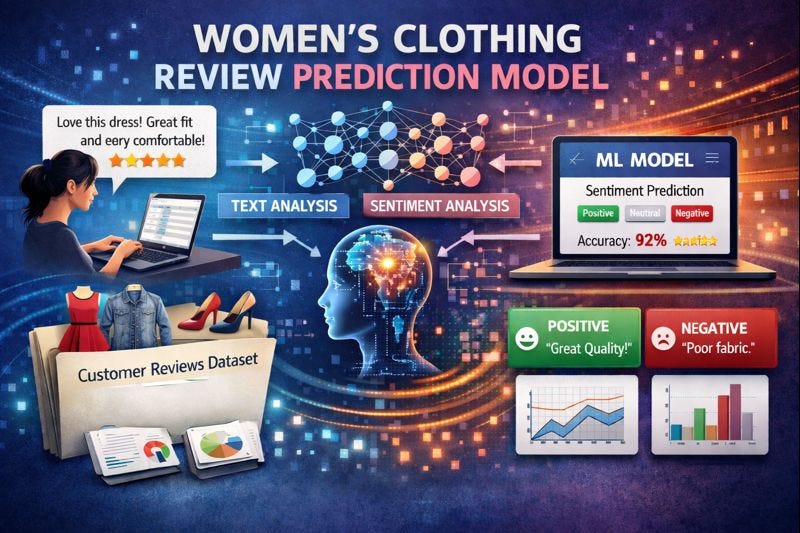
Image created using ChatGPT
Ever wondered how the E-commerce companies are using the valuable reviews left by billions of customers around the globe. How are these reviews monitized by those companies? What can machine learning models decode from the raw text ? These were the initial questions that popped in my mind when i started to analyse the Women’s E-commerce clothing reviews Dataset.
The following features are available within the dataset:
- Clothing ID: Integer categorical variable that refers to the specific piece being reviewed.
- Age: Positive integer variable of the reviewer’s age.
- Title: String variable for the title of the review.
- Review Text: String variable for the review body.
- Positive Feedback Count: Positive integer documenting the number of other customers who found this review positive.
- Division Name: Categorical name of the product’s high-level division.
- Department Name: Categorical name of the product’s department.
- Class Name: Categorical name of the product’s class.
The target:
- Recommended IND: Binary variable stating whether the customer recommends the product, where 1 is recommended and 0 is not recommended.
Title and Review Text are the ones needed for further analysis.
Part 1: Exploratory Data Analysis of Text data
We humans use a lot of stop words in our day-to-day communication. These words are needed to form a proper sentence and communicate what you wish to say. Sadly, these words are of zero importance to machines. You see, machines don’t like to dwell on topics that are irrelevant. To them, you need to be precise and direct. See for yourself the count of stop words used in the Review Text, which has roughly 22,000 rows.
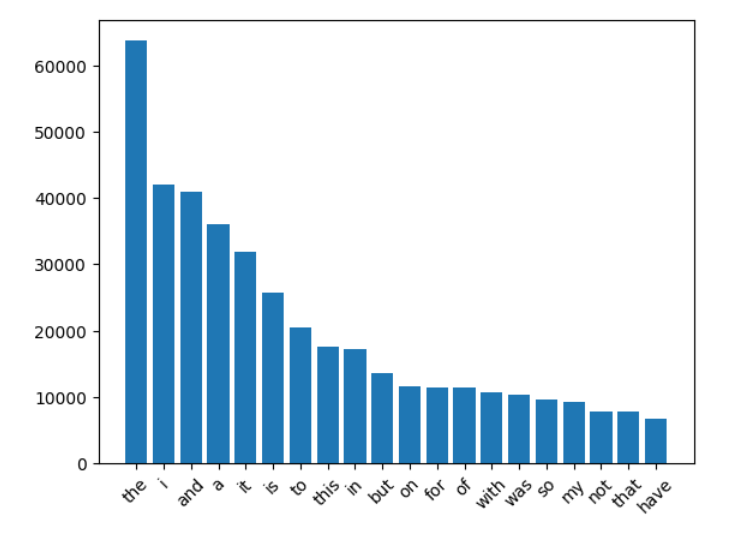
Image showing the count of stop words in Review Text
When analyzing reviews, one should keep an eye on adjectives being used. Below, we can see that adjectives like great, perfect, and flattering, to name a few, are used very often. Without contextual meaning, we are biased to conclude these reviews as positive. On the other hand, adjectives like small, little, short, big, tight, etc., in the context of clothing reviews, voice negativity.
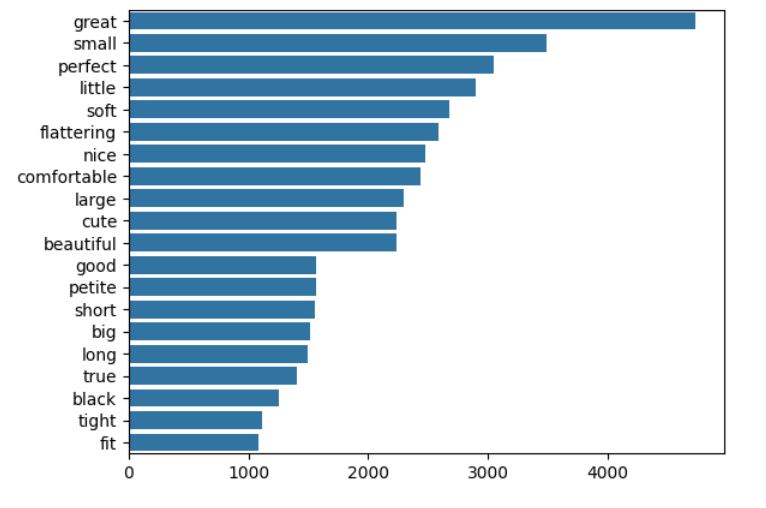
Adjectives used in the reviews
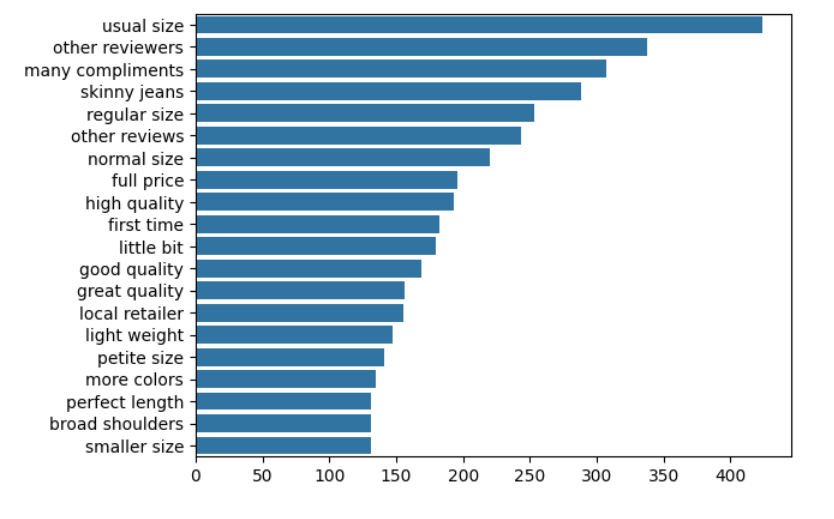
Digging further into adjectives, certain patterns of words were used often by customers in their reviews. Below, we can see the pattern ADJ followed by NOUN in the reviews.
Part 2: Scikit-learn Pipelines for text features
When it comes to analyzing text features, the first thing to be performed is to convert the whole text into lemmatized strings. This helps in the later stages when we create a vectorizer from the text features. Below, you can find a Scikit-learn-style class to lemmatize the passed text features.
class SpacyLemmatizer(BaseEstimator, TransformerMixin):
    """
    A scikit-learn compatible transformer that lemmatizes texts using a provided
    spaCy NLP pipeline and returns a list of lemmatized strings.

    For each input text, this transformer uses ``nlp.pipe`` (batched processing)
    to tokenize and lemmatize tokens, skipping stop words. Lemmas are optionally
    passed through a translation table (e.g., to strip punctuation) via ``str.translate(tab)``.
    The output is a 1D list of lemmatized strings, one per input sample.

    Example:
        >>> import spacy
        >>> nlp = spacy.load("en_core_web_sm")
        >>> lemmatizer = SpacyLemmatizer(nlp)
        >>> X = ["Alice was running quickly.", "They have been building cars."]
        >>> lemmatized = lemmatizer.fit_transform(X)
        >>> lemmatized  # doctest: +SKIP
        ['Alice run quickly', 'They have build car']

    Notes:
        - Non-string inputs in ``X`` may raise errors during processing; ensure
          inputs are strings or pre-coerce them.
        - Uses ``nlp.pipe(X)`` for efficiency. You can pass additional kwargs
          (e.g., ``batch_size``) by modifying the code if needed.
        - Stop words are excluded via ``token.is_stop``. If you prefer to keep
          stop words, remove the check.
        - ``tab`` must be defined in the surrounding scope if you intend to
          call ``token.lemma_.translate(tab)``; otherwise, drop ``translate(tab)``.
        - The transformer is stateless; ``fit`` is a no-op and returns ``self``.

    Args:
        nlp: A spaCy NLP pipeline (e.g., ``spacy.load("en_core_web_sm")``) that
            provides token lemmas via ``token.lemma_`` and stopword flags via
            ``token.is_stop``.

    Returns:
        During ``transform``, returns ``List[str]``—one lemmatized string per input sample.

    """

    def __init__(self, nlp):
        self.nlp = nlp

    def fit(self, X, y=None):
        return self

    def transform(self, X):
        lemmatized_text = []
        for doc in self.nlp.pipe(X):
            lemmas = []
            for token in doc:
                if not token.is_stop:
                    lemmas.append(token.lemma_.translate(tab))
            lemmatized_text.append(' '.join(lemmas))
        return lemmatized_text
Further, I used two vectorizers for text data analysis. First, I used the classic TF-IDF after lemmatizing the review feature. Considering the computational power needed during modeling, I restricted the maximum features to 500, and the lemmatized text has to be present in at least three reviews.
tfidf_pipeline = Pipeline([
    ('lemmatizer',SpacyLemmatizer(nlp=nlp),),
    ('tfidf_vectorizer',TfidfVectorizer(max_features=500,min_df=3,stop_words='english',ngram_range=(1,2)),),
])
Next, I created a DictVectorizer to count the Named Entity Recognition labels and parts-of-speech tags in the review feature.
Counting Named Entity Recognition Labels
In order to count the NER labels, I created a class inheriting from the BaseEstimator and TransformerMixin classes of Scikit-learn. NERCounter returns a list of dictionaries with each label and the corresponding count in the text feature.
class NERCounter(BaseEstimator, TransformerMixin):
    """
    A scikit-learn compatible transformer that counts named entities per label
    using a provided spaCy-like NLP pipeline.

    This transformer expects an iterable of texts, runs NER on each text via
    ``self.nlp`` (e.g., a spaCy pipeline), and returns a list of dictionaries.
    Each dictionary maps entity labels (e.g., "PERSON", "ORG") to their counts
    in the corresponding text. If ``labels`` is provided, only those labels are
    counted; otherwise, all entity labels found by the model are counted.

    Typical usage is to chain this with ``DictVectorizer`` to obtain a numeric
    feature matrix suitable for machine learning models.

    Example:
        >>> import spacy
        >>> from sklearn.feature_extraction import DictVectorizer
        >>> nlp = spacy.blank("en")
        >>> # (In practice, load an NER-enabled model, e.g. `spacy.load("en_core_web_sm")`)
        >>> ner = NERCounter(nlp, labels=["PERSON", "ORG"])
        >>> X = ["Alice works at Acme Corp.", "Bob joined Foo Inc. in 2020."]
        >>> dicts = ner.fit_transform(X)
        >>> dicts
        [{'PERSON': 1, 'ORG': 1}, {'PERSON': 1, 'ORG': 1}]
        >>> vec = DictVectorizer(sparse=True)
        >>> X_vec = vec.fit_transform(dicts)  # shape (2, 2)

    Notes:
        - The provided ``nlp`` object must expose a callable that accepts a string
          and returns a Doc-like object with a ``.ents`` iterable, where each
          entity has ``.label_``.
        - Non-string inputs are treated as empty strings.
        - The transformer is stateless; ``fit`` is a no-op and returns ``self``.

    Args:
        nlp: A spaCy-like NLP pipeline with named entity recognition enabled.
        labels (Iterable[str] | None, optional): If set, limit counting to these
            entity labels. If ``None``, count all labels found. Defaults to ``None``.

    Returns:
        During ``transform``, returns ``List[Dict[str, int]]`` where each dict maps
        entity labels to counts for one sample.

    """

    def __init__(self, nlp, labels=None):
        self.nlp = nlp
        self.labels = labels
    def fit(self, X, y=None):
        return self
    def transform(self, X):
        ents = []
        for text in X:
            doc = self.nlp(text if isinstance(text, str) else "")
            counts = {}
            for ent in doc.ents:
                if self.labels is None or ent.label_ in self.labels:
                    counts[ent.label_] = counts.get(ent.label_, 0) + 1
            ents.append(counts)
        return ents
Counting Parts-Of-Speech Tags
The class below, POSCounter, returns a list of dictionaries counting the number of parts-of-speech tags in the passed text. For example: how many nouns, verbs, or adjectives are present in the text.
class POSCounter(BaseEstimator, TransformerMixin):
    """
    Count part-of-speech (POS) tags per input text using a spaCy-like pipeline.

    Parameters
    ----------
    nlp : callable
        A spaCy-like pipeline that, when called with a string, returns a Doc-like
        object whose tokens expose the attribute ``pos_``.

    Returns
    -------
    List[Dict[str, int]]
        For each input sample, a dictionary mapping POS tag strings (e.g., "NOUN",
        "VERB", "ADJ") to their counts.

    Notes
    -----
    - Non-string inputs are coerced to empty strings.
    - This transformer is stateless; ``fit`` is a no-op.
    - Combine with :class:`sklearn.feature_extraction.DictVectorizer` to convert
      the list of dicts into a numeric feature matrix for modeling.

    Examples
    --------
    >>> import spacy
    >>> from sklearn.feature_extraction import DictVectorizer
    >>> nlp = spacy.load("en_core_web_sm")
    >>> pos_counter = POSCounter(nlp)
    >>> dicts = pos_counter.fit_transform(["Alice runs fast.", "Acme builds cars."])
    >>> vec = DictVectorizer(sparse=True)
    >>> X_vec = vec.fit_transform(dicts)
    """

    def __init__(self, nlp):
        self.nlp = nlp
    def fit(self, X, y=None):
        return self
    def transform(self, X):
        pos_count = []
        for text in X:
            doc = self.nlp(text if isinstance(text, str) else "")
            counts = {}
            for token in doc:
                counts[token.pos_] = counts.get(token.pos_, 0) + 1
            pos_count.append(counts)
        return pos_count
Good to know: All three pipelines do not analyze the content of the reviews. What they convey is just how a user writes a review. Is the person writing a lengthy review containing many POS tags or NER labels? Scoring the review based on the count of certain words is what I am trying to do.
Finally, bundling all the pipelines into a ColumnTransformer to preprocess the features based on their type.
feature_engineering = ColumnTransformer([
        ('num', num_pipeline, num_features),
        ('cat', cat_pipeline, cat_features),
        ('tfidf_title', tfidf_pipeline, 'Title'),
        ('tfidf_review', tfidf_pipeline, 'Review Text'),
        ('review_pos_count', pos_counts_pipe, 'Review Text'),
        ('words_count_title',words_counts_pipeline,'Title'),
        ('words_count_review',words_counts_pipeline,'Review Text'),
        ('review_ner_counts',ner_counts_pipe,'Review Text'),
],
        remainder="drop",
        verbose_feature_names_out=False,
        sparse_threshold=1.0
)
A complete list of preprocessing steps carried out using ColumnTransformer from Scikit-learn.
[embed]
Part 3: Model training using SVC
Finally, a pipeline for training the model using Support Vector Classifier.
# train a support vector machine classifier using a pipeline
model_pipeline = Pipeline([
                            ('features',feature_engineering),
                            ('svc',SVC(random_state=27))
                        ])
Using the initial parameters obtained after training the model on the training dataset for RandomizedSearchCV.
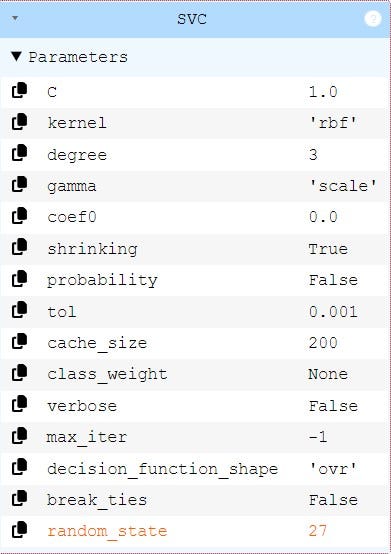
Fine-tuning the model using RandomizedSearchCV (using this because GridSearchCV takes too much time on my machine).
cv_strategy = StratifiedKFold(n_splits=5, shuffle=True, random_state=27)

#recall = make_scorer(recall_score, pos_label=0)

param_grid = [{'svc__C': [1,3,5,8,10,12],
               'svc__gamma': [0.08, 0.1, 0.12]
               }]

param_search = RandomizedSearchCV(
    estimator=model_pipeline,
    param_distributions=param_grid,
    n_iter=6,               # Try 6 different combinations of parameters
    cv=cv_strategy,         # Use 5-fold cross-validation
    n_jobs=-1,              # Use all available processors (for multiprocessing)
    refit=True,             # Refit the model using the best parameters found
    verbose=3,              # Output of parameters, score, time
    random_state=27,
)

param_search.fit(X_train, y_train)

# Retrieve the best parameters
param_search.best_params_
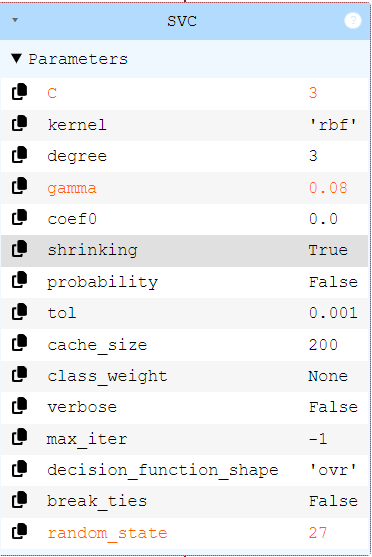
Finally, the best parameters after fine-tuning the model.
Part 4: Model evaluation
Here is the comparison of hyperparameters between the base and best models after tuning.
[embed]
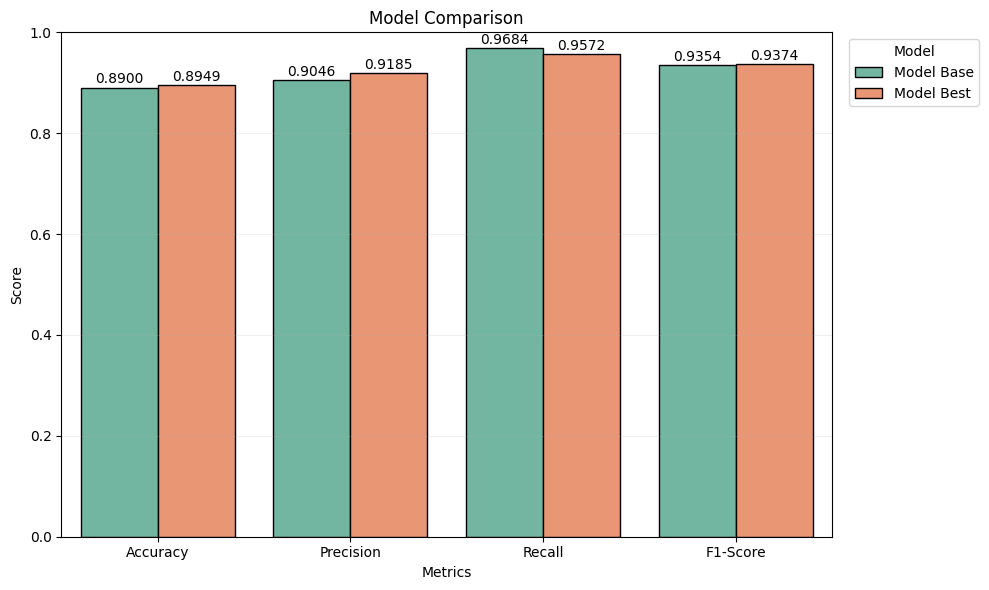
Here is how the evaluation metrics look for the base and best models. There seems to be a slight improvement for the best model, but it doesn’t justify the computational effort spent on model tuning.
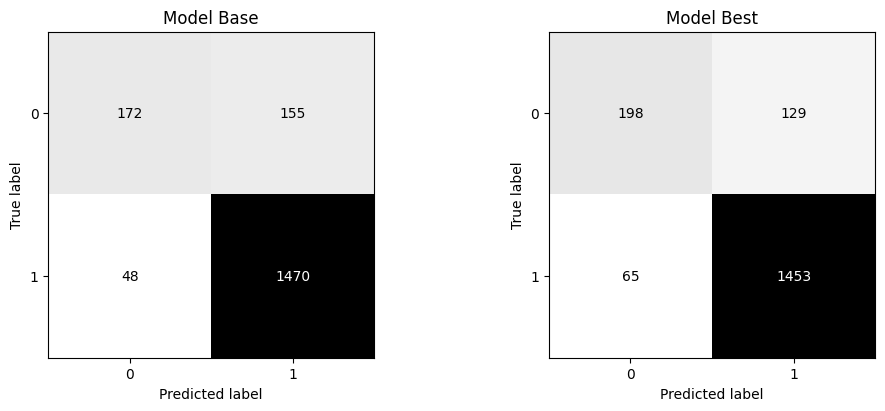
Moving on to the confusion matrix, the first and foremost thing that we infer is the imbalance between classes. There are more positive reviews than negative ones. Machine learning models perform well when the classes are equally distributed. Additionally, both models do not seem to perform well on the class with label 0 (not recommending the product). Missing out on this prediction could be critical when the company needs to work on the negative reviews of a product.
One final inference before closing out on this topic is about the classification report of the models. The classification report helps to understand the class-wise evaluation metrics. This is very important in this case because of class imbalance.
The classification report of the best model performs better than the base model in predicting both class labels.
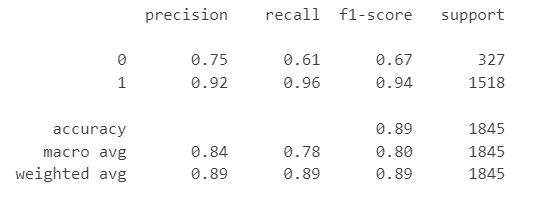
Classification report Best model
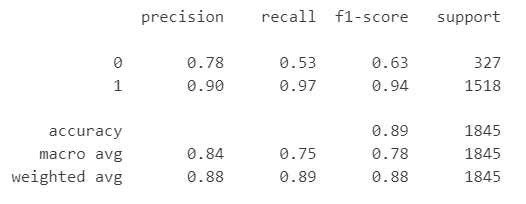
Classification report Base model
Conclusion
After analyzing the evaluation metrics of both models, there seems to be no significant difference in model performance. The F1-score and accuracy of both models are more or less the same. Because of the imbalance in classes, we can clearly see that the evaluation metrics of Class 0 are much lower compared to the other class.
Suggestions for future improvements:
- GridSearchCV with more fine-tuning — Since this was computationally expensive, I was not able to fine-tune further.
- Training and testing the model with a balanced dataset. This is very important in this analysis because any company needs to work on the negative reviews of their product to improve its quality.
메타데이터
- post_id
- ec91c0da30f1
- slug
- using-spacy-for-sentiment-analysis-of-customer-reviews-ec91c0da30f1
- url
- https://medium.com/@kumar.byes/using-spacy-for-sentiment-analysis-of-customer-reviews-ec91c0da30f1
- canonical_url
- https://medium.com/@kumar.byes/using-spacy-for-sentiment-analysis-of-customer-reviews-ec91c0da30f1
- author_url
- https://medium.com/@kumar.byes
- status
- ok
- fetched_at
- 2026-07-13 06:23:13