From Natural Language to Production Infrastructure: How Agent Plugins for AWS Replace Manual…
Introduction
From Natural Language to Production Infrastructure: How Agent Plugins for AWS Replace Manual CloudFormation
Introduction
Every developer who has deployed an application on AWS knows the ritual. You start with a working application on your laptop, then spend days navigating the maze of CloudFormation templates, CDK constructs, IAM policies, VPC configurations, and CI/CD pipeline definitions before that application reaches a production endpoint. The gap between it works locally and it works on AWS is not a code problem. It is an infrastructure knowledge problem.
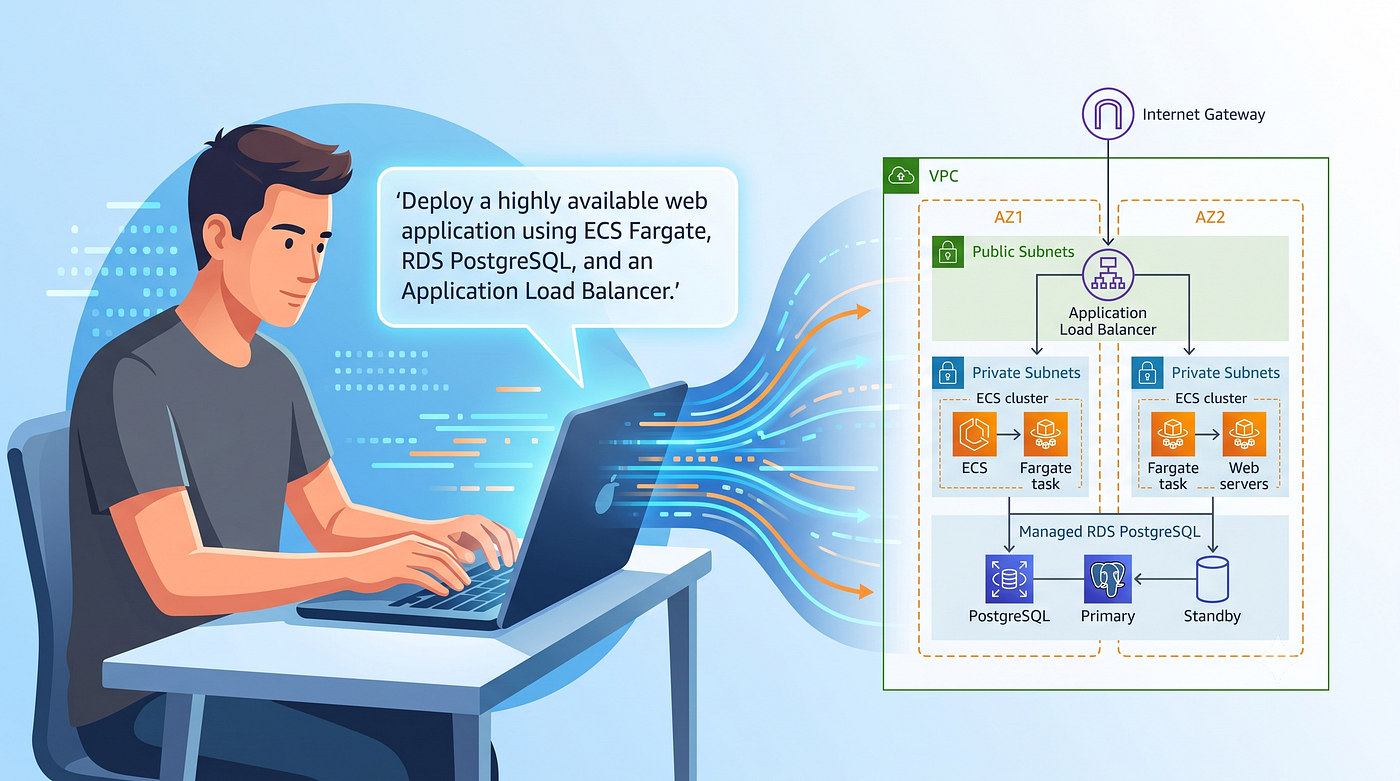
The Agent Toolkit for AWS, which reached general availability in May 2026, eliminates this gap by giving AI coding agents the tools, knowledge, and guardrails they need to work with AWS services directly. Instead of manually writing hundreds of lines of CloudFormation YAML or CDK TypeScript, a developer can now type a prompt like deploy this Express app to AWS with a PostgreSQL database and receive a complete, production-ready infrastructure definition: architecture selection, IaC code, cost estimation, and CI/CD pipeline, all generated from a single natural language instruction.
The underlying architecture is straightforward. The Agent Toolkit combines four components: a managed MCP (Model Context Protocol) server that provides authenticated access to every AWS API, a curated set of agent skills that encode AWS best practices for specific domains, plugins that bundle everything into a single install for your coding agent, and rules files that set project-level guardrails for how agents behave. Together, these components let any MCP-compatible agent (Claude Code, Codex, Cursor, Kiro, Windsurf, Cline) understand your codebase, reason about the right AWS architecture, and generate deployment artifacts that follow production-grade patterns. The entire toolkit is free to use: you pay only for the AWS resources your agent provisions.
This article is a deep dive into how this system works. It covers the architecture of the Agent Toolkit, walks through a complete deployment workflow using a real Express.js application as the example, and examines the mechanisms behind service selection, cost estimation, and CI/CD generation.
The Infrastructure Knowledge Gap

Building a web application is not the bottleneck. Frameworks like Express, FastAPI, and Next.js make it possible to go from idea to working code in hours. The bottleneck is what happens next: translating a running application into cloud infrastructure that is secure, scalable, cost-effective, and maintainable.
Consider what deploying a Node.js Express application with a PostgreSQL database actually requires on AWS. At minimum: a container registry, a compute service, a managed database, a VPC with proper subnets, security groups, an IAM execution role with least-privilege permissions, a load balancer for HTTPS termination, a CI/CD pipeline, and DNS configuration. Each component has its own configuration surface and interaction patterns with every other component.
For teams without dedicated infrastructure engineers, this knowledge gap creates one of three outcomes: over-engineering (copying enterprise reference architectures that cost ten times what the workload requires), under-engineering (overly permissive security, no auto-scaling, no CI/CD), or paralysis (the application never leaves the developer’s laptop).
AI coding agents with general-purpose training data can partially bridge this gap. But they consistently make mistakes that an experienced AWS practitioner would never make: IAM policies with wildcard resources, deprecated services, invalid Fargate CPU/memory combinations, or VPC configurations that break container networking. The problem is not capability. It is currency: models are trained on documentation that may be months or years out of date.
The Agent Toolkit for AWS solves this by providing agents with access to the latest AWS documentation at query time, curated skills that encode current best practices, and authenticated API access to validate configurations against the actual state of your AWS account.
Agent Toolkit Architecture

The Agent Toolkit for AWS is an open source project (available at github.com/aws/agent-toolkit-for-aws) that provides a layered system for enhancing AI coding agents with AWS expertise. It is not a standalone application. It extends whatever coding agent you already use through the Model Context Protocol, the open standard for connecting AI agents to external tools and data sources.
The architecture has four layers, each designed to be independently useful while composing into a more powerful whole when used together.
The AWS MCP Server is the foundation layer. It is a managed, remote MCP server hosted by AWS (available in US East N. Virginia and Europe Frankfurt) that exposes two categories of tools. The knowledge tools (aws___search_documentation, aws___read_documentation, aws___retrieve_skill, aws___recommend, aws___list_regions, aws___get_regional_availability) provide real-time access to current AWS documentation, skills, and service information without requiring authentication. The API tools (aws___call_aws, aws___run_script, aws___get_presigned_url, aws___get_tasks) execute authenticated AWS operations: any of the 15,000+ AWS API calls, sandboxed Python scripts, S3 pre-signed URLs, and long-running task polling.
The MCP Server uses IAM SigV4 authentication through a local proxy (mcp-proxy-for-aws), which means it respects your existing IAM policies. The server automatically adds two condition context keys to every request: aws:ViaAWSMCPService and aws:CalledViaAWSMCP. These keys let you write IAM policies that differentiate agent-initiated actions from direct human API calls, so you can restrict agents to read-only operations while humans retain full access. Every API call is logged to CloudTrail, and CloudWatch metrics published under the AWS-MCP namespace provide observability into agent activity. This is not a backdoor into your account. It is a controlled interface with full audit trail.
Skills are the knowledge layer. Each skill is a curated package of instructions, code scripts, and reference materials that tells an agent how to complete a specific AWS task. Skills are not documentation. They are action-oriented: they specify which steps to follow, which APIs to call, which mistakes to avoid, and how to verify the result. A skill typically consumes a few thousand tokens when loaded, far less than the equivalent raw documentation.
The Agent Toolkit includes core skills for CDK and CloudFormation authoring, container deployments (ECS, Fargate, ECS Express Mode), serverless applications (Lambda, API Gateway, Step Functions, SAM), IAM policy design, observability configuration, billing and cost management, SDK usage patterns across Python, JavaScript, and Swift, and full-stack application development (AWS Blocks). Specialized skills go deeper into individual services: databases, networking, storage, migration, and security. Skills are loaded progressively: agents discover and retrieve only what is relevant to the current task, so having many skills available does not consume context or slow the agent down.
Skills also encode critical guardrails that prevent common agent mistakes. The billing skill, for example, mandates that agents must never perform arithmetic in their reasoning (LLM math is unreliable on cost data) and must always verify the current date before querying Cost Explorer (models frequently default to dates from their training data). The containers skill requires confirmation before destructive operations like force-new-deployment. These are not suggestions; they are structured instructions that well-behaved agents follow deterministically.
Plugins are the delivery layer. A plugin bundles the MCP Server configuration and a curated set of skills into a single install command for your coding agent. The aws-core plugin is the starting point for most developers: it covers service selection, infrastructure as code, serverless, containers, storage, observability, billing, SDK usage, and deployment. Additional plugins include aws-agents (for building AI agents with Bedrock AgentCore), aws-data-analytics (data lake, ETL, and analytics with S3 Tables, Glue, Athena), and aws-agents-for-devsecops (incident investigation, release readiness, security scanning with AWS DevOps Agent and Security Agent).
Rules files are the governance layer. These are project-level configuration files that set preferences and guardrails for how agents work in your specific project. They tell agents to use the AWS MCP Server, discover available skills before improvising, and search documentation before acting. Rules files ensure consistent behavior across team members without requiring individual configuration.
The simplest setup path is the AWS CLI wizard, which detects installed agents and configures everything automatically:
# Interactive wizard: detects agents, installs skills, configures MCP Server
aws configure agent-toolkit
# Or manage skills individually:
aws agent-toolkit add-skill - skill-name aws-cdk
aws agent-toolkit add-skill - skill-name aws-containers
aws agent-toolkit list-available-skills
For manual setup (or agents not auto-detected by the wizard), you add the MCP Server to your agent’s configuration file:
{
  "mcpServers": {
    "aws": {
      "command": "uvx",
      "args": [
        "mcp-proxy-for-aws",
        "https://aws-mcp.us-east-1.api.aws/mcp"
      ]
    }
  }
}
After setup, the agent gains access to the full AWS skill library and can discover additional skills on demand.
How Deployment Works: The Express App Example
To illustrate the full workflow, let us walk through a realistic scenario. You have a Node.js Express application with a PostgreSQL dependency, and you want to deploy it to AWS. The application is a REST API for a task management system. It uses Express for HTTP routing, Sequelize for ORM, and expects a DATABASE_URL environment variable pointing to a PostgreSQL instance.
With the Agent Toolkit installed, you open your coding agent and type:
Deploy this Express app to AWS with a managed PostgreSQL database. It needs HTTPS, auto-scaling, and a CI/CD pipeline that deploys on push to main.
The agent does not respond with a generic template. It reads your project structure, analyzes package.json for dependencies, checks for a Dockerfile (or offers to create one), examines your database configuration, and then begins a structured reasoning process that follows the skills loaded from the toolkit.
Service Selection
The first decision the agent makes is which compute service to use. The aws-containers skill provides an explicit decision guide. For a simple HTTP application with a new deployment (no legacy constraints), the skill recommends ECS Express Mode as the simplest path: a single API call that handles container registry, compute, load balancing, and auto-scaling in a managed environment. For production workloads requiring full VPC control, custom ALB configuration, or fine-grained IAM, it recommends ECS on Fargate with an Application Load Balancer.
The agent examines the requirements in the prompt (HTTPS, auto-scaling, CI/CD pipeline) and determines that ECS Fargate with an ALB is the appropriate choice: it provides the networking control needed for proper HTTPS termination, configurable scaling policies, and clean integration with CodePipeline or GitHub Actions.
For the database, the agent recommends Amazon RDS for PostgreSQL. It checks the aws-billing-and-cost-management skill and the AWS Pricing MCP Server to provide a cost estimate before generating any code.
Architecture Recommendation and Cost Estimation
Before writing any infrastructure code, the agent presents the proposed architecture and estimated costs. This is a critical step: it prevents the developer from discovering cost surprises after deployment.
The agent uses the aws___call_aws tool to query the AWS Pricing API and the aws___run_script tool to compute estimates deterministically (since the billing skill prohibits in-reasoning arithmetic):
# Agent-generated cost estimation script (runs in AWS MCP Server sandbox)
import json

# Approximate monthly costs for the proposed architecture (us-east-1)
estimates = {
  "ECS Fargate (2 tasks, 0.5 vCPU, 1GB each)": {
    "vCPU": "$29.55/month",
    "memory": "$6.49/month",
    "note": "730h × 2 tasks × $0.04048/vCPU-h × 0.5 + 730h × 2 × $0.004445/GB-h × 1"
  },
  "Application Load Balancer": {
    "fixed": "$16.43/month",
    "LCU": "~$5–15/month depending on traffic"
  },
  "RDS PostgreSQL (db.t4g.micro, 20GB gp3)": {
    "instance": "$12.41/month",
    "storage": "$2.30/month"
  },
  "ECR + Data transfer": {
    "cost": "~$2/month"
  }
}

total_low = 29.55 + 6.49 + 16.43 + 5 + 12.41 + 2.30 + 2
total_high = 29.55 + 6.49 + 16.43 + 15 + 12.41 + 2.30 + 2

print(f"Estimated monthly cost: ${total_low:.2f} - ${total_high:.2f}")
print(f"\nBreakdown:")
for service, details in estimates.items():
  print(f" {service}")
  for key, value in details.items():
    print(f" {key}: {value}")
The agent presents this estimate (approximately $74 to $84 per month for a minimal production setup) and waits for confirmation before proceeding. This is not a billing guarantee; it is a ballpark based on current on-demand pricing. The developer can adjust parameters (instance size, scaling bounds, Multi-AZ) before the agent generates the final infrastructure code.
Infrastructure Generation with CDK
Once the architecture is confirmed, the agent generates a complete CDK project following patterns from the aws-cdk skill. The skill provides explicit guidance on project structure, construct patterns, and critical warnings (like the “deadly embrace” of cross-stack references or the data-loss risk of construct ID changes).
Here is the core of what the agent generates:
import * as cdk from 'aws-cdk-lib';
import * as ec2 from 'aws-cdk-lib/aws-ec2';
import * as ecs from 'aws-cdk-lib/aws-ecs';
import * as ecsPatterns from 'aws-cdk-lib/aws-ecs-patterns';
import * as rds from 'aws-cdk-lib/aws-rds';

export class TaskApiStack extends cdk.Stack {
  constructor(scope: cdk.App, id: string, props?: cdk.StackProps) {
    super(scope, id, props);

    const vpc = new ec2.Vpc(this, 'ApiVpc', {
      maxAzs: 2,
      natGateways: 1,
    });

    // RDS PostgreSQL instance in private subnets
    const database = new rds.DatabaseInstance(this, 'Database', {
      engine: rds.DatabaseInstanceEngine.postgres({
        version: rds.PostgresEngineVersion.VER_16_4,
      }),
      instanceType: ec2.InstanceType.of(
        ec2.InstanceClass.T4G, ec2.InstanceSize.MICRO
      ),
      vpc,
      vpcSubnets: { subnetType: ec2.SubnetType.PRIVATE_WITH_EGRESS },
      credentials: rds.Credentials.fromGeneratedSecret('taskapi'),
      databaseName: 'taskdb',
      allocatedStorage: 20,
      storageType: rds.StorageType.GP3,
      removalPolicy: cdk.RemovalPolicy.SNAPSHOT,
    });

    // ECS Fargate service behind an ALB
    const service = new ecsPatterns.ApplicationLoadBalancedFargateService(
      this, 'ApiService', {
        vpc,
        cpu: 512,
        memoryLimitMiB: 1024,
        desiredCount: 2,
        publicLoadBalancer: true,
        taskImageOptions: {
          image: ecs.ContainerImage.fromAsset('.'),
          containerPort: 3000,
          secrets: {
            DB_HOST: ecs.Secret.fromSecretsManager(database.secret!, 'host'),
            DB_NAME: ecs.Secret.fromSecretsManager(database.secret!, 'dbname'),
            DB_USER: ecs.Secret.fromSecretsManager(database.secret!, 'username'),
            DB_PASSWORD: ecs.Secret.fromSecretsManager(database.secret!, 'password'),
          },
        },
        circuitBreaker: { rollback: true },
      }
    );

    // Allow Fargate tasks to connect to RDS
    database.connections.allowFrom(
      service.service, ec2.Port.tcp(5432), 'Allow from ECS tasks'
    );

    // Auto-scaling: 2–10 tasks based on CPU utilization
    const scaling = service.service.autoScaleTaskCount({
      minCapacity: 2,
      maxCapacity: 10,
    });
    scaling.scaleOnCpuUtilization('CpuScaling', {
      targetUtilizationPercent: 70,
    });

    // Reduce ALB deregistration delay for faster deployments
    service.targetGroup.setAttribute(
      'deregistration_delay.timeout_seconds', '30'
    );
   }
}
Every pattern here comes from the skills: circuit breaker with rollback prevents stuck deployments, deregistration delay is reduced from the 300-second default (“the number one cause of slow deployments” per the containers skill), secrets are injected from Secrets Manager rather than plain environment variables, and the database sits in private subnets with security groups that allow only ECS task traffic on port 5432.
CI/CD Pipeline Generation
The final piece is the deployment pipeline. Based on the project structure (the agent detects a .github directory or asks which CI/CD platform to use), it generates a GitHub Actions workflow:
name: Deploy to AWS

on:
  push:
    branches: [main]

permissions:
  id-token: write
  contents: read

jobs:
  deploy:
    runs-on: ubuntu-latest
    steps:
      - uses: actions/checkout@v4
      - uses: aws-actions/configure-aws-credentials@v4
        with:
          role-to-assume: arn:aws:iam::${{ secrets.AWS_ACCOUNT_ID }}:role/GitHubActionsDeployRole
          aws-region: us-west-2
      - uses: actions/setup-node@v4
        with:
          node-version: '20'
      - name: Install dependencies
        run: npm ci
      - name: Run tests
        run: npm test
      - name: Install CDK
        run: npm install -g aws-cdk
      - name: CDK diff
        run: cdk diff
      - name: CDK deploy
        run: cdk deploy - require-approval never
The pipeline uses OIDC authentication (no static credentials) because the aws-cdk skill’s security considerations mandate it. It runs cdk diff before cdk deploy because the skill warns that construct ID changes cause resource replacement and potential data loss.
Under the Hood: Skills and Progressive Disclosure
The quality of the generated output depends entirely on the skills the agent loads. Without skills, a general-purpose model will produce infrastructure that looks correct but contains subtle errors that only surface in production.
The progressive disclosure model is central to how this works efficiently. When you ask the agent to “deploy this Express app,” it does not load every AWS skill into context. Instead:
-
It loads skill descriptions (a few tokens each) to determine relevance. For a deployment task, it identifies aws-containers, aws-cdk, and aws-billing-and-cost-management as relevant.
-
It loads the full SKILL.md for each relevant skill. The aws-containers skill is approximately 20KB and contains the service selection decision guide, eighteen critical “gotchas,” quick-start patterns, and pointers to deeper reference files.
-
It loads reference files only when the conversation requires deeper detail. Blue/green deployment questions trigger references/service-scaling-and-updates.md. A CannotPullContainerError triggers references/ecs-troubleshooting-guide.md.
This means the agent’s context window is never wasted on irrelevant information. A deployment task consumes only deployment-relevant portions of the skill library; a debugging task consumes the troubleshooting portions.
Security and Enterprise Governance
The Agent Toolkit implements a trust but verify model that addresses the legitimate concern of giving an AI agent access to your AWS account.
IAM condition keys (aws:ViaAWSMCPService and aws:CalledViaAWSMCP) allow you to write IAM policies that distinguish between agent actions and human actions. A policy can grant ec2:Describe and ecs:Describe to the MCP Server while blocking ec2:TerminateInstances or ecs:DeleteService, effectively making the agent read-only while the human retains full access. This means the agent can explore your account state, validate configurations, and estimate costs without being able to modify anything. Actual deployments happen through the generated CDK code and CI/CD pipeline, not through the MCP Server directly.
CloudTrail integration captures every API call the MCP Server makes, creating a complete audit trail. CloudWatch metrics published under the AWS-MCP namespace let you monitor MCP server usage separately from direct human activity. For teams managing multiple accounts, multi-profile support allows agents to route individual requests through different AWS credential profiles without restarting, using an explicit allowlist configured at proxy startup.
Sandboxed script execution (the aws___run_script tool) runs Python scripts server-side in an environment that inherits IAM permissions but has no network access and no filesystem exposure. This lets agents compute cost estimates, process API responses, and chain multiple API calls in a single round-trip without exposing your local machine or burning context on sequential tool calls.
Skill-level guardrails are embedded in the instructions themselves. The aws-containers skill, for example, requires agents to confirm with the user before executing destructive operations like force-new-deployment or delete-service. The aws-cdk skill requires cdk diff before every deploy to production. The billing skill prohibits in-reasoning arithmetic and requires date verification before any Cost Explorer query. These guardrails are not suggestions; they are structured instructions that well-behaved agents follow deterministically.
Limitations and Current Boundaries
The Agent Toolkit significantly reduces the infrastructure knowledge gap, but it does not eliminate it entirely. Several boundaries are worth understanding.
The system depends on the quality of the underlying model. A more capable model will produce better results because it can reason more effectively about the skill instructions, handle ambiguous requirements, and catch its own mistakes. Less capable models may skip skill steps or produce configurations that violate the skill’s gotchas despite having access to them.
Skills cover the most common workflows but not every edge case. If your deployment involves a service or pattern that no skill covers, the agent falls back to its training data and the AWS documentation search tool. The results will be less reliable than skill-guided output.
Cost estimates are approximations based on current pricing and assumed usage patterns. They do not account for data transfer spikes, reserved instance discounts, savings plans, or free tier eligibility. For production cost planning, the estimates should be validated against the AWS Pricing Calculator.
The AWS MCP Server is currently available in two regions (US East N. Virginia and Europe Frankfurt) and can make API calls to any region. If your enterprise requires data residency guarantees for the MCP Server itself, verify that the available regions meet your compliance requirements.
Generated infrastructure is a starting point, not a final product. Production deployments should always go through your organization’s standard review process: security review, architecture review, and cost approval. The Agent Toolkit accelerates the path to that review, but it does not replace it.
Conclusion
The Agent Toolkit for AWS represents a structural shift in how developers interact with cloud infrastructure. Instead of learning the configuration surface of dozens of AWS services, a developer describes their intent in natural language and receives production-grade infrastructure artifacts that follow current best practices.
The architecture is deliberately modular: the MCP Server provides raw capability, skills provide curated knowledge, plugins provide convenient packaging, and rules files ensure consistency across teams. The system improves continuously as AWS service teams update skills and deprecate outdated guidance.
For teams building on AWS without dedicated infrastructure engineers, this changes the economics of deployment. The hours previously spent translating application requirements into CDK code can now be spent on application logic and feature development. The infrastructure knowledge gap does not disappear; it is bridged by a system that encodes that knowledge in a form that AI agents can operationalize reliably.
References
-
AWS, “Agent Toolkit for AWS” (GitHub repository)
-
AWS News Blog, “The AWS MCP Server is now generally available” May 2026
-
AWS Documentation, “Agent Toolkit for AWS User Guide”
-
AWS Documentation, “Understanding AWS MCP Server tools”
-
AWS Documentation, “Security in Agent Toolkit for AWS”
-
AWS, “MCP Proxy for AWS” (GitHub repository)
-
AWS Documentation, “AWS CLI integration — Agent Toolkit for AWS”
메타데이터
- post_id
- ec9f7126ac2a
- slug
- from-natural-language-to-production-infrastructure-how-agent-plugins-for-aws-replace-manual-ec9f7126ac2a
- url
- https://medium.com/data-reply-it-datatech/from-natural-language-to-production-infrastructure-how-agent-plugins-for-aws-replace-manual-ec9f7126ac2a
- canonical_url
- https://medium.com/data-reply-it-datatech/from-natural-language-to-production-infrastructure-how-agent-plugins-for-aws-replace-manual-ec9f7126ac2a
- author_url
- https://medium.com/@brcmat
- status
- ok
- fetched_at
- 2026-07-10 01:40:30