Fastrpc with raxa dragon Q6A
Earier we failed using the official RADXA image so now we try armbian.
Fastrpc with radxa dragon Q6A
Earier we failed using the official RADXA image so now we try armbian.
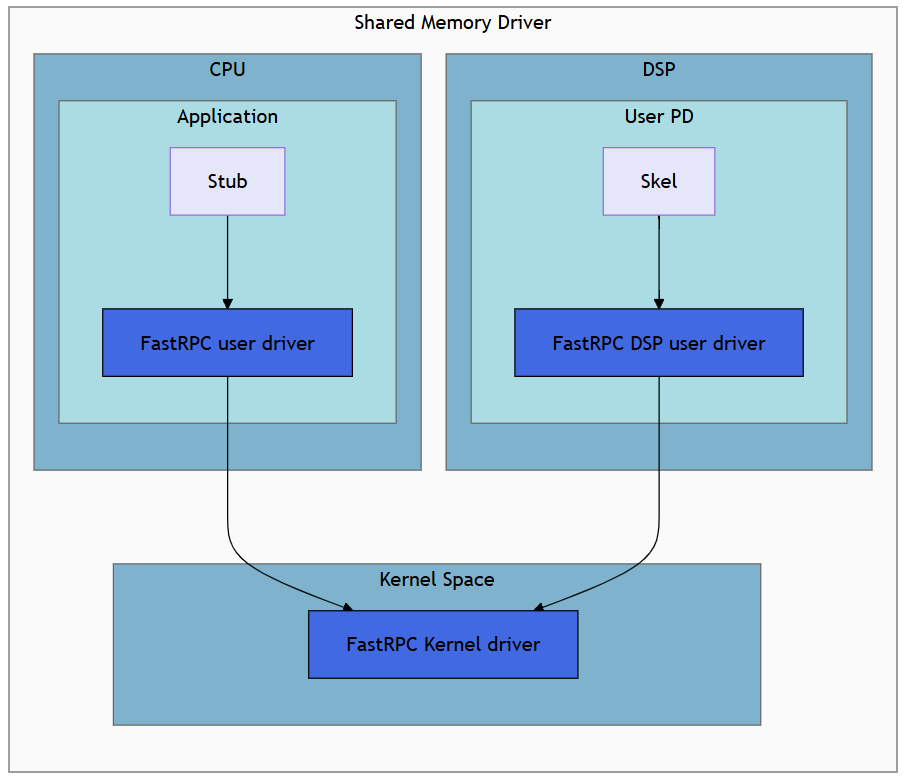
fastrpc with qualcomm
This version seems to work better but we got some strange output. Maybe audio is broken.
cat /proc/cmdline BOOT_IMAGE=/boot/vmlinuz-6.18.0-rc6-edge-qcs6490
root=UUID=e241ac3c-24f2-4ecb-8b0e-bc31825e2370 ro ttyMSM0 console=tty0
console=ttyMSM0 splash=verbose i915.force_probe=*

olof@radxa-dragon-q6a:~$
ls -l /dev/*sprpc* /dev/fastrpc*
/dev/fastrpc-adsp
/dev/fastrpc-cdsp
/dev/fastrpc-cdsp-secure
At least we seem to have kernel support.
sudo dmesg | grep -i -E 'fastrpc|adsprpc|cdsprpc|remoteproc|cdsp'
[    0.000000] OF: reserved mem: 0x0000000081800000..0x00000000835fffff (30720 KiB) nomap non-reusable cdsp-secure-heap@81800000
[    0.000000] OF: reserved mem: 0x0000000087000000..0x0000000088dfffff (30720 KiB) nomap non-reusable cdsp@87000000
[    3.493374] remoteproc remoteproc0: adsp is available
[    3.598976] remoteproc remoteproc1: cdsp is available
[    3.695632] remoteproc remoteproc1: powering up cdsp
[    3.699727] remoteproc remoteproc1: Booting fw image qcom/qcs6490/radxa/dragon-q6a/cdsp.mbn, size 3579904
[    3.749832] remoteproc remoteproc0: powering up adsp
[    3.763268] remoteproc remoteproc0: Booting fw image qcom/qcs6490/radxa/dragon-q6a/adsp.mbn, size 12635676
[    3.982323] remoteproc remoteproc1: remote processor cdsp is now up
[    3.991590] qcom,fastrpc a300000.remoteproc:glink-edge.fastrpcglink-apps-dsp.-1.-1: no reserved DMA memory for FASTRPC
[    3.991865] platform a300000.remoteproc:glink-edge:fastrpc:compute-cb@1: Adding to iommu group 17
[    3.992620] platform a300000.remoteproc:glink-edge:fastrpc:compute-cb@2: Adding to iommu group 18
[    3.993224] platform a300000.remoteproc:glink-edge:fastrpc:compute-cb@3: Adding to iommu group 19
[    3.993723] platform a300000.remoteproc:glink-edge:fastrpc:compute-cb@4: Adding to iommu group 20
[    3.994211] platform a300000.remoteproc:glink-edge:fastrpc:compute-cb@5: Adding to iommu group 21
[    3.995467] platform a300000.remoteproc:glink-edge:fastrpc:compute-cb@6: Adding to iommu group 22
[    3.996642] platform a300000.remoteproc:glink-edge:fastrpc:compute-cb@7: Adding to iommu group 23
[    3.997866] platform a300000.remoteproc:glink-edge:fastrpc:compute-cb@8: Adding to iommu group 24
[    3.998976] platform a300000.remoteproc:glink-edge:fastrpc:compute-cb@11: Adding to iommu group 25
[    3.999967] platform a300000.remoteproc:glink-edge:fastrpc:compute-cb@12: Adding to iommu group 26
[    4.001043] platform a300000.remoteproc:glink-edge:fastrpc:compute-cb@13: Adding to iommu group 27
[    4.002135] platform a300000.remoteproc:glink-edge:fastrpc:compute-cb@14: Adding to iommu group 28
[    4.019317] remoteproc remoteproc0: remote processor adsp is now up
[    4.033020] qcom,fastrpc 3700000.remoteproc:glink-edge.fastrpcglink-apps-dsp.-1.-1: no reserved DMA memory for FASTRPC
[    4.033747] platform 3700000.remoteproc:glink-edge:fastrpc:compute-cb@3: Adding to iommu group 29
[    4.036271] platform 3700000.remoteproc:glink-edge:fastrpc:compute-cb@4: Adding to iommu group 30
[    4.037869] platform 3700000.remoteproc:glink-edge:fastrpc:compute-cb@5: Adding to iommu group 31
[    4.050270] qcom,apr 3700000.remoteproc:glink-edge.adsp_apps.-1.-1: Adding APR/GPR dev: gprsvc:service:2:1
[    4.050363] qcom,apr 3700000.remoteproc:glink-edge.adsp_apps.-1.-1: Adding APR/GPR dev: gprsvc:service:2:2
[    4.080258] qcom_pmic_glink_rpmsg 3700000.remoteproc:glink-edge.PMIC_RTR_ADSP_APPS.-1.-1: error -ENODEV: no pmic_glink device to attach to
[    4.093656] qcom_pmic_glink_rpmsg 3700000.remoteproc:glink-edge.PMIC_RTR_ADSP_APPS.-1.-1: rpmsg_dev_probe: failed: -19
[    9.196180] platform 3700000.remoteproc:glink-edge:gpr:service@1:dais: Adding to iommu group 32
Install build tools
git clone --recurse-submodules https://github.com/radxa-pkg/fastrpc.git
cd fastrpc
sudo apt update
sudo apt install -y devscripts debhelper dh-exec lintian pandoc pkg-config libyaml-dev libbsd-dev build-essential
sudo apt-get build-dep fakeroot  . -y
sudo apt install -y fakeroot libfakeroot devscripts debhelper dh-exec lintian pandoc pkg-config libyaml-dev libbsd-dev build-essential dpkg-dev
debuild --no-sign -b
Install all ../*.deb files in apropriate order.
sudo apt install ./*.deb
Ok, when running the test we are missing firmware form here, /usr/share/qcom/qcs6490/radxa/dragon-q6a/dsp
fastrpc_test  -a v68
ERROR 0x72: Unable to create FastRPC session on domain 3
Exiting...
Test FAILED
Please look at the mini-dm logs or the adb logcat logs for DSP output
[FAIL] libmultithreading.so (error code: 0x72)

ERROR 0x72: Unable to create FastRPC session on domain 3

hap_example function FAILED
Please look at the mini-dm logs or the adb logcat logs for DSP output
Error occurred with selector FARF_RUNTIME (id: 0): 114
ERROR 0x72: Unable to create FastRPC session on domain 3

hap_example function FAILED
Please look at the mini-dm logs or the adb logcat logs for DSP output
Error occurred with selector MEM (id: 1): 114
ERROR 0x72: Unable to create FastRPC session on domain 3

hap_example function FAILED
Please look at the mini-dm logs or the adb logcat logs for DSP output
Error occurred with selector PERF (id: 2): 114
[FAIL] libhap_example.so (error code: 0x72)

Allocate 4000 bytes from ION heap
ERROR 0x68: memory alloc failed
[FAIL] libcalculator.so (error code: 0x68)

========================================
Test Summary:
  Total tests run:    3
  Passed:             0
  Failed:             3
  Skipped:            0
========================================

RESULT: 3 test(s) FAILED
Oh no. But it seems that we are missing this,
fastrpc_shell_unsigned_3We download it and extract it, wget https://github.com/radxa-build/radxa-dragon-q6a/releases/download/rsdk-r2/radxa-dragon-q6a_noble_gnome_r2.output_512.img.xz
sudo mkdir -p /usr/share/qcom/qcs6490/radxa/dragon-q6a/dsp

# Then on your WSL/PC:
scp -r /mnt/loop/usr/lib/dsp/* olof@<board-ip>:/tmp/dsp_files/

# Back on the board:
sudo cp -r /tmp/dsp_files/* /usr/share/qcom/qcs6490/radxa/dragon-q6a/dsp/

# Verify the symlink now resolves
ls -la /usr/lib/dsp/cdsp/fastrpc_shell_unsigned_3

# Restart and test
sudo systemctl restart cdsprpcd
sudo env LD_LIBRARY_PATH=/usr/lib/fastrpc_test DSP_LIBRARY_PATH=/usr/share/fastrpc_test/v68 fastrpc_test -a v68
After you made this hack you will find the missing file here,
find /usr/share/qcom/qcs6490/radxa/dragon-q6a/dsp/ -name fastrpc_shell_unsigned_3
/usr/share/qcom/qcs6490/radxa/dragon-q6a/dsp/dsp/cdsp/fastrpc_shell_unsigned_3
/usr/share/qcom/qcs6490/radxa/dragon-q6a/dsp/cdsp/fastrpc_shell_unsigned_3
Still failing. So we try upgrading,
sudo apt install linux-image-edge-qcs6490

Ok, the computer booted but I lost wifi and still no fastrpc.
FastRPC Status — Work in Progress
Kernel: 6.18.10-edge-qcs6490 Userspace packages: fastrpc 1.0.4-1, libcdsprpc1 1.0.4-1 — built from radxa-pkg/fastrpc
The CDSP boots cleanly and the kernel driver loads correctly:
remoteproc remoteproc1: Booting fw image qcom/qcs6490/radxa/dragon-q6a/cdsp.mbn, size 3579904
remoteproc remoteproc1: remote processor cdsp is now up
The device nodes and DMA heap are accessible. The fastrpc_shell_unsigned_3 DSP-side loader binary (960884 bytes) was manually extracted from the official Radxa image and placed at /usr/lib/dsp/cdsp/ since it is not included in the open-source package.
Despite this, fastrpc_test -a v68 fails at FASTRPC_IOCTL_INIT_CREATE with error 0x80000600. The kernel driver passes the shell binary to the DSP, but the DSP rejects it. The most likely cause is a version mismatch between the fastrpc_shell_unsigned_3 binary and the board-specific cdsp.mbn — these are a matched pair that must come from the same build. The official Radxa image also ships a different version of libcdsprpc (installed to /usr/lib/ rather than /usr/lib/aarch64-linux-gnu/) which may contribute to the failure.
Getting FastRPC fully working on a self-built system currently requires obtaining the matching binary blobs directly from Radxa, either via a complete official image or a future radxa-firmware-qcs6490 apt package.
The next step is to copy libcdsprpc.so and friends from the mounted official image directly to /usr/lib/ on the board and retest, but I save that for another day.
메타데이터
- post_id
- eca5f27ef00d
- slug
- fastrpc-with-raxa-dragon-q6a-eca5f27ef00d
- url
- https://medium.com/@olof-astrand/fastrpc-with-raxa-dragon-q6a-eca5f27ef00d
- canonical_url
- https://medium.com/@olof-astrand/fastrpc-with-raxa-dragon-q6a-eca5f27ef00d
- author_url
- https://medium.com/@olof-astrand
- status
- ok
- fetched_at
- 2026-07-11 13:01:24