Behind The Scenes of Your Web Browser
I recently had the opportunity to give a talk on web browsers and in the depths of my research I got to learn so much, I thought it best to…
Behind The Scenes of Your Web Browser
Photo by Jakob Owens on Unsplash
I recently had the opportunity to give a talk on web browsers and in the depths of my research I got to learn so much, I thought it best to share.
Overview
This article is going to be a high level sneak peek of the inner workings of modern day browsers and how they deliver the seamless experience for you and billions of users across the world.
First things first, what is a web browser? A browser is an application that presents the web resource you choose, by requesting it from the server and displaying it in the browser window. The first web browser, WorldWideWeb, was developed in 1990 by **Tim Berners-Lee. Since then, it’s been a slow and steady rise which all changed in 2008 when Google launched Google Chrome and essentially the Chromium** browser project which powers most of the browsers we love and use today.
Some of the most used browsers today include: Chrome, Safari, Firefox, Microsoft Edge, Opera, Internet Explorer amongst others. Chrome takes the huge share of the pie with over 3 billion users. https://gs.statcounter.com/browser-market-share/desktop/worldwide
BROWSER COMPONENTS
In this section, we’ll request a web resource and follow the process involved up until we see the results on your browser window. To do this, we first have to introduce Browser components. These represent the different engines and the processes in the stages of a request.
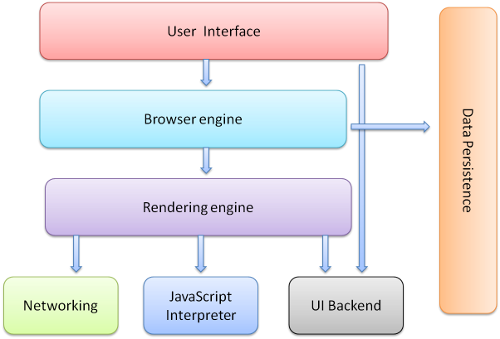
1. User Interface
This is the browser window that’s seen when you open a browser application. Typically includes the back/forward button, reload page button, bookmarking menu and address bar where you can input the url of the website you’d like to visit.
The browser’s user interface is not specified in any formal specification, it‘s a result of good practices shaped over years of experience and by browsers imitating each other.
2. Networking
This handles the network calls such as HTTP requests using different implementations for different platforms. To better understand the role the networking component plays in the user journey, we’ll briefly delve into what is DNS lookup and how it works.
The Domain Name System (DNS) is the phonebook of the Internet. In order to load a webpage, we need to resolve the url/hostname that the user types into their web browser (example.com) and convert it into a valid IP address. Once the dns server returns an IP address, the network component will make a request to that IP address which maps to the web server with the resources for (example.com). These resources include the index.html file that will be loaded on the browser.
Take a look at the image below for a diagrammatic overview of the same.
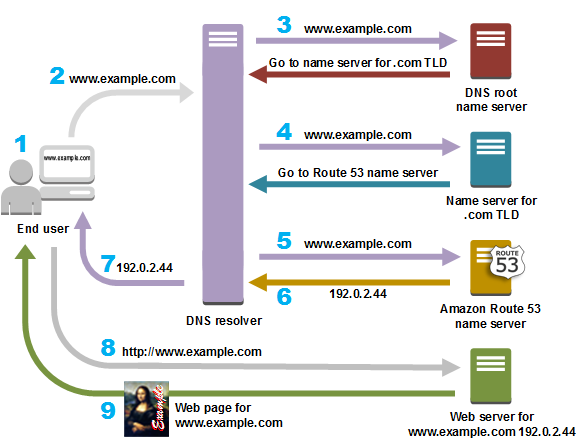
AWS Route53 DNS resolve
3. Browser Engine & Rendering Engine
Browser engine is also known as the layout engine. We’ll look at both components since browser engines combine the layout and rendering processes.
The main function of this component is to transform HTML documents and other resources of a web page into an interactive visual representation on a user’s device. As the name suggests, rendering engine renders/displays the requested contents on the browser screen.
From the previous step, we’ve seen the networking component access the resources from the web server. The rendering engine will start getting the contents of the requested document from the networking layer. After that, it goes through these different stages: Parsing html and parsing css to create the DOM tree and style rules tree respectively, creating the render tree, layout and painting processes.
Browsers run different instances of rendering engines on each tab.
DOM TREE
The Document Object Model (DOM) tree is the structural representation of the html document. As the rendering engine receives the html document, it parses it, translating it to a structure the code can use, and results in the construction of the DOM tree. You never get an “Invalid Syntax” error on HTML code as browsers fix any invalid content during this process.
**Tree** is a non-linear data structure that simulates a hierarchy, with a root value(top of the hierarchy) and subtrees of children with parent nodes.
The result of parsing is usually a tree of nodes that represent the structure of the document
STYLE RULES TREE
The result of parsing css is the style rules tree which consists of individual css rules, selector objects(i.e the html element, class names) and declaration objects(the style applied e.g margin and the value assigned). Read more on css parsing
RENDER TREE
The render tree is the visual representation of the document containing elements in the order in which they will be displayed. It’s generated simultaneously while the DOM tree is being constructed. It’s purpose is to enable painting the contents in their correct order. The tree consists of render objects which are rectangles with visual attributes, layout() and painting() methods.
It’s important to note that non-visual DOM elements example “head” element, and elements with “display: none”, will not be inserted in the render tree.
LAYOUT PROCESS
Also called reflow, is a recursive process that involves giving each render object, the exact coordinates on where it should appear on the screen, i.e the position and size. If you are familiar with layout shifts, this process explains why cumulative layout shifts affect your site performance.
The position of the root render object, <html>, is 0,0 and its dimensions are the viewport — the visible part of the browser window. All render objects have a “layout” or “reflow” method, and each renderer invokes the layout method of its children that need layout.
The layout usually has the following pattern:
- Parent renderer determines its own width.
- Parent goes over children and:
- Place the child renderer (sets its x and y).
- Calls child layout if needed — which calculates the child’s height.
- Parent uses children’s accumulative heights and the heights of margins and padding to set its own height — this will be used by the parent renderer’s parent.
PAINTING
Traverse the render tree and recursively call the paint() method of each render object to display the content and colours on the page. The painting order is shown below. Visually, you’d see the background colour on the screen before you see the image, border or content/children.
- background colour
- background image
- border
- children
- outline️
[embed]Video representation of the rendering process
4. Javascript Engine
We’ve seen how the browser handles the html and css resources it receives to build the visual representation of the site, we’ll now take a look at the JavaScript of it all :)
JavaScript is most well-known as the scripting language for Web pages. JavaScript engines are used to execute JS code. Their use is not limited to browsers, however every major browser has a JS engine. The first engines were mere interpreters but modern engines use just-in-time compilation for improved performance. Our focus will be on the v8 engine, used by Chromium browsers.
The first step once the JS engine receives JavaScript code is parsing, which results in the construction of Abstract Syntax Tree (AST). The interpreter then converts the AST to bytecode which is run through a compiler to produce machine specific code.
In JIT compilation, the entire code is compiled and immediately executed.
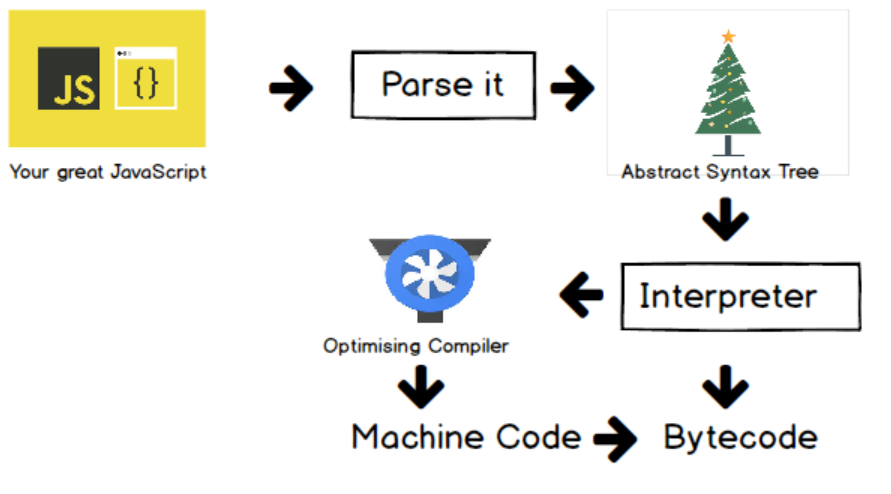
V8 ENGINE
5. Data Storage
This is a persistence layer that allows the browser to save data, such as cookies, locally. Browsers support storage mechanisms which include localStorage, IndexedDB, WebSQL and FileSystem.
The storage capacity for the browser is based on your hard drive size. The global limit is calculated as 50% of free disk space. Chrome, however, uses upto 80% of free space, and 5% in incognito.
Conclusion
At last, the end of the road! Hope you found this insightful, I sure did :) If you didn’t get some of it, you can always read more on individual topics.
Remember, the goal of all learning is action, not knowledge (John C Maxwell).
The Chromium codebase and most of the Browser and JavaScript engines are open source, take the opportunity to explore, do code reviews, learn, build and contribute.
Browser engines: **Blink (Chrome, Microsoft Edge, Opera), [Webkit](https://webkit.org/) (iOS/Apple devices), [Gecko](https://en.wikipedia.org/wiki/Gecko_(software))** (Firefox).
JavaScript engines: **V8 engine (chrome and chromium browsers), [SpiderMonkey](https://spidermonkey.dev/)**(Firefox), Nitro (iOS).
Additional references
메타데이터
- post_id
- ecc92e1cd300
- slug
- behind-the-scenes-of-your-web-browser-ecc92e1cd300
- url
- https://medium.com/@steph-ny/behind-the-scenes-of-your-web-browser-ecc92e1cd300
- canonical_url
- https://medium.com/@steph-ny/behind-the-scenes-of-your-web-browser-ecc92e1cd300
- author_url
- https://medium.com/@steph-ny
- status
- ok
- fetched_at
- 2026-06-29 01:02:39




