🥨 SPSS Snacks #2 | Transposing Output Tables
Because wide tables are often more useful than tall ones.
🥨 SPSS Snacks #2 | Transposing Output Tables
Because wide tables are often more useful than tall ones.
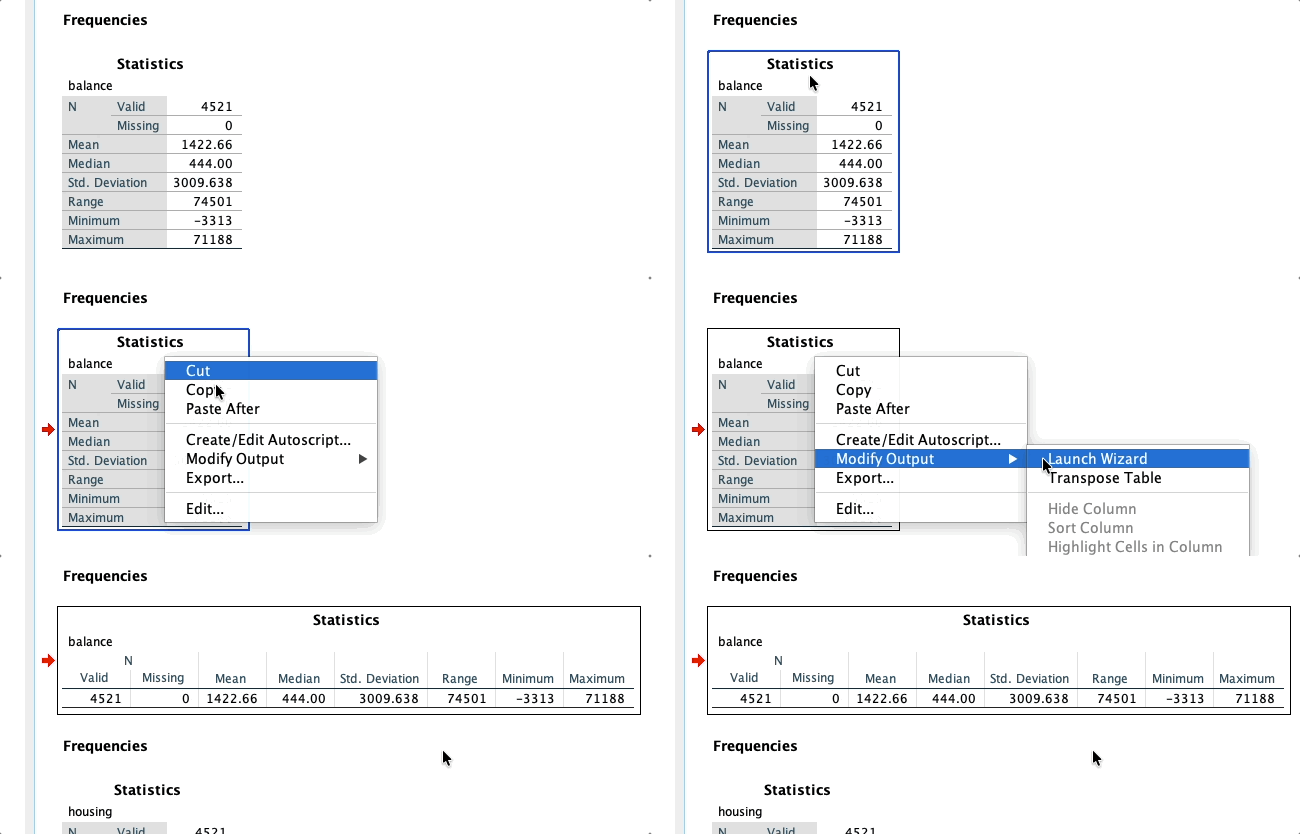
Transpose tables is literally two clicks away.
For some reason (not that surprising), SPSS likes to present the results in tall tables. They look good and nice in the Output window, but not so much in a document or worse, a presentation!
Fortunately, you can transpose tables directly in the Output. Simply right-click > Modify Output> Transpose Table. You can then export it to the format of your choice or edit it further (more snacks coming 😉).
메타데이터
- post_id
- ece4d0a9566d
- slug
- spss-snacks-2-transposing-output-tables-ece4d0a9566d
- url
- https://medium.com/@mhmxd/spss-snacks-2-transposing-output-tables-ece4d0a9566d
- canonical_url
- https://medium.com/@mhmxd/spss-snacks-2-transposing-output-tables-ece4d0a9566d
- author_url
- https://medium.com/@mhmxd
- status
- ok
- fetched_at
- 2026-06-14 11:28:49