Beyond the Cloud: How I Used Dart Isolates to Build a High-Performance Local RAG Engine
Indexing 1GB of technical PDFs in minutes to power a private, 0-latency AI search — all on the desktop.
Beyond the Cloud: How I Used Dart Isolates to Build a High-Performance Local RAG Engine
Indexing 1GB of technical PDFs in minutes to power a private, 0-latency AI search — all on the desktop.
Why Dart?
When I first stared at a 26GB log file sitting on my NVMe drive, I knew Python — the “default” language for AI — wasn’t going to cut it. I didn’t want a script that would crawl; I wanted an engine that would scream. I started looking for a language that could handle massive I/O without the “Stop-the-World” lag that plagues most modern runtimes.
That’s when I rediscovered Dart.
The Erlang Parallel: A “Shared-Nothing” Discovery
Most people think of Dart as “that language for Flutter UI,” but under the hood, it hides a superpower: Isolates.
If you’ve ever looked into Erlang, you know the beauty of the “Actor Model” — independent workers that don’t share memory, communicating only through messages. Dart’s Isolates are its spiritual successor.
In a standard multi-threaded language (like Java or C#), threads share the same memory space. This sounds efficient until you realize they have to fight over “locks” to prevent data corruption. Worse, when the Garbage Collector (GC) kicks in, it often has to pause the entire application to clean up memory. On a 26GB file, a global GC pause is a death sentence for performance.
The GC Secret: Personal Space for Data
The “Aha!” moment for LynSøk came when I realized how Dart handles memory: Each Isolate has its own private heap and its own dedicated Garbage Collector.
- No Global Locking: Because Isolates don’t share memory, they never “fight.”
- Independent Cleaning: If Worker Isolate #4 is finished processing an 8MB chunk of a PDF, its GC can clean up that memory instantly without affecting the Search UI or the other 11 workers.
- Micro-Pauses vs. Multi-Second Freezes: Instead of one giant GC trying to manage 4GB of RAM, I had 16 tiny GCs managing 50MB each. The result? Total fluidity.
import 'dart:io';
import 'dart:isolate';

void main() async {
  final receivePort = ReceivePort();
  final filePath = 'huge_26gb.log';

  // 1. Spawn the worker in its own "soundproof room" (Isolate)
  await Isolate.spawn(readLogWorker, {
    'path': filePath,
    'sendPort': receivePort.sendPort,
  });

  // 2. Main thread listens for the results
  await for (var message in receivePort) {
    if (message is String && message == 'DONE') {
      print('Indexing complete!');
      receivePort.close();
      break;
    }

    // Process the chunk (e.g., search for "Error" or "Hobbit")
    final List<int> chunk = message;
    print('Processing chunk: ${chunk.length} bytes');
  }
}

// --- The Background Worker ---
void readLogWorker(Map<String, dynamic> data) async {
  final String path = data['path'];
  final SendPort sendPort = data['sendPort'];

  final file = File(path);
  final raf = await file.open(mode: FileMode.read);
  const chunkSize = 1024 * 1024 * 8; // 8MB chunks

  try {
    while (true) {
      final buffer = await raf.read(chunkSize);
      if (buffer.isEmpty) break;

      // 3. Shouting the results back to the manager
      sendPort.send(buffer);
    }
  } finally {
    await raf.close();
    sendPort.send('DONE');
  }
}
From 26GB to “Instant”
By leveraging this “Shared-Nothing” architecture, I built a worker pool that could saturate my CPU cores. The main thread stayed buttery smooth, handling the Flutter UI at 120fps, while the background Isolates were chewing through the 26GB log file in under 30 seconds.
Dart wasn’t just a UI tool anymore; it was the high-concurrency engine I needed for local RAG. It allowed me to treat a massive dataset not as a single, terrifying monolith, but as a stream of independent tasks that could be conquered in parallel.

The “Dirty Work” of Extraction
Processing a 26GB log file was my “proof of concept,” but turning that into a functional RAG (Retrieval-Augmented Generation) system meant moving from simple text-streaming to the messy, fragmented world of document architecture. I quickly realized that a search engine is only as good as its “eyes.” If the extraction fails, the AI is hallucinating on a blank page.
The PDF Nightmare: Drawing, Not Writing
Most people think a PDF is just a text file with fancy fonts. In reality, a PDF is a series of drawing instructions. Extracting text from one is like trying to reconstruct a book from shredded confetti. I had to build a pipeline that could navigate internal streams, resolve indirect objects, and handle the “hex-encoded” or “UTF-16BE” characters that often turn technical papers into gibberish.
To make this work at scale, I moved away from raw 8MB byte-chunks (which work for logs) to File-Level Parallelism. Complex formats like PDF and DOCX have internal “maps” (like XREF tables) that live at the very end of the file. If you chop them in half, they break. My worker pool evolved: instead of splitting one giant file, it now takes a list of 1,000 mixed documents and feeds them to the “Team of Speed-Readers” one whole file at a time.
The Ranking Brain: BM25
Once I had the raw text, I couldn’t just use a simple String.contains(). If you search for "The Hobbit," every page containing the word "the" would show up. I needed BM25 (Best Matching 25)—the gold standard of search algorithms.
BM25 doesn’t just count how many times a word appears; it looks at:
- Term Frequency: How often does “Hobbit” appear in this file?
- Inverse Document Frequency: If the word “the” appears in every document, it’s worth nothing. If “Hobbit” only appears in three files, those files are highly relevant.
By implementing BM25 directly in Dart, I could rank thousands of search results in milliseconds, ensuring the most relevant “context” always rises to the top for the LLM to read.

Snippets and the Magic of Byte Offsets
The real “secret sauce” of LynSøk is how it connects a search result back to the physical file. During the indexing phase, I don’t just save the text; I save the Byte Offsets.
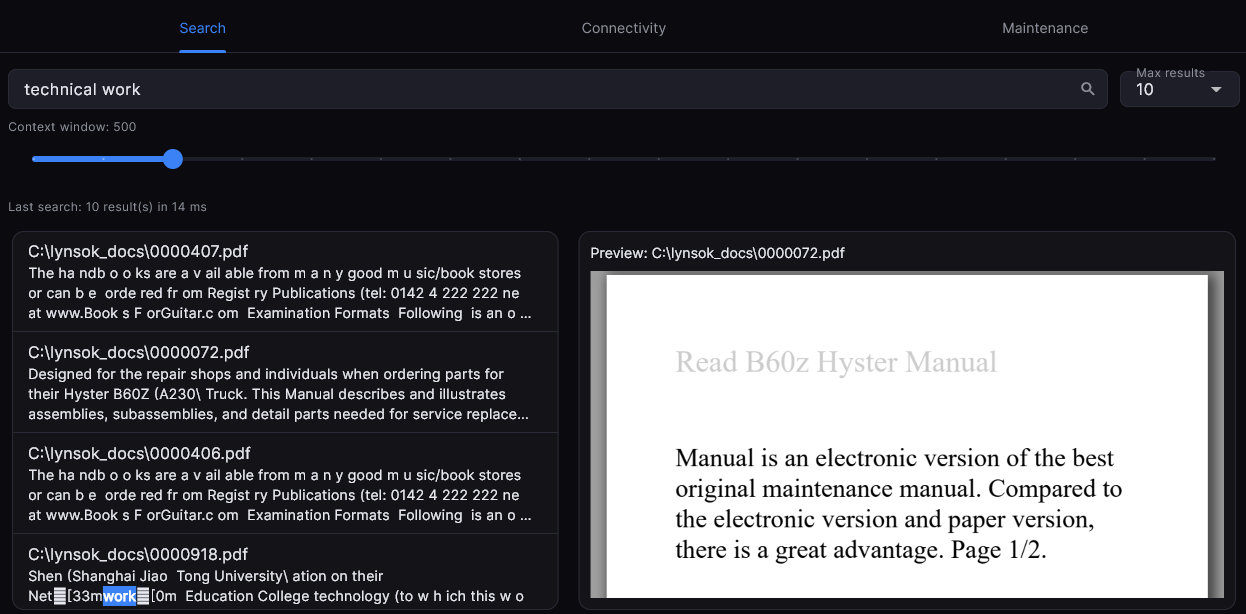
Think of these as GPS coordinates for every sentence. When you search for a term, the engine looks at the index, finds the match, and uses those offsets to “reach back” into the original file and pull out a Snippet — exactly 200 words before and 200 words after the hit.
// Conceptual Snippet Logic
final matchOffset = index.getOffset(query);
final snippet = rawFile.readRange(matchOffset - 200, matchOffset + 200);
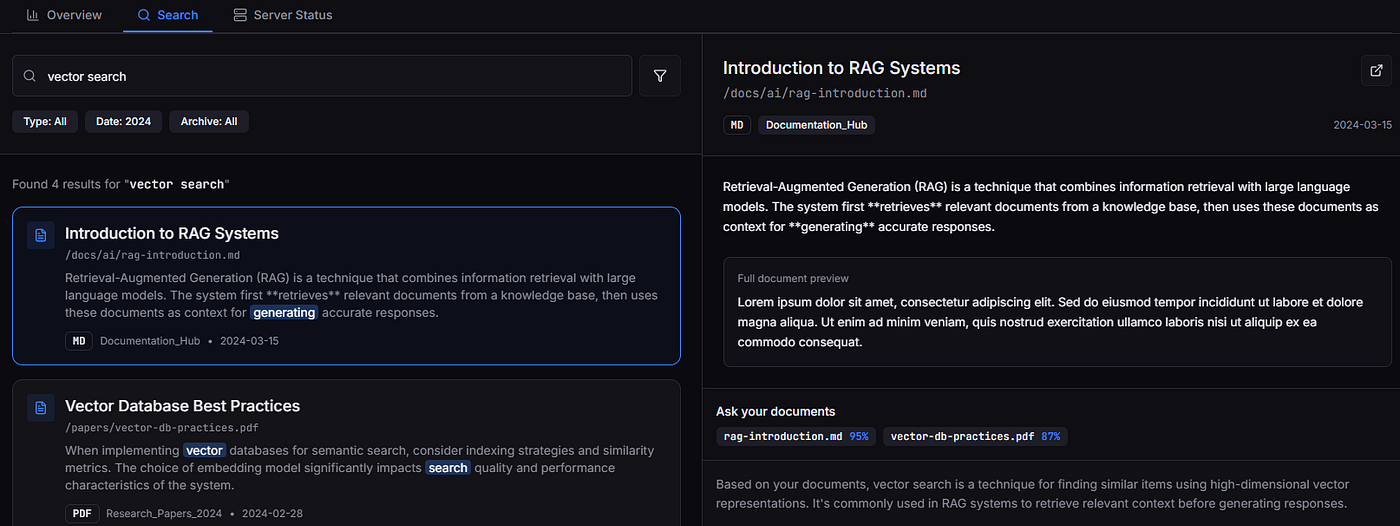
This “Snippet Logic” is what makes the Search-to-Source preview possible. It’s why you can click a search result in the Flutter UI and have the PDF viewer jump exactly to the right page and paragraph. We aren’t just searching a database; we are navigating a 1GB library with a laser pointer.
The Bridge — MCP and the AI Connection
While the engine and the extractor do the heavy lifting, the real magic happens when you connect that data to an LLM. This is where the Model Context Protocol (MCP) comes in. Think of it as the “USB-C for AI.” Just as USB-C standardized how we connect hardware, MCP standardizes how AI models like Claude or Cursor “plug into” your local data.
By hosting an MCP server directly inside the Flutter app, LynSøk becomes a first-class citizen in the AI’s brain. When you ask Claude, “What does my project documentation say about the new API?”, Claude doesn’t just guess — it sends a JSON-RPC request to LynSøk, which then scans your optimized index and hands back the exact text snippets it needs.
The MCP Handshake (Dart Code)
Using a standard JSON-RPC 2.0 structure, the app handles requests from the AI over stdio or SSE (Server-Sent Events). Here’s a simplified look at how the server dispatches a tool call:
// A conceptual MCP Tool Dispatcher in Dart
void handleMcpRequest(Map<String, dynamic> request, SendPort uiPort) {
  final method = request['method'];

  if (method == 'tools/call') {
    final toolName = request['params']['name'];
    final arguments = request['params']['arguments'];

    if (toolName == 'search_index') {
      // 1. Trigger our high-performance BM25 search
      final results = lynSokEngine.search(arguments['query']);

      // 2. Respond to the AI with the context it needs
      sendMcpResponse({
        'content': results.map((r) => {'type': 'text', 'text': r.snippet}).toList(),
      });

      uiPort.send("AI accessed index via MCP: ${arguments['query']}");
    }
  }
}
A Note on the HTTP Server
While MCP is the “shiny new toy,” I also kept a traditional HTTP Server running as a backbone. Why? Flexibility.
- Portability: If you aren’t using an MCP-compatible client, you can still hit the
localhost:8080/searchendpoint with a simplecurlor a Python script. - Stream-Ready: The HTTP server is perfect for streaming results. Instead of waiting for the full search to finish, we can “pipe” results to the UI as they are found.
Using Dart’s shelf package, the server is incredibly lightweight:
final router = Router()..get('/search', (Request request) {
  final query = request.uri.queryParameters['q'];
  final results = engine.search(query!);
  return Response.ok(jsonEncode(results));
});
Connecting the Dots (Claude Config)
To get this working, you just point your Claude Desktop configuration to your compiled Dart binary. It looks like this in your claude_desktop_config.json:
{
  "mcpServers": {
    "lynsok": {
      "command": "C:\\Path\\To\\lynsok.exe",
      "args": ["mcp-mode"]
    }
  }
}
Flutter Desktop — More Than Just a Pretty Face
For a long time, the industry put Flutter in a box: “It’s great for mobile apps.” But building LynSøk taught me that Flutter is actually a secret weapon for high-performance desktop engineering. When you are building a tool that needs to manage 26GB of data while staying responsive, you can’t afford the “memory tax” of a web-wrapper like Electron.
Here is why Flutter was the only choice for a modern, Windows 11-native search experience.
1. The “Zero-Bridge” Synergy
In many desktop frameworks, the UI and the “engine” live in different worlds. If you build a search engine in C++ and a UI in Electron, you have to pass massive amounts of data across a “bridge,” which creates a bottleneck.
Because LynSøk’s core is pure Dart, the transition to Flutter was seamless. There is no translation layer. The same high-performance classes that handle BM25 ranking and Isolate management in the CLI are used directly in the Flutter app. It’s one unified, compiled machine-code binary.
2. Beyond the Browser: Truly Native Desktop APIs
A search engine shouldn’t feel like a website in a window; it should feel like part of the Operating System. Flutter Desktop provides deep access to native APIs that make LynSøk feel like a “Pro” tool.
3. The “Search-to-Source” Experience at 60fps
The most demanding part of the UI was the Preview Pane. When a user clicks a search result, I need to instantly render a 500-page PDF, find the exact line using byte offsets, and highlight it — all without the UI stuttering.
Because Flutter uses the Impeller (and Skia) rendering engines, it draws every pixel directly on the GPU. Whether I’m rendering a complex DOCX layout or a high-resolution PDF via pdfrx, the scrolling remains a fluid 60fps. Try doing that in a browser-based app with a 1GB file open, and you'll quickly see the "Out of Memory" ghost.
4. Developer Velocity: From Idea to .exe
Finally, there’s the productivity. Flutter’s Hot Reload meant I could tweak the BM25 ranking visualization or the MCP server logs in real-time without restarting the app. I was able to build a Windows 11 installer, a macOS build, and a Linux version from a single codebase, ensuring that no matter what OS a researcher uses, their data stays local and their search stays fast.
Conclusion: The New Desktop Standard
LynSøk proves that you don’t have to choose between a beautiful UI and “close-to-the-metal” performance. By pairing Dart’s Isolate-driven engine with Flutter’s hardware-accelerated UI, we’ve built a tool that respects the user’s privacy, their hardware, and their time.
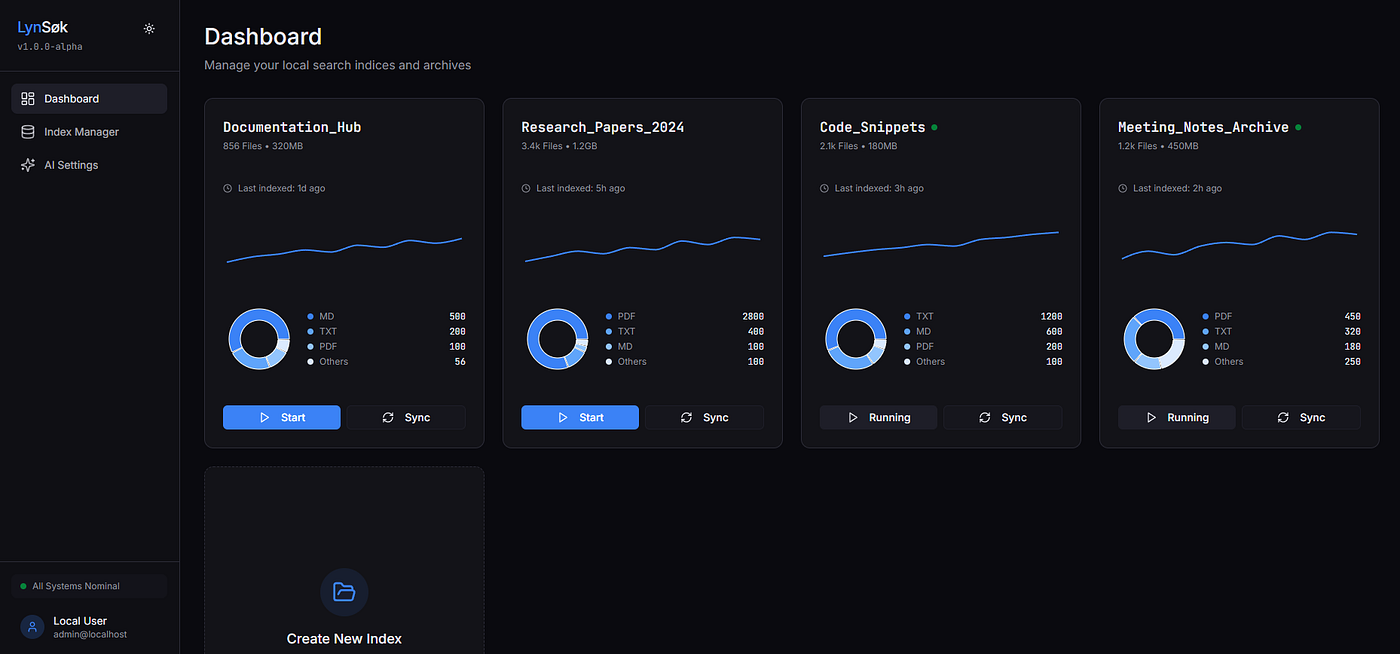
Experience the speed of local-first AI search. LynSøk is open-source and for you to test out on Windows, Linux and macOS.
- Official Website: lynsok.com
- GitHub Repository: [github.com/htmltag/lynsok_project](http://Experience the speed of local-first AI search. LynSøk is open-source and currently in Beta for Windows and macOS. Stop uploading your private data to the cloud and start searching your own knowledge base at lightning speed. Official Website: lynsok.com GitHub Repository: github.com/htmltag/lynsok_project)
메타데이터
- post_id
- ed2febbc6bca
- slug
- beyond-the-cloud-how-i-used-dart-isolates-to-build-a-high-performance-local-rag-engine-ed2febbc6bca
- url
- https://medium.com/@jonathansoylandlier/beyond-the-cloud-how-i-used-dart-isolates-to-build-a-high-performance-local-rag-engine-ed2febbc6bca
- canonical_url
- https://medium.com/@jonathansoylandlier/beyond-the-cloud-how-i-used-dart-isolates-to-build-a-high-performance-local-rag-engine-ed2febbc6bca
- author_url
- https://medium.com/@jonathansoylandlier
- status
- ok
- fetched_at
- 2026-07-17 04:42:44



