Three Cheers for XProc 3 Running XSpec Tests
New steps for your XProc 3 pipelines
Three Cheers for XProc 3 Running XSpec Tests
New steps for your XProc 3 pipelines
XProc 3, an XML-based programming language for processing documents in pipelines, has become popular in the XML Community. XProc 3 makes its presence known at markup conferences through scheduled presentations, “open mike” talks, and at least one “birds of a feather” gathering. A new XProc users’ group is about to be launched this week. Resources for XProc newcomers include a book, a list of other learning materials, and an emerging website still in progress but worth checking out.
“Processing documents” might not sound closely aligned with XSpec. However, XProc is good at chaining together a set of steps that can include executing XSLT transformations or XQuery queries. From that perspective, running an XSpec test suite to produce a test report fits right into XProc’s area of expertise.
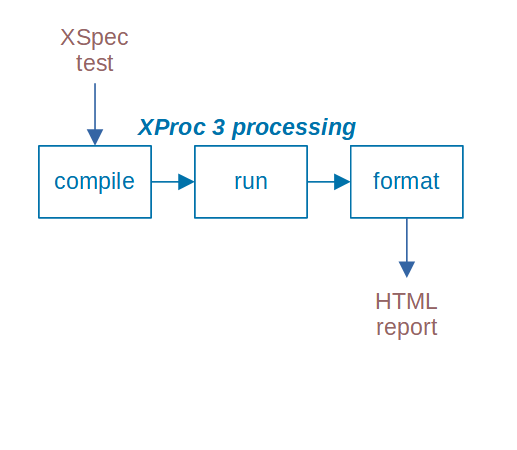
Starting with your XSpec test suite as an input document, XProc compiles it into a test runner, runs that to produce test results, and then formats those results to create an HTML report that becomes the output document.
XProc Pipelines in the XSpec Distribution
XSpec already has XProc version 1 pipelines that you can use to run XSpec test suites for XSLT and XQuery.
XSpec v3.3, released in September 2025, includes XProc version 3 pipelines to accomplish the same goals. Many thanks to George Bina for contributing the new XProc 3 pipelines to the XSpec repository! In addition, XSpec v4.0 includes an XProc 3 pipeline for running XSpec test suites for XProc.
Three Ways to Use XSpec’s XProc Pipelines
Things you can do with the XProc pipelines that ship with XSpec include:
- Run an XSpec test suite from the command line
- Run XSpec test suites from a code development environment
- Use the shipped-with-XSpec pipeline as a building block within a pipeline of your own creation
Running a Test from the Command Line
Running with XProc describes how to run an individual XSpec test suite with one of the XProc pipelines in the XSpec distribution, from the command line.
Running Tests Within Oxygen
The Oxygen XML Editor product provides transformation scenarios named XSpec for XSLT using XProc and XSpec for XQuery using XProc that enable you to run one or more XSpec test suites using XProc, from within the editor window.

XSpec v4.0 adds another one: XSpec for XProc using XProc.
You can even select multiple files or folders from the Project pane and run all the test suites with the same transformation scenario.
You might find these XProc-based transformation scenarios faster than the Run XSpec Test transformation scenario, which doesn’t use XProc.
In Oxygen 27.1 and earlier versions, these transformation scenarios use the XProc 1 pipelines. Oxygen 28.0 supports using the XProc 3 pipelines, and XSpec 3.4 upgrades the transformation scenarios to use XProc 3.
Building Your Own Pipeline
If you are building your own XProc pipeline, it can include running XSpec test suites as part of the functionality. More specifically, your pipeline can import the XSpec distribution’s XProc pipelines and invoke their steps to run XSpec test suites. Upgrading the XSpec distribution’s pipelines from XProc version 1 to version 3 fills a gap for XProc 3 users, who wouldn’t be able to use the earlier XProc 1 steps in an XProc 3 pipeline.
What might you want to build in XProc, using XSpec as part of the functionality? Here are some ideas:
- For a given XSpec test suite that pertains to XSLT or XQuery or even both, run the test suite against the appropriate language(s).
- Loop over all XSpec files in a particular folder or file tree, and run each test suite. Maybe also produce a consolidated report that summarizes all the test results and links to the individual test suite reports.
- Generate an XSpec test suite (according to some custom process) and then run it.
- Generate some XSLT or XQuery code (according to some other custom process) and then test it by running a pre-existing XSpec test suite.
What About XSpec Tests for Schematron?
As of now (August 2025), the latest code in the XSpec repository contains XProc pipelines for running XSpec tests for XSLT and XQuery. In progress is an XProc pipeline for running XSpec tests for Schematron, using an XQuery-based implementation of Schematron behind the scenes.
What’s still missing is an XProc pipeline for running XSpec tests for Schematron using an XSLT-based implementation of Schematron. If you want to use such a pipeline when it’s available, keep an eye on issue 2160.
Notes on Using the MorganaXProc-IIIse Processor
The instructions in Running with XProc use XML Calabash, which is an XProc processor — but not the only one. If you want to use the XSpec distribution’s XProc 3 pipelines with the MorganaXProc-IIIse processor instead, be aware that:
- An error like
Document of type 'application/octet-stream' not supported on port 'source'.means that MorganaXProc-III doesn’t recognize files with the.xspecfilename extension as XML files. To avoid the error, create a configuration file that mapsxspecto theapplication/xmlmedia type and point Morgana to your configuration file with an argument likeconfig=C:\morgana-config.xmlin your command that runs Morgana. The media type mapping looks like this:
<morgana-config xmlns="http://www.xml-project.com/morganaxproc">
    <mediatype-mapping>
        <map file-extension="xspec" media-type="application/xml" />
    </mediatype-mapping>

    <!-- other settings... -->

</morgana-config>- When you run an XSpec test for XQuery, you need to configure MorganaXProc-III with both an XQuery connector and an XSLT connector, such as
-xquery-connector=saxon12-3 -xslt-connector=saxon12-3. The XSLT connector is needed because the XSpec compilation process uses XSLT, even if the test suite is testing XQuery. Also, use MorganaXProc-III version 1.7.1 or later, for testing XQuery.
Key Takeaways
- You can run XSpec tests for XSLT or XQuery using the XProc pipeline language. You can do so using an operating system command, a development environment, or as part of a larger XProc pipeline.
- XSpec v3.3 upgrades these XProc steps from version 1 to version 3.
메타데이터
- post_id
- ed67e9d33ce8
- slug
- three-cheers-for-xproc-3-running-xspec-tests-ed67e9d33ce8
- url
- https://medium.com/@xspectacles/three-cheers-for-xproc-3-running-xspec-tests-ed67e9d33ce8
- canonical_url
- https://medium.com/@xspectacles/three-cheers-for-xproc-3-running-xspec-tests-ed67e9d33ce8
- author_url
- https://medium.com/@xspectacles
- status
- ok
- fetched_at
- 2026-07-17 23:00:59