Loops in Python
Loops are used to execute a block of code repeatedly. Python provides powerful and clean looping mechanisms that make iteration simple and…
Loops in Python
Loops are used to execute a block of code repeatedly. Python provides powerful and clean looping mechanisms that make iteration simple and readable.
What are Loops?
Loops are one of the most powerful constructs in Python programming. They allow you to execute a block of code repeatedly based on a condition or over a sequence of elements.
Without loops, you would have to write repetitive code manually — making programs lengthy, inefficient, and hard to maintain.
Instead of writing:
print("Hello")
print("Hello")
print("Hello")
We use:
for i in range(3):
  print("Hello")
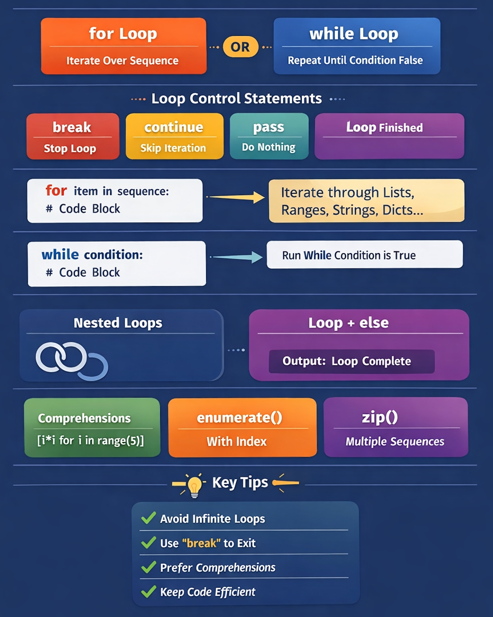
Python provides two primary types of loops:
- for Loop → Iterates over a sequence
- while Loop → Runs until a condition becomes False
Additionally, Python provides loop control statements like:
- break
- continue
- pass
- else with loop
1. for Loop in Python
For loops is used to iterate over a sequence such as a list, tuple, string or range. It allow to execute a block of code repeatedly, once for each item in the sequence.
Syntax:
for variable in sequence:
    # code block
Flow Diagram Logic
- Take first item from sequence
- Execute code block
- Move to next item
- Repeat until sequence ends
Example:
fruits = ["Apple", "Banana", "Mango"]
for fruit in fruits:
    print(fruit)
Using range() with for Loop
The range() function in Python is used to generate a sequence of numbers. It is commonly used in loops (especially for loops) when you need to repeat an action a specific number of times.
Syntax:
range(start, stop, step)

# Here:
  # start => Starting number (default = 0)
  # stop  => Ending number (NOT included)
  # step  => Increment / Decrement value (default = 1)
Examples 1:
# 1. Only Stop Value
for i in range(5):
  print(i)
# output : 0,1,2,3,4
# Starts from 0 by default and stops before 5.
# -----------------------------------------------------------------

# 2. Start + Stop
for i in range(2,6):
  print(i)
# output: 2,3,4,5
# Starts from 2 and stops before 6.
# -----------------------------------------------------------------

# 3. Start + Stop + Step
for i in range(1,10,2):
  print(i)
# output:1,3,5,7,9
# Increments by 2.
# -----------------------------------------------------------------

# 4. Negative Step (Reverse Loop)
for i in range(10,0,-2):
  print(i)
# output: 10,8,6,4,2
# Counts backwards.
# -----------------------------------------------------------------

# 5. Convert range() to List
nums = range(5)
print((list(nums))
# output : [0, 1, 2, 3, 4]
# -----------------------------------------------------------------

# 6. Using range() with len()
fruits = ["apple", "banana","mango"]
for i in range(len(fruits)):
  print(i, fruits[i])
# output:
  # 0 apple
  # 1 banana
  # 2 mango
# -----------------------------------------------------------------

# 7. Loop N times
for _ in range(3):
  print("Hello")
# output:
  # Hello
  # Hello
  # Hello
# -----------------------------------------------------------------

# 8. Nested for Loop
for i in range(3):
  for j in range(2):
    print(i,j)
# output:
   # 0 0
   # 0 1
   # 1 0
   # 1 1
   # 2 0
   # 2 1
# -----------------------------------------------------------------
Example 2 : for loop with String, List and Dictionary
# 1. Loop Through String
for ch in "Python":
  print(ch)
# output: 0,2,4,6,8,10
 # P
 # y
 # t
 # h
 # o
 # n
# -----------------------------------------------------------------

# 2. Loop Through a List
fruits = ["apple", "banana", "mango"]
for fruit in fruits:
    print(fruit)
# output:
  # apple
  # banana
  # mango
# -----------------------------------------------------------------

# 3. Loop Through Dictionary
student = {"name": "ABC", "age": 25}
for key in student:
    print(key, student[key])
# output:
  # name ABC
  # age 25
# -----------------------------------------------------------------
Examples 3: for loop with control statements:
# 1. for Loop with else
for i in range(3):
  print(i)
else:
  print("Loop completed")
# else runs when loop finishes normally.
# -----------------------------------------------------------------

# 2. break in for Loop
for i range(5):
  if i == 3:
    break:
  print(i)
# output:
  # 0
  # 1
  # 2
# -----------------------------------------------------------------

# 3. continue in for Loop
for i in range(5):
    if i == 2:
        continue
    print(i)
# output:
  # 0
  # 1
  # 3
  # 4
# -----------------------------------------------------------------

# 4. pass in for Loop
for i in range(5):
    pass
# The loop executes internally but performs no action.
2. while Loop
A while loop is used to execute a block of code repeatedly as long as a condition is True.
It is also called a condition-controlled loop.
Syntax :
while condition:
    # code block
The loop continues until the condition becomes False.
Example 1:
i = 1
while i <= 5:
    print(i)
    i += 1
# output:
  # 1
  # 2
  # 3
  # 4
  # 5
How it works:
- i = 1
- Condition i <= 5 → True → runs
- Increments i
- Stops when i = 6
Example 2:
# 1. Infinite while Loop
while True:
  print("Hello")
# If the condition never becomes False → infinite loop.
# -----------------------------------------------------------------

# 2. Nested while Loop
i = 1
while i <= 3:
  j = 1
  while j <=2;
    print(i,j)
    j +=1
  i += 1
  # output:
    # 1 1
    # 1 2
    # 2 1
    # 2 2
    # 3 1
    # 3 2
Runs forever unless stopped manually (Ctrl + C).
Examples 3: for while with control statements:
# 1. while with break
i = 1
while i<=10:
  if i == 5:
    break
  print(i)
  i+=1
# break stops the loop immediately.
# output:
  # 1
  # 2
  # 3
  # 4
# -----------------------------------------------------------------

# 2. while with continue
i = 0
while i<5:
  i+=1
  if i == 3:
    continue
  print(i)
# continue skips the current iteration.
# output:
  # 1
  # 2
  # 4
  # 5
# -----------------------------------------------------------------

# 3. while with else
i = 1
while i<=3:
  print(i)
    i += 1
else
  print("Loop Finished")
# else runs only if the loop ends normally (not by break).
# if break is used → else will NOT run.
# output:
  # 1
  # 2
  # 2
  # Loop finished
# -----------------------------------------------------------------
Questions
- What is a loop in Python?
- When should you use
forloop? - When should you use
whileloop? - What is an infinite loop?
- What is
range()inforloop? - Can we use
elsewith loops? - Difference between
breakandcontinue?
Table of Contents
메타데이터
- post_id
- ed79f109769e
- slug
- loops-in-python-ed79f109769e
- url
- https://medium.com/@sams.article/loops-in-python-ed79f109769e
- canonical_url
- https://medium.com/@sams.article/loops-in-python-ed79f109769e
- author_url
- https://medium.com/@sams.article
- status
- ok
- fetched_at
- 2026-07-12 00:22:36