Mapping the black box: How to use AI Service Blueprint based on the OODA loop
Designing for “agentic” AI is chaotic. How do we visualize, plan, and debug interactions with a “black box” that has its own mind? When a…
Mapping the black box: How to use AI Service Blueprint based on the OODA loop
Designing for “agentic” AI is chaotic. How do we visualize, plan, and debug interactions with a “black box” that has its own mind? When a user’s request fails, is it bad data (Observe), a wrong assumption (Orient), or a broken API (Act)?
To move beyond this guesswork, we need a shared map.
I’m proposing an AI Service Blueprint based on the OODA loop. It’s a practical tool that gives designers, PMs, and engineers a shared understanding. Its value is simple:
- Pinpoint Failure: It separates the AI’s “thought process” into logical steps, making it clear where a breakdown occurred.
- Design for Trust: It forces us to build in
Evidence(like "checking calendars..."), so the user isn't left guessing what the AI is doing. - Clarify AI Policy: The
Decidelane is where we explicitly define the agent's rules (e.g., "Always ask for confirmation before booking").
How The Concept Works
This tool is necessary because AI agents (like Perplexity, ChatGPT or Copilot) are fundamentally changing our UIs. We’re shifting from a “web of presentation” (designing for human eyes) to a “web of actions” (designing for machine logic).
Designers now have two jobs: design for the human (emotion, brand) and design for the machine (logic, structured data, and “The Handoff”).
To manage this, the blueprint separates the user’s view (Front stage) from the AI’s internal process (Backstage). The OODA loop (Observe, Orient, Decide, Act) provides the perfect structure for these backstage lanes.
The Blueprint Lanes:
The concept is simple: we replace the traditional blueprint lanes with stages of the AI’s cognitive cycle.
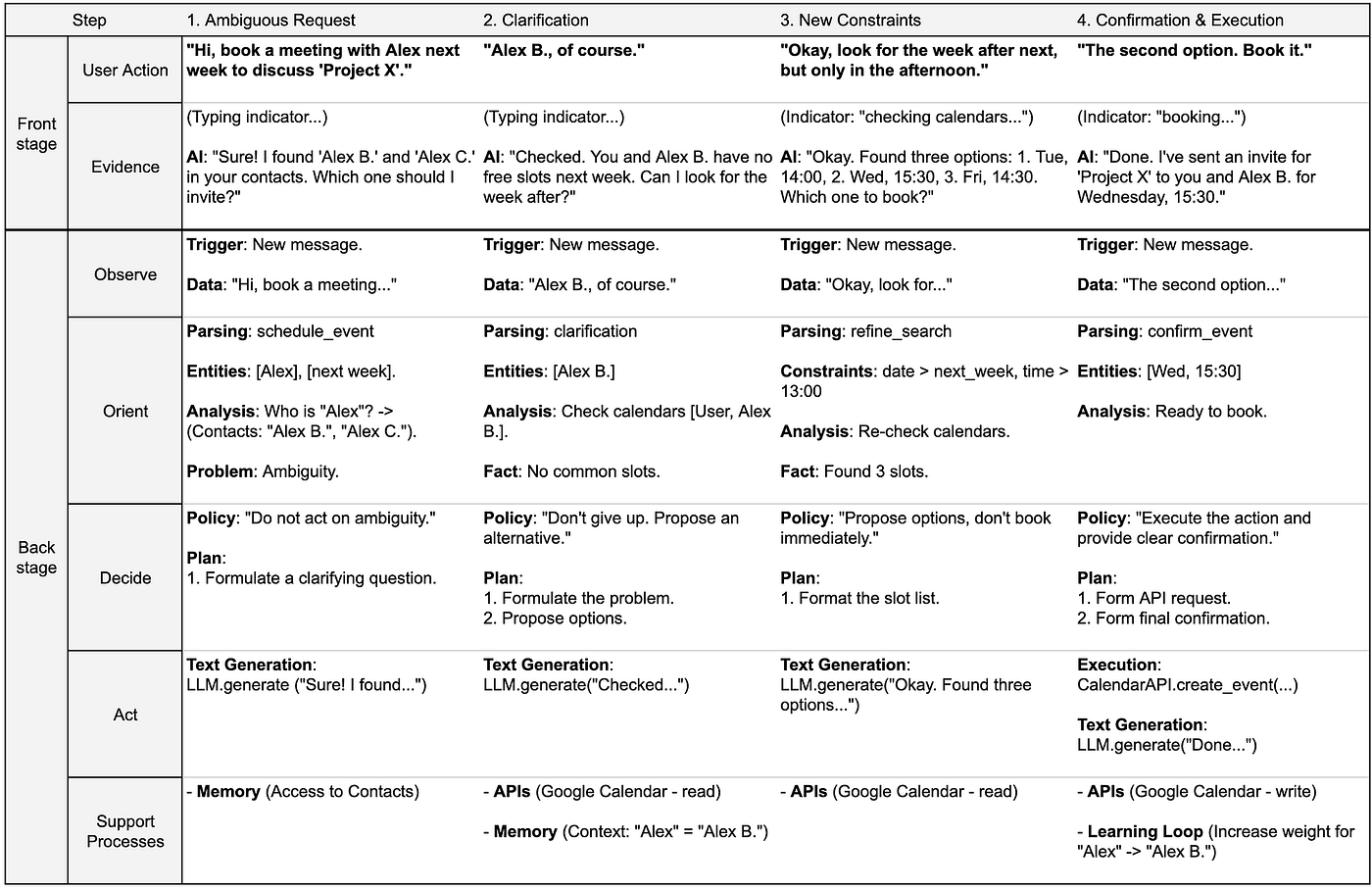
- User Action [Front stage]: Input from the user (text, click, voice).
- Evidence (Actions)[Front stage]: The interface, status indicators, and AI responses. This is crucial for building trust.
- Observe [Backstage]: The system’s immediate collection of “raw” data from the user or other sources (APIs, sensors).
- Orient [Backstage]: The “brain” of the operation. This is where the AI synthesizes data, consults its memory, and understands the true intent.
- Decide [Backstage]: Planning. Based on its orientation, the AI selects the best course of action or policy.
- Act [Backstage]: Executing the plan. This could be calling an API, generating text, or running a script.
- Support Processes [Backstage]: The underlying infrastructure that makes it all possible (Databases, Memory, Learning Loops, API definitions).
Case #1 — A Simple Blueprint
Let’s apply it. A manager asks the AI to schedule a meeting. The agent must first resolve ambiguity (which ‘Alex’?) and then navigate calendar conflicts.
Case #2 — A Flexible Approach
It’s not always necessary to build a complete AI Service Blueprint from the start. This approach is flexible and allows you to create the map in stages, depending on your team’s objectives.
You can approach the process in three levels of detail:
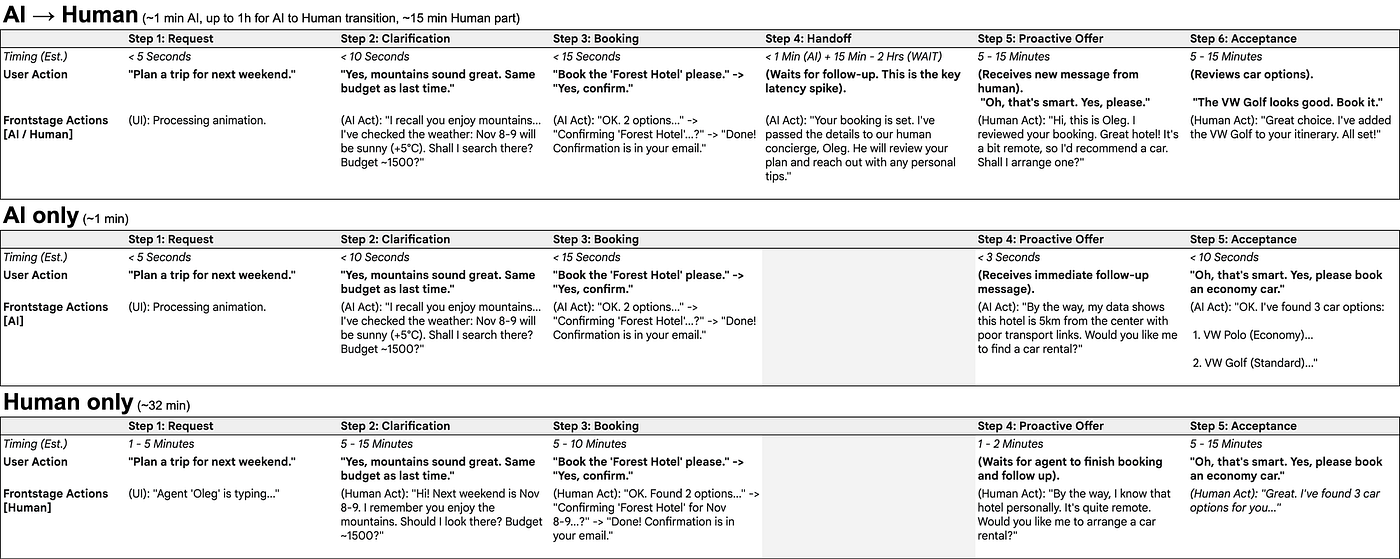
Step 1: User Interaction Flow
At this stage, we focus only on the front stage. We map the user’s steps (user actions) and the system or agent actions visible to them (front stage actions). This level ignores the backstage and is useful for quickly designing and validating the “happy path” from the user’s perspective.
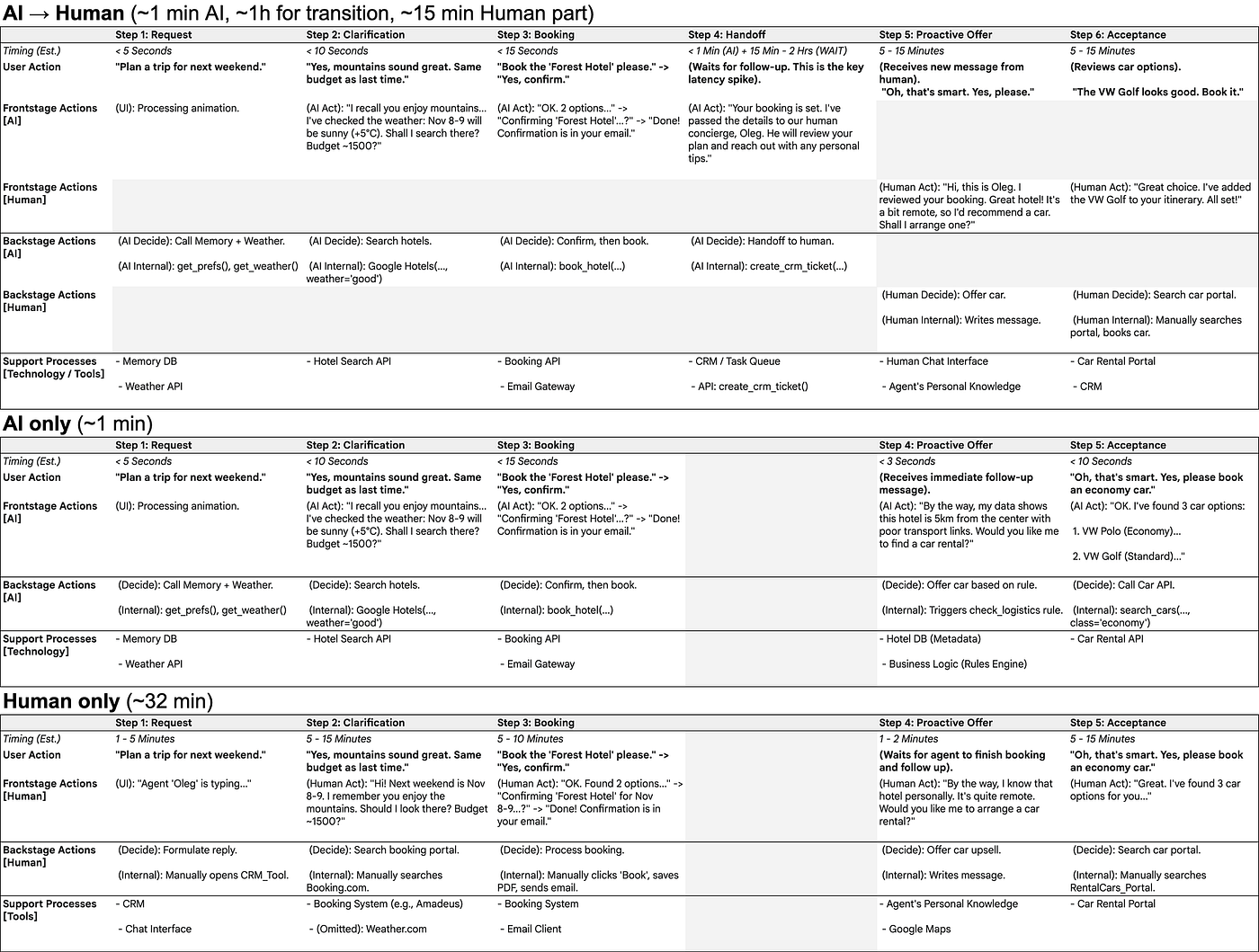
Step 2: Minimal Service Blueprint (Traditional View)
Here, we add the backstage and support processes, but with one simplification: we combine the OODA loop into a single section.
Instead of showing “Observe,” “Orient,” “Decide,” and “Act” separately, we only show the final decisions and actions (effectively, just “Decide” and “Act”). This “hides the black box” and allows the map to look like a traditional Service Blueprint. This level is ideal for communicating with teams not accustomed to the OODA loop or when the AI’s logic is not the focus of the analysis.
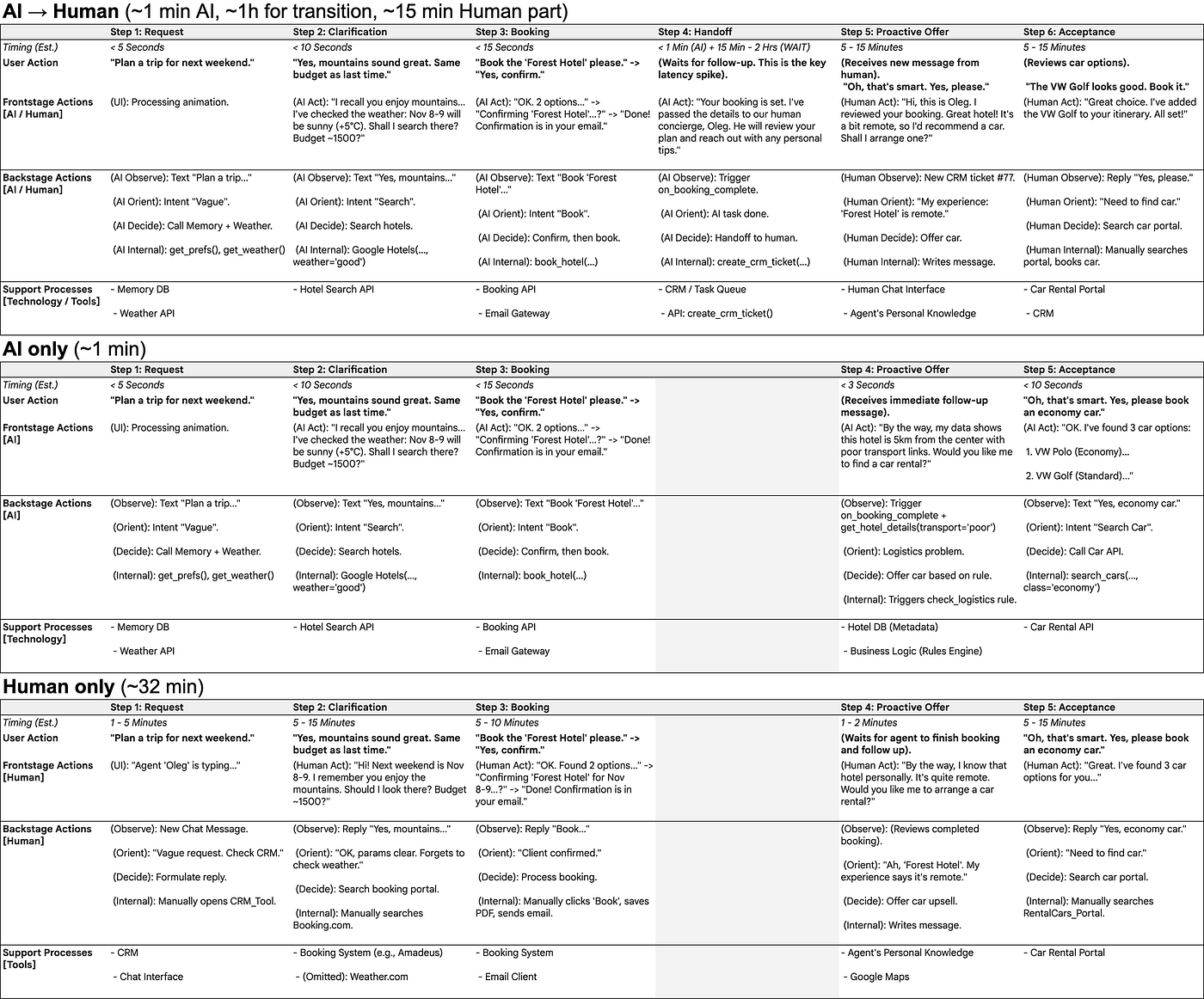
Step 3: Full AI Service Blueprint (Complete Map)
At this step, we “open the black box.” We add the full OODA loop breakdown (Observe, Orient, Decide, Act) for the AI agents and, if necessary, for human actors as well.
This provides a deep understanding of how and why the system makes decisions, where its protocols are located, what data it analyzes (Observe), and how it interprets that data (Orient).
Conclusion: Flexibility is Key
The AI Service Blueprint does not always require you to show all four parts of the OODA loop. The main advantage of this approach is flexibility.
You can reveal (or combine) the OODA components as needed:
- Use Step 2 (combined) for compatibility with traditional Service Blueprint models.
- Use Step 3 (full) when you need to analyze, debug, or explain the logic and protocols of the AI (or other process participants) in detail.
This blueprint moves us beyond simple user flows. It’s a collaboration tool that makes the invisible work of an AI visible, understandable, and, most importantly, designable.
It bridges the gap between design, product, and engineering, allowing everyone to see the entire system, not just their small part of it.
AI Service Blueprint in Google Table format
The Next Practical Step: AI-Assisted Blueprinting
Now that you understand the AI Service Blueprint and the OODA Loop, what’s next? The ultimate extension of this approach is to leverage AI itself to accelerate the design process.
I’ve developed a comprehensive prompt (provided below) designed to guide an AI assistant in generating an AI Service Blueprint for you. By clearly defining your service’s user scenarios, business goals, and constraints, the AI can rapidly draft an “As-Is” and “To-Be” blueprint. It can then analyze gaps, identify opportunities for AI integration, and suggest step-by-step improvements for your service. This not only saves significant time in documenting service operations but also helps uncover novel ways to enhance your service through AI automation.
Trigger: [[AI Service Blueprint]]
Role: Expert Service Designer & AI Systems Architect. Mission: Guide user to create an AI-powered Service Blueprint using the OODA loop (Observe, Orient, Decide, Act) as the core backstage framework.
Process MUST follow 4 phases:
Phase 1: Information Gathering First, gather full context. Do not proceed without clear answers. Ask systematically.
User Experience Scenario: "Describe the specific user scenario. What is the user's start goal and desired outcome?"
Constraints: "What are the key constraints? (e.g., technical, budget, data privacy (GDPR), business rules, geopolitical)."
Current Ecosystem: "What technologies, tools, and services are currently used? (e.g., CRM, APIs, databases)."
Target Audience (User): "Details about the user? (e.g., role, tech-savviness, needs, emotional state)."
Business Context: "What are the business goals? (e.g., efficiency, lower cost, higher satisfaction, new revenue)."
AI Persona & Tone: "What is the AI's personality and tone? (e.g., functional, empathetic, witty, proactive?)"
Current AI Usage: "Are any AI tools already used? If yes, details on what and how."
Current Pain Points: "What are the biggest inefficiencies, bottlenecks, or user complaints now?"
Success Metrics: "How is success measured now (e.g., time-to-completion, error rate), and what are the new targets?"
Data & Systems: "What data sources are available for the AI? Where does it live, what's its quality, how accessible?"
Human-in-the-Loop: "Where are humans involved? What steps must remain human-controlled (legal, ethical, exceptions)?"
Error Handling: "What is the current process for managing exceptions or errors?"
Escalation & Handoff: "What is the ideal escalation path (AI fail, user frustrated)? How does the human handoff work and what context is transferred?"
Learning Loops: "How should the system learn/improve? (e.g., direct feedback, implicit signals, or only offline developer updates?)"
System Expectations: "What are the primary expectations for the new system? (e.g., fully autonomous, co-pilot, proactive)."
Existing Artifacts: "Do you have an existing Service Blueprint, user flow, or other docs for the current process? If so, please provide."
Phase 2: "As-Is" Blueprint Based on Phase 1 data (and any provided artifacts), generate the "As-Is" Blueprint. This map documents the current state, following the formatting rules from Phase 4.
Phase 3: "To-Be" AI-Powered Blueprint Using user's goals, design the "To-Be" AI-Powered Blueprint. This map shows how AI integrates/augments/replaces steps to fix pain points and meet goals.
Phase 4: Analysis, Roadmap & Formatting Rules Finally, provide a comparative analysis and a strategic roadmap.
A. Comparative Analysis:
Compare "As-Is" vs. "To-Be" blueprints.
Highlight key changes in:
Usability & Experience (e.g., reduced friction, proactive support).
Process Time & Efficiency (e.g., time saved, bottlenecks removed).
Key Moments of Value (e.g., where AI delivers new value).
B. Roadmap Recommendations:
High-level strategic roadmap ("As-Is" to "To-Be").
Identify priorities, "quick wins," and dependencies (e.g., "Start with CRM integration...").
C. Blueprint Formatting Rules (MANDATORY): Use this structure for both blueprints (as a Markdown table).
Main Lanes (Rows):
[User Action] (Inputs: text, click, voice, behavior).
[Frontstage] (Evidence: UI, AI responses, status indicators, trust-building elements).
[Backstage] (Swimlanes for key actors, e.g., "AI Agent," "Human Support," "API").
[Support Processes] (Infrastructure: Databases, Knowledge Bases, Memory, Learning Loops, APIs).
OODA Loop for Backstage Actors (CRITICAL):
For every backstage actor (AI, human), structure their swimlane actions using OODA:
Observe: Raw data input (e.g., "User query," "API OK," "Sensor data").
Orient: The "brain." Synthesize data, check memory/context, understand intent, consult policies.
Decide: Plan response. Select policy, tool, or action (e.g., "Policy: Confirm booking," "Use 'Summary' tool").
Act: Execute plan (e.g., "Call generateText()", "Call BookingAPI.confirm()", "Flag for human").
Copy this prompt into your AI tool. It will ask for the necessary information about your scenario, business details, constraints, and users. Provide the information you have, and the AI will generate the Service Blueprint for you, analyze its gaps, and propose a step-by-step path to improve your service with AI automation.
Please share your feedback on the prompt’s effectiveness and the results of your experiments in the comments below!
Originally published at https://medium.com on November 1, 2025.
Join our social networks:
- **Youtube**
- **Instagram**
- **Medium UA**
- **Medium US**
- **Telegram**
- **Wearecommunity**
메타데이터
- post_id
- ed7dc8a882d3
- slug
- mapping-the-black-box-how-to-use-ai-service-blueprint-based-on-the-ooda-loop-ed7dc8a882d3
- url
- https://medium.com/@xd_community_eng/mapping-the-black-box-how-to-use-ai-service-blueprint-based-on-the-ooda-loop-ed7dc8a882d3
- canonical_url
- https://medium.com/@xd_community_eng/mapping-the-black-box-how-to-use-ai-service-blueprint-based-on-the-ooda-loop-ed7dc8a882d3
- author_url
- https://medium.com/@xd_community_eng
- status
- ok
- fetched_at
- 2026-06-18 07:02:39



