The Quiet Keyboard That Saved My 2:00 PM Zoom Call
We’ve all been there.
The Quiet Keyboard That Saved My 2:00 PM Zoom Call
We’ve all been there.
You’re on a high-stakes call with the CTO. You’re taking notes, feeling like a productivity god. Then, you see it — the little green bar on your Zoom tile is bouncing like a heart monitor. You aren’t talking, but your keyboard is.
Clack. Clack. CLACK.
Every time you hit the “Enter” key, it sounds like a gunshot. Finally, the lead dev unmutes: “Hey, who’s typing on a typewriter? We can hear every line of code you’re writing.”
Photo by Sofya on Unsplash
The Mortifying Reality of “Clicky” Switches
As a self-proclaimed keyboard geek, I’ve tried everything. I’ve gone through the “Blue Switch” phase where I wanted my home office to sound like a 1950s newsroom. It was fun for ten minutes. It was a disaster for my professional reputation.
Most remote workers think “Mechanical” equals “Loud.” They stick to their mushy laptop keys because they’re afraid of the noise. But after testing hundreds of boards at Productivity Lab, I can tell you: silence is actually a feature you can buy.
The Expert Solution: Silent Mechanicals
If you want the feel of a pro tool without the Zoom embarrassment, you need to look at three things:
Low-Profile Tactiles
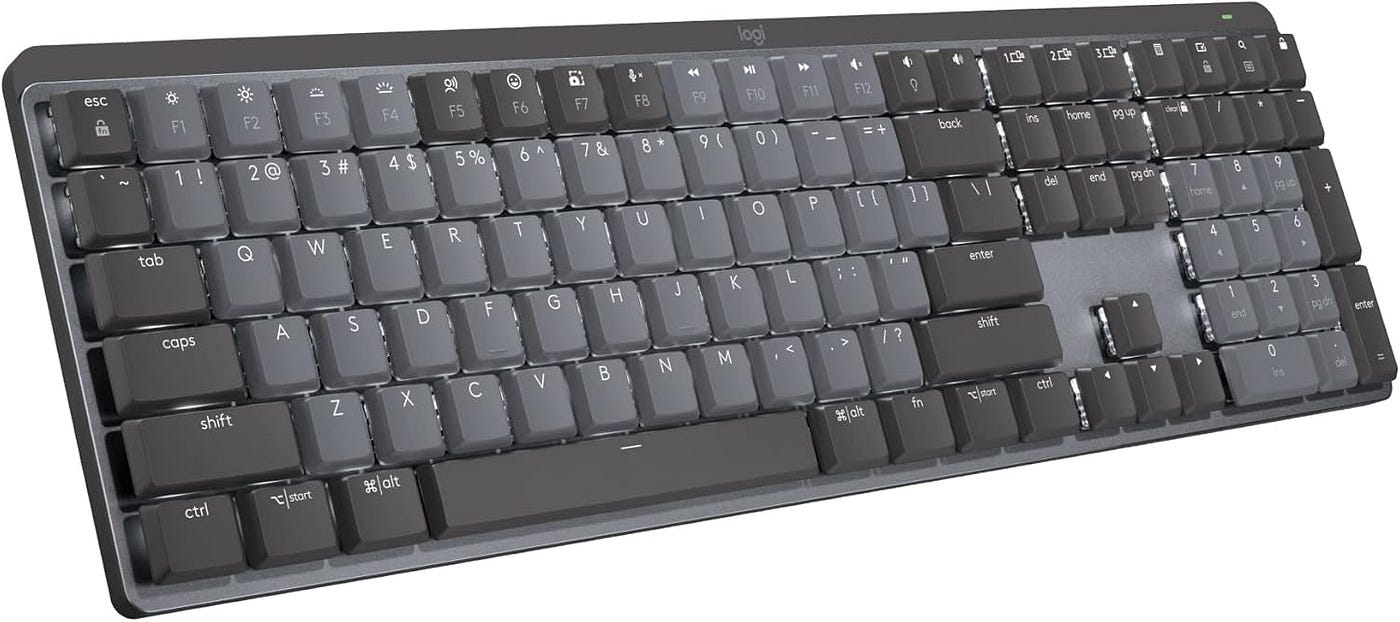
The Logitech MX Mechanical uses “Tactile Quiet” switches. They give you a subtle bump so you know you’ve hit the key, but the sound is more of a “thud” than a “click.”
Internal Gaskets
Keyboards like the Keychron Q6 Max use silicone gaskets. Think of these like tiny shock absorbers. They don’t just feel better; they kill the high-pitched “ping” of the metal case.

The Desk Mat Trick
Most people don’t realize their desk is an amplifier. A hollow wooden desk makes any keyboard louder. Putting a simple felt or rubber desk mat under your board is like putting a muffler on a car.
My Personal Setup
Lately, I’ve been using the **NuPhy Air75 V2** with their “Aloe” switches. It’s a low-profile board that is so quiet I can type during a presentation and nobody — not even the most sensitive microphone — picks it up.

But silence isn’t the only thing that matters. You still need speed, comfort, and a layout that doesn’t give you carpal tunnel by age 35.
I’ve spent the last few months breaking down the science of “Silent but Productive” setups. If you’re ready to ditch the mushy keys without annoying your coworkers, I’ve ranked the best quiet options in my full 2026 guide.
Check out the full comparison here:
👉https://www.productivitylabguide.com/best-keyboard-for-work
메타데이터
- post_id
- ede11eec5d46
- slug
- the-quiet-keyboard-that-saved-my-2-00-pm-zoom-call-ede11eec5d46
- url
- https://medium.com/@productivitylabguide/the-quiet-keyboard-that-saved-my-2-00-pm-zoom-call-ede11eec5d46
- canonical_url
- https://medium.com/@productivitylabguide/the-quiet-keyboard-that-saved-my-2-00-pm-zoom-call-ede11eec5d46
- author_url
- https://medium.com/@productivitylabguide
- status
- ok
- fetched_at
- 2026-06-26 21:52:29