Revolutionize AutoCAD Sharing: Safe, Full-Feature Offline Viewer in a Single HTML
You don’t need to hand over the original AutoCAD drawing, bind a cloud account, or install AutoCAD — just a browser and a single html file…
Revolutionize AutoCAD Sharing: Safe, Full-Feature Offline Viewer in a Single HTML
You don’t need to hand over the original AutoCAD drawing, bind a cloud account, or install AutoCAD — just a browser and a single html file, and you can still zoom, toggle layers, and measure.
[embed]
demo link: https://mlightcad.github.io/cad-viewer/cad-simple-viewer/
1. Background: The “Revolutionary Way” to Share Drawings
Anyone who’s done projects has been here: you need to share a drawing, but every option falls into one of three traps: leak risk, hard to use, or requires internet.
1.1 The Old Three Ways (and Why They Suck)
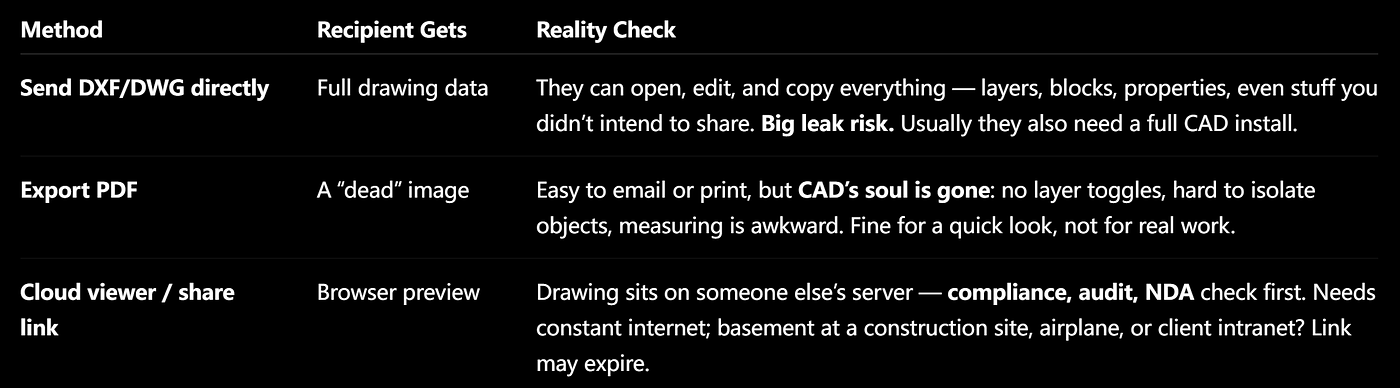
Old Ways to Share AutoCAD DXF/DWG Drawings
1.2 The Fourth Way: A Self-Contained HTML “Mini CAD Viewer”
Exporting HTML is a signature move of cad-viewer (rare in the industry, done properly):
- No source file: The HTML only contains a visual snapshot (vertices, colors, layer info), not DWG/DXF. Can’t reverse-engineer — big reduction in leak risk.
- Not like PDF: Offline you can zoom, pan, toggle layers, zoom to specific layers, measure distances, and switch between English/Chinese. True viewing workflow.
- No cloud account: Produces a single
.htmlwith scripts inline. Works from USB,file://, or internal static pages — offline friendly. - Minimal delivery: Email, chat, or cloud storage — one file. Any modern browser works, no install, no registration.
In short: balancing confidentiality, offline access, and usability — not replacing AutoCAD, just delivering the right view safely to the other side.
2. Goals and Boundaries
2.1 What We Want
- Offline single file: One
.html, no backend, no DWG/DXF inside. - Controlled file size: Only keep visual data, not the entire model database.
- Two “shuttles”: Export in the full viewer; view in lightweight runtime — separate responsibilities.
- Maintainable Types, encoding, collecting, packaging, and UI.
2.2 What We Don’t Do
- Don’t recreate editable
AcDbentities in HTML - Don’t parse DXF/DWG offline
- Don’t aim to replace full Viewer features (ribbon, command line, properties panel)
2.3 Two Shuttles: Export vs. View

Export vs. View
- Shuttle A: Open drawing in
cad-viewer/cad-simple-viewer, runchtml, snapshot the scene, package into HTML. - Shuttle B: Recipient double-clicks HTML, inline scripts unpack snapshot, rebuild Three.js scene, start zooming, toggling layers, and measuring.
3. Exporting from CAD-Viewer
If you’re using [@mlightcad/cad-viewer](https://mlightcad.github.io/cad-viewer/cad-viewer/):
3.1 Three Simple Steps
1. Open the drawing — DWG or DXF, make sure lines are visible.
2. Trigger export:
- Use “File -> Export to HTML” menu in ribbon
- Or command line:
chtml
3. Wait for download — browser gives xxx.html, extension guaranteed .html.

Export Drawing to HTML
3.2 Quick Reminders Before Export
ItemTipDrawing must be visibleOnly what’s drawn on screen gets exported. Layers matter Frozen or hidden layers won’t appear in snapshot. Language packsViewer language at export becomes offline default. Switch to English if needed.
4. Exporting via Command Line
Prefer black box and blinking cursor? @mlightcad/cad-html-exporter-cli uses Playwright + Chromium to do the same job headlessly.
4.1 One-Time Browser Setup
pnpm install
pnpm export:html:setup   # Install Chromium, once only
4.2 Main Commands

Commands
Quick try:
pnpm export:html
# Open tmp/minimal-line.html, brag: "Offline line view works!"
Export your own drawing:
pnpm export:html:run -- D:\drawings\plan.dwg -o D:\out\plan.html
pnpm export:html:run -- drawing.dxf -o drawing.html --locale zh --title "Floor Plan 1F"
5. Opening and Using Exported HTML
5.1 How to open

Ways to Open HTML Drawing
No CAD or Node install required — all scripts inline.
5.2 Toolbar

Buttons in Toolbar
5.3 Layers Panel
- Toggle check = show/hide
- Zoom to layer = focus only on that layer; button disables if empty
- On narrow screens, panel auto-hides to avoid blocking drawing
5.4 Measurement
Units follow the original drawing. Weird decimals? Check original in Viewer — HTML just displays accurately. Currently only distance measurements supported; more coming.
6. Integrating into Your Own App
Front-end developers, sit tight.
6.1 What you need
- Dependency:
@mlightcad/cad-simple-viewer(already includescad-html-exporter) - User command:
chtml(AcApExportHtmlCmd→AcApHtmlConvertor)
6.2 Don’t forget Viewer Runtime
Export fetches viewer-runtime.iife.js and inlines it. Default path:
./viewer-runtime.iife.jsCan override in MlCadViewer / AcApDocManager.createInstance:
htmlViewerRuntimeUrl?: string | URL // e.g., './assets/viewer-runtime.iife.js'6.3 Packaging Existing Snapshots
Have AcExSnapshotV1 already? Use AcApHtmlConvertor.packSnapshot() or packHtml(snapshot, { viewerRuntime }) to skip scene collection.
7. Troubleshooting

Troubleshooting
8. How It Works (For Developers)
Enough for everyday use; here’s what’s under the hood.
8.1 Background
HTML export sits in the “fourth way” triangle: confidential, offline, usable — not a CAD killer, just safe delivery.
8.2 Package Responsibilities

Package Responsibilities
Key output: dist/viewer-runtime.iife.js — fetched and inlined during export.
8.3 Data Flow

Data Flow to Export Drawing to HTML
CLI uses Playwright to open dist-runner, runs exportCadToHtml(), same Builder + packHtml, writes file.
8.4 Technical Highlights
- Snapshot
AcExSnapshotV1: meta, layers, layout+batch, current layout id - HTML embedding: gzip + Base64 in
<script id="mlcad-snapshot">; escape</script>to avoid premature termination - Scene collection: DFS traversal, pick
AcTrBatchedLine/AcTrBatchedMesh - Runtime: decode → i18n → WebGL → group by layer
- i18n: use
data-i18n-textfor buttons, nottextContent, to prevent toolbar collapsing
메타데이터
- post_id
- ee0ed8ced0a8
- slug
- revolutionize-autocad-sharing-safe-full-feature-offline-viewer-in-a-single-html-ee0ed8ced0a8
- url
- https://medium.com/@mlightcad/revolutionize-autocad-sharing-safe-full-feature-offline-viewer-in-a-single-html-ee0ed8ced0a8
- canonical_url
- https://medium.com/@mlightcad/revolutionize-autocad-sharing-safe-full-feature-offline-viewer-in-a-single-html-ee0ed8ced0a8
- author_url
- https://medium.com/@mlightcad
- status
- ok
- fetched_at
- 2026-06-09 15:37:30