Sysmon Config and Sending Logs to Wazuh: Enhancing Endpoint Visibility
By default, the Wazuh Agent collects Windows and system logs. While this provides a basic level of monitoring, it does not deliver enough…
Sysmon Config and Sending Logs to Wazuh: Enhancing Endpoint Visibility
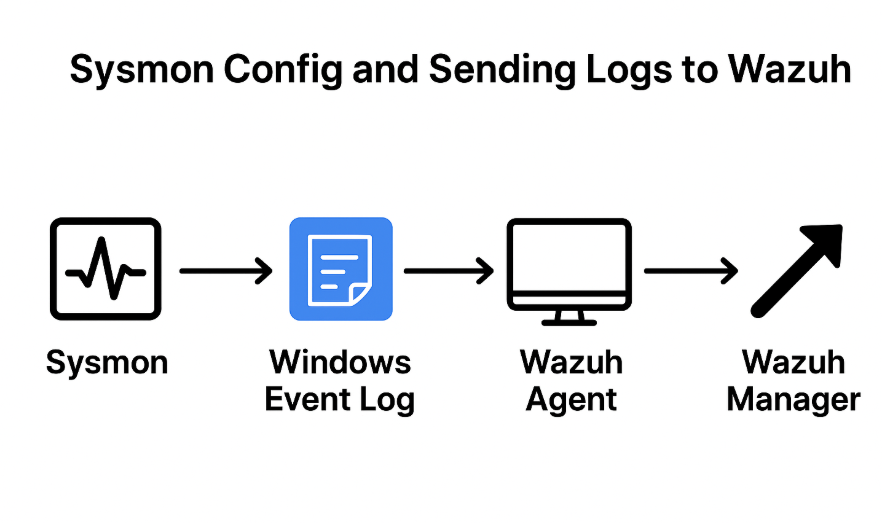
Architecture Diagram
By default, the Wazuh Agent collects Windows and system logs. While this provides a basic level of monitoring, it does not deliver enough visibility into endpoint activity to effectively detect modern threats. To build a strong EDR solution, we need to go beyond standard logs and capture details such as process executions, command-line activity, and network connections.
The strength of Wazuh lies in its flexibility. We can extend its capabilities by integrating additional tools like Sysmon and Packetbeat, which provide deeper insights into what is happening on our endpoints. Once these tools are deployed, we simply configure the Wazuh Agent to forward their logs, giving analysts a richer data set to work with for threat detection and incident response.
Why Sysmon?
Sysmon, part of Microsoft’s Sysinternals Suite, is a lightweight system service and driver that monitors and logs critical system events. With the right configuration, Sysmon records things like:
- Process creation (with hashes and parent/child relationships)
- Command-line arguments
- Network connections
- File changes
- Registry modifications
- Driver and DLL loading
Installation:
Step 1: Install Sysmon:
Download Sysmon from Microsoft Sysinternals: https://learn.microsoft.com/en-us/sysinternals/downloads/sysmon (In this example, we’re using Sysmon v15.15.)
Extract the downloaded archive into a folder, e.g.:
C:\Users\arfan\Downloads\SysmonStep 2: Download a Sysmon Configuration:
Sysmon requires an XML configuration file to define what events to log. Instead of starting from scratch, we can use a well-maintained community config.
Download Olaf Hartong’s sysmon-modular config: https://github.com/olafhartong/sysmon-modular/blob/master/sysmonconfig.xml
Save this sysmonconfig.xml into the same folder as Sysmon.
Step 3: Install Sysmon with Config
Open PowerShell as Administrator and navigate to the Sysmon folder:
C:\Users\arfan\Downloads\SysmonNow install Sysmon with the config file:
.\Sysmon64.exe -i .\sysmonconfig.xmlClick Agree when prompted.
At this point, Sysmon is running as a service. You can verify it under: Services → Sysmon (System Monitor)

Sysmon Service Running Successfully
You should also start seeing logs here:
Event Viewer → Applications and Services Logs → Microsoft → Windows → Sysmon → OperationalNext, we need Wazuh to collect Sysmon’s event logs.
Step 4: Configure Wazuh Agent to Collect Sysmon Logs:
- Open Notepad as Administrator.
- Edit the Wazuh agent configuration file (replace path if different):
C:\Program Files (x86)\ossec-agent\ossec.conf
- Add the following block inside the
<ossec_config>section:
<localfile>
  <location>Microsoft-Windows-Sysmon/Operational</location>
  <log_format>eventchannel</log_format>
</localfile>
⚠️ Important: The <location> value must match the exact event channel path from Event Viewer → Sysmon → Properties.
-
Save the file.
-
Restart the Wazuh agent service:
Services → Wazuh Agent → Restart

Sysmon Logs sending to Wazuh Successfully
Extending Wazuh on Linux
While Sysmon enhances endpoint monitoring on Windows, Linux endpoints have their own options for deeper visibility:
- Packetbeat (Elastic Beat): Useful for network monitoring on Linux. It captures traffic data such as DNS queries, HTTP requests, and SQL queries, giving analysts visibility into communication patterns and potential exfiltration attempts. (On Windows, Sysmon already captures network connections, so Packetbeat is most valuable for Linux.)
- Sysmon for Linux: Microsoft now officially provides a Linux version of Sysmon. Although still developing, it offers similar functionality to its Windows counterpart by monitoring process creation, file changes, and network connections. Logs are sent to the Wazuh Agent just like on Windows, providing consistent visibility across platforms.
By combining these tools with the Wazuh Agent, SOC analysts can achieve the same level of insight on Linux endpoints as they do on Windows.
Conclusion
By combining Sysmon with Wazuh, we unlock powerful endpoint visibility.
- Sysmon collects detailed forensic-level event data.
- Wazuh Agent forwards this data into your SIEM/EDR pipeline.
The Wazuh Agent is a highly capable EDR solution, and its true strength lies in its flexibility. By extending it with services like Sysmon and Packetbeat, SOC analysts gain deep visibility into endpoint activity. Beyond endpoints, Wazuh can also aggregate logs from applications such as Nginx, ModSecurity, and MySQL, creating a unified view of both system and application behavior. This expanded visibility gives security teams the comprehensive insight they need to detect, investigate, and respond to threats effectively.
Arfan Abid
메타데이터
- post_id
- ee2ef3ad5e96
- slug
- sysmon-config-and-sending-logs-to-wazuh-enhancing-endpoint-visibility-ee2ef3ad5e96
- url
- https://medium.com/@ArfanAbid/sysmon-config-and-sending-logs-to-wazuh-enhancing-endpoint-visibility-ee2ef3ad5e96
- canonical_url
- https://medium.com/@ArfanAbid/sysmon-config-and-sending-logs-to-wazuh-enhancing-endpoint-visibility-ee2ef3ad5e96
- author_url
- https://medium.com/@ArfanAbid
- status
- ok
- fetched_at
- 2026-07-24 03:44:10



