Mounting Persistent Storage to a Kubernetes Pod on EKS Using EBS (PV & PVC) — A Hands-On…
Persistent storage is one of those Kubernetes concepts that sounds simple on paper — “just attach a volume to your pod” — until you…
Mounting Persistent Storage to a Kubernetes Pod on EKS Using EBS (PV & PVC) — A Hands-On Walkthrough
Persistent storage is one of those Kubernetes concepts that sounds simple on paper — “just attach a volume to your pod” — until you actually try it on a real cluster with multiple nodes spread across availability zones. I recently set this up end-to-end on Amazon EKS using EBS-backed static Persistent Volumes, and ran straight into a classic real-world gotcha along the way. Here’s the full walkthrough, mistake and all, because I think the mistake teaches more than a clean success story would.
The Goal
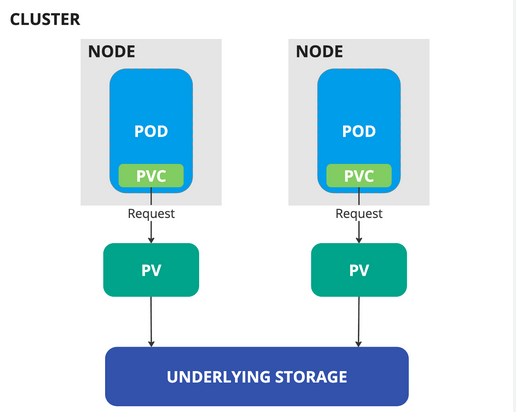
Attach a real, persistent Amazon EBS volume to an Nginx pod running on EKS, so that any data written inside the pod survives even if the pod is deleted and recreated. That’s the entire point of Persistent Volumes (PV) and Persistent Volume Claims (PVC) — decoupling storage from the pod’s lifecycle.
Step 1: The EKS Cluster
I started with a standard two-node EKS cluster:
kubectl get nodes
Step 2: Install the AWS EBS CSI Driver
EKS doesn’t talk to EBS out of the box. You need the AWS EBS CSI (Container Storage Interface) driver installed on the cluster so Kubernetes knows how to provision, attach, and mount EBS volumes:
kubectl apply -k "github.com/kubernetes-sigs/aws-ebs-csi-driver/deploy/kubernetes/overlays/stable/?ref=release-1.62"This creates the service accounts, cluster roles, and role bindings the driver needs:

Step 3: Give the Nodes IAM Permission to Touch EBS
Installing the driver isn’t enough — the underlying EC2 instances (your EKS worker nodes) need IAM permission to actually attach/detach EBS volumes on your behalf. This means attaching the AmazonEBSCSIDriverPolicy (AWS-managed policy) to the IAM role used by your node group — either directly, or via IAM Roles for Service Accounts (IRSA) tied to the ebs-csi-controller-sa service account created above.
Without this step, the driver pods run fine, but any attach/detach API call to EC2 will be silently rejected with permission errors.
Step 4: Create the EBS Volume
Next, I created a raw EBS volume manually in the AWS console (2Gi), which gave me a volume ID like vol-0050d0582bb7da55a. This is what's known as static provisioning — you create the disk yourself and hand-wire it into a PV, rather than letting Kubernetes provision one dynamically via a StorageClass.
Step 5: Define the PersistentVolume (PV)
apiVersion: v1
kind: PersistentVolume
metadata:
  name: static-ebs-pv
spec:
  accessModes:
    - ReadWriteOnce
  capacity:
    storage: 2Gi
  storageClassName: ebs-static
  persistentVolumeReclaimPolicy: Retain
  csi:
    driver: ebs.csi.aws.com
    volumeHandle: vol-0050d0582bb7da55a
Step 6: Define the PersistentVolumeClaim (PVC)
apiVersion: v1
kind: PersistentVolumeClaim
metadata:
  name: static-ebs-pvc
spec:
  accessModes:
    - ReadWriteOnce
  storageClassName: ebs-static
  resources:
    requests:
      storage: 2Gi
Applied both, and they bound instantly:
kubectl get pv
kubectl get pvc

Clean bind. Felt like smooth sailing.
Step 7: The Pod — and the First Failure
apiVersion: v1
kind: Pod
metadata:
  name: nginx-ebs-pod
spec:
  containers:
  - name: nginx
    image: nginx:latest
    ports:
    - containerPort: 80
    volumeMounts:
    - name: ebs-storage
      mountPath: /usr/share/nginx/html
  volumes:
  - name: ebs-storage
    persistentVolumeClaim:
      claimName: static-ebs-pvc
Applied it, and the pod just… sat there. Pending.
kubectl get pods
Time to dig into kubectl describe pod, which is honestly where 90% of Kubernetes debugging actually happens:

And there it was: InvalidVolume.ZoneMismatch.
The Root Cause: EBS Volumes Are Zone-Locked
This is the part that trips up a lot of people new to EBS + Kubernetes, and it’s worth internalizing: an EBS volume lives in exactly one Availability Zone, permanently. It cannot be attached to an EC2 instance in a different AZ — not through Kubernetes, not through the console, not through the CLI. There’s no “flag” to fix this; it’s a hard AWS constraint.
My cluster had two nodes — one in us-east-1b, one in us-east-1c. My EBS volume had been created in us-east-1b. The scheduler placed my pod on whichever node it liked, and there was roughly a coin-flip's chance it would land on the wrong AZ. It did.
The PV I’d defined had no idea the volume was AZ-locked, so nothing stopped the scheduler from placing the pod on the wrong node in the first place.
The Fix: nodeAffinity on the PV
The fix is to tell Kubernetes explicitly which zone this volume lives in, so the scheduler only ever places pods that use this PVC onto nodes in that same zone:
apiVersion: v1
kind: PersistentVolume
metadata:
  name: static-ebs-pv
spec:
  accessModes:
    - ReadWriteOnce
  capacity:
    storage: 2Gi
  storageClassName: ebs-static
  persistentVolumeReclaimPolicy: Retain
  csi:
    driver: ebs.csi.aws.com
    volumeHandle: vol-0050d0582bb7da55a
  nodeAffinity:
    required:
      nodeSelectorTerms:
      - matchExpressions:
        - key: topology.kubernetes.io/zone
          operator: In
          values:
          - us-east-1b
That nodeAffinity block is the key addition. It tells the Kubernetes scheduler: "any pod that claims this PV must be scheduled onto a node physically sitting in us-east-1b — no exceptions."
Reapplied everything from scratch:
kubectl apply -f pv.yaml
persistentvolume/static-ebs-pv created
kubectl apply -f pvc.yamlkubectl apply -f pod.yamlkubectl get pods
Running. That’s the moment this stops being theory and becomes a working system.

Step 8: Actually Proving Persistence
Getting Running status isn't proof the volume is actually persistent — plenty of things can look fine and still be backed by ephemeral storage. So I tested it properly:
kubectl exec -it nginx-ebs-pod -- bash
root@nginx-ebs-pod:/# cd /usr/share/nginx/html/
root@nginx-ebs-pod:/usr/share/nginx/html# mkdir demo-one
root@nginx-ebs-pod:/usr/share/nginx/html# cd demo-one/
root@nginx-ebs-pod:/usr/share/nginx/html/demo-one# touch demo-file
root@nginx-ebs-pod:/usr/share/nginx/html/demo-one# exit
Then I deleted the pod entirely:
kubectl delete -f pod.yamlkubectl get podsAt this point, if the storage were ephemeral (e.g. emptyDir or the container's own writable layer), demo-file would be gone forever. Recreated the pod from the same manifest:
kubectl apply -f pod.yaml
pod/nginx-ebs-pod created
(A quick note: right after creation I got error: Internal error occurred: unable to upgrade connection: container not found ("nginx") on my first exec attempt — that's normal, it just means the container was still finishing its ContainerCreating phase. A few seconds later, kubectl get pods showed 1/1 Running, and the exec worked fine.)
kubectl exec -it nginx-ebs-pod -- bash
root@nginx-ebs-pod:/# cd /usr/share/nginx/html/
root@nginx-ebs-pod:/usr/share/nginx/html# ls
demo-one  lost+found
root@nginx-ebs-pod:/usr/share/nginx/html# cd demo-one/
root@nginx-ebs-pod:/usr/share/nginx/html/demo-one# ls
demo-file
**demo-file was still there.** New pod, same underlying EBS volume, data intact. That lost+found directory is also a nice tell — it's the standard artifact of a real filesystem on a real block device, not a container's overlay layer.
Key Takeaways
- PV/PVC decouples storage from pod lifecycle. Pods are disposable; the data doesn’t have to be.
- EBS volumes are permanently tied to a single Availability Zone. This isn’t a Kubernetes limitation — it’s how EBS works at the AWS infrastructure level.
- Always set
nodeAffinityon statically-provisioned EBS-backed PVs so the scheduler can't place your pod on a node in the wrong zone. Skipping this is the single most common cause ofFailedAttachVolume/ZoneMismatcherrors with static EBS provisioning. **kubectl describe podis your best debugging friend.** TheEventssection at the bottom told me exactly what was wrong, in plain language, within seconds.- Don’t trust “Running” status alone — actually write data, kill the pod, recreate it, and verify the data survives. That’s the only real proof your persistence setup works.
What’s Next
The natural follow-up to this is moving from static provisioning (manually creating the EBS volume and PV) to dynamic provisioning using a StorageClass, where Kubernetes creates the EBS volume for you on demand — and even handles the AZ-matching problem automatically via WaitForFirstConsumer binding mode. That's a good next experiment if you want to take this further.
메타데이터
- post_id
- ee37df1c240f
- slug
- mounting-persistent-storage-to-a-kubernetes-pod-on-eks-using-ebs-pv-pvc-a-hands-on-ee37df1c240f
- url
- https://medium.com/@mandahemasudhakar/mounting-persistent-storage-to-a-kubernetes-pod-on-eks-using-ebs-pv-pvc-a-hands-on-ee37df1c240f
- canonical_url
- https://medium.com/@mandahemasudhakar/mounting-persistent-storage-to-a-kubernetes-pod-on-eks-using-ebs-pv-pvc-a-hands-on-ee37df1c240f
- author_url
- https://medium.com/@mandahemasudhakar
- status
- ok
- fetched_at
- 2026-08-17 18:38:08