Building a Semantic Search Knowledge Base with MindsDB
Learn how to build intent-based semantic search in MindsDB with Knowledge Bases, PGVector and FAISS
Building a Semantic Search Knowledge Base with MindsDB

Written by Andriy Burkov, Ph.D. & Author, MindsDB Advisor
What happens when a developer searches for “how to make async HTTP calls” but your documentation says “asynchronous network requests”? Traditional keyword search fails — even though the content is exactly what they need.
This is the fundamental limitation of keyword search: it matches words, not meaning.
In this tutorial, we’ll build a semantic search system using MindsDB that understands user intent. Using 2 million Stack Overflow posts, we’ll create knowledge bases with two different vector storage backends — PGVector and FAISS- and compare their performance.
What You’ll Learn:
- How MindsDB knowledge bases convert text into searchable vectors
- Setting up pgvector (PostgreSQL-based) and FAISS (Facebook AI Similarity Search) storage
- Combining semantic search with metadata filters
- Building an AI agent that uses your knowledge base to answer questions
Prerequisites:
- A MindsDB account (cloud or self-hosted)
- PostgreSQL database with the Stack Overflow dataset
- An OpenAI API key for embeddings
How Semantic Search Works
Before we dive in, let’s understand the key difference between keyword and semantic search:
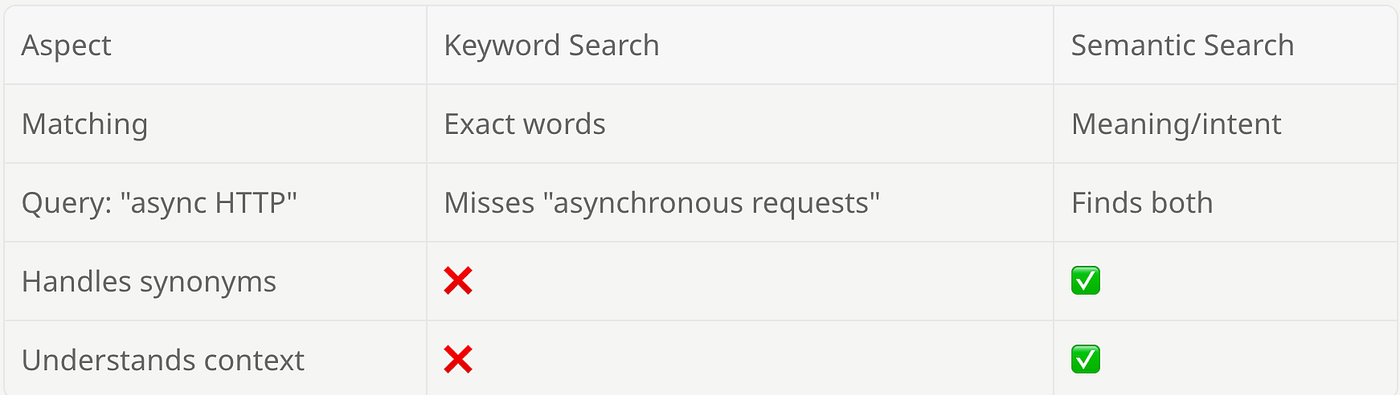
Semantic search works by:
- Embedding: Converting text into numerical vectors using an embedding model
- Storing: Saving these vectors in a vector database
- Querying: Converting the search query to a vector and finding the closest matches
MindsDB handles all of this through its Knowledge Base abstraction.
Installing Dependencies
We need two packages:
- mindsdb_sdk: Python client for interacting with MindsDB servers
- pandas: For working with query results as DataFrames
!pip install mindsdb_sdk pandas3. Connecting to the MindsDB Cloud Instance
import mindsdb_sdk

# Connect to your MindsDB instance
server = mindsdb_sdk.connect(
    'YOUR_MINDSDB_URL',  # e.g., 'https://cloud.mindsdb.com' for MindsDB Cloud
    login='YOUR_USERNAME',
    password='YOUR_PASSWORD'
)
print("Connected to MindsDB server")
Connected to MindsDB server4. Connecting to the Data Source
def run_query(sql, success_msg="Query executed successfully"):
    """Execute a SQL query and handle 'already exists' errors gracefully."""
    try:
        result = server.query(sql).fetch()
        print(success_msg)
        return result
    except RuntimeError as e:
        if "already exists" in str(e).lower():
            print("Resource already exists - skipping")
        else:
            raise
        return None

# Connect to your PostgreSQL database containing Stack Overflow data
run_query("""
    CREATE DATABASE pg_sample
    WITH ENGINE = "postgres",
    PARAMETERS = {
        "user": "YOUR_PG_USER",
        "password": "YOUR_PG_PASSWORD",
        "host": "YOUR_PG_HOST",
        "port": "5432",
        "database": "sample"
    }
""", "Created pg_sample database connection")
Created pg_sample database connectionLet’s verify the connection by exploring the data. Check the dataset size:
# Get total row count
count = server.query("SELECT COUNT(*) as cnt FROM pg_sample.stackoverflow_2m").fetch()
print(f"Dataset size: {count['cnt'].iloc[0]:,} rows")
Dataset size: 2,000,000 rowsShow 10 records:
# Test sample data
df = server.query("SELECT * FROM pg_sample.stackoverflow_2m LIMIT 10").fetch()

# Display as a nice table (in Jupyter notebooks)
from IPython.display import display
display(df)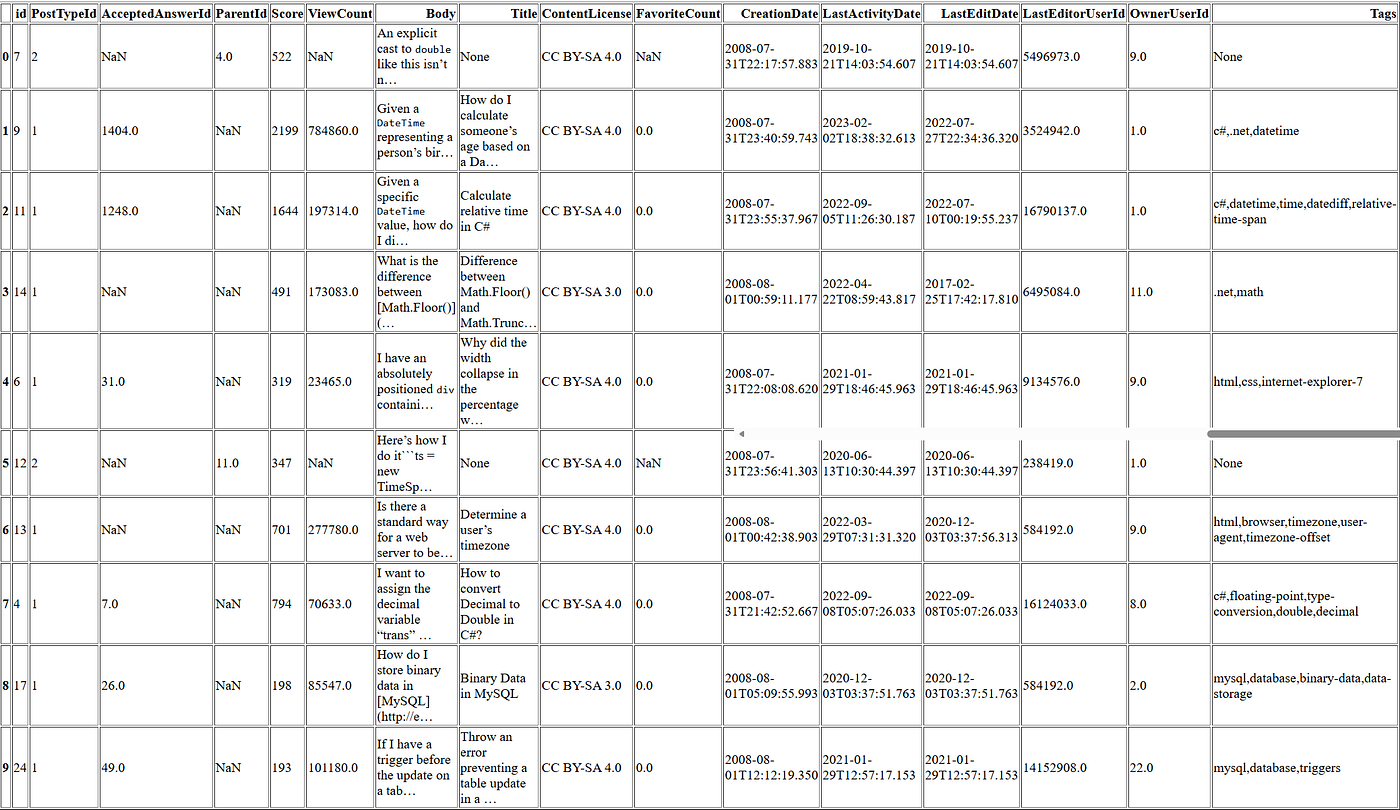
The Stack Overflow dataset contains 2 million posts — both questions (PostTypeId=1) and answers (PostTypeId=2). Key columns include:
Id- Unique identifier for each postBody- The content we'll make semantically searchableTitle- The title of the post (questions only)Tags- Programming language and topic tags (e.g.,python,javascript)Score- Community voting score—useful for prioritizing high-quality contentViewCount- Popularity metric for filteringPostTypeId- Type of post (1=question, 2=answer)AcceptedAnswerId- ID of the accepted answer (for questions)CreationDate,LastActivityDate,LastEditDate- Timestamps
This rich metadata allows us to combine semantic understanding with traditional filters — for example, finding Python questions about async programming with a score above 10.
4. Setting Up Vector Storage Backends
MindsDB supports multiple vector storage options. We’ll set up both pgvector and a recently added FAISS and will compare how quick they are.
PGVector (PostgreSQL Extension)
pgvector is a PostgreSQL extension for vector similarity search. It’s ideal when you want to keep vectors alongside your relational data.
# Create pgvector database connection
run_query("""
    CREATE DATABASE pg_vector
    WITH ENGINE = "pgvector",
    PARAMETERS = {
        "user": "YOUR_PG_USER",
        "password": "YOUR_PG_PASSWORD",
        "host": "YOUR_PG_HOST",
        "port": "5432",
        "database": "vector"
    }
""", "Created pg_vector database connection")
Created pg_vector database connectionFAISS (Facebook AI Similarity Search)
FAISS is a library for efficient similarity search developed by Facebook AI Research. It’s optimized for fast similarity search on large datasets.
# Create FAISS database connection
run_query("""
    CREATE DATABASE db_faiss
    WITH ENGINE = 'duckdb_faiss',
    PARAMETERS = {
        "persist_directory": "/home/ubuntu/faiss"
    }
""", "Created db_faiss database connection")
Created db_faiss database connectionChoosing Between PGVector and FAISS
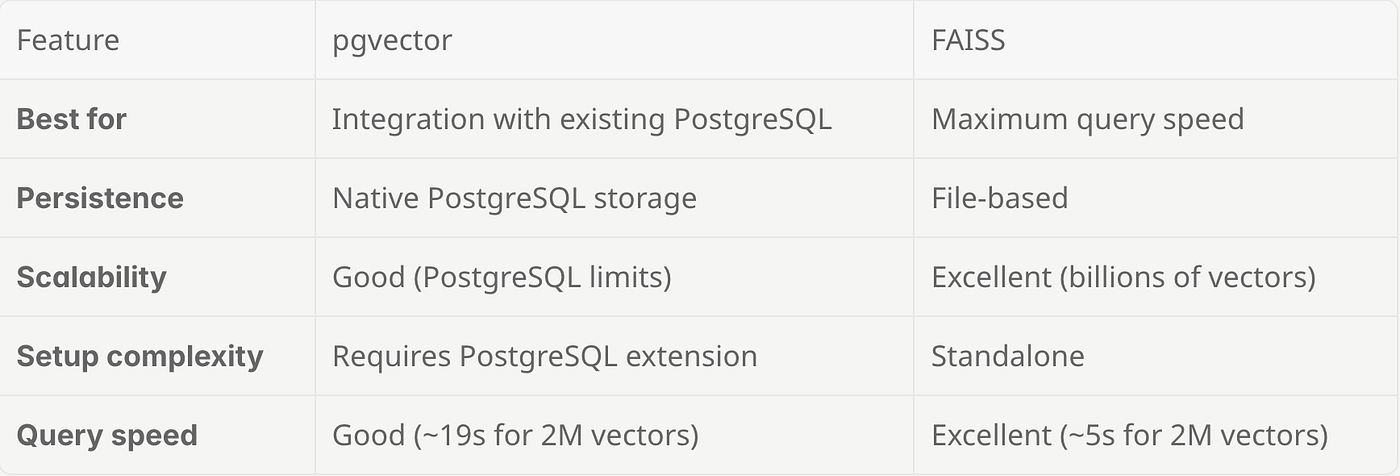
For this tutorial, we’ll implement both so you can see the performance difference firsthand.
5. Creating Knowledge Bases
Now we have a table with relational data and two vector stores to keep the embedding vectors. We are ready to create knowledge bases using both storage backends.
The knowledge base will:
- Use OpenAI’s
text-embedding-3-smallmodel for generating embeddings - Store the post
Bodyas searchable content - Include metadata fields for filtering results
Knowledge Base with PGVector Storage
def kb_exists(kb_name):
    """Check if a knowledge base already exists."""
    try:
        result = server.query("SELECT name FROM information_schema.knowledge_bases").fetch()
        return kb_name in result['name'].values
    except Exception:
        return False

# Create pgvector knowledge base
if kb_exists("kb_stack_vector"):
    print("kb_stack_vector already exists - skipping creation")
else:
    run_query("""
        CREATE KNOWLEDGE_BASE kb_stack_vector
        USING
            storage = pg_vector.stack,
            embedding_model = {
                "provider": "openai",
                "model_name": "text-embedding-3-small"
            },
            content_columns = ['Body'],
            metadata_columns = [
                "PostTypeId",
                "AcceptedAnswerId",
                "ParentId",
                "Score",
                "ViewCount",
                "Title",
                "ContentLicense",
                "FavoriteCount",
                "CreationDate",
                "LastActivityDate",
                "LastEditDate",
                "LastEditorUserId",
                "OwnerUserId",
                "Tags"
            ]
    """, "Created kb_stack_vector knowledge base")
Created kb_stack_vector knowledge baseKnowledge Base with FAISS Storage
# Create FAISS knowledge base
if kb_exists("kb_stack_faiss"):
    print("kb_stack_faiss already exists - skipping creation")
else:
    run_query("""
        CREATE KNOWLEDGE_BASE kb_stack_faiss
        USING
            storage = db_faiss.stack,
            embedding_model = {
                "provider": "openai",
                "model_name": "text-embedding-3-small"
            },
            content_columns = ['Body'],
            metadata_columns = [
                "PostTypeId",
                "AcceptedAnswerId",
                "ParentId",
                "Score",
                "ViewCount",
                "Title",
                "ContentLicense",
                "FavoriteCount",
                "CreationDate",
                "LastActivityDate",
                "LastEditDate",
                "LastEditorUserId",
                "OwnerUserId",
                "Tags"
            ]
    """, "Created kb_stack_faiss knowledge base")
Created kb_stack_faiss knowledge baseUnderstanding the Parameters
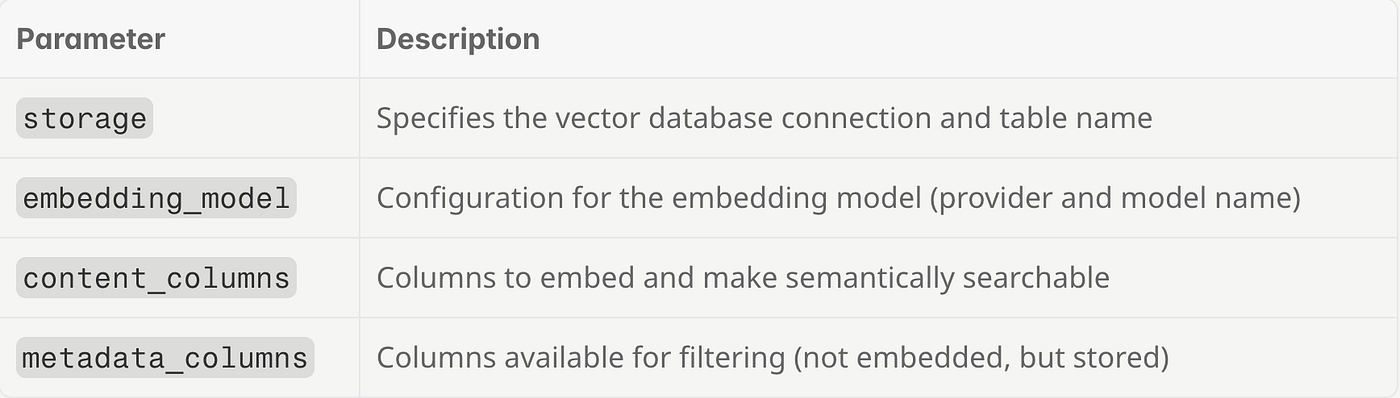
6. Loading Data into Knowledge Bases
Now we’ll insert the Stack Overflow data into our knowledge bases. This process:
- Fetches data from the source table in batches
- Generates embeddings for content columns using the OpenAI API
- Stores vectors and metadata in the vector database
Loading Data into PGVector Knowledge Base
def is_kb_empty(kb_name):
    """Check if a knowledge base is empty (fast - only fetches 1 row)."""
    result = server.query(f"SELECT id FROM {kb_name} LIMIT 1").fetch()
    return len(result) == 0

if is_kb_empty("kb_stack_vector"):
    print("kb_stack_vector is empty - starting data insertion...")
    server.query("""
        INSERT INTO kb_stack_vector
        SELECT * FROM pg_sample.stackoverflow_2m
        USING
            batch_size = 1000,
            track_column = id
    """).fetch()
    print("Data insertion started for kb_stack_vector")
else:
    print("kb_stack_vector is not empty - skipping data insertion")
Data insertion started for kb_stack_vectorLoading Data into FAISS Knowledge Base
if is_kb_empty("kb_stack_faiss"):
    print("kb_stack_faiss is empty - starting data insertion...")
    server.query("""
        INSERT INTO kb_stack_faiss
        SELECT * FROM pg_sample.stackoverflow_2m
        USING
            batch_size = 1000,
            track_column = id
    """).fetch()
    print("Data insertion started for kb_stack_faiss")
else:
    print("kb_stack_faiss is not empty - skipping data insertion")
Data insertion started for kb_stack_faissWait until the data insertion is complete.
7. Querying the Knowledge Bases
Once data is loaded, you can perform semantic searches combined with metadata filtering.
Basic Semantic Search
Search for content related to “8-bit music” (finds semantically similar content):
import time

# Semantic search on pgvector KB
start = time.time()
results_vector = server.query("""
    SELECT * FROM kb_stack_vector
    WHERE content = '8-bit music'
    AND Tags LIKE '%python%'
    LIMIT 10
""").fetch()
elapsed_vector = time.time() - start
print(f"pgvector query time: {elapsed_vector:.2f} seconds")
display(results_vector)

# Semantic search on FAISS KB
start = time.time()
results_faiss = server.query("""
    SELECT * FROM kb_stack_faiss
    WHERE content = '8-bit music'
    AND Tags LIKE '%python%'
    LIMIT 10
""").fetch()
elapsed_faiss = time.time() - start
print(f"FAISS query time: {elapsed_faiss:.2f} seconds")
display(results_faiss)
pgvector query time: 19.21 seconds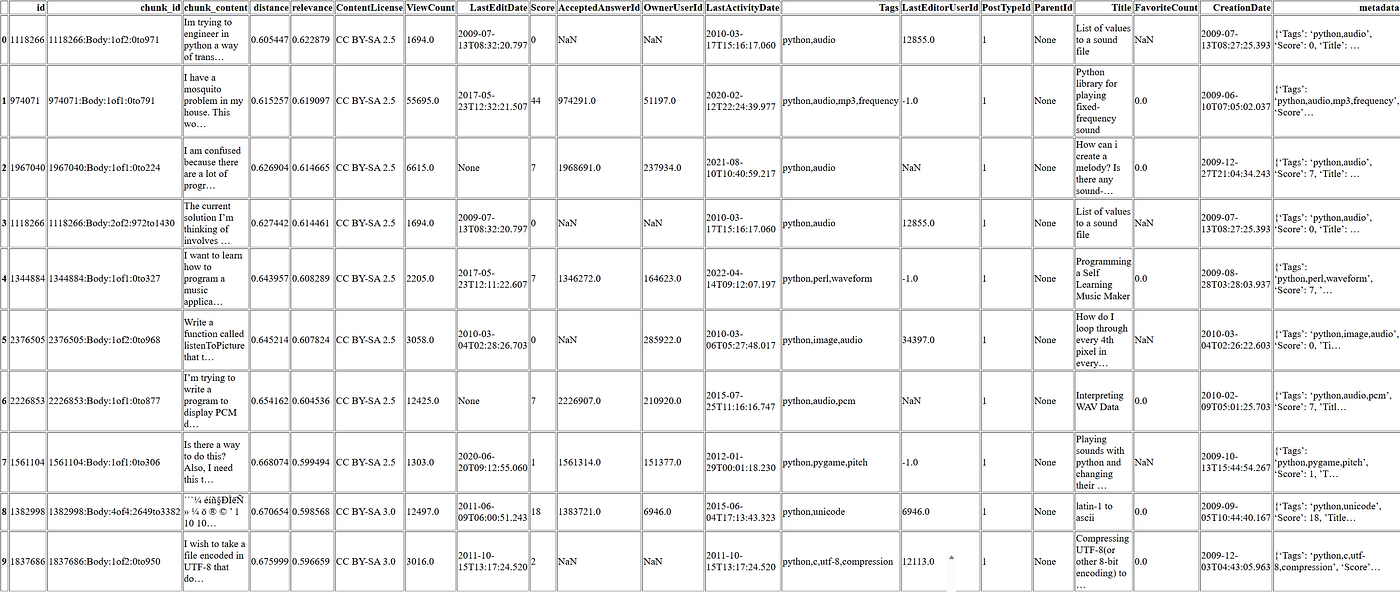
FAISS query time: 5.04 seconds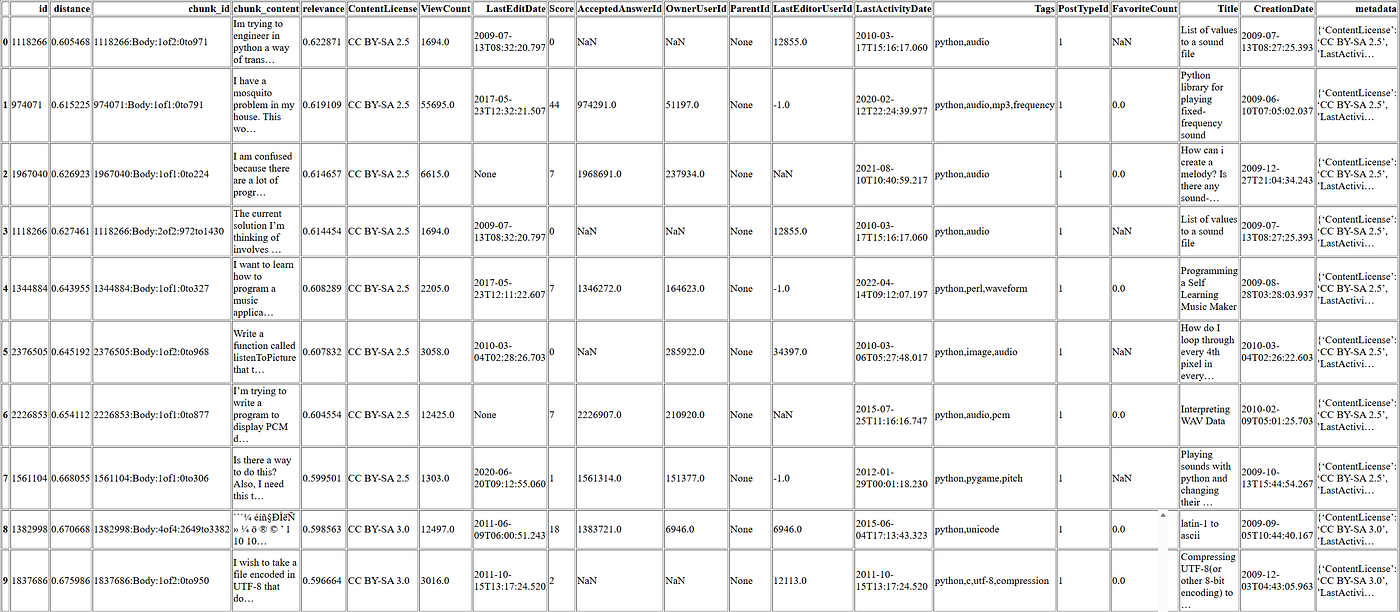
Analyzing the Results
Notice how the search for “8-bit music” returned posts about:
- Converting values to sound files
- Playing fixed-frequency sounds
- Creating melodies programmatically
None of these posts contain the exact phrase “8-bit music,” yet they’re all semantically relevant to chiptune/retro audio generation. This is the power of semantic search.
Also note the 4x speed improvement with FAISS (5 seconds vs 19 seconds for pgvector). For production systems with high query volumes, this difference is significant.
Combined Semantic and Metadata Filtering
Find AJAX-related posts tagged with jQuery that have high view counts:
# pgvector: Semantic search with metadata filters
start = time.time()
results = server.query("""
    SELECT * FROM kb_stack_vector
    WHERE content = 'ajax'
        AND Tags LIKE '%jquery%'
        AND ViewCount > 1000.0
        AND relevance > 0.6
    LIMIT 10
""").fetch()
print(f"pgvector query time: {time.time() - start:.2f} seconds")
display(results)

# FAISS: Semantic search with metadata filters
start = time.time()
results = server.query("""
    SELECT * FROM kb_stack_faiss
    WHERE content = 'ajax'
        AND Tags LIKE '%jquery%'
        AND ViewCount > 1000.0
        AND relevance > 0.6
    LIMIT 10
""").fetch()
print(f"FAISS query time: {time.time() - start:.2f} seconds")
display(results)
pgvector query time: 5.76 seconds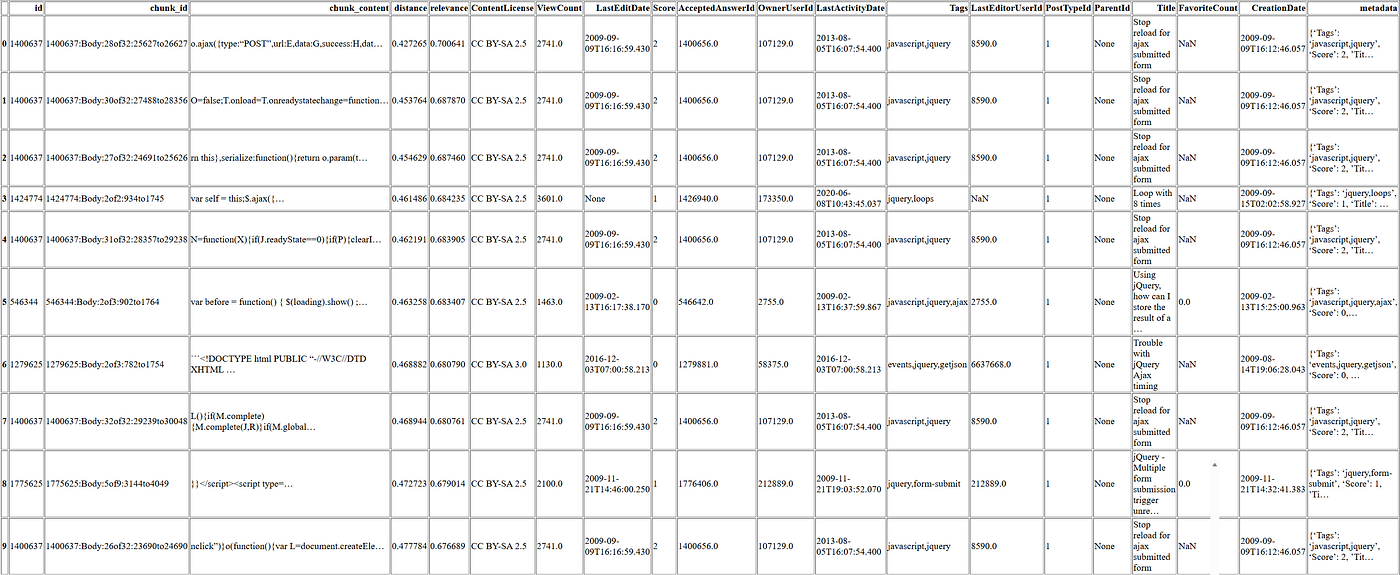
FAISS query time: 2.50 seconds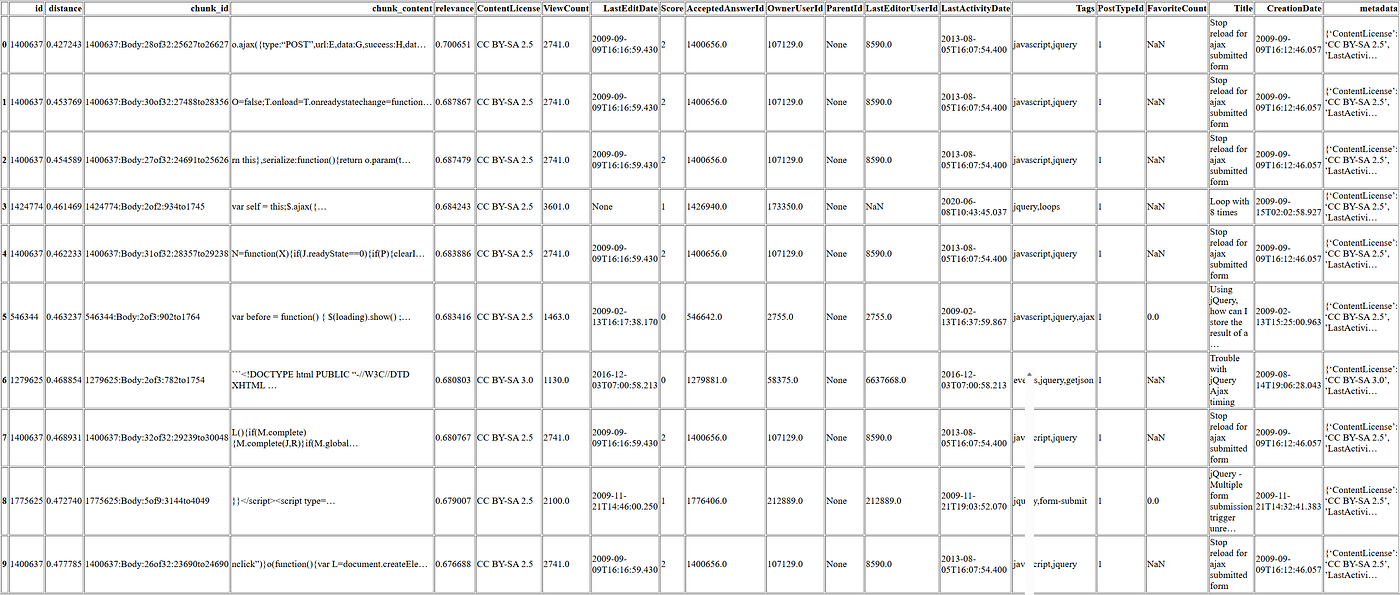
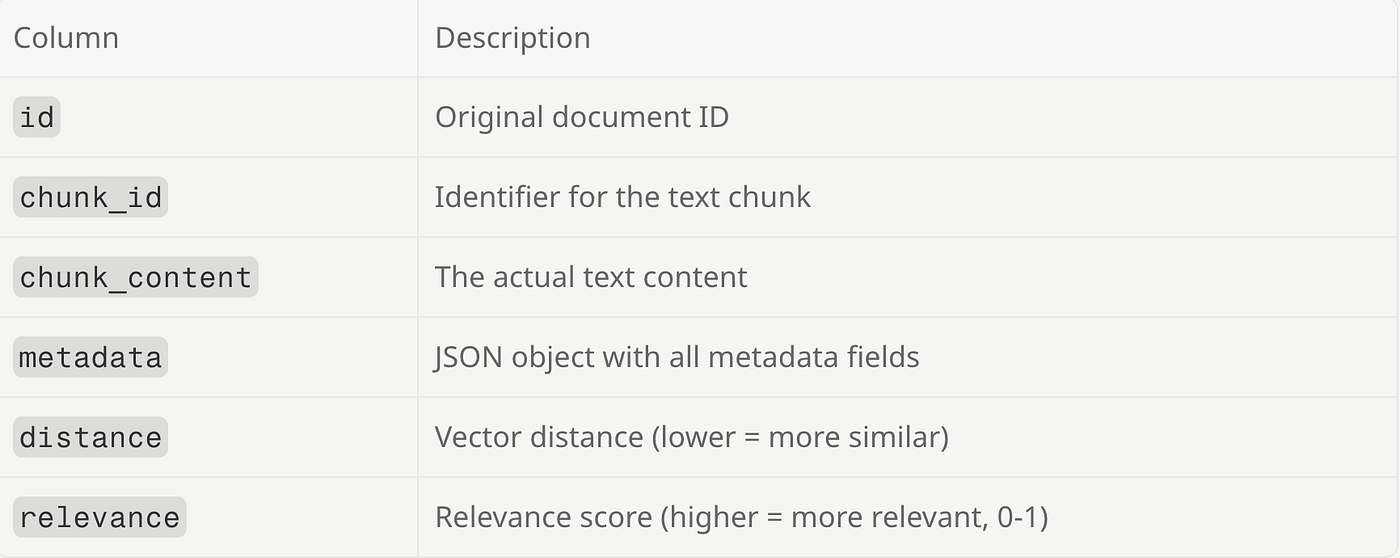
Understanding Query Results
The query returns these columns:
Filtering by Relevance
Get only highly relevant results:
The Power of Combined Filtering
The query we just ran demonstrates MindsDB’s hybrid search capability:
SELECT * FROM kb_stack_faiss
WHERE content = 'ajax'              -- Semantic match
    AND Tags LIKE '%jquery%'        -- Metadata filter
    AND ViewCount > 1000            -- Popularity threshold
    AND relevance > 0.6             -- Quality threshold
This finds posts that:
- Are semantically similar to “ajax” (not just keyword matches)
- Are tagged with jQuery
- Have significant engagement (>1000 views)
- Meet a minimum relevance score
This combination is impossible with traditional search and would require complex custom code with raw vector databases.
def run_query_ignore_exists(sql, success_msg="Query executed successfully"):
    """Execute a query, silently ignoring 'already exists' errors."""
    try:
        result = server.query(sql).fetch()
        print(success_msg)
        return result
    except RuntimeError as e:
        return None  # Silently ignore
# Create MindsDB Agent
run_query_ignore_exists("""
    drop agent stackoverflow_agent
""", "Dropped stackoverflow_agent")

run_query("""
    CREATE AGENT stackoverflow_agent
    USING
        model = {
            "provider": "openai",
            "model_name": "gpt-4.1"
        },
        data = {
            "knowledge_bases": ["mindsdb.kb_stack_faiss"]
        },
        prompt_template = '
            You are a helpful programming assistant.
            mindsdb.kb_stack_faiss is a knowledge base that contains Stack Overflow questions and answers.
            Use this knowledge to provide accurate, helpful responses to programming questions.
            Include code examples when relevant.
            You must base your answer on the Stack Overflow questions and answers extracted from mindsdb.kb_stack_faiss.
            If you failed to get the results from mindsdb.kb_stack_faiss, answer I could not get the results from mindsdb.kb_stack_faiss.
            Print the chunk ID for each question and answer you based your answer on.
            IMPORTANT: Use a limit of 100 in your query to the knowledge base.
        '
""", "Created stackoverflow_agent")
Dropped stackoverflow_agent
Created stackoverflow_agent# Query the agent
start = time.time()
response = server.query("""
SELECT answer
FROM stackoverflow_agent
WHERE question = 'Compare JavaScript to TypeScript for building web services'
""").fetch()
print(f"Agent response time: {time.time() - start:.2f} seconds\n")
print(response['answer'].iloc[0])Agent response time: 63.44 seconds
To compare JavaScript and TypeScript for building web services, let's look at insights from Stack Overflow posts (see chunk IDs for reference):
**JavaScript:**
- JavaScript is a dynamic, weakly typed, prototype-based language with first-class functions ([1253285:Body:1of1:0to384](https://stackoverflow.com/posts/1253285)).
- It is the default language for web development, both on the client (browser) and, with Node.js, on the server ([870980:Body:1of1:0to133](https://stackoverflow.com/posts/870980)).
- JavaScript is flexible and widely supported, but its lack of static typing can lead to runtime errors and makes large codebases harder to maintain.
**TypeScript:**
- While not directly mentioned in the top results, TypeScript is a superset of JavaScript that adds static typing and modern language features. It compiles to JavaScript, so it runs anywhere JavaScript does.
- TypeScript helps catch errors at compile time, improves code readability, and is especially beneficial for large projects or teams.
**Web Services:**
- JavaScript (with Node.js) is commonly used to build RESTful APIs and web services ([208051:Body:1of1:0to147](https://stackoverflow.com/posts/208051)).
- TypeScript is increasingly popular for the same purpose, as it provides all the benefits of JavaScript plus type safety and better tooling (e.g., autocompletion, refactoring).
**Summary Table:**
| Feature | JavaScript | TypeScript |
|-----------------|----------------------------------|-------------------------------------|
| Typing | Dynamic, weakly typed | Static typing (optional) |
| Tooling | Good, but less type-aware | Excellent (autocompletion, refactor)|
| Learning Curve | Lower | Slightly higher (due to types) |
| Error Checking | Runtime | Compile-time + runtime |
| Ecosystem | Huge, universal | Same as JS, plus TS-specific tools |
| Maintainability | Can be challenging in large code | Easier in large codebases |
**Conclusion:**
- For small projects or rapid prototyping, JavaScript is sufficient and easy to start with.
- For larger projects, teams, or when maintainability and reliability are priorities, TypeScript is generally preferred.
References:
- [1253285:Body:1of1:0to384](https://stackoverflow.com/posts/1253285)
- [870980:Body:1of1:0to133](https://stackoverflow.com/posts/870980)
- [208051:Body:1of1:0to147](https://stackoverflow.com/posts/208051)
If you want more specific code examples or a deeper dive into either technology, let me know!Conclusion
We’ve built a complete semantic search system that:
- Processes 2 million Stack Overflow posts
- Supports both pgvector and FAISS backends
- Combines semantic search with metadata filtering
- Powers an AI agent for natural language queries
Key Takeaways
- FAISS is much faster than pgvector for pure search queries
- Metadata filtering lets you narrow results by tags, scores, dates
- Knowledge bases abstract complexity — no need to manage embeddings manually
- Agents can leverage knowledge bases for RAG-style applications
Next Steps
- Try different embedding models
- Add more data sources
- Build a chat interface
- Explore different chunking strategies
You can watch the recording of this demo by registering here to receive the link.
메타데이터
- post_id
- ee81fa705fdf
- slug
- building-a-semantic-search-knowledge-base-with-mindsdb-ee81fa705fdf
- url
- https://medium.com/mindsdb/building-a-semantic-search-knowledge-base-with-mindsdb-ee81fa705fdf
- canonical_url
- https://medium.com/mindsdb/building-a-semantic-search-knowledge-base-with-mindsdb-ee81fa705fdf
- author_url
- https://medium.com/@mindsdbteam
- status
- ok
- fetched_at
- 2026-06-10 08:17:25