Building a Real-Time LLM Voice Assistant GUI in MATLAB — Powered by GPT-4o and Whisper
Building a Real-Time LLM Voice Assistant GUI in MATLAB Using GPT-4o and Whisper: An Excellent Teaching Resource
Wake word detection · speech transcription · live analytics · text-to-speech, all wired together in under 700 lines of pure MATLAB
Why MATLAB for an AI Voice Assistant?
When most engineers think “LLM chatbot,” they reach for Python. Yet MATLAB remains the lingua franca of signal processing, control systems, and academic research. If your team already lives in MATLAB, plotting Bode diagrams in the morning, running Simulink sims in the afternoon, why context-switch to Python just to add a conversational AI layer?
C.S.C.H.I.N. (the Voice Intelligence System name shown in the GUI title bar) is a proof-of-concept that answers that question head-on: a fully graphical, multi-panel voice assistant built entirely in MATLAB, backed by OpenAI’s GPT-4o chat completion, Whisper speech-to-text, and the TTS-1 text-to-speech API.
This article walks through every major design decision, the architecture, the gotchas, and what you can build on top of it.
What the System Does
At a glance, CSCHIN provides:
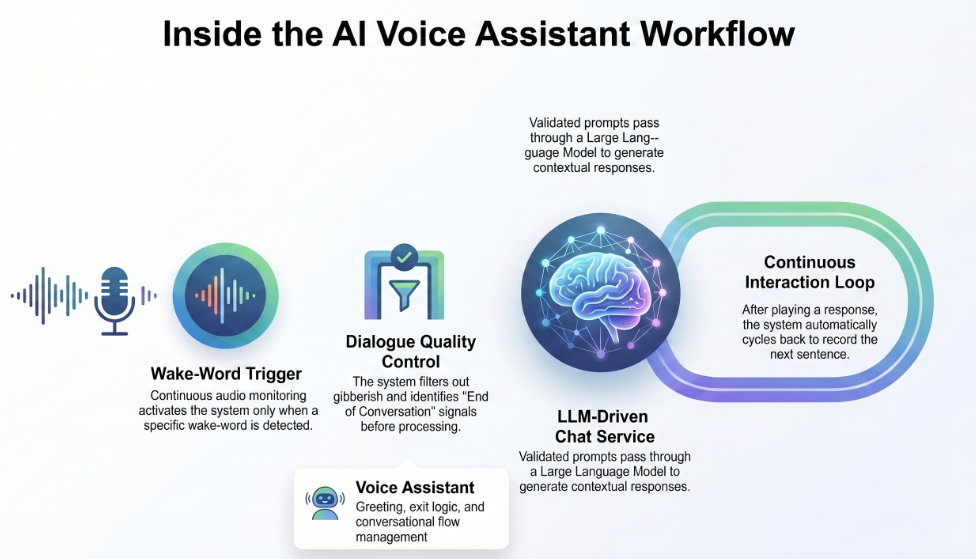
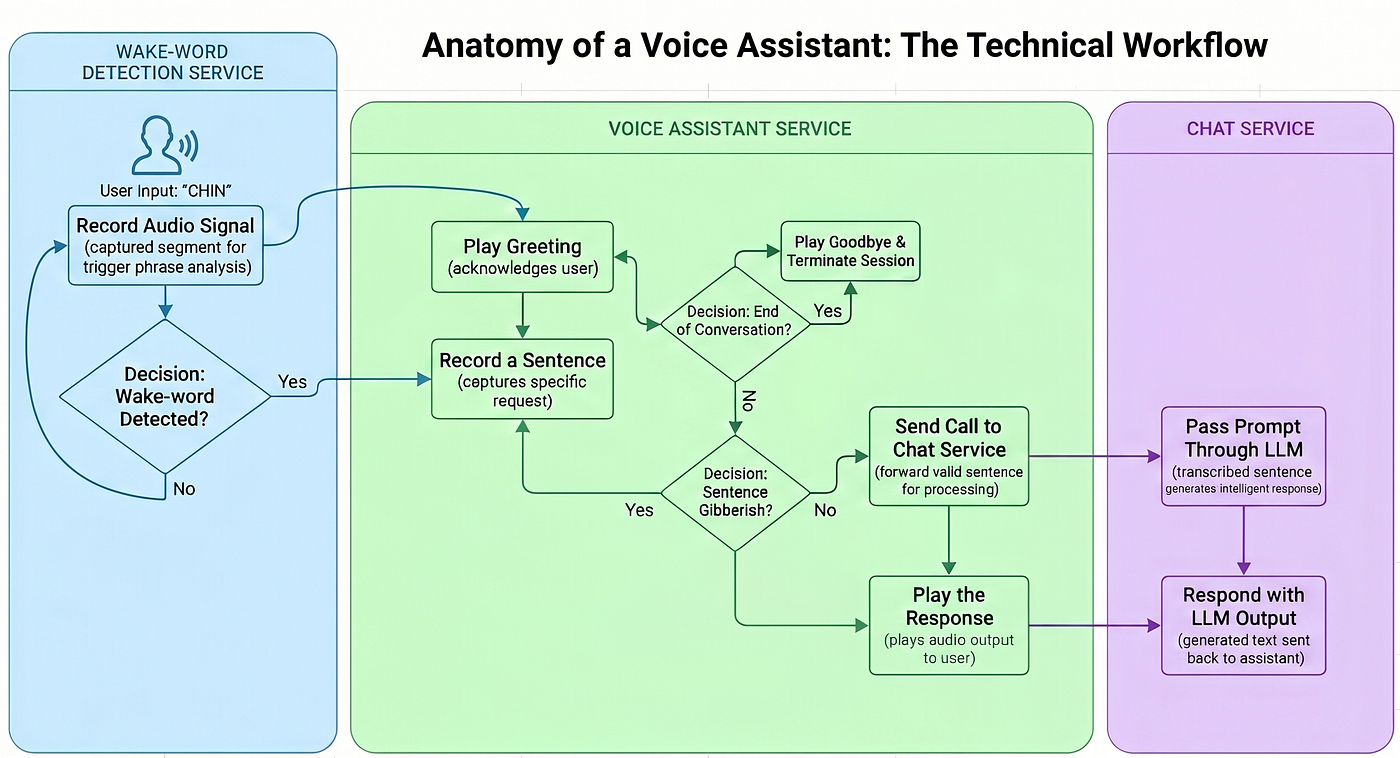
- Wake-word detection — it continuously records 2-second audio clips and only enters conversation mode when the word “chin” is detected in the transcription.
- Continuous voice conversation — once awake, it records 5-second utterances, transcribes them with Whisper, sends them to GPT-4o, and reads the reply aloud using OpenAI TTS.
- Text prompt fallback — a built-in text box lets you type questions directly, bypassing the microphone entirely.
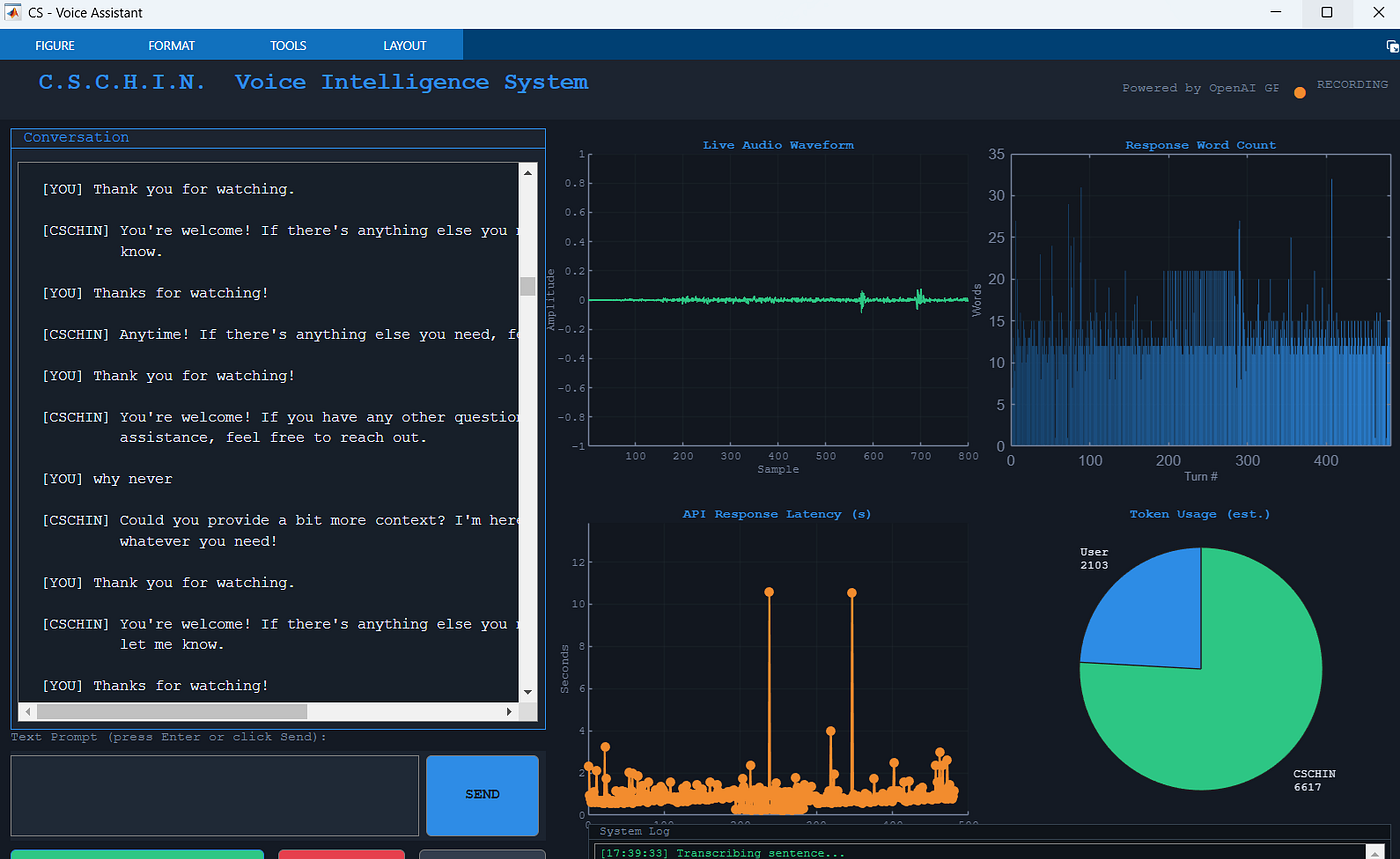
- Live analytics dashboard — four real-time charts update after every turn: audio waveform, response word-count bar chart, API latency line graph, and a token-usage pie chart.
- Session management — a clear button resets conversation history and all charts; a stop button exits voice mode without closing the window.
Architecture Overview
┌──────────────────────────────────────────────────────────┐
│                    MATLAB Figure (fig)                    │
│  ┌──────────────────┐   ┌────────────────────────────┐  │
│  │  Chat Transcript │   │  Live Audio Waveform        │  │
│  │  (listbox)       │   │  Response Word Count (bar)  │  │
│  │                  │   │  API Latency (line plot)     │  │
│  │  Text Prompt +   │   │  Token Usage (pie)          │  │
│  │  SEND button     │   └────────────────────────────┘  │
│  └──────────────────┘                                    │
│  [START VOICE]  [STOP]  [CLEAR]        System Log       │
└──────────────────────────────────────────────────────────┘
         │                        │
         ▼                        ▼
   audiorecorder            OpenAI REST APIs
   (MATLAB built-in)        ├─ /v1/audio/transcriptions  (Whisper)
                            ├─ /v1/chat/completions      (GPT-4o)
                            └─ /v1/audio/speech          (TTS-1)
All mutable state — conversation history, latency arrays, token counts, UI handles, lives in fig.UserData, a struct that acts as the application's shared store. This avoids global variables while keeping every nested callback and helper function in sync.
Key Design Patterns
1. State Management via fig.UserData
MATLAB’s figure object can carry arbitrary data in its UserData property. The entire app state is packed into a single struct at initialisation:
appState.conversationHistory = struct('role', {}, 'content', {});
appState.turnCount    = 0;
appState.latencies    = [];
appState.wordCounts   = [];
appState.userTokens   = 0;
appState.botTokens    = 0;
fig.UserData = appState;
Every callback reads with st = fig.UserData, modifies st, then writes back with fig.UserData = st. It is a poor-man's Redux for MATLAB, predictable and debuggable.
2. Non-Blocking Voice Loop via Timer
Running a blocking while true audio loop inside a button callback would freeze the GUI completely. The fix is timer:
t = timer('ExecutionMode', 'singleShot', 'StartDelay', 0.1, ...
    'TimerFcn', @(~,~) voiceLoop(fig));
start(t);
voiceLoop processes one wake-word check, then re-schedules itself if the running flag is still set. The event queue keeps the figure responsive, the Stop button remains clickable at any time.
3. Wake-Word Detection Without a Custom Model
Rather than training a keyword-spotting network, CSCHIN uses a pragmatic shortcut: record 2 seconds, transcribe the whole clip with Whisper, then do a case-insensitive regex search for the wake word:
function result = containsWakeWord(text, wakeWord)
    result = ~isempty(regexpi(text, wakeWord, 'once'));
end
Whisper’s word-error rate on short clips is low enough that this works reliably in a quiet room. The wake word is configurable, just change the WAKE_WORD constant at the top of the file.
4. Whisper via curl (System Call)
MATLAB’s webwrite does not natively support multipart/form-data uploads, which is what the Whisper endpoint requires. The workaround is a one-line curl system call:
curlCmd = ['curl -s -X POST https://api.openai.com/v1/audio/transcriptions' ...
           ' -H "Authorization: Bearer ' apiKey '"' ...
           ' -F model=whisper-1' ...
           ' -F file=@' tmpFile];
[status, result] = system(curlCmd);
The audio is first written to a temp .wav file, uploaded, then deleted. GPT-4o chat and TTS use MATLAB's webwrite/webread with weboptions, which handles JSON bodies natively.
5. Live Waveform Update
During every recording, the audio buffer is downsampled to 800 points and pushed to a pre-existing line object — no axes redraw required:
waveD = double(audio) / 32768;
idx   = round(linspace(1, numel(waveD), 800));
set(st.hWaveLine, 'YData', waveD(idx));
drawnow limitrate;
drawnow limitrate flushes the graphics queue without stalling execution — the MATLAB equivalent of requestAnimationFrame.
6. Gibberish Filter
Short or empty transcriptions (ambient noise, breath sounds) are discarded before hitting the API:
function result = isGibberish(text)
    cleaned = regexprep(strtrim(text), '[^a-zA-Z ]', '');
    result  = numel(cleaned) < 3;
end
Three alphabetic characters is a deliberately low bar , “hi”, “ok”, “yes” all pass. Raise it if your environment is noisy.
The Four Analytics Panels
Panel What it shows Update trigger Live Audio Waveform 800-sample downsampled view of the last recorded clip After every guiRecordAudio call Response Word Count Bar chart, one bar per conversation turn, gradient-coloured After every LLM response API Response Latency Line + marker plot of toc measurements After every LLM response Token Usage Pie chart of estimated user vs. assistant tokens After every LLM response
Token counts are estimated by word-splitting (numel(strsplit(text))), not from the API's actual usage field. For a production system, parse result.usage.prompt_tokens and result.usage.completion_tokens from the GPT-4o response instead.
Running It
Prerequisites:
- MATLAB R2022b or later (for
webwrite/webreadJSON support) - An OpenAI API key with access to
gpt-4o,whisper-1, andtts-1 curlavailable on the system path (macOS/Linux: built-in; Windows: install from curl.se or use WSL)- A working microphone
Steps:
- Open
LLMVoiceAssistant_cschin_gui.min MATLAB. - Replace the
sk-proj-...placeholder on line 15 with your own API key — or better yet, setOPENAI_API_KEYas an environment variable and remove the hardcoded string entirely. - Run
cschin_guiin the command window. - Click START VOICE and say “Chin” to wake the assistant, or type directly in the text box.
Security note: Never commit a live API key to a public repository. Move it to
getenvor a local config file before sharing your code.
Extending the System
A few directions worth exploring:
Swap the wake word — Change WAKE_WORD = 'chin' to any word or phrase. Because detection relies on Whisper transcription, multi-word phrases ("hey MATLAB", "hello system") work just as well.
Add tool calling — GPT-4o supports function/tool calling. You could let the assistant trigger MATLAB simulations, fetch data from a database, or control instruments — turning it into an agentic lab assistant.
Replace TTS with a local model — For offline or low-latency use, substitute playTTS with a call to a local Coqui TTS or Kokoro model via a Python sidecar process.
Persist conversation history — Currently history resets on clear. Add a jsonencode / jsondecode save/load to a .json file for session continuity across MATLAB restarts.
Real token counting — Parse the usage struct from the GPT-4o response to get accurate prompt and completion token counts, useful for cost tracking in long research sessions.
Lessons Learned
Building this in MATLAB surfaced a few non-obvious constraints:
**webwritecannot do multipart uploads.** If you need to POST a file, you needcurlor a JavaHttpURLConnectioncall.- MATLAB timers survive figure deletion if not properly stopped. The
onClosecallback setsrunning = falseand adds apause(0.2)to let in-flight timer callbacks drain beforedelete(fig). **drawnow limitrateis your friend.** Calling baredrawnowinside a tight loop can make MATLAB unresponsive. Thelimitrateflag caps refresh to ~20 fps and keeps the event queue healthy.**uiwait(fig)blocks the command window** until the figure closes. This is intentional — it keeps the function scope alive so all nested callbacks can close over local variables.
Closing Thoughts
CSCHIN demonstrates that building a production-quality LLM voice interface does not require leaving your existing engineering environment. With roughly 700 lines of MATLAB, no toolboxes, no deep learning, no Python, you get wake-word detection, multi-turn conversation memory, TTS playback, and a live analytics dashboard.
The same pattern scales up: replace the curl audio upload with batch transcription for lecture recordings, swap GPT-4o for a fine-tuned domain model, or embed the GUI into a larger Simulink-based simulation cockpit. The scaffolding is there, the rest is up to your imagination.
The full source code (LLMVoiceAssistant_cschin_gui.m) is available on GitHub or contact me cheng.chin@ncl.ac.uk. If you found this useful, clap and follow for more posts on applied AI in scientific computing.
Tags: MATLAB · LLM · GPT-4 · OpenAI · Voice Assistant · Speech Recognition · Whisper · Signal Processing · AI Engineering
메타데이터
- post_id
- eea3ee8bafbc
- slug
- building-a-real-time-llm-voice-assistant-gui-in-matlab-powered-by-gpt-4o-and-whisper-eea3ee8bafbc
- url
- https://medium.com/@mcschin75/building-a-real-time-llm-voice-assistant-gui-in-matlab-powered-by-gpt-4o-and-whisper-eea3ee8bafbc
- canonical_url
- https://medium.com/@mcschin75/building-a-real-time-llm-voice-assistant-gui-in-matlab-powered-by-gpt-4o-and-whisper-eea3ee8bafbc
- author_url
- https://medium.com/@mcschin75
- status
- ok
- fetched_at
- 2026-07-27 12:13:18