MCP Primer: From Local Tool to Remote Server
Summary
MCP Primer: From Local Tool to Remote Server
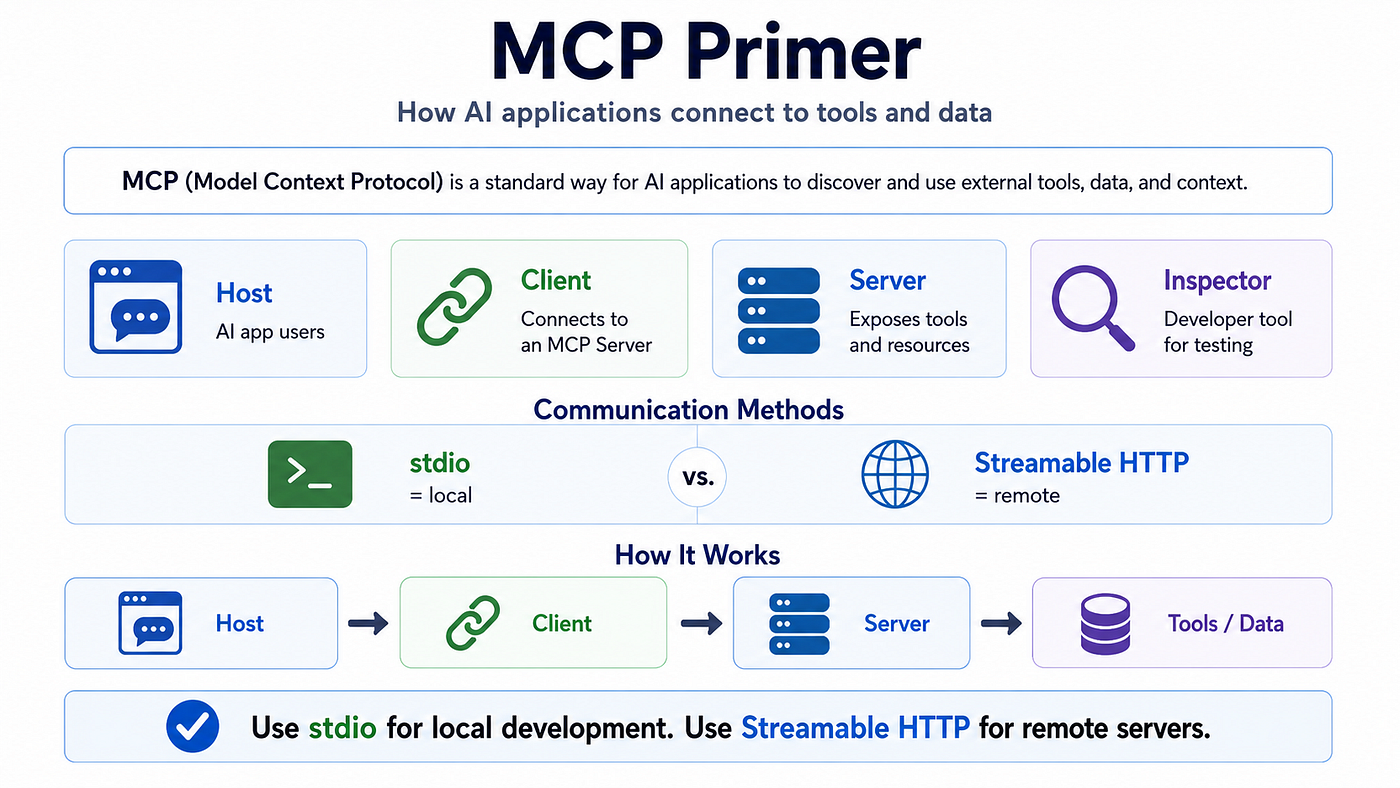
Summary
MCP, or Model Context Protocol, is a standard way for AI applications to connect with external tools and data.
A simple way to understand MCP is this:
MCP Server exposes capabilities. MCP Client consumes those capabilities. MCP Host manages one or more MCP Clients. MCP Inspector is a developer tool used to test MCP Servers.
In this article, we will build a small MCP notes server in Python. The server can:
- Add a note
- List notes
- Search notes
Then we will consume it in two ways:
- Locally, through
stdio, using MCP Inspector - Remotely, through Streamable HTTP, using a custom MCP Client
By the end, you should understand the most important MCP concepts: Host, Client, Server, Inspector, stdio, Streamable HTTP, and @mcp.tool().
1. Why MCP Matters
Before MCP, every AI application had to integrate with every external tool in its own way.
For example, if an AI assistant needed to access:
- A database
- A file system
- Jira
- GitHub
- Internal business APIs
- Search services
- Knowledge bases
Each integration could become a custom implementation.
MCP tries to solve this by providing a standard protocol between AI applications and external capabilities.
A simple analogy:
REST API is usually designed for web applications and services. MCP is designed for AI applications and agents.
MCP is not exactly the same as REST. It can use HTTP as a transport, but the protocol itself is based on MCP messages, capabilities, tools, resources, prompts, and client-server lifecycle.
2. The Most Important MCP Roles
The first confusing part of MCP is usually this question:
Who consumes the MCP Server?
There are three important terms:
MCP Host
An MCP Host is the AI application that the user interacts with.
Examples:
- Claude Desktop
- Claude Code
- Cursor
- VS Code extension
- Your own AI agent application
The Host usually does not talk to the MCP Server directly. Instead, it creates MCP Clients.
MCP Client
An MCP Client is the component that connects to an MCP Server.
A Host may create one MCP Client per MCP Server.
For example:
MCP Host
  |
  | creates
  v
MCP Client
  |
  | connects to
  v
MCP Server
If one Host connects to three MCP Servers, it may create three MCP Clients.
MCP Host
  |
  +--> MCP Client A --> MCP Server A
  |
  +--> MCP Client B --> MCP Server B
  |
  +--> MCP Client C --> MCP Server C
MCP Inspector
MCP Inspector is a developer tool.
It is not your production Host. It is mainly used for testing and debugging MCP Servers.
You can use MCP Inspector to:
- Connect to an MCP Server
- View available tools
- Call tools manually
- Inspect tool results
- Debug connection problems
For local development, MCP Inspector is often the first tool you should use.
3. Who Consumes the MCP Server?
There are three common ways to consume an MCP Server.
1. MCP Inspector consumes MCP Server
This is mainly for local development and debugging.
MCP Inspector
     |
     | MCP protocol over stdio or Streamable HTTP
     v
MCP Server
2. MCP Host consumes MCP Server by creating MCP Client
This is the common AI application model.
MCP Host
     |
     | creates MCP Client
     v
MCP Client
     |
     | MCP protocol
     v
MCP Server
3. Custom MCP Client consumes MCP Server directly
You can also write your own MCP Client.
This is useful when you are building your own agent, backend service, automation system, or enterprise AI platform.
Custom MCP Client
     |
     | MCP protocol
     v
MCP Server
4. How Does MCP Communicate?
MCP has a protocol layer and a transport layer.
The protocol defines the message structure and behavior.
The transport defines how messages move between client and server.
Two important transports are:
stdio- Streamable HTTP
5. stdio Transport
stdio means standard input and standard output.
In this mode, the MCP Client starts the MCP Server as a local subprocess.
Then they communicate through stdin and stdout.
MCP Client
     |
     | starts local process
     v
notes_server.py
     |
     | reads from stdin
     | writes to stdout
This is common for local tools.
For example, a local filesystem MCP Server may run on the same machine as Claude Desktop or Cursor.
The important idea:
stdio is usually local.
6. Streamable HTTP Transport
Streamable HTTP is used when the MCP Server runs as an independent HTTP service.
The MCP Client connects to a URL such as:
http://localhost:8000/mcpor remote:
https://mcp.yourdomain.com/mcpThe important idea:
Streamable HTTP is usually used for remote or production-style MCP Servers.
However, this does not mean the MCP Server is a normal webpage.
If you open the MCP endpoint in a browser, you may not see a useful page.
Why?
Because the browser is not performing the MCP client lifecycle. It is not initializing an MCP session, listing tools, or calling tools using MCP messages.
So the correct mental model is:
Browser:       "Are you a webpage?"
MCP Server:    "No. Please use an MCP Client."
7. What We Will Build
We will build a simple notes MCP Server.
It provides three tools:
add_note(title, content)
list_notes()
search_notes(keyword)
The server stores notes in a local JSON file:
notes.jsonThe architecture is simple:
MCP Client or Inspector
     |
     | MCP protocol
     v
notes_server.py
     |
     v
notes.json
8. Create the Project
Create a new folder:
mkdir mcp-notes-demo
cd mcp-notes-demo
Initialize the Python project:
uv initCreate a virtual environment:
uv venvActivate it on Windows:
.venv\Scripts\activateInstall MCP:
uv add "mcp[cli]"Now the project is ready.
9. Create the Local MCP Server
Create a file named:
notes_server.pyAdd the following code:
from pathlib import Path
import json
from datetime import datetime
from mcp.server.fastmcp import FastMCP
mcp = FastMCP("notes-demo")
NOTES_FILE = Path(__file__).with_name("notes.json")
def load_notes() -> list[dict]:
    if not NOTES_FILE.exists():
        return []
with NOTES_FILE.open("r", encoding="utf-8") as file:
return json.load(file)
def save_notes(notes: list[dict]) -> None:
    with NOTES_FILE.open("w", encoding="utf-8") as file:
        json.dump(notes, file, indent=2, ensure_ascii=False)
@mcp.tool()
def add_note(title: str, content: str) -> str:
    notes = load_notes()
note = {
"id": len(notes) + 1,
"title": title,
"content": content,
"created_at": datetime.now().isoformat(timespec="seconds"),
} notes.append(note)
save_notes(notes) return f"Added note #{note['id']}: {title}"
@mcp.tool()
def list_notes() -> str:
    notes = load_notes()
if not notes:
return "No notes found." lines = []
for note in notes:
lines.append(
f"#{note['id']} | {note['title']} | {note['created_at']}"
) return "\n".join(lines)
@mcp.tool()
def search_notes(keyword: str) -> str:
    notes = load_notes()
    keyword_lower = keyword.lower()
results = [
note
for note in notes
if keyword_lower in note["title"].lower()
or keyword_lower in note["content"].lower()
] if not results:
return f"No notes found for keyword: {keyword}" lines = []
for note in results:
lines.append(
f"#{note['id']} | {note['title']}\n{note['content']}"
) return "\n\n---\n\n".join(lines)
if __name__ == "__main__":
    mcp.run()
The key line is this:
@mcp.tool()This means:
Expose this Python function as an MCP Tool.
Without @mcp.tool(), the function is just a normal Python function.
With @mcp.tool(), the MCP Server can advertise this function to MCP Clients.
For example, this function:
@mcp.tool()
def add_note(title: str, content: str) -> str:
    ...
becomes an MCP Tool named:
add_noteThe MCP Client can discover it and call it.
10. Test the Server with MCP Inspector
Run:
uv run mcp dev notes_server.pyThis starts the MCP development environment and opens MCP Inspector.
In MCP Inspector:
- Click Connect
- Go to Tools
- Try
add_note - Try
list_notes - Try
search_notes
The flow looks like this:
MCP Inspector
     |
     | MCP protocol over stdio
     v
notes_server.py
     |
     v
notes.json
At this point, you have created your first MCP Server and consumed it through MCP Inspector.
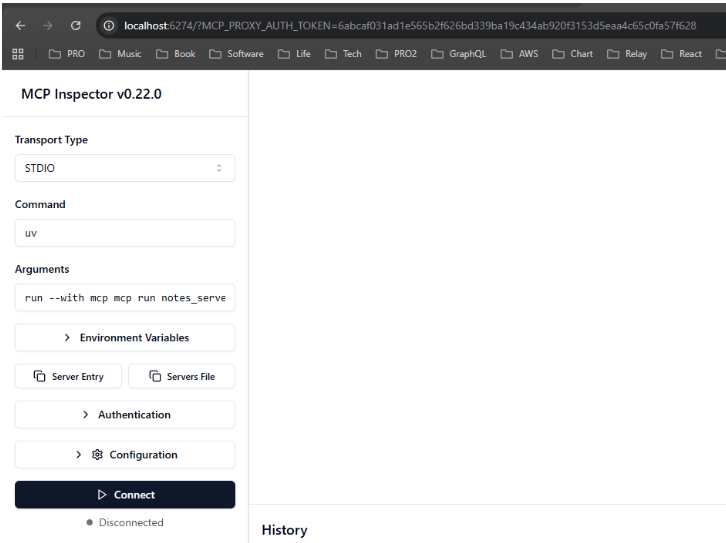
After clicking the Connect button, it will show tabs
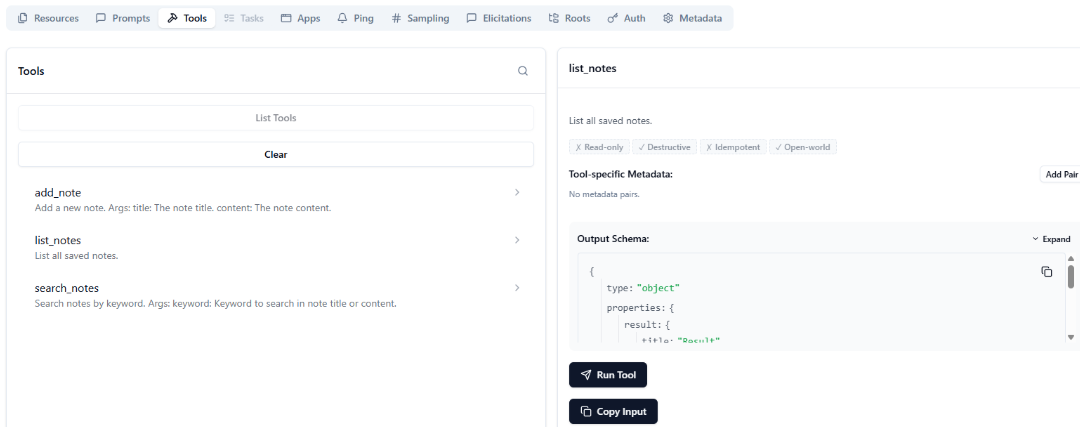
Under Tools, you can test tools liking testing Restful APIs in Postman.
11. Why MCP Inspector Is Not the Final Application
MCP Inspector is useful, but it is not the final user-facing application.
It is like Postman for REST APIs.
For REST APIs:
Postman -> REST APIFor MCP:
MCP Inspector -> MCP ServerIn production, the consumer is usually an MCP Host or your custom MCP Client.
12. Create a Streamable HTTP MCP Server
Now let’s expose the same notes server through Streamable HTTP.
Create a new file:
notes_server_http.pyAdd this code:
from pathlib import Path
import json
from datetime import datetime
from mcp.server.fastmcp import FastMCP
mcp = FastMCP(
"notes-demo-remote",
host="0.0.0.0",
port=8000,
stateless_http=True,
json_response=True,
)NOTES_FILE = Path(__file__).with_name("notes.json")
def load_notes() -> list[dict]:
    if not NOTES_FILE.exists():
        return []
with NOTES_FILE.open("r", encoding="utf-8") as file:
return json.load(file)
def save_notes(notes: list[dict]) -> None:
    with NOTES_FILE.open("w", encoding="utf-8") as file:
        json.dump(notes, file, indent=2, ensure_ascii=False)
@mcp.tool()
def add_note(title: str, content: str) -> str:
    """Add a new note."""
    notes = load_notes()
note = {
"id": len(notes) + 1,
"title": title,
"content": content,
"created_at": datetime.now().isoformat(timespec="seconds"),
} notes.append(note)
save_notes(notes) return f"Added note #{note['id']}: {title}"
@mcp.tool()
def list_notes() -> str:
    """List all saved notes."""
    notes = load_notes()
if not notes:
return "No notes found." return "\n".join(
f"#{note['id']} | {note['title']} | {note['created_at']}"
for note in notes
)
@mcp.tool()
def search_notes(keyword: str) -> str:
    """Search notes by keyword."""
    notes = load_notes()
    keyword_lower = keyword.lower()
results = [
note
for note in notes
if keyword_lower in note["title"].lower()
or keyword_lower in note["content"].lower()
] if not results:
return f"No notes found for keyword: {keyword}" return "\n\n---\n\n".join(
f"#{note['id']} | {note['title']}\n{note['content']}"
for note in results
)
if __name__ == "__main__":
    mcp.run(transport="streamable-http")
The most important difference is this:
mcp.run(transport="streamable-http")Now the MCP Server runs as an HTTP-based MCP service.
Run it:
uv run python notes_server_http.pyThe MCP endpoint is:
http://localhost:8000/mcpFor a remote server, replace localhost with the server IP or domain name:
http://192.168.1.50:8000/mcpor:
https://mcp.yourdomain.com/mcp13. Why You Cannot Consume It Like a Normal Web Page
This part is important.
When we see an HTTP URL, we naturally want to open it in a browser.
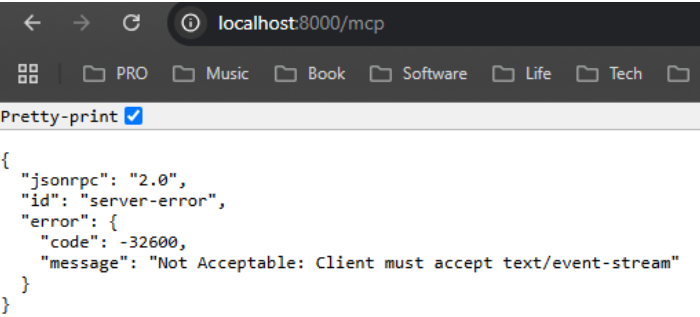
But an MCP Streamable HTTP endpoint is not a normal website.
This is not the right mental model:
Browser
   |
   v
MCP Server
The correct model is:
MCP Client
   |
   | MCP protocol over Streamable HTTP
   v
MCP Server
A browser can send simple HTTP requests, but it does not automatically behave as an MCP Client.
An MCP Client must:
- Connect to the MCP endpoint
- Initialize the MCP session
- List available tools
- Call tools using MCP messages
- Parse MCP responses
That is why we need a real MCP Client.
14. Create a Custom MCP Client
Create a file:
client_remote.pyAdd this code:
import asyncio
from mcp import ClientSession
from mcp.client.streamable_http import streamable_http_client
def print_tool_result(result):
    for item in result.content:
        if hasattr(item, "text"):
            print(item.text)
        else:
            print(item)
async def main():
    server_url = "http://localhost:8000/mcp"
# Remote examples:
# server_url = "http://192.168.1.50:8000/mcp"
# server_url = "https://mcp.yourdomain.com/mcp" async with streamable_http_client(server_url) as (
read_stream,
write_stream,
_,
):
async with ClientSession(read_stream, write_stream) as session:
await session.initialize() tools = await session.list_tools()
print("Available tools:")
for tool in tools.tools:
print("-", tool.name) result = await session.call_tool(
"add_note",
{
"title": "Remote MCP Client",
"content": "This note was created from a remote client.",
},
)
print_tool_result(result) result = await session.call_tool("list_notes", {})
print_tool_result(result)
if __name__ == "__main__":
    asyncio.run(main())
Run the client:
uv run python client_remote.pyExpected output:
Available tools:
- add_note
- list_notes
- search_notes
Added note #1: Remote MCP Client#1 | Remote MCP Client | 2026-06-16T...Now the flow is:
client_remote.py
     |
     | MCP protocol over Streamable HTTP
     v
notes_server_http.py
     |
     v
notes.json
15. Local vs Remote MCP
Here is the simplest comparison.
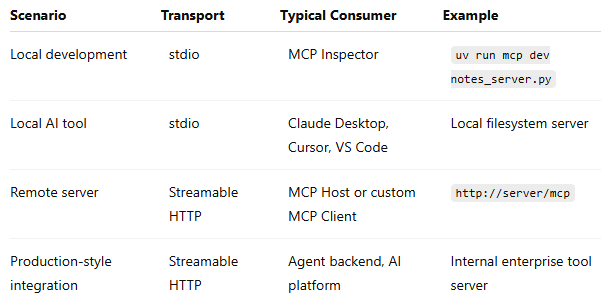
A good rule of thumb:
*Use stdio when the MCP Server runs locally as a child process. Use Streamable HTTP when the MCP Server runs independently and may be reached over the network.*
16. MCP Is Not Just “Two Agents Talking”
A common early misunderstanding is:
MCP is used for two agents to communicate.
That is not the best definition.
A better definition is:
MCP is a standard protocol for AI applications to access external tools, data, and context.
Those external capabilities may be:
- Files
- Databases
- APIs
- Search engines
- Internal business systems
- Code repositories
- Knowledge bases
MCP can be used inside agent systems, but MCP itself is not limited to agent-to-agent communication.
17. MCP vs REST API
MCP may use HTTP, but MCP is not just REST.
REST usually exposes resources through URLs such as:
GET /notes
POST /notes
GET /notes/123
MCP exposes capabilities such as:
tools/list
tools/call
In our example, the MCP Server exposes tools:
add_note
list_notes
search_notes
The MCP Client does not call:
POST /add_noteInstead, it calls the MCP tool through the MCP protocol.
That is the key difference.
HTTP can be the transport, but MCP is the protocol.
18. The Most Important Mental Model
The most important MCP mental model is this:
MCP Host
   |
   | creates
   v
MCP Client
   |
   | uses transport: stdio or Streamable HTTP
   v
MCP Server
   |
   | exposes tools/resources/prompts
   v
Real system: files, DB, API, business logic
In our notes example:
MCP Host or Client
   |
   v
MCP Server
   |
   v
Python functions
   |
   v
notes.json
In a real enterprise system:
MCP Host or Agent
   |
   v
MCP Client
   |
   v
MCP Server
   |
   v
PostgreSQL / Jira / GitHub / Internal APIs / Knowledge Base
19. What Should Be Exposed as MCP Tools?
A good MCP Tool should be an action or query that an AI assistant can safely call.
Good examples:
search_candidates(request_id)
get_request_summary(request_id)
list_recent_tickets(project_key)
search_notes(keyword)
create_interview_schedule(candidate_id, time)
Bad examples:
run_sql(sql)
execute_shell(command)
delete_all_data()
The difference is safety and intent.
A tool like this is risky:
run_sql(sql)because the model can generate arbitrary SQL.
A safer design is:
get_candidate_profile(candidate_id)
search_requests(keyword)
compare_candidates(request_id, candidate_ids)
The MCP Server should expose business-safe operations, not unlimited system access.
20. Production Considerations
For a demo, our notes server is enough.
For production, we need more:
Authentication
Remote MCP Servers should not be open to everyone.
They need authentication and authorization.
Authorization
Not every user should access every tool or every record.
For example:
User A can read request 123
User B cannot read request 123
The MCP Server must enforce this.
Do not rely only on the LLM to make permission decisions.
Tool Design
Tools should be small, clear, and safe.
A tool should have:
- Clear name
- Clear input schema
- Clear output format
- Limited scope
- Predictable side effects
Logging and Observability
You should log:
- Which tool was called
- Who called it
- Input parameters
- Execution time
- Success or failure
- Error details
Rate Limiting and Protection
MCP Servers can become a new entry point into your internal systems.
So they need the same protection as other backend services:
- Rate limit
- Timeout
- Retry control
- Backpressure
- Circuit breaker
- Audit logs
MCP does not remove backend engineering. It makes backend engineering more important.
21. Conclusion
MCP is easier to understand when we separate four concepts:
Who consumes?     Host, Client, Inspector
Who provides?     MCP Server
How communicate? stdio or Streamable HTTP
What expose?      Tools, resources, prompts
For local development:
MCP Inspector -> stdio -> MCP ServerFor remote usage:
MCP Client -> Streamable HTTP -> MCP ServerFor real AI applications:
MCP Host -> MCP Client -> MCP Server -> Real business systemThe small notes server in this article is simple, but the pattern is powerful.
Today it stores notes in notes.json.
Tomorrow the same pattern can connect an AI assistant to PostgreSQL, Jira, GitHub, internal APIs, or an enterprise knowledge base.
That is the real value of MCP:
MCP turns external tools and data into standardized capabilities that AI applications can discover and use.
메타데이터
- post_id
- eebc67a3699c
- slug
- mcp-primer-from-local-tool-to-remote-server-eebc67a3699c
- url
- https://medium.com/@charleyjava/mcp-primer-from-local-tool-to-remote-server-eebc67a3699c
- canonical_url
- https://medium.com/@charleyjava/mcp-primer-from-local-tool-to-remote-server-eebc67a3699c
- author_url
- https://medium.com/@charleyjava
- status
- ok
- fetched_at
- 2026-06-17 10:21:25