Windows Server 2025 upgrade returns to Windows Update (after more than a year)
TLDR
Windows Server 2025 upgrade returns to Windows Update (after more than a year)
TLDR
· Microsoft has re-enabled the Windows Server 2025 in-place upgrade via Windows Update for supported Windows Server 2019/2022 installs (as of April 2026).
· It was pulled previously after a bug allowed some third-party patch tools to install the upgrade unexpectedly, with no easy rollback path on Server.
· Upgrades performed via installation media (ISO/USB) weren’t affected by that issue.
When Windows Server 2025 first arrived in late 2024, Microsoft also did something new: it offered an in-place upgrade via Windows Update for supported installations of Windows Server 2019 and Windows Server 2022 (including Desktop Experience and Server Core), similar to how Windows 10/11 feature upgrades are delivered.
In my testing, the Windows Update upgrade path on Desktop Experience appears to support an N-2 window (two releases back), while Server Core appears to support N-1 (one release back) (which Microsoft also confirmed during Windows Server Summit last year).
That upgrade showed up as an Optional update under the Upgrade classification (metadata: DeploymentAction=OptionalInstallation). In other words, patch tools should treat it as an optional, not recommended update.
It didn’t last long. A bug meant some third-party patch management tools could install the feature upgrade without clearly prompting, and Windows Server doesn’t offer an easy rollback path for a full version upgrade. That left affected environments unexpectedly on Server 2025 before it had been validated there. At the time, Microsoft was silent on whether if or when, the Windows Update upgrade path would return.
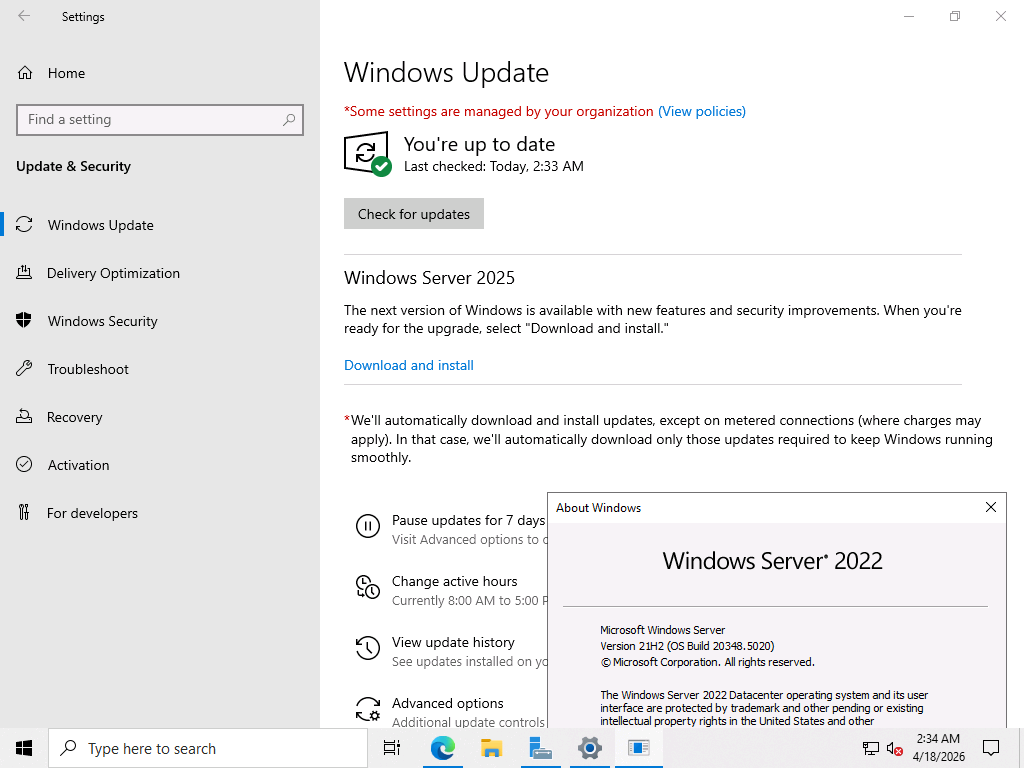


As of April 2026, it’s back
I first noticed this early this morning when I logged into my Windows Server 2022 VM that I use for testing the monthly CUs and did my weekly check for updates (including Defender updates).
I also found it interesting that this was quietly re-pushed via an update to the issue entry on the Windows Server Release Health page.
UUP dump also listed what looks like a full Windows Server 2025 upgrade for the first time this month, which lines up with Microsoft re-enabling the upgrade path via Windows Update. I then spent Saturday afternoon testing the upgrade experience via Windows Update on a Server 2019 Datacenter VM and a Server 2022 Datacenter VM (both with Desktop Experience), plus a Server 2022 VM running Server Core.
If you want Windows Update to offer the Windows Server 2025 feature upgrade, you may need to enable it via policy. Run the following commands in an elevated PowerShell session:
New-Item -Path “HKLM:\SOFTWARE\Policies\Microsoft\Windows\WindowsUpdate\AllowWindowsServerFeatureUpdate”
New-ItemProperty -Path “HKLM:\SOFTWARE\Policies\Microsoft\Windows\WindowsUpdate\AllowWindowsServerFeatureUpdate” -Name “AllowWindowsServerFeatureUpdate” -PropertyType DWord -Value 1
In my testing, I did not need to restart my server after applying that registry key.
Note: As always with in-place upgrades, especially on Server, test first and make sure you have a solid backup/restore plan, given the lack of an easy rollback if something goes wrong.
If you’d rather not use Windows Update, you can still upgrade the traditional way using Windows Server 2025 installation media (ISO/USB). Those media-based upgrades weren’t affected by the Windows Update/third-party patch tool issue described above.
My thoughts
I’m glad to see this upgrade path back, but I’d still treat it with the same caution as any in-place Server upgrade: validate it in a lab first, make sure your patch tooling won’t auto-approve anything in the Upgrade classification, and have a rollback plan that doesn’t rely on “uninstalling” the upgrade.
What are you seeing? If you’re managing Server 2019/2022, are you seeing the Server 2025 upgrade offered in Windows Update again and does your patch management tool surface it clearly as optional? If you’ve tested it (Desktop Experience or Server Core), I’d love to hear how the upgrade experience went.
메타데이터
- post_id
- eef5d9202e4b
- slug
- windows-server-2025-upgrade-returns-to-windows-update-after-more-than-a-year-eef5d9202e4b
- url
- https://medium.com/@techosarusrex/windows-server-2025-upgrade-returns-to-windows-update-after-more-than-a-year-eef5d9202e4b
- canonical_url
- https://medium.com/@techosarusrex/windows-server-2025-upgrade-returns-to-windows-update-after-more-than-a-year-eef5d9202e4b
- author_url
- https://medium.com/@techosarusrex
- status
- ok
- fetched_at
- 2026-06-20 20:29:01


