Lazer’s Interactive Symbolic Assembler (Apple //e Adventures
I was looking for tools to write assembly language programs for my the Apple //e that I just pulled out of my garage, and found an amazing…
Lazer’s Interactive Symbolic Assembler (Apple //e Adventures)
I was looking for tools to write assembly language programs for my the Apple //e that I just pulled out of my garage, and found an amazing book by Randy Hyde named “How To Program the Apple II Using 6502 Assembly Language”. I’ve been reading through it (about 1/6th so far) and got to the point where it was time to learn some mnemonics.
But I wanted to actually write a small program to play with the tool, and for that, I need an assembler.
I found 8-Bit Workshop, an online IDE for development on retro computers, and I’ll use that for real work. It’s got a full editor that understands DASM format, and a whole bunch of debugging tools built in to the emulator that you can use to see what the program is doing. This is very helpful when starting out in assembler, because in general your first few programs (at least!) won’t be printing output but just fiddling with registers and memory… being able to see the registers and memory lets you get feedback that the right thing happened. Amazing!
However, the guy who wrote the book above, Randy Hyde, also wrote a powerful Assembler for the Apple ][ named LISA: “Lazer’s Interactive Symbolic Assembler.” And it, too, is amazing. It’s the Assembly Language IDE for Apple 2!
It doesn’t have as many tools at 8-Bit Workshop, of course, but for a program of it’s time it’s incredible.
Let’s have some fun. I’m gonna F- Around and Find Out, by writing FAF0 on the Apple //e screen. Using the Mii Emu emulator for Linux and pulling the LISA tool from Apple Disk Server (see my post on Apple 2 resources here), I booted into LISA. I then used the INSERT command to write my program. It fed me line numbers in a row letting me insert commands.
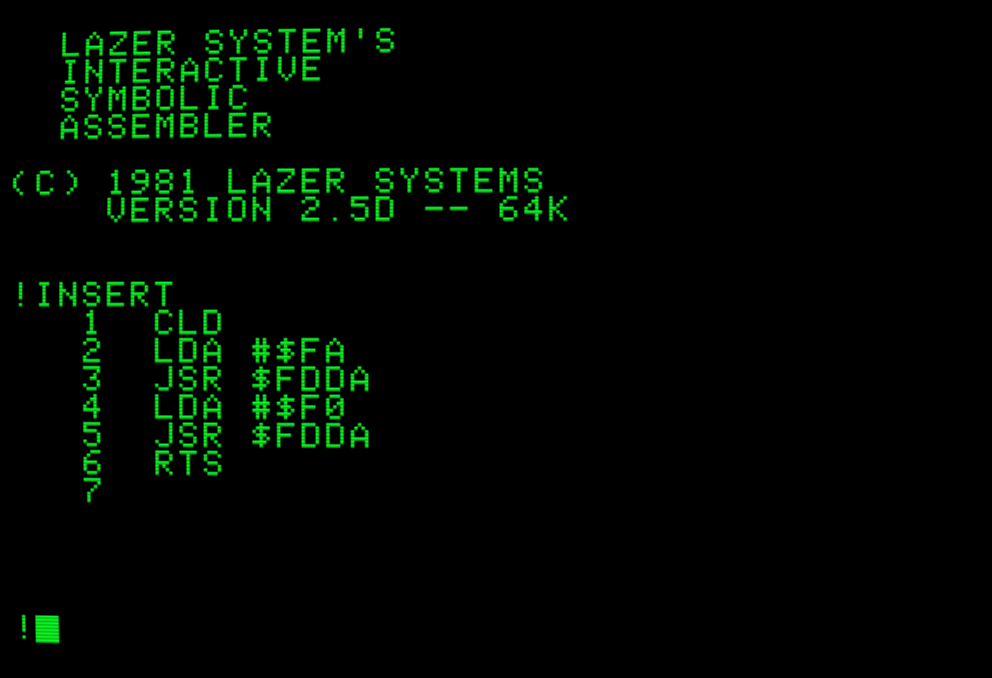
Writing code!
The program is basic…
CLD       ; Clear Decimal. Randy says so.
LDA #$FA  ; Put the hex value FA into Register A
JSR $FDDA ; Jump to the monitor, printing the byte to the screen
LDA #$F0  ; Put the hex value FO into Register A
JSR $FDDA ; Jump again, print again
RTS       ; End program
Once written, you type Control-E and Enter, and it dumps back to the ! prompt. From there you can write ASM to attempt to assemble the program. I say attempt…

Fixing an error!
…because I forgot that LISA expects an END pseudo-op to tell the assembler it’s hit the end of the program. No sweat, Abort the assembly, type INSERT 7 to start adding data at line 7, then Control-E/Enter again.
Like the Apple 2’s BASIC interpreters, everything is line editing with line numbers, and “INSERTing” lines literally inserts the line inside the source, pushing lines under it down. Side effect is that all line numbers change when you do this. Not sure how I feel about that in this environment, but here we are.
In any case, program is done, let’s “ASseMble” it:

Assembling my program!
Assembly is FAST (I’ll get to that in a second) and it directly writes the assembled program to $0800 in memory by default. Cool thing is, that means you can drop to the hardware monitor (the most hardcore of operating systems) with the “BReaK” command, and tell the monitor to start running the program at $0800. You know you’re in the hardware monitor because the prompt is now a star.

FAF0
You can then get back into the editor with “E003G” as a monitor command.
FAF0. LOL.
I called this an IDE because it does some things that I suspect an IDE should do at a minimum:
- Easy editing of source code.
- Fast development/compile/test loops.
- Immediate error feedback.
Oh, I didn’t show you #3. Here, let’s INSERT a bad opcode:

Immediate parsing and feedback
Here’s where LISA does something really, really cool. It parses each line of input as you type it, storing it in a packed binary format, and giving you INSTANT feedback if the assembler can’t understand your input. That’s the biggest IDE feature in my opinion. Telling me right away something won’t work instead of waiting for compile time to give me a cryptic barf of error messages? Thank you.
And this is how LISA is so fast. Instead of just waiting for text data and storing it in an ASCII file, it actually partially assembles every line you type into a packed binary format in memory. When you hit “ASM” you’re really already part of the way done, because LISA did some of the work between line inputs. It doesn’t have to parse the whole program so much as just assemble the code in it’s packed binary format that’s already half-assembled.
Now, will I use LISA as my everyday programming environment? I already said no. But, I can imagine a divergent timeline, where I was born 20 years earlier, and had an Apple 2 to program on… this is the tool I would want to use. A reference book, stack of paper and a pencil, and this tool would be my IDE. And I was able to pick up the basics of using the tool in like 2 minutes. I’d get to spend my time learning the machine, not the tool.
This is the kind of thing I find fascinating in retrocomputing.
Photo by Simon Kadula on Unsplash
메타데이터
- post_id
- ef840a75cc09
- slug
- lazers-interactive-symbolic-assembler-apple-e-adventures-ef840a75cc09
- url
- https://medium.com/@autodmc/lazers-interactive-symbolic-assembler-apple-e-adventures-ef840a75cc09
- canonical_url
- https://medium.com/@autodmc/lazers-interactive-symbolic-assembler-apple-e-adventures-ef840a75cc09
- author_url
- https://medium.com/@autodmc
- status
- ok
- fetched_at
- 2026-07-15 15:40:31