I Kept Breaking Vert.x Until I Understood These 7 Simple Rules
When I first jumped into Vert.x, I was thrilled. It promises super-fast performance and handling tons of connections without breaking a…
I Kept Breaking Vert.x Until I Understood These 7 Simple Rules
When I first jumped into Vert.x, I was thrilled. It promises super-fast performance and handling tons of connections without breaking a sweat.
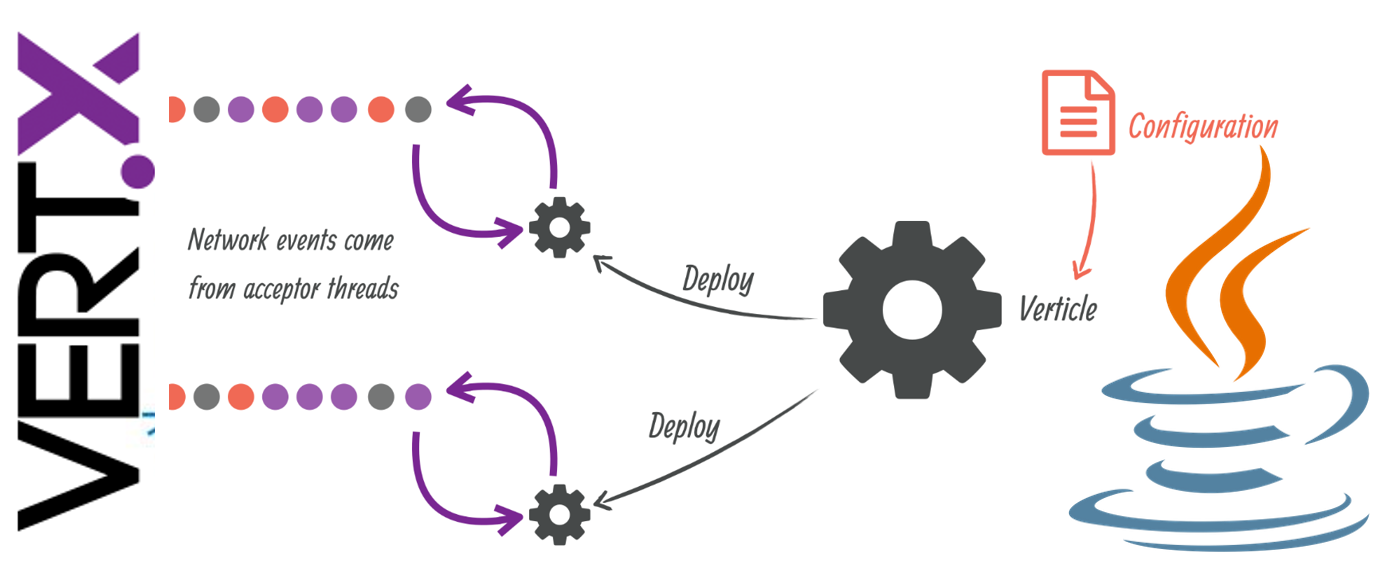
Image used under fair use. Sourced from Google. Not owned by the author.
It’s all about being event-driven and non-blocking.
But man, did I mess up. Every time I wrote what I thought was normal code — like fetching data from an old database or waiting for a file — my application would suddenly stop responding.
I kept seeing that scary “Thread Blocked” warning. 😬
The problem? Vert.x uses special threads called the Event Loop.
Think of it as a super-efficient waiter who can handle hundreds of tables (requests) by just quickly taking orders and passing them to the kitchen (I/O operations).
If this waiter stops to manually cook a meal (a blocking call), all the other customers have to wait. That’s what kills performance.
After a lot of trial and error (and reading a lot of documentation), I boiled it down to seven simple truths.
7 Golden Rules to Stop Vert.x From Crashing Your App
1. The Biggest Rule: Never Stop the Event Loop
Your main code, the stuff that handles HTTP requests or Event Bus messages, runs on the Event Loop thread. It needs to finish its job and move on immediately (we’re talking milliseconds).
- Bad Move: Using
Thread.sleep(), calling a sync database library (like standard JDBC), or using Java'ssynchronizedblock to wait for something. - Good Move: Use Vert.x’s native async tools. That means using
WebClientfor HTTP or their reactive clients for databases. They don't wait; they just tell the system, "Call me when it's done."
2. If You Must Block, Send it to the Worker Pool using executeBlocking()
Sometimes you have to use an old library that just isn’t async. You can’t change it.
What do you do? You move that chore to a dedicated helper team — the Worker Pool.
Vert.x gives you a method called vertx.executeBlocking(). This safely moves the slow, blocking task to a different thread and, crucially, brings the result back to your main Event Loop when it’s finished.
// Example: Safely running a slow operation
vertx.executeBlocking(promise -> {
    // 1. This part runs on a safe 'Worker' Thread
    try {
        String result = myOldSyncLibrary.getData(); // This might take time
        promise.complete(result);
    } catch (Exception e) {
        promise.fail(e);
    }
}, asyncResult -> {
    // 2. This part runs back on the fast 'Event Loop'
    if (asyncResult.succeeded()) {
        // Now you can use the result without causing a traffic jam
    }
});
3. Use Worker Verticles for Big, Always-Slow Services
If you have a whole chunk of logic that is always going to be CPU-heavy or blocking, don’t mix it with your main code. Put it into a Worker Verticle.
You tell Vert.x, “Hey, this Verticle is a ‘Worker’ and needs a thread from the slow pool.” You then talk to it using the Event Bus.
This keeps the fast and slow parts of your system totally separate.
4. Understand Your Callbacks Stay Put
When you kick off an async task in Vert.x, the result will always come back to the same Event Loop thread that started it.
This is super helpful because it means you don’t need to worry about complex thread safety or locking mechanisms for your variables inside the Verticle. It’s safe!
5. Learn to Chain Tasks with Futures/Promises
Async coding can look messy if you use too many nested callbacks.
Learn to use Future and Promise (or their equivalents if you use RxJava or Kotlin Coroutines).
They let you link several async steps together cleanly (.compose(), .onSuccess()) without ever needing to pause and wait.
6. Don’t Block the Workers Too Long Either
The Worker Pool isn’t magic. It has a limited number of threads. If your task in executeBlocking takes 5 minutes, you're tying up a worker thread for 5 minutes, preventing others from using it.
- Keep it Short:
executeBlockingis best for tasks that take a few seconds at most. If it's a very long job (minutes or hours), you should look into a dedicated external queue or process.
7. Pay Attention to the Logs!
Vert.x is very polite. If you block the Event Loop for more than the default time (usually 2 seconds), it screams a warning in your console:
Thread Thread[vert.x-eventloop-thread-X,5,main] has been blocked for Y ms....
Do not ignore this. It is a flashing red light telling you exactly where your application is going to choke under load. Refactor that code immediately using Rule 2.
Vert.x is awesome once you respect the “don’t wait” philosophy. Follow these rules, and you’ll build robust, fast applications without those annoying roadblocks.
메타데이터
- post_id
- ef8cf25f0abb
- slug
- i-kept-breaking-vert-x-until-i-understood-these-7-simple-rules-ef8cf25f0abb
- url
- https://medium.com/@codingplainenglish/i-kept-breaking-vert-x-until-i-understood-these-7-simple-rules-ef8cf25f0abb
- canonical_url
- https://medium.com/@codingplainenglish/i-kept-breaking-vert-x-until-i-understood-these-7-simple-rules-ef8cf25f0abb
- author_url
- https://medium.com/@codingplainenglish
- status
- ok
- fetched_at
- 2026-07-14 15:35:44






