useState vs useReducer when building a countdown timer?
What I was building?
useState vs useReducer when building a countdown timer?
What I was building?
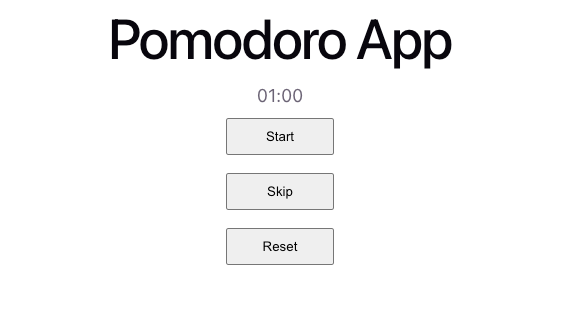
I wanted to build a countdown timer with start, pause, skip and reset functions.
- start — to start the timer.
- pause — to pause timer that is running.
- skip — skip the timer to the end.
- reset — reset the timer to the start
useState at first
When I approached building a countdown timer (first), I use useState to manage all my states, cuz this is what I’m comfortable and familiar with:
now- ongoing time pointerend- fixed end time pointerpause- the pause state of the timer - whether it's running or pausingpauseTime- the time when the user clicks pause.
I also have different handlers to update these states:
- handlePause
- inside handlePause, I also have if the timer has paused before.
- handleReset
- handleSkip
- an going action in my useEffect function
Here is my code:
import { useEffect, useState } from "react";
import "./App.css";

const formatter = (n: number) => String(n).padStart(2, "0");
const transformedTimer = (second: number) => {
  return `${formatter(Math.floor(second / 60))}:${formatter(second % 60)}`;
};

function App() {
  const [now, setNow] = useState(0); // constantly moving
  const [end, setEnd] = useState(60_000); // fixed
  const [pause, setPause] = useState(true);
  const [pauseTime, setPauseTime] = useState(0);

  const remainingSeconds = (end - now) / 1000;
  const isRunning = remainingSeconds > 0;
  const second = Math.ceil(Math.max(0, end - now) / 1000);

  const handlePause = () => {
    if (!pause) {
      // going into pause state
      setPauseTime(Date.now());
    } else {
      // going into start state
      if (pauseTime === 0) {
        const currentTime = Date.now();
        setNow(currentTime);
        setEnd((prev) => prev + currentTime);
      } else {
        const currentTime = Date.now();
        const pausedFor = currentTime - pauseTime;
        setNow(currentTime);
        setEnd((prev) => prev + pausedFor);
      }
    }

    setPause(!pause);
  };

  const handleSkip = () => {
    setNow(end);
    setEnd(60_000);
    setPause(true);
    setPauseTime(0);
  };

  const handleReset = () => {
    setNow(0);
    setEnd(60_000);
    setPause(true);
    setPauseTime(0);
  };

  useEffect(() => {
    if (!isRunning || pause) return;

    const secondTimer = setInterval(() => {
      setNow(Date.now());
    }, 100);

    return () => clearInterval(secondTimer);
  }, [isRunning, pause]);

  return (
    <>
      <h1>Pomodoro App</h1>
      <p>{transformedTimer(second)}</p>
      <button onClick={handlePause}>{pause ? "Start" : "Pause"}</button>
      <button onClick={handleSkip}>Skip</button>
      <button onClick={handleReset}>Reset</button>
    </>
  );
}

export default App;
Pause and Reflect
After I have build a basic, functional countdown timer, I looked back my code and I was not happy with it. 😕
I have too many states and too many handlers to update the states and I have yet to introduce the focus mode, break mode and longBreak mode. That means I might potentially need to intro more states into my app. 😰
So I reached out to Claude Code to ask for advice and Claude recommended me to use useReducer.
The reasons:
- States in this app are interdependent:
- When you skip, you reset
now,end,pause, andpauseTimetogether. - When you start, you update
now,endandpausetogether. - That’s a sign your state transitions are actions, not individual field updates -> your next state is depends on the current state + an action.
- Intro a phase concept — focus / break / long break.
- Each phase change triggers multiple state updates at once.
- With
useState, that means coordinating 5+ setter calls. - With
useReducer, it's only one dispatch.
useReducer
Here is the formula for useReducer . Here is the official documentation.
const [state, dispatch] = useReducer(reducer, initialArg, init?)I started to move things around.
I created the initial values first:
const [state, dispatch] = useReducer(reducer, {
  now: 0,
  end: TESTING_SECONDS,
  pause: true,
  pauseTime: 0,
});
Then a reducer function and move the handlers function to my reducer and its actions.
Especially my handlePause. In this handler, I was handling the "start" and "pause" in one handler, but with reducer, I have separated each action for their own intention.
Now I only have one place to look up all the actions that update my states. 😍
Tbh, it is very similar to useState , but instead of having individual states and setter functions, now I have reducer to handle the update states for me.
Updated code with useReducer:
import { useEffect, useReducer } from "react";
import "./App.css";
import { TESTING_SECONDS } from "./constants";

interface State {
  end: number;
  now: number;
  pause: boolean;
  pauseTime: number;
}

type Action = "start" | "running" | "pause" | "reset" | "skip" | "finish";

function reducer(state: State, action: Action): State {
  switch (action) {
    case "start": {
      const currentTime = Date.now();
      const pausedFor =
        state.pauseTime === 0 ? currentTime : currentTime - state.pauseTime;

      return {
        ...state,
        end: state.end + pausedFor,
        now: currentTime,
        pause: false,
        pauseTime: 0,
      };
    }
    case "running":
      return { ...state, now: Date.now() };
    case "pause":
      return {
        ...state,
        pauseTime: Date.now(),
        pause: true,
      };
    case "reset":
      return {
        end: TESTING_SECONDS,
        now: 0,
        pause: true,
        pauseTime: 0,
      };
    case "skip":
      return {
        end: TESTING_SECONDS,
        now: state.end,
        pause: true,
        pauseTime: 0,
      };
    case "finish":
      return { ...state, pause: true };
  }
}

const formatter = (n: number) => String(n).padStart(2, "0");
const transformedTimer = (second: number) => {
  return `${formatter(Math.floor(second / 60))}:${formatter(second % 60)}`;
};

function App() {
  const [state, dispatch] = useReducer(reducer, {
    now: 0,
    end: TESTING_SECONDS,
    pause: true,
    pauseTime: 0,
  });

  const remainingSeconds = (state.end - state.now) / 1000;
  const isRunning = remainingSeconds > 0;
  const second = Math.ceil(Math.max(0, state.end - state.now) / 1000);

  useEffect(() => {
    if (state.pause) return;
    if (!isRunning) {
      dispatch("finish");
      return;
    }

    const secondTimer = setInterval(() => {
      dispatch("running");
    }, 100);

    return () => clearInterval(secondTimer);
  }, [isRunning, state.pause]);

  return (
    <>
      <h1>Pomodoro App</h1>
      <p>{transformedTimer(second)}</p>
      <button onClick={() => dispatch(state.pause ? "start" : "pause")}>
        {state.pause ? "Start" : "Pause"}
      </button>
      <button onClick={() => dispatch("skip")}>Skip</button>
      <button onClick={() => dispatch("reset")}>Reset</button>
    </>
  );
}

export default App;
When to use useState and useReducer?
My interpretation
useReducer is more like put all the actions to update the states all in 1 place -> reducer.
- This is good for when we need to manage multiple states and one state’s value might potentially influence the other.
- For example: This timer -> a pause state will influence whether we should continue let the time state continue running.
- Another example: A checkout form, in detail:
With useState:
// useState — logic is scattered across handlers
function handleApplyCoupon(code: string) {
  setPrice(price - discount);
  setCoupon(code);
  setMessage("Coupon applied!");
}

function handleRemoveCoupon() {
  setPrice(originalPrice);
  setCoupon(null);
  setMessage("");
}
With useReducer:
// useReducer — handlers describe intent, reducer handles logic
function reducer(state, action) {
  switch (action.type) {
    case "coupon_applied": {
      const discount = DISCOUNTS[action.code] ?? 0;
      return {
        ...state,
        price: state.originalPrice - discount,
        coupon: action.code,
        message: "Coupon applied!",
      };
    }
    case "coupon_removed": {
      return {
        ...state,
        price: state.originalPrice,
        coupon: null,
        message: "",
      };
    }
  }
}
// some code...
function handleApplyCoupon(code: string) {
  dispatch({ type: "coupon_applied", code });
}

function handleRemoveCoupon() {
  dispatch({ type: "coupon_removed" });
}
useState is used when the states in the app are simple, and independent from each other.
A good example: A search bar with a dropdown filter.
query and isDropdown are independent from each other.
function ProductSearch() {
    const [query, setQuery] = useState("");
    const [isDropdownOpen, setIsDropdownOpen] = useState(false);

    return (
        <div>
            <input
                value={query}
                onChange={(e) => setQuery(e.target.value)}
            />
            <button onClick={() => setIsDropdownOpen(!isDropdownOpen)}>
                Filter
            </button>
            {isDropdownOpen && <FilterDropdown />}
        </div>
   );
}
Key note when writing reducer function:
Reducers must be PURE!
- They should not send requests, schedule timeouts, or perform any side effects (operations that impact things outside the component).
- They should update the array and object without mutation.
(same as useState setter function)
Reducers should live outside your component
- It doesn’t need access to anything inside the component (no props, no refs, no hooks).
- Easy to import and test separately when living outside the component.
- If you find your reducer needs something from the component, that’s a sign something is off in your design.
Each action describes a SINGLE intent or event.
Read more here.
Improvements
There must be improvements in my code.
Maybe I could put reducer in a separate file and import in here so the component does not look too clutter. [Updates: I did and wrote another blog about it]
If you would like to give me a PR review, please head to my Pomodoro app repo.
메타데이터
- post_id
- efe0e640a511
- slug
- usestate-vs-usereducer-when-building-a-countdown-timer-efe0e640a511
- url
- https://medium.com/@adorawyne/usestate-vs-usereducer-when-building-a-countdown-timer-efe0e640a511
- canonical_url
- https://medium.com/@adorawyne/usestate-vs-usereducer-when-building-a-countdown-timer-efe0e640a511
- author_url
- https://medium.com/@adorawyne
- status
- ok
- fetched_at
- 2026-07-11 02:55:32