Embedding MicroShift in a RHEL for Edge Image
In the era of edge computing, containerized applications and lightweight Kubernetes-style platforms are increasingly pushed out to…
Embedding MicroShift in a RHEL for Edge Image
In the era of edge computing, containerized applications and lightweight Kubernetes-style platforms are increasingly pushed out to constrained or distributed environments. For organizations building edge solutions based on Red Hat Edge (RHEL Edge), embedding a minimal Kubernetes-compatible runtime such as MicroShift directly into an OSTree-based RHEL image offers a compelling path .
In this article we will go step-by-step
- Embedding Microshift in RHEL for Edge Image.
Why MicroShift Fits Perfectly at the Edge
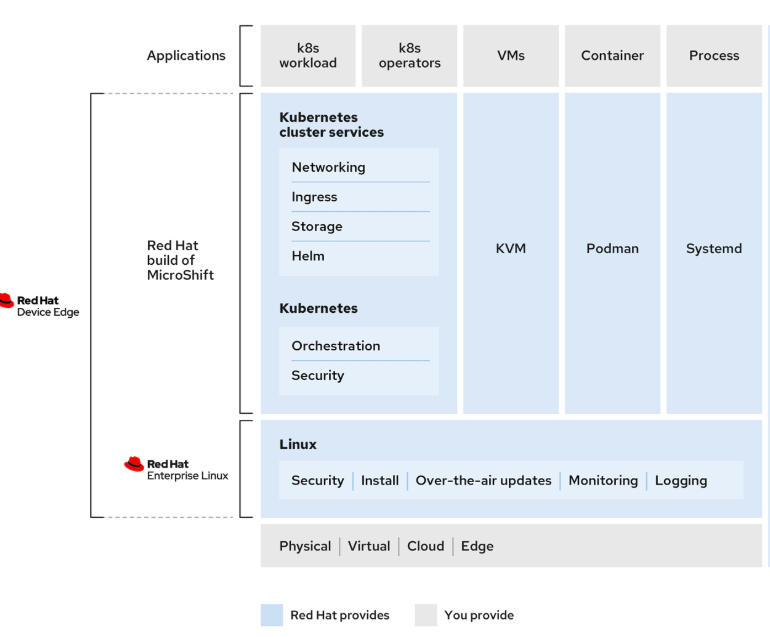
1. Built for edge-optimized operating systems MicroShift integrates directly with RHEL for Edge, taking advantage of its stability, security, and lightweight footprint. This makes it ideal for constrained or remote environments.
2. Compatible with rpm-ostree Because MicroShift works natively with rpm-ostree image-based systems, it supports atomic updates, safe rollbacks, and consistent fleet-wide deployments — crucial for managing large numbers of edge devices.
3. OS-handled operations MicroShift offloads key functions like over-the-air updates, monitoring, and logging to the operating system. This keeps the platform minimal and reduces operational complexity at the edge.
Embedding Microshift in RHEL for Edge Image
osbuild-composerservice running o the RHEL host is used for building customized operating system images. All the tools are oart of RedHat Image Builder tool .This requires creation of blueprint file ,which define customized system images by listing packages and customizations that will be part of the system.

- Follow prerequisite as described.
- Create a buleprint file.
name = "microshift_blueprint"
description = "MicroShift 4.19.0 on x86_64 platform"
version = "0.0.1"
modules = []
groups = []

[[packages]]
name = "microshift"
version = "4.19.0"

[[packages]]
name = "microshift-greenboot"
version = "4.19.0"

[[packages]]
name = "microshift-networking"
version = "4.19.0"

[[packages]]
name = "microshift-selinux"
version = "4.19.0"

[[packages]]
name = "microshift-olm"
version = "*"

[customizations.services]
enabled = ["microshift"]

[[containers]]
source = "quay.io/openshift-release-dev/ocp-v4.0-art-dev@sha256:d4b41ea0180046a3c6523df9390dc600230db03fdaa2ea415ace9b50765af9d0"
--
--- Push the blueprint to the RHEL image builder server:
sudo composer-cli blueprints push microshift_blueprint.toml- Start an OSTree-based image build from above
microshift_blueprint. The following command creates a new OSTree commit under the refrhel/9/$(uname -m)/edgeand packages it as anedge-containerimage.
BUILDID=$(sudo composer-cli compose start-ostree --ref "rhel/9/$(uname -m)/edge" microshift_blueprint edge-container | awk '/^Compose/ {print $2}')
$ sudo composer-cli compose status
ID                                     Status     Time                       Blueprint              Version   Type               Size
3020805a-97e7-4782-b797-8c050a4ddb96 FINISHED Tue Aug 12 12:54:30 2025 microshift_blueprint 0.0.1 edge-container- Download the container image using the ID and get the image ready for use by running the following command
sudo composer-cli compose image ${BUILDID}
sudo chown $(whoami). ${BUILDID}-container.tar
sudo chmod a+r ${BUILDID}-container.tar- Bootstrap a server on port 8085 for the
ostreecontainer image to be consumed by the ISO build by completing the following steps.It serves the OSTree repo over HTTP.
IMAGEID=$(cat < "./${BUILDID}-container.tar" | sudo podman load | grep -o -P '(?<=sha256[@:])[a-z0-9]*')
sudo podman run -d --name=minimal-microshift-server -p 8085:8080 ${IMAGEID}- One can look into ostree created by peeking inside the pod by checking the commit id created.
sudo podman exec -it $CONTAINER_ID /bin/bash

# cat /usr/share/nginx/html/repo/refs/heads/rhel/9/x86_64/edge
abb6b32cb97bfc732ed0bcbd785cb752e7a1a025a0f993e6409c0d08979f04cd
sudo podman cp 5d0aa5a3a767:/usr/share/nginx/html/repo /tmp/edge-ostree-reporoot@depl ~# sudo ostree --repo=/tmp/edge-ostree-repo ls abb6b32cb97bfc732ed0bcbd785cb752e7a1a025a0f993e6409c0d08979f04cd /
d00755 0 0 0 /
l00777 0 0 0 /bin -> usr/bin
l00777 0 0 0 /home -> var/home
l00777 0 0 0 /lib -> usr/lib
l00777 0 0 0 /lib64 -> usr/lib64
l00777 0 0 0 /media -> run/media
l00777 0 0 0 /mnt -> var/mnt
l00777 0 0 0 /opt -> var/opt
l00777 0 0 0 /ostree -> sysroot/ostree
l00777 0 0 0 /root -> var/roothome
l00777 0 0 0 /sbin -> usr/sbin
l00777 0 0 0 /srv -> var/srv
d00755 0 0 0 /boot
d00755 0 0 0 /dev
d00755 0 0 0 /proc
d00755 0 0 0 /run
d00755 0 0 0 /sys
d00755 0 0 0 /sysroot
d01777 0 0 0 /tmp
d00755 0 0 0 /usr
d00755 0 0 0 /var- Create the installer blueprint file.
name = "microshift-installer"
description = ""
version = "0.0.1"
modules = []
groups = []
packages = []
[customizations.locale]
language = "de_DE.UTF-8"
keyboard = "de"- Push the above blueprint image & create an edge-installer.
sudo composer-cli blueprints push microshift-installer.toml
BUILDID=$(sudo composer-cli compose start-ostree --url http://localhost:8085/repo/ --ref "rhel/9/$(uname -m)/edge" microshift-installer edge-installer | awk '{print $2}')- Download the installer iso file.
sudo composer-cli compose image ${BUILDID}
sudo chown $(whoami). ${BUILDID}-installer.iso
sudo chmod a+r ${BUILDID}-installer.iso- Create a kickstart file for adding user and the network settings
lang en_US.UTF-8
keyboard de
timezone Europe/Berlin --utc --nontp
text
reboot
zerombr
clearpart --all --initlabel
reqpart --add-boot
part pv.01 --grow
volgroup rhel pv.01
logvol / --vgname=rhel --fstype=xfs --size=10240 --name=root
rootpw --lock
ostreesetup --osname=rhel --remote=edge --ref=rhel/9/x86_64/edge --url=file:///run/install/repo/ostree/repo --nogpg

## Adding User
%post --log=/dev/console --erroronfail
set -euo pipefail
useradd -m -G wheel admin
echo 'admin:$6$fM8iSDdFrKPAOU6p$6WKnVx.fQ5wuCI9icyvqiS3iwyTXtJnzojRsKmpOnejRXkdIletBqKjqVTmTbbqbfCpTKWUdHN67aQNA6OL2S0' | chpasswd -e
%end

## Adding Network setting
%post --nochroot --log=/mnt/sysroot/root/ks-post-net.log --erroronfail
mkdir -p /mnt/sysroot/etc/NetworkManager/system-connections
cat > /mnt/sysroot/etc/NetworkManager/system-connections/enp1s0.nmconnection <<'EOF'
[connection]
id=enp1s0
type=ethernet
interface-name=enp1s0
autoconnect=true
[ipv4]
method=auto
[ipv6]
method=ignore
EOF
chmod 600 /mnt/sysroot/etc/NetworkManager/system-connections/enp1s0.nmconnection
%end
- After building the generic
edge-installerISO with Image Builder, we inject our Kickstart file usingmkksiso, producing a customizedmicroshift-x86_64.isothat installs RHEL for Edge fully automatically.
sudo mkksiso --ks kickstart.ks ${BUILDID}-installer.iso microshift-x86_64.iso- Test the image by creating a virtual machine.
sudo virt-install --name microshift-vm --ram 4096 --vcpus 2 --disk size=13,format=qcow2 --cdrom /var/lib/libvirt/boot/microshift-x86_64.iso --os-variant rhel9.0 --network network=default --graphics vnc --noautoconsole- Login to Microshift &verify the status of Microshift
ssh admin@VM_IP
password: Microshift123!

systemctl status microshift- Verify if the pods are running successfully
sudo -i
export KUBECONFIG=/var/lib/microshift/resources/kubeadmin/kubeconfig

oc get pods -A

NAMESPACE                              NAME                                       READY   STATUS    RESTARTS   AGE
kube-system                            csi-snapshot-controller-74795dc54f-bwnnz   1/1     Running   0          4m42s            1/1     Running   0          4m22s
openshift-dns                          dns-default-n7nvd                          2/2     Running   0          4m17s
openshift-dns                          node-resolver-gk457                        1/1     Running   0          4m34s
openshift-ingress                      router-default-59f4f4c47b-b6g57            1/1     Running   0          4m41s
openshift-operator-lifecycle-manager   catalog-operator-7496db5f56-cks7c          1/1     Running   0          4m31s
openshift-operator-lifecycle-manager   olm-operator-754d9fccf4-b55cf              1/1     Running   0          4m31s
openshift-ovn-kubernetes               ovnkube-master-87mvq                       4/4     Running   0          4m34s
openshift-ovn-kubernetes               ovnkube-node-wskxt                         1/1     Running   0          4m34s
openshift-service-ca                   service-ca-755884c9cf-d5knh                1/1     Running   0          4m41s
openshift-storage                      lvms-operator-65d4bdf577-zjzmr             1/1     Running   0          4m45s
openshift-storage
What’s Next : How to embed your own application into the Microshift for Edge image.
메타데이터
- post_id
- eff404023bfd
- slug
- embedding-microshift-in-a-rhel-for-edge-image-eff404023bfd
- url
- https://medium.com/@shrishs/embedding-microshift-in-a-rhel-for-edge-image-eff404023bfd
- canonical_url
- https://medium.com/@shrishs/embedding-microshift-in-a-rhel-for-edge-image-eff404023bfd
- author_url
- https://medium.com/@shrishs
- status
- ok
- fetched_at
- 2026-07-15 08:17:25