Microservice Design Pattern: Circuit Breaker
Introduction
Microservice Design Pattern: Circuit Breaker
Introduction
The Circuit Breaker pattern is a resilience strategy used in microservices to prevent cascading failures when services interact over a network.
In simple terms, it acts like a safety switch: if one service is slow, failing, or completely down, the circuit breaker stops your application from repeatedly sending requests to it. This prevents wasted resources, long wait times, and system-wide failures.
The idea comes from electrical circuit breakers. When electrical current goes beyond a safe limit, the breaker trips and opens the circuit, stopping the flow and preventing damage. Similarly, in microservices, a circuit breaker “opens” and blocks calls to a failing service until it recovers.
How it works:
- Closed State — Everything is normal, requests flow as usual.
- Open State — After too many failures, the breaker “opens” and blocks requests to the unhealthy service.
- Half-Open State — After a timeout, the breaker allows a few test requests. If they succeed, the circuit closes again; if not, it stays open.
This mechanism improves fault tolerance, resiliency, and user experience by quickly failing requests instead of waiting on a broken service.
In short: Circuit Breaker protects your system from turning one small failure into a chain reaction that can bring the whole system down.
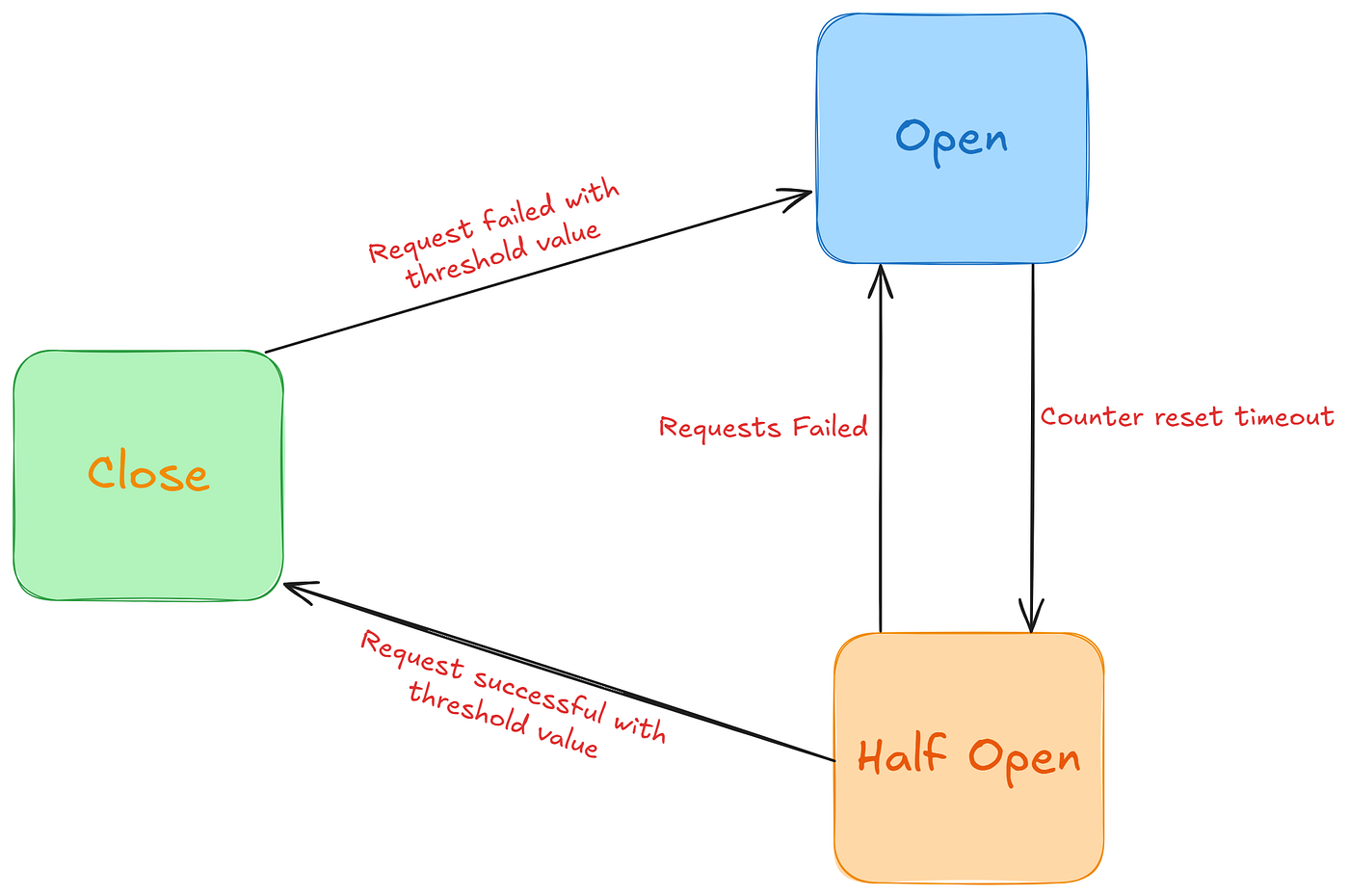
Implement Circuit Breaker with Resilience4j and Spring Boot
1. Set Up Your Spring Boot Projects
We’ll use two services:
- Product Service → provides a list of products
- Order Service → calls Product Service and uses a Circuit Breaker
Add these dependencies:
<dependency>
   <groupId>org.springframework.cloud</groupId>
   <artifactId>spring-cloud-starter-circuitbreaker-resilience4j</artifactId>
  </dependency>
<dependency>
    <groupId>org.springframework.boot</groupId>
    <artifactId>spring-boot-starter-actuator</artifactId>
</dependency>
<dependency>
    <groupId>org.springframework.boot</groupId>
    <artifactId>spring-boot-starter-aop</artifactId>
</dependency>
Note: The AOP dependency is critical! Without it, the Circuit Breaker won’t work because Spring won’t be able to “wrap” your methods with the Circuit Breaker logic.
2. Create Product Service
// Controller

@RestController
@RequiredArgsConstructor
public class ProductController {

    private final ProductService productService;

    @GetMapping("/")
    public ResponseEntity<List<Product>> getProducts() {
        List<Product> products = productService.getProducts();

        if (products.isEmpty()) {
            return ResponseEntity.noContent().build();
        }
        return ResponseEntity.ok(products);
    }
}

// Service

@Service
public class ProductService {

    public List<Product> getProducts() {
        return List.of(
                new Product(1L, "Product 1", "Description 1", 10, 100.0),
                new Product(2L, "Product 2", "Description 2", 20, 200.0),
                new Product(3L, "Product 3", "Description 3", 30, 300.0)
        );
    }
}
3. Create Order Service
// Controller

@RestController
@RequiredArgsConstructor
public class OrderController {

    private final ProductClientService productClientService;

    @GetMapping("/")
    public ResponseEntity<List<Product>> getProductsForOrder() {
        List<Product> products = productClientService.getProducts();

        if (products.isEmpty()) {
            return ResponseEntity.noContent().build();
        }
        return ResponseEntity.ok(products);
    }
}

// Service
// @CircuitBreaker wraps your method automatically.
// If Product Service fails, getProductsFallback is called.

@Service
public class ProductClientService {

    private final RestTemplate restTemplate = new RestTemplate();
    private static final String PRODUCT_SERVICE_URL = "http://localhost:8080/";

    @CircuitBreaker(name = "productService", fallbackMethod = "getProductsFallback")
    public List<Product> getProducts() {
        Product[] products = restTemplate.getForObject(PRODUCT_SERVICE_URL, Product[].class);

        // Creating immutable list for safety
        return List.of(products != null ? products : new Product[0]);
    }

    public List<Product> getProductsFallback(Exception e) {
        return List.of(
                new Product(0L, "Default Product", "This is a default product due to service unavailability", 0, 0.0)
        );
    }
}
4. Configure Circuit Breaker
resilience4j:
  circuitbreaker:
    instances:
      productService:
        register-health-indicator: true
        sliding-window-size: 10 #How many calls to track
        failure-rate-threshold: 50 #% of failures before opening the circuit
        wait-duration-in-open-state:
          seconds: 10 #Time to wait before trying the service again
        permitted-number-of-calls-in-half-open-state: 3 #Test calls allowed when circuit is half-open
        automatic-transition-from-open-to-half-open-enabled: true
        minimum-number-of-calls: 5 #Minimum number of calls before evaluating failure rate
5. Monitor Circuit Breakers with Spring Boot Actuator
management:
  health:
    circuitbreakers:
      enabled: true
  endpoints:
    web:
      exposure:
        include: health
  endpoint:
    health:
show-details: always- You can see the status of your Circuit Breakers (CLOSED, OPEN, HALF_OPEN) via the health endpoint. Use this url for check status GET http://localhost:8081/actuator/health

GitHub link: https://github.com/MuhammedJamzeeth/intern-krish/tree/main/microservices-circuitbreaker
After setting up the project, run both services:
- Call the Product Service directly using its REST URL → you’ll see the normal product data.

2 . Call the Order Service endpoint that fetches products → you’ll get the same data because the Product Service is running fine.

At this point, if you check the Actuator /actuator/health endpoint, the Circuit Breaker status will show as CLOSED, meaning the Product Service is healthy and there are no problems.

Simulating a Service Failure
- Stop the Product Service.
- Call the Order Service endpoint again → now you’ll see the fallback response that we defined in the fallback method.

Understanding Circuit Breaker Behavior
- We set
minimum-number-of-calls: 5: The Circuit Breaker will start evaluating after 5 calls. - We set
failure-rate-threshold: 50%: If 50% or more of the last 5 calls fail, the Circuit Breaker will open.

- Once open, all requests bypass the Product Service and go straight to the fallback.
- We also set
wait-duration-in-open-state: 10s: After 10 seconds, the Circuit Breaker moves to HALF_OPEN.

- In HALF_OPEN, it allows a few test requests (
permitted-number-of-calls-in-half-open-state: 3) to see if the service has recovered. - If the Product Service responds successfully, the Circuit Breaker closes and resumes normal calls.
- If failures continue, it goes back to OPEN, repeating the cycle.

Using Actuator to Monitor States
The Actuator endpoint /actuator/health helps you see the current state of the Circuit Breaker (CLOSED, OPEN, HALF_OPEN) in real time.
References
[embed]
https://www.baeldung.com/cs/microservices-circuit-breaker-pattern
메타데이터
- post_id
- eff4dd8c2dac
- slug
- microservice-design-pattern-circuit-breaker-eff4dd8c2dac
- url
- https://medium.com/@mrjamzee002/microservice-design-pattern-circuit-breaker-eff4dd8c2dac
- canonical_url
- https://medium.com/@mrjamzee002/microservice-design-pattern-circuit-breaker-eff4dd8c2dac
- author_url
- https://medium.com/@mrjamzee002
- status
- ok
- fetched_at
- 2026-07-31 16:39:44