Develop a messaging system via DNS to bypass corporate firewalls and proxies
I’ve recently coded a C&C DNS Server and a small implant that communicates with this server to help me during assessments. Unauthorized…
Develop a messaging system via DNS to bypass corporate firewalls and proxies
I’ve recently coded a C&C DNS Server and a small implant that communicates with this server to help me during assessments. Unauthorized egress is not a simple feat from servers in our data centers. This is not true in many environments where we perform Red Teaming outside of our organisation, but I do not feel satisfied getting blocked in this mature environment. Also, the security toolsets we use are fairly adept at picking up the bread-and-butter Red Teaming tools. I do not have the time to constantly develop bypasses that work for a single assessment only to redo everything for the next assessment. Coding my own C&C toolset in a way that allows me some access to a host without being too noisy and blatantly malicious for a better chance at success is what drove me to start this project. In the future, I want to employ a code signing certificate and whitelist this toolset on our detective controls to do my job without the ‘prove that you can bypass AV X or EDR Y’ requirement that all Red Teams seem to have to deal with.
I will not be releasing a C2 publicly, but I thought I’d explain the the strategy I followed to enable successful messaging between client and server.
There are some basic constraints that govern the Domain Name System:
- A domain name may contain a maximum of 255 characters
- A domain label may contain a maximum of 63 characters
- The only legal characters used in non-internationalised domains are A-Z, 0–9, and a dash ( — ) and underscore ( _ ).
- Domain Labels may not end in dashes or underscores
The challenge then is to encode your C&C data in a form that conforms to the constraints above.
High-level requirements for messages sent to the C&C:
- A single request-response should be compressed (We can envision sending and receiving files through this channel)
- Once compressed, the data should be Base64 encoded which will get us close to a form that conforms to the constraints above.
- The Base64 data should be transformed to not contain equal signs ( = ) , forward slashes ( / ) or plus signs ( + )
- Most messages being sent will be bigger than 63 characters so we need to come up with a mechanism to split the messages into valid DNS domains and reassemble these on the server-side into the original form
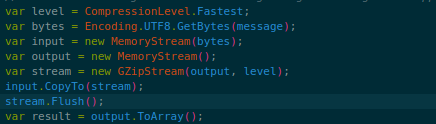
1. Compressing the message with GZIP

2. Convert the compressed data to Base64 and replace any invalid DNS characters with valid ones

3. Lastly we split the compressed and encoded message into parts matching the length of the largest acceptable label in the DNS system
The compression part is easy enough, choose your favorite algo and compress your message. The example above is showing transfers of UTF8 strings, for binary file transfers you can use the binary data directly for the compression stream.
After you’ve generated the compressed bytes of the original message, it should be converted to base64. Base64 is close to being valid as a DNS label, except for a couple of characters, which we can transform to valid ones and back to legitimate base64 on the server side. The specific characters we are converting are plus ( + ) and forward slash ( / ). We are replacing the equal signs which are base64 padding characters with blanks. Now you’d think it would not be possible to figure out if we need one, two, or no equal signs at the end of the base64 string, but we can calculate that on the server side:

Calculating the amount of padding required for the Base64 string
The last hoop to jump through is to break the now compressed, base64 encoded and DNS safe label into pieces that can fit into the 63 character limit requiring us to be able to show the server an indication of the last message in order for it to parse the message correctly. We can’t base64 decode or decompress the message parts since we need the whole message before that functionality will work. The silly method I came up with is simply appending a “9” to every message part and ending the message parts with a “1”. The last message part then gets a postfix of “9” to indicate that it is the final piece of the message. A “9” is prepended to each message part to avoid invalid characters in the domain label. Implementing this I wrongly thought subdomains may not begin with underscores or dashes, this prepended “9” is redundant. Domain labels may not end with an underscore or dash as mentioned in our constraints.
Putting it all together
Let’s look at this in action and see if we can decipher what’s going on.
We’ll be running the implant on a linux host (The implant is cross-platform since yay, .Net runs on almost everything these days). As an example we’ll setup a simple directory, including a couple of dummy files and see if we can send commands down to the implant to list the directory structure and send it back to the C&C.

Dummy files setup on the implanted host to test

The server side of the C&C issues the command to the implant and receives the response of the command
Looking at the server side logs of the C&C we can see it issuing the “ls” command to the implant. We’re not really executing a shell command on the host, under the hood ‘ls’ is interpreted to be a call to Directory.GetFiles(…). Shell commands should be avoided if you want to fly under the radar of course.
Next, we can see the implant starting to issue DNS requests to our C&C containing the results of the command. We receive two messages back. The first ends with “1” telling us that this is not the full response, we should be expecting more data. The server shows this in its log by stating “Received a message part…”
The first part is 9H4sIAAAAAAAEAzKoSS6q0c_Iz03VTyzOKNLPzC3IScwrKUktLtFPy8xJNeLCI1. We need to remove the “9” and the “1” before we append this to the next message that will be received.
For the second DNS request in the screenshot, we can see the server interpreting it as a final message with the log message of “Received final message part…”. The final message is 9Zmbn49LCqTPBJ-kMT5JQ64aVz8XAAAAAP__9. This ends with a “9” showing the server that we can attempt to put these pieces together, fix the base64, and decompress the data.
After removing the first and last characters of each message, we can concatenate the message parts and fix up the base64. The full message from the implant is:
H4sIAAAAAAAEAzKoSS6q0c_Iz03VTyzOKNLPzC3IScwrKUktLtFPy8xJNeLCIZmbn49LCqTPBJ-kMT5JQ64aVz8XAAAAAP__
Now we need to get this string back into valid base64. We replace underscores with forward-slashes and dashes with pluses and we also amend the padding of the base64 string if necessary:
H4sIAAAAAAAEAzKoSS6q0c/Iz03VTyzOKNLPzC3IScwrKUktLtFPy8xJNeLCIZmbn49LCqTPBJ+kMT5JQ64aVz8XAAAAAP//
This string should now be decodable as a GZip stream:


And there we go
Final thoughts
There are a few basic configurations necessary for communicating over DNS. We’ve not covered any of the basics of how to get it done, but the information is easy to find. For the C&C server and implant there are a lot more things to consider and implement.
For example:
- We need a custom communication protocol to keep track of specific implants and their current state.
- Implants should be registered and authenticated at the C&C. Allowing unauthorised connections would expose your C&C to adversaries.
- The network traffic between the implant and the C&C should be encrypted since the data is shared between DNS servers and can easily be decoded if implemented in the manner as I have explained above.
This strategy does solve the main problem of figuring out a way to send random data through the Domain Name System. It is possible to extend this idea to send even more data. A full domain name may be a maximum of 255 characters and a single label may be 63 characters, so you could employ multiple labels to send data if your domain is short enough. We have seen ESET employ multiple labels to achieve this.
Detection
Implants or applications using DNS as a messaging system are fairly easily detected. Most use TXT queries, since any other query can only return an IP address. Noted though, you can definitely encode reply messages in the form of an IP, it would just require far more DNS requests which would be noisy.
Alerting on the amount of unique subdomain queries per 30 minutes is a decent strategy to detect TXT based DNS messaging.
You will find that a few legitimate applications use this mechanism, we’ve seen quite a few Anti-Virus/Security vendors use this as a preferred communication channel.
메타데이터
- post_id
- effbf95a35ae
- slug
- develop-a-messaging-system-via-dns-to-bypass-corporate-firewalls-and-proxies-effbf95a35ae
- url
- https://systemweakness.com/develop-a-messaging-system-via-dns-to-bypass-corporate-firewalls-and-proxies-effbf95a35ae
- canonical_url
- https://systemweakness.com/develop-a-messaging-system-via-dns-to-bypass-corporate-firewalls-and-proxies-effbf95a35ae
- author_url
- https://medium.com/@ashr.636
- status
- ok
- fetched_at
- 2026-07-26 18:43:57