Eslint and Prettier configuration
YouTube: https://www.youtube.com/@RoadToCodeWithMB
Eslint and Prettier configuration
YouTube: https://www.youtube.com/@RoadToCodeWithMB
🔧 Step 1: Install ESLint and Plugins
In your Vite React project root, run: (sometimes it comes by default when you have installed new app/plugins but you can validate)
below screenshot is from package.json file when I created new vite react project
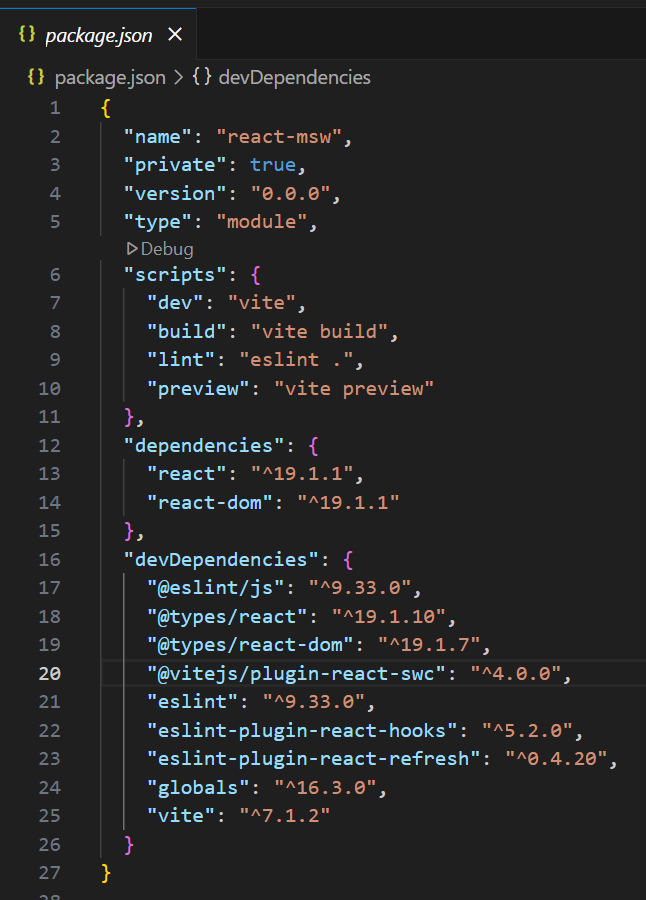
means eslint are already installed
npm install eslint eslint-plugin-react eslint-plugin-react-hooks eslint-plugin-jsx-a11y eslint-plugin-import --save-devOr with Yarn:
yarn add -D eslint eslint-plugin-react eslint-plugin-react-hooks eslint-plugin-jsx-a11y eslint-plugin-import🔧 Step 2: Initialize ESLint
npx eslint --init🔧 Step 3: Example .eslintrc.js for React + Vite
export default {
  env: {
    browser: true,
    es2021: true,
  },
  extends: [
    "eslint:recommended",
    "plugin:react/recommended",
    "plugin:react-hooks/recommended",
    "plugin:jsx-a11y/recommended",
    "plugin:import/recommended",
    "prettier", // if you also use Prettier
  ],
  parserOptions: {
    ecmaFeatures: {
      jsx: true,
    },
    ecmaVersion: "latest",
    sourceType: "module",
  },
  plugins: ["react", "react-hooks", "jsx-a11y", "import"],
  rules: {
    "react/react-in-jsx-scope": "off", // Not needed with React 17+
    "react/prop-types": "off", // If using TypeScript or prefer no prop-types
  },
  settings: {
    react: {
      version: "detect",
    },
  },
}
🔧 Step 4: Add ESLint Scripts in package.json
"scripts": {
  "lint": "eslint . --ext .js,.jsx,.ts,.tsx",
  "lint:fix": "eslint . --ext .js,.jsx,.ts,.tsx --fix"
}
Now you can run:
npm run lint
npm run lint:fix
new ESLint flat config style (eslint.config.js) vs the older .eslintrc.js format.
Here’s the difference and what you should do in your Vite + React app:
✅ Old Style (.eslintrc.js, .eslintrc.json)
- Works with ESLint < 9
- Uses
extends: [],plugins: [], etc. - Still widely used and supported.
- Most tutorials and boilerplates use this.
✅ New Style (eslint.config.js)
- Introduced with ESLint 9 (2024)
- Uses
defineConfigand flat configs (arrays of objects). - Better DX, less confusing than multiple config files merging.
- Example you pasted is the new way.
👉 Which one should you use?
- If your project uses ESLint 9+, you should create
**eslint.config.js** at the root. - If you’re on ESLint 8 or lower, you must use
.eslintrc.js.
You can check ESLint version:
npx eslint --version🔧 Example eslint.config.js for Vite + React (Flat Config)
import globals from "globals";
import js from "@eslint/js";
import pluginReact from "eslint-plugin-react";
import pluginReactHooks from "eslint-plugin-react-hooks";
import pluginJsxA11y from "eslint-plugin-jsx-a11y";

export default [
  js.configs.recommended,
  {
    files: ["**/*.{js,jsx,ts,tsx}"],
    languageOptions: {
      ecmaVersion: "latest",
      sourceType: "module",
      globals: globals.browser,
    },
    plugins: {
      react: pluginReact,
      "react-hooks": pluginReactHooks,
      "jsx-a11y": pluginJsxA11y,
    },
    rules: {
      "react/react-in-jsx-scope": "off", // Not needed with React 17+
      "react/prop-types": "off", // If using TS
    },
    settings: {
      react: { version: "detect" },
    },
  },
];
🔑 So to answer your question:
- No, you don’t need both files.
- If you’re on ESLint 9+ → use
eslint.config.js(flat config). - If you’re on ESLint 8 or lower → stick with
.eslintrc.js.
👉 Do you want me to show you how to migrate from .eslintrc.js to eslint.config.js so you can future-proof your Vite + React project?
🛠 Migration Steps
1. Delete old config file
Remove .eslintrc.js (or .eslintrc.json) if it exists.
rm .eslintrc.js2. Create eslint.config.js at project root
Here’s a good React + Vite starter config (flat config):
// eslint.config.js
import globals from "globals"
import js from "@eslint/js"
import pluginReact from "eslint-plugin-react"
import pluginReactHooks from "eslint-plugin-react-hooks"
import pluginJsxA11y from "eslint-plugin-jsx-a11y"
import pluginImport from "eslint-plugin-import"

export default [
  js.configs.recommended, // base JS rules
  {
    files: ["**/*.{js,jsx,ts,tsx}"],
    languageOptions: {
      ecmaVersion: "latest",
      sourceType: "module",
      globals: globals.browser,
    },
    plugins: {
      react: pluginReact,
      "react-hooks": pluginReactHooks,
      "jsx-a11y": pluginJsxA11y,
      import: pluginImport,
    },
    rules: {
      "react/react-in-jsx-scope": "off", // not needed with React 17+
      "react/prop-types": "off", // disable if using TS
      "react-hooks/rules-of-hooks": "error",
      "react-hooks/exhaustive-deps": "warn",
    },
    settings: {
      react: { version: "detect" },
    },
  },
]- Update
package.jsonscripts
"scripts": {
  "lint": "eslint .",
  "lint:fix": "eslint . --fix"
}- Run ESLint
npm run lint
npm run lint:fix
5. (Optional) VS Code Setup
Add a .vscode/settings.json file:
{
  "eslint.experimental.useFlatConfig": true,
  "eslint.validate": ["javascript", "javascriptreact", "typescript", "typescriptreact"]
}
✅ That’s it — now your Vite + React project uses the latest ESLint v9 flat config.
👉 Let’s wire up Prettier with ESLint flat config in your Vite + React app
🔧 Step 1: Install Prettier + ESLint Plugin
npm install -D prettier eslint-plugin-prettier eslint-config-prettier- prettier → formatter
- eslint-plugin-prettier → runs Prettier as an ESLint rule
- eslint-config-prettier → disables rules that conflict with Prettier
🔧 Step 2: Create a Prettier Config (Optional)
Add a prettier.config.js (or .prettierrc):
export default {
  semi: false,
  singleQuote: true,
  trailingComma: "all",
  printWidth: 100,
  tabWidth: 2,
}
old style
{
  semi: false,
  singleQuote: true,
  trailingComma: "all",
  printWidth: 100,
  tabWidth: 2,
}
🔧 Step 3: Update eslint.config.js
Here’s the updated flat config: (this is optional)
// eslint.config.js
import globals from "globals"
import js from "@eslint/js"
import pluginReact from "eslint-plugin-react"
import pluginReactHooks from "eslint-plugin-react-hooks"
import pluginJsxA11y from "eslint-plugin-jsx-a11y"
import pluginImport from "eslint-plugin-import"
import pluginPrettier from "eslint-plugin-prettier"

export default [
  js.configs.recommended,
  {
    files: ["**/*.{js,jsx,ts,tsx}"],
    languageOptions: {
      ecmaVersion: "latest",
      sourceType: "module",
      globals: globals.browser,
    },
    plugins: {
      react: pluginReact,
      "react-hooks": pluginReactHooks,
      "jsx-a11y": pluginJsxA11y,
      import: pluginImport,
      prettier: pluginPrettier,
    },
    rules: {
      ...pluginPrettier.configs.recommended.rules, // ✅ enable Prettier rules
      "react/react-in-jsx-scope": "off",
      "react/prop-types": "off",
      "react-hooks/rules-of-hooks": "error",
      "react-hooks/exhaustive-deps": "warn",
    },
    settings: {
      react: { version: "detect" },
    },
  },
]
🔧 Step 4: Update package.json scripts
"scripts": {
  "lint": "eslint .",
  "lint:fix": "eslint . --fix",
  "format": "prettier --write ."
}
🔧 Step 5: VS Code Integration (optional)
.vscode/settings.json
{
  "editor.formatOnSave": true,
  "editor.defaultFormatter": "esbenp.prettier-vscode",
  "eslint.experimental.useFlatConfig": true,
  "eslint.validate": ["javascript", "javascriptreact", "typescript", "typescriptreact"]
}
✅ Now:
- ESLint catches code quality issues.
- Prettier handles formatting.
- Conflicts between them are resolved automatically.
메타데이터
- post_id
- f0259ebeb58b
- slug
- eslint-and-prettier-configuration-f0259ebeb58b
- url
- https://medium.com/@contactmanoharbatra/eslint-and-prettier-configuration-f0259ebeb58b
- canonical_url
- https://medium.com/@contactmanoharbatra/eslint-and-prettier-configuration-f0259ebeb58b
- author_url
- https://medium.com/@contactmanoharbatra
- status
- ok
- fetched_at
- 2026-08-07 01:46:55




