Heap Analytics: In-Depth Review (+Better Alternative)
Heap Analytics: In-Depth Review (+Better Alternative)
How good is Heap analytics? And, how can it help product teams generate actionable insights and make informed decisions?
These are the key questions we cover in the article, so if you’re after the answers, look no further!
Let’s dive in!
TL;DR
- Heap offers a comprehensive suite of analytical features that help product teams make data-driven decisions.
- With Heap, you can collect data on user actions, screen and page views, user properties, conversions, and acquisition channels.
- Userpilot is a product adoption platform with advanced analytics features that make it a solid alternative to Heap. It enables you to analyze user behavior in-app, collect feedback, and drive engagement with in-app experiences.
- Heap’s Journeys feature allows you to analyze the paths that users take inside the product. You can do it with Userpilot’s Paths.
- Both products offer segmentation features but in Userpilot you can segment users by more criteria.
- Heatmaps in Heap allow you to track clicks, scrolling, and user attention, while in Userpilot heatmaps you can track clicks, hovers, and text infills.
- In Heap, you can also analyze user behavior in detail with session replays. Userpilot currently doesn’t offer this functionality.
- Both Userpilot and Heap allow you to track custom events.
- Heap tracks all the user data automatically so you don’t have to tag individual features or events. This allows you to analyze data retrospectively when the need arises. However, this means storing a lot of data, which can be expensive.
- Both Heap and Userpilot track data in real-time but only Userpilot has tools that allow you to act on the data, for example by triggering in-app surveys.
- Heap supports both mobile- and web-based products, while Userpilot only web-based ones.
- To see how Userpilot can help you analyze user in-app behavior and act on the insights to improve adoption and retention, book the demo!
What is Heap product analytics?
Heap is a product analytics platform, which allows customer success teams, marketers, and product managers to track user interactions within an app across all touchpoints in the user journeys.
Thanks to the data, teams can gain a better understanding of user needs and make data-driven decisions to improve conversions, retention and deliver experiences that delight customers.
What data does Heap collect?
Heap enables teams to collect, analyze, and visualize complete data about all aspects of user experience inside the product.
With Heap, you can track;
- User actions like clicks, form submissions, scrolls, and downloads
- Screen and page views
- User properties, like demographics and device type
- Conversions
- Acquisition data, like traffic sources
Where Heap analytics stands out is automatic data collection, so users don’t have to tag any events or features. Thanks to that, you can analyze event data retrospectively even if you didn’t think you would need to do it initially.
Overview of Heap’s functionality
So what analytics functionality does Heap offer? Let’s look at some of its flagship features.
Journey analysis for tracking user interactions
Thanks to this feature, product teams can visualize and analyze all the paths that users take in the customer journey.
What are the use cases of the Journeys feature?
- By comparing conversion rates of different paths, you can use identify happy paths inside the product. If you know the most optimal path leading to activation and adoption, you can onboard your users more effectively.
- You can also find unhappy paths that are marred by high friction and drop-off rates. In this way, you can optimize them to improve conversion rates and retention.
- Journeys enable you to test the impact of new features and product changes on conversion rates and customer success.

Heap analytics: Journeys.
Segmentation for understanding user behaviors of different groups
The odds are that your user base is not uniform. Instead, it consists of different groups with unique JTBDs, needs, and preferences.
Heap’s segmentation features allow you to group your customers for more granular analysis of their needs and wants, and for delivering personalized product experiences.
You can also use it to exclude certain data sets from the analysis so that your results are valid and reliable. For example, you could filter out your internal users, like employees, or bots.
With Heap, you can segment users by:
- **Event data **— for example, how many times or how often users completed an event within a specific time frame.
- User properties — like demographics or IP addresses.

Heap analytics: Segmentation.
Heatmap analysis for spotting high engagement areas in the user interface
A heatmap is a visual representation of user interactions with a page or screen. Basically, they are color-coded page overlays. The warmer the color, the higher the user engagement with the feature.
Heap’s heatmaps are incredibly easy to interpret. One look is enough to see where users click (Clickmaps), how far down the page they scroll (Scroll Depth), or what they pay attention to (Attention Maps).
Using this functionality, you can understand user intent, and create segments for granular insights. This helps to optimize the UI to reduce friction and improve conversions.
For example, if users aren’t engaging with important features, you can improve engagement by uncluttering the UI and showcasing the features with in-app messages like tooltips.

Heap analytics: Heatmaps.
Session replay for understanding users’ experience
Session replays serve a very similar purpose as heatmaps. They allow you to carry out an in-depth analysis of users’ interactions with a particular product page or screen.
To do so, you simply record what users do while engaging with the product as if it was a film. Once you have the recording, you watch it and analyze user interactions to identify friction points and optimize the UX.
With Heap, you can filter the replays by:
- Events — for example, sessions when users completed a specific event.
- Users — for example, users with a specific role in their company.
- Date ranges — for example, sessions from the last week or between two specific dates.

Heap analytics: Session replay.
Pros and cons of Heap digital insights platform
As a product analytics platform, Heap has a number of strengths:
✅ A comprehensive range of analytics and reporting features that allow you to gain insights into different aspects of user behaviors.
✅ Automatic data-capture which doesn’t require tagging so that you can analyze it all retrospectively when the need arises.
✅ Real-time data tracking so you can respond immediately or trigger event-based experiences (with the help of integrations).
✅ Support for web- and mobile-based products.
However, Heap’s advantages can also be its downsides:
❌ Steep learning curve — because of the advanced features it offers, Heap is difficult to learn.
❌ High data storage costs — you have to store all the data you collect, whether you need it or not.
What do users say about Heap?
Heap boasts a solid 4.3/5 rating on the review site G2.
Its users value its UI, automatic data collection, and in-depth analytics reports with granular insights into user behavior which enables informed decision-making.
For example, here’s what Jonah, a product manager, has to say:
Heap has a very extensive and robust UI that enables you to dive deep into the data about how your users use your applications. The heat map and user journey features will allow you to see insights that are very hard to capture and visualize compared to other data analytics and visualization software. Heap takes much of the hard work required to centralize and visualize the data and provides critical insights into what product decisions you should make for your upcoming sprints.

Heap G2 review.
However, not all users are as enthusiastic about Heap as Jonah.
For example, Kelsey, a social media expert, mentions that the UI is not very intuitive for users who don’t specialize in data analysis. What’s more, Heap doesn’t always seem to cope with the huge amounts of data it collects:
…first, I don’t find it overly intuitive to use. As someone who works primarily in social media and copywriting, running data analyses isn’t my #1 skill,… so some of the more technical aspects of the tool make it seem unnecessarily complicated… Second, I’ve been hamstringed by queries simply not loading the data I need it to. I’ve reached out to CX about this and their response has been that there’s simply too much data for the query to run successfully…

G2 review.
Heap pricing
Heap offers 4 pricing plans, including the Free plan which gives you access to the main analytics features. It stores your data for 6 months and you can track up to 10k sessions a month.
For longer data storage, higher usage limits, or more advanced features, you need one of the paid plans, all of which come with custom pricing:
- Growth — best for scale-ups
- Pro — best if you need the most advanced analytics features
- Premier — best for enterprise businesses

Heap pricing.
Userpilot: A better alternative to Heap analytics
Why would you consider Userpilot as an alternative to Heap?
As a product growth platform, Userpilot offers not only robust analytics features but also allows you to collect and analyze user feedback and act on the insights by triggering personalized in-app experiences.
And it’s so much easier to learn than Heap.
User path analysis for tracking the steps customers take
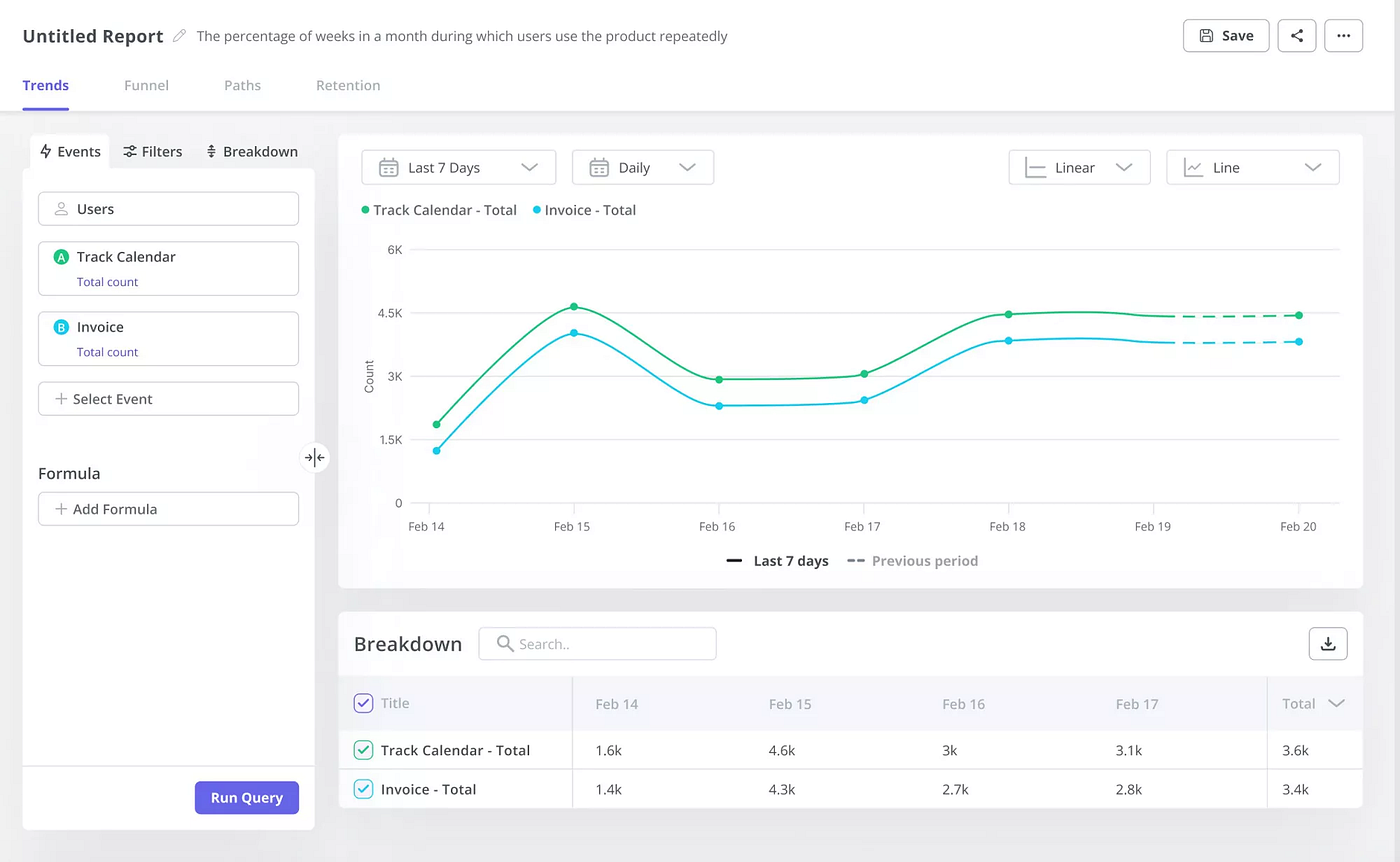
Userpilot’s Paths functionality, which will be available mid-September 2023, enables you to track every single step the user takes.
Just like Heap Journeys, you can use the feature to identify happy and unhappy paths and optimize customer journeys and improve conversions by removing unnecessary friction.
Are you curious about the feature? Book the demo to find out more!

Userpilot Paths.
Segmentation for collecting actionable insights about user behavior
Userpilot offers advanced segmentation features.
It enables teams to create user segments based on:
- User attributes, like name, ID, plan, or website sessions.
- Company data.
- Tagged features they have engaged with.
- Custom events they’ve completed.
- In-app experiences they’ve engaged with like checklists.
- User feedback — both quantitative and qualitative.

Userpilot segmentation.
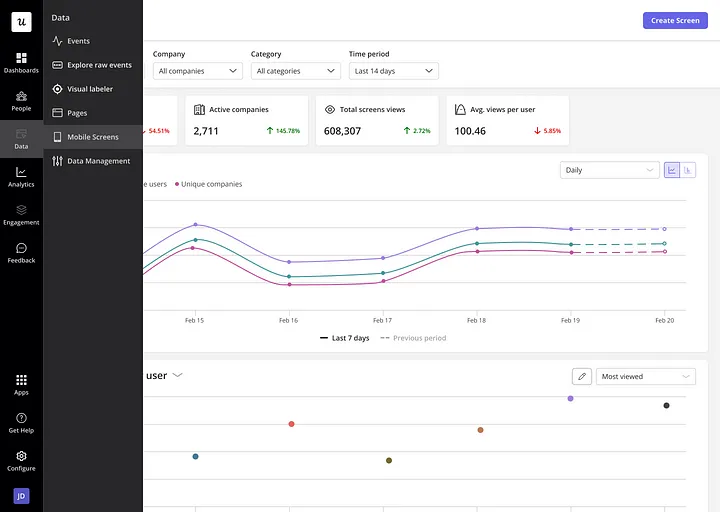
Having built your segments, you can then visualize and analyze the performance of each segment for relevant and statistically valid insights.

Userpilot Features & Events dashboard.
With Userpilot, you can use the information to create personalized in-app experiences for each of the segments. For example, you can use in-app messages to drive engagement with features that are relevant for users with particular JTBDs.
Heatmaps for tracking engagement points in the digital experience
Userpilot allows you to visualize user engagement with different elements of your page and screen with heatmaps, just like Heap does.
You can filter the results by user segments to quickly identify patterns for different user groups.

Userpilot heatmap.
Custom events tracking for monitoring those with a high impact on conversion rates
Let’s imagine you’ve used the Paths feature to identify a number of events that are closely linked with user conversions. The occurrence of individual events doesn’t mean anything but when users complete them all, it indicates that they’re ready to upgrade to the paid plan.
With Userpilot, you can bundle the events up into custom events and track them as one. Whenever users complete the custom event, you could trigger an in-app message to prompt them to upgrade.
In a similar way, you can use the feature to prevent churn.

Userpilot custom events.
Userpilot pricing
There are three Userpilot pricing plans:
- Starter — from $249/month
- Growth — custom pricing
- Enterprise — custom pricing
Userpilot offers live demos and a free 14-day trial.

Userpilot pricing.
Conclusion
Heap is one of the market-leading analytics platforms.
It offers a range of analytics features for granular analysis of user interactions with web- and mobile-based products. However, it may be a bit challenging to use if you have limited experience in data science.
If you want to see how Userpilot can help you achieve the same goals as Heap, book the demo!
메타데이터
- post_id
- f0552cc3d2cf
- slug
- heap-analytics-in-depth-review-better-alternative-f0552cc3d2cf
- url
- https://medium.com/@userpilot/heap-analytics-in-depth-review-better-alternative-f0552cc3d2cf
- canonical_url
- https://medium.com/@userpilot/heap-analytics-in-depth-review-better-alternative-f0552cc3d2cf
- author_url
- https://medium.com/@userpilot
- status
- ok
- fetched_at
- 2026-06-15 20:49:13