ASUS ROG Ally vs Steam Deck: Raw Power Meets Refined Efficiency
The handheld PC gaming revolution has crystallized into two distinct philosophies. On one side, ASUS’s ROG Ally represents the “no…
ASUS ROG Ally vs Steam Deck: Raw Power Meets Refined Efficiency
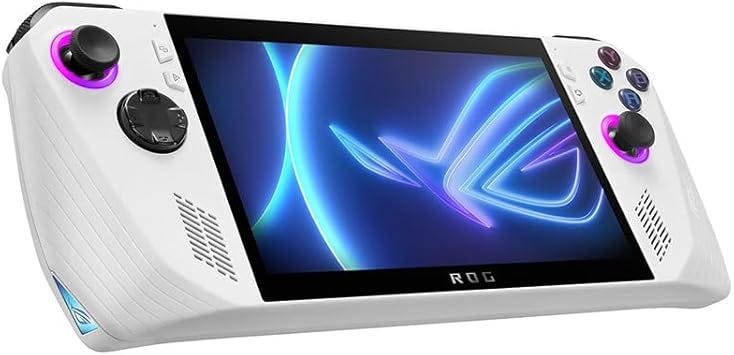
The handheld PC gaming revolution has crystallized into two distinct philosophies. On one side, ASUS’s ROG Ally represents the “no compromises” approach — maximum performance crammed into a portable form factor, consequences be damned. On the other, Valve’s Steam Deck embodies calculated restraint — conservative hardware wrapped in the most mature handheld software ecosystem ever created.

Both promise PC gaming on the go. Both run your Steam library. But the experience of using them couldn’t be more different, and the choice between them reveals more about your gaming priorities than any spec sheet comparison ever could.
I’ve extensively used both devices, and in 2026, the decision between them has become clearer — and more complicated — than ever.
The Silicon Gulf: Performance That Matters (And Doesn’t)
The core hardware difference is substantial. The ASUS ROG Ally (Z1 Extreme model) runs AMD’s “Phoenix” APU built on a 4nm process with 8 Zen 4 cores and 16 threads. The Steam Deck uses the older 7nm “Aerith” custom chip with 4 Zen 2 cores and 8 threads.
In raw computational terms, the ROG Ally delivers approximately 8.6 teraflops of theoretical performance compared to the Steam Deck’s ~1.6 teraflops. That’s a massive 71% performance advantage in CPU-bound scenarios and modern AAA titles like Cyberpunk 2077 or Returnal.
The ROG Ally X revision further widened this gap by introducing 24GB of LPDDR5X RAM versus the Deck’s fixed 16GB. This provides substantially more headroom for system resources and VRAM allocation.
But here’s the critical nuance: performance ceiling and real-world experience aren’t the same thing.
The Steam Deck is engineered for efficiency at low wattages (4–15W). Playing indie titles like Stardew Valley or Hades, the Deck can maintain 6-hour battery life by drawing just 4–7 watts — a range where the Ally’s Zen 4 architecture struggles to maintain stability. The Deck feels optimized for the games most people actually play on handhelds: indie roguelikes, platformers, turn-based RPGs.
Crank both devices to their maximum TDP (25–30W “Turbo” modes), and the ROG Ally significantly outpaces the Deck, achieving playable 1080p frame rates in demanding titles that simply aren’t possible on Valve’s hardware. If you’re determined to play Elden Ring or Red Dead Redemption 2 at high settings on a handheld, the Ally is your only realistic option.
The SD Card Disaster: ASUS’s Thermal Engineering Failure
This is the skeleton in ASUS’s closet that needs addressing upfront.
The original 2023 ROG Ally had a catastrophic design flaw: the MicroSD card reader was positioned directly beneath the main heat exhaust. Under thermal stress — particularly in 30W Turbo mode — the heat from the exhaust caused SD card readers to malfunction or permanently fail. In severe cases, the heat was sufficient to kill the inserted SD cards themselves.
ASUS remained silent on this issue for nearly a year before finally acknowledging it in May 2024, extending the warranty on 2023 models to 24 months. By August/September 2024, ASUS released a revised motherboard design addressing the thermal routing.
The ROG Ally X further mitigated this through internal component repositioning and a doubled 80Wh battery that altered airflow and heat distribution.
If you’re considering a used ROG Ally in 2026, verify it has the revised motherboard or buy the Ally X model. The SD card thermal issue is not a minor inconvenience — it’s a fundamental engineering oversight that can brick your storage.
The Steam Deck has no equivalent thermal crisis. Its conservative thermal design operates well within safe parameters across its entire TDP range.
Repairability: A Tale of Two Approaches
iFixit teardowns reveal fascinating differences in repairability philosophy.
The ROG Ally is surprisingly repair-friendly in key areas. The battery attaches via screws — trivially easy to replace. The thumbsticks sit on modular boards connected by screws and detachable cables, making it simple for the community to swap standard potentiometer sticks for GuliKit Hall Effect modules that eliminate drift through magnetic sensing.
The Steam Deck’s battery is adhesive-mounted, requiring heat guns and significant effort to remove without damaging the chassis. However, Valve maintains a direct partnership with iFixit to sell official replacement parts — screens, batteries, motherboard components. You can literally order spare parts directly and repair your own device with official support.
ASUS does not officially sell individual spare parts to consumers. The modular design is meaningless if you cannot source replacement components.
This creates a paradox: the ROG Ally is mechanically easier to repair, but the Steam Deck has better repair infrastructure and part availability.
Both devices use M.2 2230 SSDs for storage (the Ally X supports 2280 as well), making storage upgrades straightforward on either platform.
Software Ecosystems: Windows Hell vs Linux Zen
This is where philosophical differences become starkest.
The Steam Deck runs SteamOS 3.0 — a custom Linux distribution with a console-like interface that “just works.” Press the power button, pick a game, play. Sleep and wake cycles function flawlessly. Quick Resume lets you suspend multiple games and switch between them instantly. The entire experience is seamless, polished, and designed around the actual behavior patterns of handheld gaming.
The ROG Ally ships with Windows 11. This means you have access to every PC game launcher — Steam, Epic, Game Pass, GOG — without compatibility layers. But it also means dealing with Windows updates, driver issues, bloatware, and ASUS’s Armoury Crate software, which is resource-heavy and frequently buggy.
The community created workarounds. Bazzite OS is a Fedora-based SteamOS clone that brings the Deck’s console-like UI and superior sleep/wake functionality to ASUS hardware. G-Helper is a lightweight alternative to Armoury Crate, providing granular TDP control, fan curves, and RGB management without the bloat.
But here’s the reality: if you want Game Pass on a handheld, the ROG Ally is your only option between these two. Game Pass streaming works on Steam Deck, but native Game Pass requires Windows.
For users who primarily play Steam games and value pick-up-and-play convenience, the Steam Deck’s software integration is substantially superior. For users who need Windows-exclusive launchers or prefer maximum software flexibility, the Ally’s Windows foundation is necessary despite its friction.
Emulation Performance: Where Power Actually Matters
High-end emulation is where the ROG Ally’s performance advantage becomes undeniable.
PlayStation 3 and Xbox 360 emulation on the Steam Deck is… rough. Games like God of War 3 or Metal Gear Solid 4 frequently dip below 20fps with inconsistent frame pacing. The ROG Ally has sufficient CPU headroom to push these titles toward stable 30fps or even 60fps in optimized scenarios.
Nintendo Switch emulation reveals similar gaps. Both devices handle most Switch titles adequately, but the ROG Ally is the only one that can effectively run The Legend of Zelda: Tears of the Kingdom at consistent 1080p frame rates when pushed to high TDP.
For retro gaming enthusiasts who view handheld PCs as ultimate emulation machines, the ROG Ally’s superior processing power delivers tangible, meaningful advantages.
Community Modifications: Reaching “Endgame” Status
Enthusiasts have developed sophisticated hardware and software modifications for both platforms.
PTM7950 Phase Change Thermal Material: Repasting the Steam Deck with Honeywell PTM7950 shows measurable thermal stability improvements during extended sessions. The ROG Ally reportedly uses similar phase-change material stock, though community repasting still occurs.
JSAUX Transparent Backplates: Custom backplates for the Steam Deck feature integrated passive heat plates. Testing indicates 2–5°C GPU temperature reductions and fan speeds reduced by up to 900 RPM, significantly decreasing noise.
Hall Effect Thumbstick Swaps: The ROG Ally’s modular thumbstick design makes swapping to GuliKit Hall Effect modules straightforward. These magnetic sensors eliminate the physical contact points that cause drift — a persistent issue with traditional potentiometer sticks on both devices.
These modifications transform stock devices into “endgame” configurations, but they require technical confidence and void warranties.
The 2026 Market Reality: Pricing and Positioning
In 2026, the handheld PC market has shifted dramatically. The ROG Ally has seen aggressive price cuts following the Ally X release and the Nintendo Switch 2 launch.
In the Czech Republic market at retailers like Alza.cz, the original ROG Ally Z1 Extreme frequently appears as “Zánovní” (used/like-new) for approximately 9,000–11,000 CZK. This positions it competitively against the Steam Deck OLED.
The Nintendo Switch 2’s June 2025 launch at approximately $449 (£350/11,000 CZK) forced both the ROG Ally and Steam Deck into a mid-range PC niche where they must justify higher costs through library freedom (Steam/Epic/Game Pass) and advanced emulation capabilities.
The Steam Deck OLED represents Valve’s refined vision — better screen, improved battery efficiency, refined ergonomics. It’s the Steam Deck “perfected” rather than revolutionized.
Battery Life: The Unreported Story
Battery life varies wildly based on workload, but general patterns emerge:
Steam Deck: 2–8 hours depending on game demands. Indie titles and older games stretch toward the maximum. AAA titles at higher TDP drain toward the minimum.
ROG Ally: 1.5–5 hours depending on TDP settings. Turbo mode obliterates battery life. Conservative TDP extends runtime but negates the performance advantage.
ROG Ally X: 80Wh battery (doubled from original) delivers 2–8 hours, bringing it closer to Steam Deck endurance at equivalent power draws.
For frequent travelers or users who game during commutes, the Steam Deck’s superior efficiency at low wattages and more predictable battery performance proves valuable.
Display Technology: 1080p vs OLED
The ROG Ally features a 1920x1080 IPS display running at 120Hz. The higher resolution and refresh rate suit fast-paced competitive games and provide sharper text rendering in Windows.
The Steam Deck OLED uses a 1280x800 HDR OLED panel at 90Hz. Lower resolution, but OLED technology delivers true blacks, infinite contrast, and dramatically superior color vibrancy. For single-player narrative games and visually artistic indie titles, the OLED screen is breathtaking.
The original Steam Deck LCD model runs the same 1280x800 resolution at 60Hz with standard LCD technology — serviceable but unremarkable.
Resolution versus display technology represents a genuine trade-off with no objectively correct answer. Competitive gamers and Windows power users benefit from 1080p. Narrative gamers and those prioritizing visual quality prefer OLED.
Ergonomics and Build Quality
The ROG Ally is smaller and lighter, making it more portable but less comfortable for extended sessions. The buttons and thumbsticks feel slightly cramped for users with larger hands.
The Steam Deck is chunkier and heavier, but the ergonomics are widely praised. The grip angle, button placement, and overall weight distribution feel natural during long gaming marathons. It’s less portable but more comfortable.
Both devices feature decent build quality, though neither feels “premium” in the way high-end smartphones or tablets do. They’re gaming devices first, industrial design showcases second.
The Verdict: Choose Your Gaming Philosophy
The **ASUS ROG Ally** (particularly the Ally X revision) is for:
- Users who need Windows and Game Pass access
- Performance enthusiasts who want maximum frame rates
- High-end emulation focused on PS3/Xbox 360/Switch
- Anyone comfortable with software tweaking (G-Helper, Bazzite)
- Users who prioritize 1080p resolution and 120Hz capability
Critical warning: Avoid original 2023 models without verified motherboard revisions due to SD card thermal issues.
The Valve Steam Deck (OLED model recommended) is for:
- Users who primarily play Steam library games
- Anyone valuing pick-up-and-play console-like experience
- Travelers prioritizing battery efficiency and sleep/wake reliability
- Users who want official repair part availability
- Anyone preferring OLED visual quality over resolution
If you view handheld PCs as portable gaming consoles, get the Steam Deck. If you view them as miniaturized gaming PCs requiring maximum performance and software flexibility, get the ROG Ally X.
In 2026, both represent mature, capable platforms with distinct strengths. Your choice shouldn’t be which device is “better” — it’s which philosophy aligns with how you actually game.
This article contains affiliate links, which means I may earn a commission if you make a purchase through these links at no additional cost to you. PC Guys is dedicated to providing honest, detailed gaming hardware analysis and reviews to help enthusiasts make informed purchasing decisions.
Reviews from the desk of
메타데이터
- post_id
- f0ae7815d8d7
- slug
- asus-rog-ally-vs-steam-deck-raw-power-meets-refined-efficiency-f0ae7815d8d7
- url
- https://medium.com/@pcguysorguk/asus-rog-ally-vs-steam-deck-raw-power-meets-refined-efficiency-f0ae7815d8d7
- canonical_url
- https://medium.com/@pcguysorguk/asus-rog-ally-vs-steam-deck-raw-power-meets-refined-efficiency-f0ae7815d8d7
- author_url
- https://medium.com/@pcguysorguk
- status
- ok
- fetched_at
- 2026-06-13 07:35:29